
Products compared
ASUS
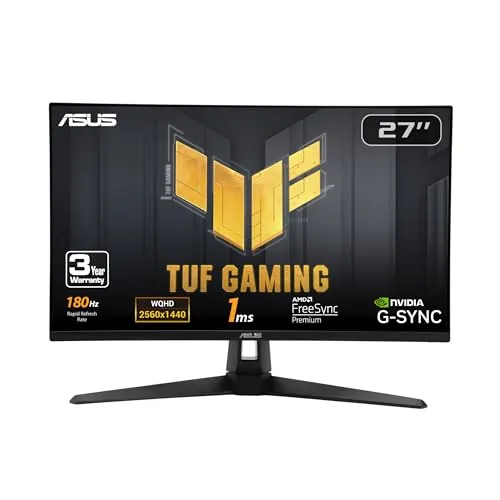
ASUS TUF Gaming VG27AQ3A 27-inch QHD Monitor
Exact U.S. TUF model in the listing data; 27-inch 2560 × 1440 format with input-rate limits that depend on HDMI versus DisplayPort.
Model VG27AQ3A
Amazon ASIN B0BZR9TMBJ

ASUS
ASUS ProArt Display PA278QV 27-inch QHD Monitor
Exact U.S. ProArt model in the listing data; 27-inch 2560 × 1440 format with a manufacturer-listed 75 Hz maximum and adjustable supplied stand.
Model PA278QV
Amazon ASIN B088BC5HMM
Differences that matter
What matters most to you?
Choose a priority to see what it changes.
Sources for QHD input-rate ceiling by connection
Sources for Movement available from the included stand
Sources for Desk depth and monitor clearance
Start with the resolution and port your computer will use
These exact models share a 27-inch 2560 × 1440 resolution, so the first check is whether your current computer connection can drive the mode you want. ASUS lists VG27AQ3A at up to 144 Hz over HDMI and up to 180 Hz over DisplayPort. Its manual confirms QHD 100/120/144 Hz timings on both inputs, and lists QHD 165/170/180 Hz as DisplayPort-only. If 180 Hz is a requirement, HDMI is not enough; confirm your computer output, cable, dock or adapter and chosen input can all carry the DisplayPort mode.
ASUS lists PA278QV up to 75 Hz. The manual's timing table contains a QHD timing of about 74.924 Hz but does not attach that row to a specific input. Treat that as a table entry, not a guarantee for every computer or signal chain. These are listed compatibility limits, not tested motion or gaming results.
Match the stand to your desk position
VG27AQ3A's supplied stand tilts and swivels but does not adjust height or pivot. PA278QV adds up to 150 mm of height travel and ±90° portrait rotation, alongside tilt and swivel. Its user guide says to raise the stand to its highest position and tilt the panel before rotating it. Choose PA278QV if those movements must come from the stand in the box; choose VG27AQ3A only if its fixed height works for your layout or you separately verify a suitable mounting option.
Use ASUS's published dimensions as a desk-fit starting point: with the stand, VG27AQ3A is estimated at 61.50 cm wide and 21.40 cm deep, while PA278QV is estimated at 61.50 cm wide and 22.60 cm deep. ASUS says dimensions vary by region. Measure your own usable desk depth and rear clearance, plus the screen height and portrait space you need; dimensions alone do not establish fit for every desk or stand position.
Confirm cables and the exact retail package
A supported monitor mode still depends on the whole connection. ASUS's pages list different ports on these models, but their package notes are not a promise about every reseller's box: ASUS says accessories vary by region, and both user guides mark video cables optional. Check whether the exact offer includes a cable that matches both the source and monitor and is capable of the mode you intend to use.
For VG27AQ3A, the stand is the fixed-position compromise; for PA278QV, the refresh ceiling is the input compromise. If you need both QHD above 75 Hz and height adjustment from the included stand, neither model answers both requirements.
Product details
ASUS TUF Gaming VG27AQ3A 27-inch QHD Monitor
- Native resolution and inputs
- 27-inch, 2560 × 1440; ASUS lists HDMI up to 144 Hz and DisplayPort up to 180 Hz. Source
- Supplied stand movement
- ASUS lists tilt and swivel, with no height adjustment; the exact manual says no pivot. Source
- Physical dimensions with stand
- ASUS estimates 61.50 × 45.50 × 21.40 cm (W × H × D); dimensions may vary by region. Source
ASUS ProArt Display PA278QV 27-inch QHD Monitor
- Native resolution and maximum refresh
- 27-inch, 2560 × 1440; ASUS lists a maximum refresh rate of 75 Hz. Source
- Supplied stand movement
- ASUS lists 0–150 mm height adjustment, ±90° pivot and ±90° swivel; its user guide describes the stand steps for portrait rotation. Source
- Physical dimensions with stand
- ASUS estimates 61.50 × 53.20 × 22.60 cm (W × H × D); dimensions may vary by region. Source
Before you buy
Community discussions
Checking which display mode the computer sees
ASUS TUF Gaming VG27AQ3A 27-inch QHD Monitor
A VG27AQ3A owner said their computer showed a 60 Hz mode and did not offer the refresh rate they expected.
What to check
Check the mode list for your source and cable. Decide which refresh rate you need for the tasks you actually do at this desk.
Common questions
Can the VG27AQ3A do QHD 180 Hz over HDMI?
No. ASUS's U.S. technical specification lists HDMI up to 144 Hz and DisplayPort up to 180 Hz. Its VG27AQ3A manual marks QHD 165, 170 and 180 Hz unsupported over HDMI. Check that your computer and the full cable/dock/adapter path support the required DisplayPort mode.TUF Gaming VG27AQ3A — Tech Specs, ASUS USAASUS TUF Gaming VG27AQ3A Series User Guide
Does the PA278QV support QHD 75 Hz on every input?
ASUS lists 75 Hz as the PA278QV's maximum, but its user guide's QHD 74.924 Hz timing row is not labeled by input. Verify the mode with your own source and connection instead of treating one timing-table row as a guarantee for every port, dock or adapter.ProArt Display PA278QV — Tech Specs, ASUS USAASUS PA278QV / PA278QEV Series User Guide
Which supplied stand can raise the monitor or turn it to portrait?
ASUS lists no height adjustment for VG27AQ3A. PA278QV offers up to 150 mm of height movement and ±90° pivot, with its guide describing the sequence for turning the panel to portrait. Compare those documented stand movements with your desk and use.TUF Gaming VG27AQ3A — Tech Specs, ASUS USAProArt Display PA278QV — Tech Specs, ASUS USAASUS PA278QV / PA278QEV Series User Guide
Will the required DisplayPort or HDMI cable be in the box?
Do not assume so. ASUS says accessory availability can vary by region, and each model's manual marks some video cables optional. Check the exact retailer offer and bundle before ordering.TUF Gaming VG27AQ3A — Tech Specs, ASUS USAASUS TUF Gaming VG27AQ3A Series User GuideProArt Display PA278QV — Tech Specs, ASUS USAASUS PA278QV / PA278QEV Series User Guide
Sources and scope
This guide compares manufacturer-listed input modes, stand adjustments and dimensions. It does not test game performance, motion clarity, color accuracy, image quality, eye comfort or reliability. The VG27AQ3A’s source, cable, dock or adapter must support the intended QHD mode; ASUS specifications are monitor input limits, not a guarantee about a connected computer. ASUS marks available accessories as region-dependent and its manuals label video cables optional, so check the selected retailer package. The PA278QV manual lists a QHD 74.924 Hz timing without assigning it to a particular input; the page uses ASUS’s separately stated 75 Hz maximum without claiming each port behaves identically in every host setup.
Related comparisons

ASUS ProArt PA279CRV vs PA278QV: 4K USB-C or QHD Legacy Inputs?
Both are 27-inch ASUS ProArt IPS monitors, but they solve different desk problems. PA279CRV is 3840×2160 (4K) and its USB-C input supports DisplayPort Alt Mode and up to 96 W Power Delivery; with a compatible laptop it can carry video and USB data through one cable while connecting the monitor's hub. PA278QV is 2560×1440 (QHD), lists HDMI, DisplayPort, Mini DisplayPort and dual-link DVI-D, and has a four-port USB-A hub that needs a separate USB-B upstream connection. Before buying, check the laptop's USB-C video support and power needs, or check which legacy video port your desktop uses. ASUS lists different color-space coverage on the two models; these manufacturer specifications do not predict a user's calibrated result.
Read comparison
ASUS ROG Strix XG27ACS vs TUF VG27AQ3A: USB-C, 180Hz and Desk Setup
Both exact ASUS models are 27-inch 2560×1440 Fast IPS monitors with a listed maximum refresh rate of 180Hz. The connector path matters: ASUS lists HDMI up to 144Hz on both; ROG XG27ACS also lists DisplayPort and USB-C DisplayPort Alt Mode up to 180Hz, while TUF VG27AQ3A lists DisplayPort up to 180Hz. ROG adds USB-C with 7.5W power delivery and a stand that raises up to 120 mm and rotates to portrait. TUF has two HDMI inputs, built-in 2W × 2 speakers, tilt and swivel, but no stand height adjustment or pivot. Before buying, match the monitor input to your computer's output and decide whether you need to raise the screen or connect multiple HDMI sources.
Read comparison