
Products compared
ASUS
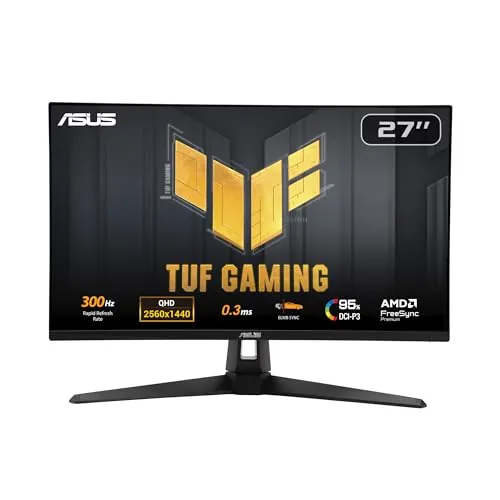
ASUS TUF Gaming VG27AQM5A
27-inch QHD (2560 × 1440) monitor with a maker-listed 300Hz maximum. The official US specification lists two HDMI 2.1 inputs and one DisplayPort 1.4; its USB-C port is described in the manual as a firmware service port.
Model VG27AQM5A
Amazon ASIN B0F233D6W1
LG
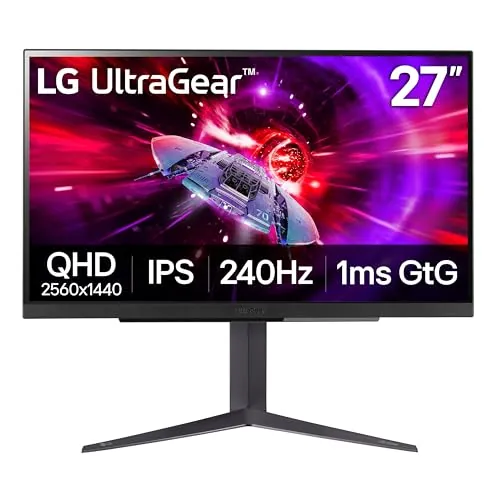
LG UltraGear 27GR83Q-B.AUS
Exact US support identity 27GR83Q-B.AUS. LG’s US product page lists a 27-inch QHD IPS panel at 240Hz, two HDMI 2.1 inputs, DisplayPort, USB upstream and two USB downstream ports, plus a tilt/height/pivot adjustable stand.
Model 27GR83Q-B.AUS
Amazon ASIN B0C63HDHPR
Differences that matter
What matters most to you?
Choose a priority to see what it changes.
Sources for Included stand movement and mounting check
Start with the mode your PC can actually drive
Both models are 27-inch QHD (2560 × 1440) IPS gaming monitors. ASUS lists 300Hz maximum; its exact-model manual includes 2560 × 1440 at 300Hz in the supported timing table for HDMI and DisplayPort. LG lists 240Hz and says a graphics card supporting DisplayPort 1.4 or HDMI 2.1 is required to reach up to 240Hz.
That makes the ASUS ceiling relevant when your PC and the connection you plan to use can output a QHD mode above 240Hz. If 240Hz meets your target, the additional ASUS headroom is not itself proof of clearer motion, lower latency or better gaming. Check the output modes for your exact GPU and cable before choosing by the headline maximum.
Map the ports to your PC and USB accessories
ASUS lists two HDMI 2.1 inputs and DisplayPort 1.4. The manual identifies USB-C as a service connection for firmware updates. Do not count it as a laptop display input, charging connection or data hub.
LG's US page lists two HDMI 2.1 inputs, DisplayPort, one USB upstream and two USB downstream ports. It does not specify the DisplayPort version or upstream connector type on the page we reviewed. If a particular DisplayPort mode or single-cable laptop workflow is essential, verify that exact connection with the manufacturer before ordering.
Choose the stand movement or check your monitor arm
ASUS specifies tilt and swivel for the VG27AQM5A stand, but no height adjustment or pivot; it lists 100 × 100 mm VESA mounting. LG describes the 27GR83Q-B stand as tilt/height/pivot adjustable, which is useful if you want those moves without relying on a separate arm.
LG's US product and exact .AUS support pages reviewed here do not state adjustment ranges or the VESA pattern. If you need a particular range or intend to use an arm, check LG's exact 27GR83Q-B.AUS manual and mounting details. Do not infer an unlisted fit from the ASUS mount specification.
Product details
ASUS TUF Gaming VG27AQM5A
Consider the ASUS when your PC and input path can actually use a QHD mode above 240Hz, and the fixed-height stand suits your desk or you plan to use a verified compatible mount. Its USB-C connector is for firmware service, so do not buy it expecting that port to carry laptop video or charging.
- Panel and maximum mode
- 27-inch, 2560 × 1440 QHD; ASUS lists 300Hz maximum and supported timing at 2560 × 1440 / 300Hz over HDMI and DisplayPort. Source
- Inputs
- 2 × HDMI 2.1 and 1 × DisplayPort 1.4. The single USB Type-C port is a service port for firmware upgrades, not a documented video or laptop-charging input. Source
- Included stand and mounting
- Tilt and swivel are listed; height adjustment and pivot are listed as unavailable. ASUS specifies 100 × 100 mm VESA wall mounting. Source
LG UltraGear 27GR83Q-B.AUS
Consider the LG when 240Hz is enough for your source and you want the maker-listed height/pivot adjustments or USB downstream ports. Check its exact mounting pattern or connection details with LG if you plan to use a monitor arm or need a particular DisplayPort mode.
- Panel and maximum mode
- 27-inch, 2560 × 1440 QHD IPS; LG lists a 240Hz refresh rate. Its footnote says a graphics card supporting DisplayPort 1.4 or HDMI 2.1 is required to reach up to 240Hz. Source
- Inputs and USB
- LG lists two HDMI 2.1 inputs, DisplayPort, USB upstream and two USB downstream ports. The US product page does not specify the DisplayPort version or the connector type of the upstream connection. Source
- Included stand
- LG lists tilt, height and pivot adjustment. The reviewed US product and exact-SKU support pages do not specify the adjustment ranges or VESA mounting pattern. Source
Before you buy
Community discussions
VG27AQM5A owner compares motion in their game setup
ASUS TUF Gaming VG27AQM5A
One owner tested the VG27AQM5A across several refresh rates and motion settings in Doom, Microsoft Flight Simulator and God of War. They preferred an older TN display for camera panning but described the ASUS as better for color and slower games. This is one person’s account, not a controlled comparison with the LG model in this guide.
What to check
If motion clarity is a deciding factor, try the games and motion settings you actually use; do not treat a higher refresh ceiling or this one owner’s result as a prediction for your setup.
Common questions
Will the ASUS run at 300Hz at QHD over either input?
ASUS's English VG27AQM5A manual lists 2560 × 1440 at 300Hz in the supported timing table for both HDMI and DisplayPort. The monitor maximum is a specification, not a guarantee that your PC, GPU, cable and selected mode can output it.ASUS TUF Gaming Monitor VG27AQM5A Series User Guide (English)
Does the ASUS USB-C port connect or charge a laptop?
ASUS calls it a service port and says to connect it to a PC for monitor firmware upgrades. The manual does not document it as video input, USB hub data or laptop charging, so do not plan that workflow around this port.ASUS TUF Gaming Monitor VG27AQM5A Series User Guide (English)
Is the LG DisplayPort definitely version 1.4?
The LG USA product page lists DisplayPort and says a graphics card supporting DP 1.4 or HDMI 2.1 is required to reach up to 240Hz, but it does not state the monitor's DisplayPort version in the reviewed listing. Confirm the exact requirement with LG if your PC depends on that detail.27 Inch UltraGear QHD 1440P 1ms 240Hz Gaming Monitor with NVIDIA G-SYNC Compatible | LG USA, 27GR83Q-BLG 27GR83Q-B.AUS Product Support Page | LG USA
Which stand can raise and pivot the monitor?
LG lists its included stand as tilt/height/pivot adjustable. ASUS lists tilt and swivel, but no height adjustment or pivot. LG does not state the adjustment ranges in the reviewed US page.27 Inch UltraGear QHD 1440P 1ms 240Hz Gaming Monitor with NVIDIA G-SYNC Compatible | LG USA, 27GR83Q-BTUF Gaming VG27AQM5A - Tech Specs | ASUS USA
Sources and scope
This is a comparison of manufacturer specifications and setup features, not a side-by-side display test. The advertised refresh ceiling does not establish image quality, motion clarity, input lag, or gaming performance; the source device, resolution, cable and selected mode determine what you can use. LG’s US product page does not specify the DisplayPort version or VESA mounting pattern, so verify those with LG for the exact 27GR83Q-B.AUS if they matter to your setup. No comparable physical-depth figures were reviewed for both products, so measure the actual stand and desk space before ordering.
Related comparisons

ASUS ROG Strix XG27ACS vs LG 27GR83Q-B.AUS: Refresh Rate, USB-C, and Stand Fit
Both are 27-inch QHD gaming displays, but the useful refresh ceiling depends on your cable path. ASUS XG27ACS carries video over USB-C DisplayPort Alt Mode and supports 180Hz through USB-C/DisplayPort, with HDMI listed to 144Hz. LG 27GR83Q-B.AUS offers two HDMI 2.1 inputs and DisplayPort, with up to 240Hz when the graphics card supports the required interface. Check the exact host output, cable and stand movement your desk needs before buying.
Read comparisonASUS TUF Gaming VG27AQM5A vs ROG Strix XG27ACS
Both are 27-inch QHD (2560 × 1440) ASUS Fast IPS monitors, but their connections lead to different setups. The TUF VG27AQM5A lists QHD up to 300 Hz over HDMI and DisplayPort, while its USB-C connector is a firmware service port. The ROG XG27ACS supports video over USB-C DisplayPort Alt Mode with 7.5 W power delivery, and lists QHD up to 180 Hz over USB-C/DisplayPort or 144 Hz over HDMI. Its stand adds 0–120 mm height adjustment; the TUF stand does not. Match the input to your actual PC or console before choosing.
Read comparison