
Products compared
ASUS
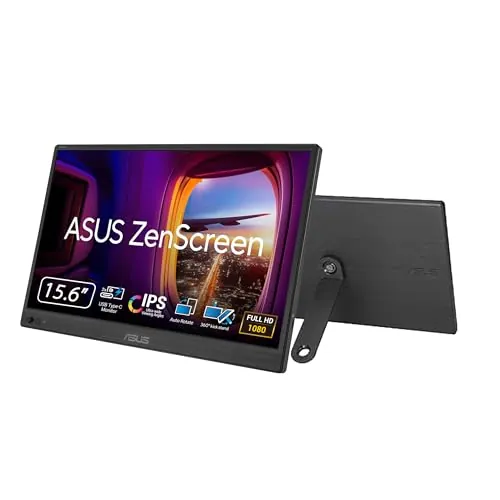
ASUS ZenScreen 15.6-inch Portable Monitor
ASUS ZenScreen MB169CK, a 15.6-inch Full HD portable display. Confirm the listing names MB169CK before purchase.
Model MB169CK
Amazon ASIN B0CPFYVPBG
Lenovo
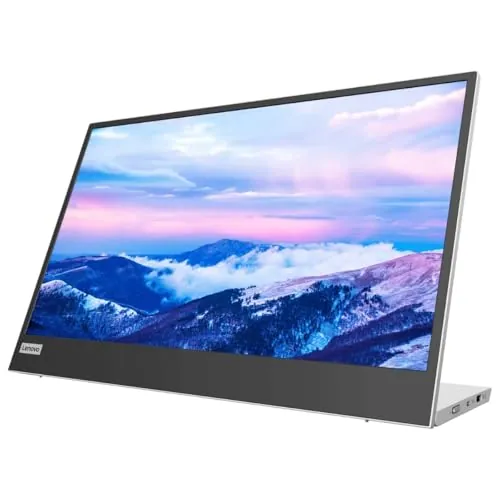
Lenovo L15 15.6-inch IPS FHD Portable Monitor
Lenovo L15, North American SKU 66E4UCC1UZ, as named on Lenovo US.
Model 66E4UCC1UZ
Amazon ASIN B0B5GRGCX5
Differences that matter
What matters most to you?
Choose a priority to see what it changes.
Sources for Stand and position
Sources for Published monitor weight
Sources for Basic panel format
Match the video path to the source device
Both panels are listed as 15.6-inch 1920 × 1080 displays, but their inputs differ. ASUS specifies two USB-C DisplayPort Alt Mode ports and Mini HDMI. Lenovo specifies USB-C DisplayPort Alt Mode, with one upstream and one downstream port. Before ordering, check whether the port on the actual laptop can send video; USB-C shape alone does not guarantee Alt Mode.
If you need HDMI, MB169CK is the documented option in this pair. Its user guide shows HDMI-to-Mini-HDMI and a separate optional adapter-power route. The L15 sources list no HDMI input, so do not plan around an HDMI-only host for that monitor.
Separate monitor power from laptop charging
Lenovo advertises up to 65 W of USB-C pass-through power on L15. It describes one upstream and one downstream USB-C port; actual power available depends on connected devices and configuration and can decline with downstream USB use or higher brightness. Match the laptop’s charging requirement to the supply you will connect instead of assuming every 65 W setup delivers the full rating.
ASUS lists 7.64 W monitor consumption and marks its power adapter optional. Its manual shows USB-C host connection, HDMI connection, and an optional adapter supply path. The cited ASUS material does not document charging the laptop through the monitor, so do not buy it expecting that function.
Compare the travel and desk setup, not just screen weight
ASUS includes a 360° kickstand in the MB169CK documentation and lists no height adjustment. Lenovo lists a built-in stand with up to 10 mm lift and 100 mm VESA mounting. Choose based on the angle or mounting position your work surface needs.
Weight figures are not directly comparable: ASUS lists 0.78 kg without a stand, whereas Lenovo lists 0.86 kg with its stand and marks the figure approximate. Include the stand, sleeve, cables and charger you will carry when estimating your real bag load.
Product details
ASUS ZenScreen 15.6-inch Portable Monitor
MB169CK is the more flexible input choice if your source can provide USB-C DisplayPort Alt Mode or HDMI. For HDMI use, plan a separate power path as shown in the manual. ASUS lists an optional adapter, so verify what the exact retail package includes.
- Display and inputs
- 15.6-inch 1920 × 1080; 2 USB-C ports supporting DisplayPort Alt Mode and 1 Mini HDMI input. Source
- Power and included items
- Rated 7.64 W; MB169CK manual describes a USB-C connection and an HDMI setup with optional adapter power. Manual box list includes USB-C cable, Mini HDMI-to-HDMI cable, protective sleeve and 360° kickstand; adapter marked optional. Source
- Listed monitor weight
- 0.78 kg net weight without stand in ASUS specifications. Source
Lenovo L15 15.6-inch IPS FHD Portable Monitor
L15 fits a USB-C-first setup where the host has DisplayPort Alt Mode, and its downstream USB-C port supports power pass-through up to 65 W. Check the laptop’s charging need and the power source first; maximum pass-through is not guaranteed in every setup.
- Display and ports
- 15.6-inch 1920 × 1080; 2 USB-C ports with DP 1.2 Alt Mode, one upstream and one downstream. Source
- Pass-through charging
- USB-C power delivery up to 65 W; actual capacity varies with connected devices and configuration and may be reduced by downstream USB use or higher brightness. Source
- Stand and listed weight
- Integrated stand supports up to 10 mm lift; 0.86 kg with stand (approximate). Source
Before you buy
Community discussions
Packing a portable monitor for travel
ASUS ZenScreen 15.6-inch Portable Monitor
After trying several options, one buyer chose the ASUS MB169CK for use away from home.
What to check
Compare how each display stands and how much space its support and cables take in the bag you already carry.
One screen for a Mac mini and iPad
ASUS ZenScreen 15.6-inch Portable Monitor
A traveler who moves between countries wants a portable screen for a Mac Mini and iPad and names the ASUS MB169CK as one candidate.
What to check
Check each device’s exact output port and generation, then see which cables and power sources each display needs.
Common questions
Will either monitor work from any USB-C port?
Not necessarily. Both manufacturers specify USB-C DisplayPort Alt Mode for video. Verify that the computer’s specific USB-C port supports display output. ASUS also lists Mini HDMI; Lenovo’s cited L15 specification lists USB-C ports only.ASUS ZenScreen MB169CK technical specificationsASUS USB Type-C Monitor MB169CK user guideLenovo L15 Monitor Product Specifications Reference (PSREF)
Can the Lenovo L15 charge my laptop?
Lenovo documents USB-C power delivery up to 65 W through the L15. It also warns that actual capacity depends on devices and configuration and may decline with downstream USB devices or higher brightness. Check your laptop’s power needs and the power source; 65 W is not guaranteed in every setup.Lenovo L15 Mobile Monitor datasheetLenovo L15 Monitor Product Specifications Reference (PSREF)
Does the ASUS MB169CK need a separate power adapter?
ASUS lists the adapter as optional and its manual shows USB-C operation as well as HDMI with an optional adapter-power setup. The exact power arrangement depends on your source and package; check the manual and verify the retail box contents.ASUS ZenScreen MB169CK technical specificationsASUS USB Type-C Monitor MB169CK user guide
Which one is lighter to carry?
ASUS lists 0.78 kg without a stand; Lenovo lists 0.86 kg with its stand. The measurement bases differ, so they do not settle which complete travel kit is lighter.ASUS ZenScreen MB169CK technical specificationsLenovo L15 Monitor Product Specifications Reference (PSREF)
Sources and scope
Compare weights on the same basis. ASUS lists 0.78 kg without a stand, while Lenovo lists 0.86 kg with its stand. If you plan to charge your laptop through the L15, check your laptop’s input needs and Lenovo’s power conditions for the 65 W maximum.
Related comparisons
ASUS ZenScreen MB16ACV vs Lenovo L15: Check Ports, Power and Mount First
The ASUS ZenScreen MB16ACV supports native USB-C video and a USB-A route through a DisplayLink driver; its fold-out kickstand also has a 1/4-inch tripod socket. Lenovo’s L15 requires USB-C DisplayPort Alt Mode and a source with enough power, uses a 5 A electronically marked cable, and supports a 100 mm two-hole mount or up to 10 mm of stand lift. Check your laptop’s exact port spec and the selected box contents: the L15 U.S. model lists a 1 m USB-C cable and clips, while ASUS says accessories vary by region.
Read comparison

ASUS ProArt PA279CRV vs PA278QV: 4K USB-C or QHD Legacy Inputs?
Both are 27-inch ASUS ProArt IPS monitors, but they solve different desk problems. PA279CRV is 3840×2160 (4K) and its USB-C input supports DisplayPort Alt Mode and up to 96 W Power Delivery; with a compatible laptop it can carry video and USB data through one cable while connecting the monitor's hub. PA278QV is 2560×1440 (QHD), lists HDMI, DisplayPort, Mini DisplayPort and dual-link DVI-D, and has a four-port USB-A hub that needs a separate USB-B upstream connection. Before buying, check the laptop's USB-C video support and power needs, or check which legacy video port your desktop uses. ASUS lists different color-space coverage on the two models; these manufacturer specifications do not predict a user's calibrated result.
Read comparison