
Products compared
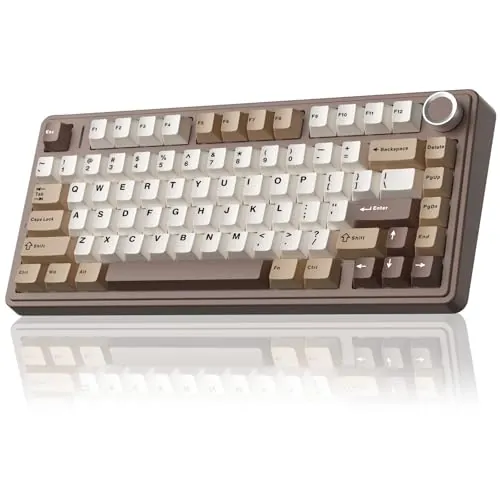
AULA
AULA F75 Wireless Mechanical Keyboard
AULA F75, shown here as the White & Brown U.S. listing. AULA's model page covers F75 generally; check the selected offer for its switch and included items.
Model F75
Amazon ASIN B0G3PTHM36
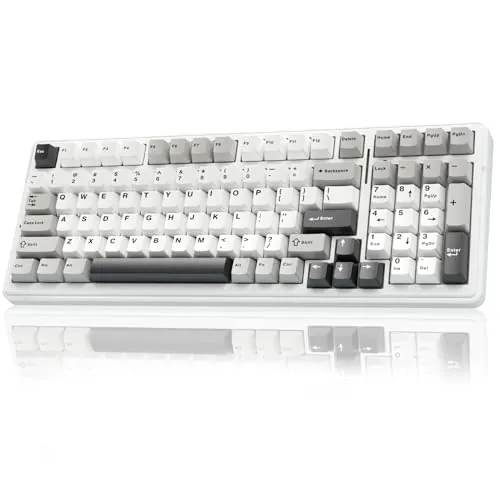
AULA
AULA F99 Wireless Mechanical Keyboard
AULA standard F99, shown here as the Black & Grey & White offer with Graywood switch. This comparison uses the standard F99 page and manual; confirm the selected switch and box contents on the seller listing.
Model F99 (standard model; not F99 Pro or F99 Max)
Amazon ASIN B0CLLHSWRL
Differences that matter
What matters most to you?
Choose a priority to see what it changes.
Sources for Media and lighting control workflow
Pick the number-pad layout before comparing switch names
AULA describes the F75 as a 75% layout. The standard F99 manual diagram depicts a separate number pad on the right. If you regularly enter numbers, decide whether you want that dedicated block; the F99 choice comes with a larger listed footprint.
AULA’s product page has inconsistent F99 percentage labels. This guide does not use the percentage or key-count labels to decide which model is wider or has a number pad; it uses the product dimensions and standard F99 manual diagram.
Measure the desk before choosing the wider layout
AULA lists the F75 as 322.7 × 143.2 × 43.1 mm and the F99 as 390.63 × 146.78 × 42.57 mm. Comparing the first listed dimension gives about 67.9 mm more width for F99. Use the full measurements as a fit screen, then allow for the cable and the way you arrange your mouse and other desk items.
These are manufacturer-listed body dimensions, not measurements of the space needed around your hands or other equipment. If your desk is close to the available width, confirm the exact selected model and measure your own setup.
Choose the dial or the keyboard shortcut workflow
The F75 manual describes a Gaming/Office mode dial. It assigns lighting adjustments to the dial in one mode and volume/mute actions in the other, with Fn lighting shortcuts also documented. This gives a buyer a choice of rotary input plus key combinations, not evidence of faster or easier control.
The standard F99 manual documents function-row media keys and Fn lighting combinations. F75 also has documented keyboard shortcuts, so media or lighting shortcuts alone do not establish an F99 advantage. Check the exact F99 manual linked to the listing; the Pro and Max are separate model variants.
Before checkout: confirm the exact listing configuration
The selected Amazon listing data names the F75 White & Brown and the standard F99 Black & Grey & White with Graywood switch. AULA’s product pages cover model options, and the F99 page separately links F99 Pro and F99 Max manuals. Confirm the selected seller variation, keyboard layout, switch, receiver and included cable/accessories against the exact ASIN before ordering.
Both model pages list Bluetooth, 2.4 GHz wireless, and wired modes. Match those listed options to your host and check the exact model’s instructions for mode switching; this comparison does not test pairing or wireless reliability.
Product details
AULA F75 Wireless Mechanical Keyboard
The selected listing listing is White & Brown. AULA’s F75 page lists a 75% layout and 322.7 × 143.2 × 43.1 mm body dimensions. Its manual documents a dial for mode-dependent volume and lighting controls.
- Manufacturer-listed dimensions
- 322.7 × 143.2 × 43.1 mm (listed ±1 mm) Source
- Manufacturer layout description
- 75% layout Source
- Connection modes
- Bluetooth, 2.4 GHz wireless, and wired Source
- Documented rotary control
- The F75 manual describes mode-dependent volume and lighting actions through its dial. Source
AULA F99 Wireless Mechanical Keyboard
The selected listing is the standard F99, not the separately documented Pro or Max model. Its manual diagram shows a right-side numeric keypad; the manufacturer page lists a 390.63 mm body width. The published percentage labels conflict, so this guide uses the physical diagram and dimensions instead.
- Manufacturer-listed dimensions
- 390.63 × 146.78 × 42.57 mm Source
- Manual-shown key layout
- The standard F99 manual diagram shows a separate numeric keypad on the right. Source
- Connection modes
- Wired USB Type-C, Bluetooth, and 2.4 GHz wireless Source
- Documented media and lighting controls
- The standard F99 manual lists function-row media commands and Fn lighting combinations. Source
Before you buy
Community discussions
Trading the number pad for a smaller layout
AULA F75 Wireless Mechanical Keyboard
An F75 user who rarely needed a number pad described missing some dedicated navigation keys during text work.
What to check
List the navigation keys you use every day and check their positions on the exact keyboard layout before choosing the compact model.
Keeping a number pad on a tighter desk
AULA F99 Wireless Mechanical Keyboard
An F99 user described moving to a compressed layout for desk space while keeping number entry available.
What to check
Compare the keyboard width and where the arrow keys and number pad sit. Leave space for the mouse position you actually use.
Common questions
Does the standard AULA F99 have a numeric keypad?
The standard F99 manual diagram shows a right-side numeric keypad. AULA’s F99 pages use inconsistent percentage labels, so this comparison relies on the diagram rather than a layout-percentage label.AULA F99 1800 Layout Wireless Mechanical Keyboard — specifications and included-items listAULA F99 Manual — standard-model PDF
How much wider is the F99 based on AULA’s listed dimensions?
AULA lists 322.7 mm for the first F75 dimension and 390.63 mm for the first F99 dimension. The difference is 67.93 mm, about 68 mm; verify the actual desk fit with the product and cable in your setup.AULA F75 75% Gasket Wireless Mechanical Keyboard — specifications and included-items listAULA F99 1800 Layout Wireless Mechanical Keyboard — specifications and included-items list
Can the F75 dial replace the F99’s keyboard shortcuts?
They are different input styles. The F75 manual describes a dial for mode-dependent volume and lighting actions. Manuals for both F75 and standard F99 also document media or lighting shortcuts; neither source establishes that one workflow is easier or faster.AULA F75 Manual — model-specific PDFAULA F99 Manual — standard-model PDF
Sources and scope
Verify the exact switch and color at checkout. AULA's standard F99 manual shows the number pad. The body's published dimensions are the clearest way to check your desk space when layout labels differ.
- AULA F75 75% Gasket Wireless Mechanical Keyboard — specifications and included-items list
- AULA F99 1800 Layout Wireless Mechanical Keyboard — specifications and included-items list
- AULA F75 Manual — official manual landing page and linked model-specific PDF
- AULA F99 Manual — official standard-model manual landing page and linked PDF
- AULA F75 Manual — model-specific PDF
- AULA F99 Manual — standard-model PDF
Related comparisons
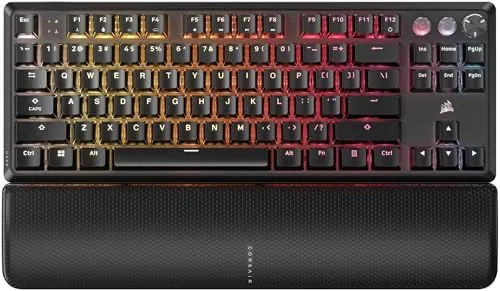
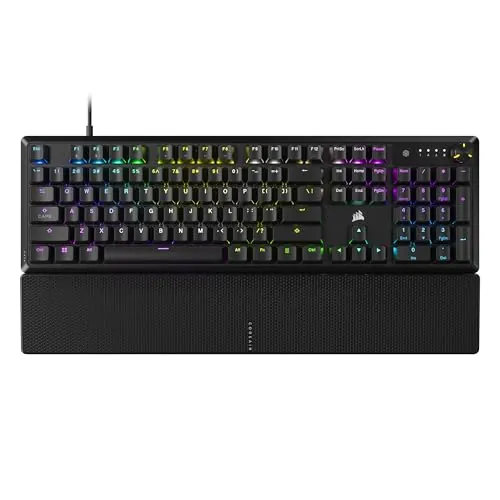
Corsair K70 PRO TKL vs K70 CORE: Adjustable Keys or a Full-Size Numpad?
Both are wired, North American-layout Corsair keyboards with a rotary dial and FlashTap support. The decision turns on layout and switch controls: K70 CORE keeps a full-size number pad and uses pre-lubed MLX Red linear mechanical switches; K70 PRO TKL removes the numpad and adds adjustable actuation and Rapid Trigger on its supported MGX magnetic keys. Neither spec sheet proves a faster, quieter or more comfortable typing experience.
Read comparison

Logitech MX Keys S vs Wave Keys: Choose by Lighting, Layout and Power
These two Logitech keyboards share Bluetooth, an included Logi Bolt receiver and Easy-Switch workflows, so connection alone does not settle the choice. MX Keys S (920-011558) has a low-profile layout, adaptive backlighting and a USB-C charging port you can use while typing. Wave Keys (920-011898) has a wave-shaped layout with an attached cushioned palm rest, uses two included AAA batteries, and its Logitech consumer FAQ says its keys are not backlit. Check your lighting, desk layout, host operating systems and power preference before choosing; neither model is a universal comfort winner.
Read comparison