
Products compared

Canon
Canon PIXMA TR7120 Wireless Multi-Function Home Printer
U.S. white PIXMA TR7120 SKU 7178C002; color inkjet print/copy/scan with a 35-sheet ADF.
Model 7178C002
Amazon ASIN B0FMB4JBJ8
Brother
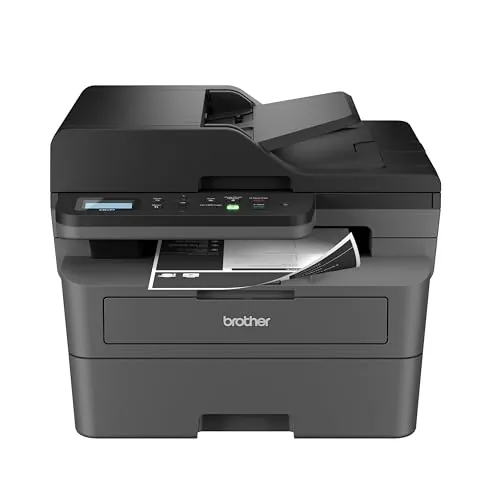
Brother DCP-L2640DW Wireless Monochrome Laser Multi-Function Printer
U.S. monochrome laser all-in-one; Brother's exact model page lists Ethernet, dual-band Wi-Fi and USB 2.0, plus a 50-page ADF.
Model DCPL2640DW
Amazon ASIN B0CPLFTPCV
Differences that matter
Sources for Built-in connection route
Sources for Multi-page feeder and paper loading
Start with what must come out of the printer
The Canon PIXMA TR7120 is the color-printing option in this pair: Canon lists color document and photo printing, borderless photo sizes, cards and envelopes for its exact U.S. SKU 7178C002. The Brother DCP-L2640DW is a monochrome printer. It can scan color originals, so choosing Brother does not mean scans must be black and white; it means the printer's output is monochrome.
That gives the first decision rule: if the finished page itself needs color, the documented fit is Canon. If you only need to save a color scan but print ordinary black-and-white pages, Brother remains in consideration. Neither source establishes a print-quality or running-cost winner, so don't read the color capability as a quality ranking.
Check the cable and network route before ordering
Brother's exact-model specifications list Ethernet, dual-band Wi-Fi and USB 2.0. Canon's TR7100-series interface table lists Hi-Speed USB and Wi-Fi; the same manual's model list explicitly includes TR7120. Its complete listed interface row does not name an Ethernet port.
If the printer must connect to a wired LAN, Brother has the documented port. If a wireless connection is acceptable, either offers Wi-Fi; if one nearby computer can connect directly, Canon also lists USB. A USB cable is not a substitute for a built-in network jack when the requirement is Ethernet.
Plan the real feeder and two-sided-document routine
Canon lists a 35-sheet ADF for plain paper and a five-sheet limit for legal-size originals. Brother lists a 50-page ADF. That makes Brother's stated feeder capacity larger, but the number alone does not determine your job: confirm your original size and use the model's supported loading directions.
Both printers list automatic two-sided printing. Scanning duplex originals is separate: Canon says a double-sided original cannot be scanned automatically with the TR7100 ADF, and Brother's DCP-L2640DW specifications say duplex scanning is unavailable. If your stack has printing on both faces, budget for turning pages over and scanning the reverse as another pass. Brother also lists duplex copying as unavailable; Canon's feature list includes two-sided copy, but that does not turn its ADF into automatic duplex scanning.
Match the paper path to what you print
For Canon, the listed cassette holds 100 sheets of plain paper, and its supported list includes several photo sizes, greeting cards and #10 envelopes. Brother lists a 250-sheet standard tray, one-sheet manual feed, and office media that includes bond, labels, envelopes, recycled, colored and letterhead paper. Those are support lists, not proof that every paper weight or size works in every tray.
Use a short pre-purchase check: write down your common page size, specialty stock and whether color must appear on the printed page. Compare those requirements with the exact manufacturer's media table. If neither media list covers the stock you need, keep comparing rather than assuming a generic printer label guarantees fit.
Product details
Canon PIXMA TR7120 Wireless Multi-Function Home Printer
- Printed output and media
- Color document and photo printing; cassette supports 100 sheets of plain paper and listed photo-paper, envelope and card sizes. Source
- Network and direct connection
- Canon's interface specification lists Hi-Speed USB and dual-band Wi-Fi; the listed interface row does not name Ethernet. Source
- Feeder and duplex scanning
- 35-sheet plain-paper ADF capacity (5 legal-size sheets). The TR7100 manual says a double-sided original cannot be scanned automatically through the ADF. Source
- Automatic two-sided printing
- Automatic duplex printing is listed; this is separate from scanning both sides of a two-sided original in the ADF. Source
Brother DCP-L2640DW Wireless Monochrome Laser Multi-Function Printer
- Printed output and scan color
- The printer is monochrome; its scanner supports black-and-white and color scanning. Source
- Network and direct connection
- Standard interfaces include Ethernet, dual-band wireless and Hi-Speed USB 2.0. Source
- Feeder and duplex scanning
- Brother lists a 50-page ADF; its specifications say duplex scanning is not available. Scanner capability includes color. Source
- Paper handling
- Standard paper tray capacity is listed as 250 sheets. Brother lists plain, bond, envelope, label, recycled, colored and letterhead media, with one-sheet manual feed. Source
Before you buy
Community discussions
Testing a scan after adding the printer on Windows
Brother DCP-L2640DW Wireless Monochrome Laser Multi-Function Printer
One Windows 11 user could print a few test pages after adding a DCP-L2640DW, then the printer appeared offline when they tried to scan. They had not found the cause.
What to check
For a shared desk on Windows, test a print and scan using the Brother’s planned connection. That makes it easier to judge whether wired networking changes your setup.
Comparing a feeder scan with the flatbed
Brother DCP-L2640DW Wireless Monochrome Laser Multi-Function Printer
A Brother DCP-L2640DW owner saw skewed scans through the automatic feeder in macOS Image Capture but reported straight scans on the flatbed. They saw similar skew on the replacement unit, with the cause unresolved.
What to check
If document stacks matter, scan a sample stack with the feeder and inspect the edges and text alignment. Compare with scanning just one page on the flatbed.
Common questions
Can the Brother scan a color original even though it is a monochrome printer?
Yes. Brother lists the DCP-L2640DW scanner's capability as black-and-white and color, while the printer itself is monochrome. If the finished page must be in color, the Brother is not the fit shown by its documentation.Brother U.S. DCP-L2640DW Wireless Monochrome Laser Multi-Function Printer — specifications
Which model has Ethernet?
Brother lists Ethernet, Wi-Fi and USB 2.0. Canon's complete TR7100-series interface specification, applicable to TR7120, lists USB and Wi-Fi but not Ethernet. Direct USB connection and joining an Ethernet network are different setups.Canon TR7100 Series manual — Product SpecificationsCanon U.S.A. PIXMA TR7120 Wireless Multi-Function Home Printer — SKU 7178C002Brother U.S. DCP-L2640DW Wireless Monochrome Laser Multi-Function Printer — specifications
Do either of these ADFs scan both sides of an original automatically?
No. Canon's TR7100 manual states that a double-sided original cannot be scanned automatically with its ADF; Brother lists duplex scanning as unavailable. Both list automatic two-sided printing, which is a separate function.Canon TR7100 Series manual — Loading Documents in the ADFBrother U.S. DCP-L2640DW Wireless Monochrome Laser Multi-Function Printer — specificationsCanon U.S.A. PIXMA TR7120 Wireless Multi-Function Home Printer — SKU 7178C002
Does Canon accept the same media as the Brother?
Their published lists differ. Canon lists photo paper, cards and #10 envelopes among cassette media; Brother lists office media such as bond, envelopes, labels, recycled paper, colored paper and letterhead, plus one-sheet manual feed. Check each model's supported paper sizes and weights for your specific stock.Canon U.S.A. PIXMA TR7120 Wireless Multi-Function Home Printer — SKU 7178C002Brother U.S. DCP-L2640DW Wireless Monochrome Laser Multi-Function Printer — specifications
Sources and scope
This guide is based on the exact U.S. Canon PIXMA TR7120 SKU 7178C002 and Brother DCP-L2640DW model documentation. Canon's TR7100-series manual explicitly includes TR7120. Printed output and scanning are different: Brother's scanner can save color scans even though the printer is monochrome. Both models document automatic two-sided printing, while both ADFs require manual handling to scan double-sided originals. This is a manufacturer-documentation comparison, not a measured print-quality, speed, ink/toner cost, reliability or workflow-time test.
- Canon U.S.A. PIXMA TR7120 Wireless Multi-Function Home Printer — SKU 7178C002
- Canon TR7100 Series online manual — model scope
- Canon TR7100 Series manual — Loading Documents in the ADF
- Canon TR7100 Series manual — Product Specifications
- Brother U.S. DCP-L2640DW Wireless Monochrome Laser Multi-Function Printer — specifications
Related comparisons

Canon PIXMA TR7120 vs TR8620a: Ink, Paper Feeds and Scanning
Both printers can automatically print on both sides and use an ADF, but neither automatically scans both sides of an original through that feeder. TR7120 holds up to 35 Letter sheets in its ADF; TR8620a holds 20 and adds fax, five individual ink tanks, a 100-sheet rear feed and Ethernet. Match the exact cartridge family and the paper or scan task you do most.
Read comparison
Canon PIXMA TR7120 vs TS6520: ADF, Ink, Duplex & Space Compared
The Canon PIXMA TR7120 adds a 35-sheet letter / 5-sheet legal automatic document feeder (ADF); the TS6520 scans from its flatbed only. Both use PG-295 black and CL-286 color ink, list a 100-sheet plain-paper cassette, and print automatically on both sides. Compare the feeder's real workflow value with the height and access your space allows.
Read comparison