
Products compared

Canon
Canon PIXMA TR7120 Wireless Multi-Function Home Printer
U.S. white model; exact Canon SKU 7178C002.
Model 7178C002
Amazon ASIN B0FMB4JBJ8
HP
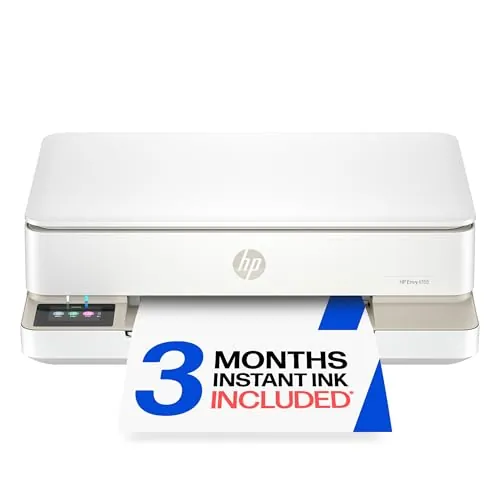
HP Envy 6155 All-in-One Printer
U.S. HP product-number variant C2WR7A#B1H; confirm the product number on the live listing because the Envy 6155 family includes nearby configurations.
Model C2WR7A#B1H
Amazon ASIN B0GMKRR64P
Differences that matter
What matters most to you?
Choose a priority to see what it changes.
Sources for Originals: feeder or glass
Sources for Two-sided workflow
Sources for On-printer controls
Sources for Ink choices and subscription terms
Start with the originals you scan
The most concrete difference is how pages enter the scanner. Canon's U.S. support page identifies the TR7120 SKU 7178C002 and lists a flatbed plus ADF. The ADF accepts up to 35 plain-paper sheets or five legal-size sheets, and the listed ADF maximum is 8.5 × 14 inches. That gives a household that regularly digitizes forms or copies a stack a source-backed reason to choose the Canon.
HP's exact Envy 6155 product page identifies C2WR7A#B1H and lists a flatbed scanner with an 8.5 × 11.7-inch maximum scan size. Use that path when originals can be placed on glass one at a time. Do not transfer an ADF specification from another Envy 6155-family model to this product number. Neither cited source documents automatic two-sided ADF scanning.
Separate the screen choice from the scan choice
The TR7120 uses a 1.42-inch monochrome OLED; HP lists a 2.4-inch color capacitive touchscreen. That makes the HP the clear fit only if the larger, color on-printer panel is a priority. The size and color are listed specifications, not a test of which interface is easier or faster.
Both manufacturers list automatic two-sided printing. Canon also lists two-sided copy, but a copy feature is not the same as a documented automatic duplex scan. If you need to capture both sides of originals without turning or re-feeding them, confirm that exact workflow in the manual before choosing either machine.
Do a desk, cable, and ink check before checkout
Both list capacity for 100 sheets of input paper. HP additionally lists a 25-sheet output tray; leave room for the input path to open and pages to collect rather than measuring only the closed cabinet footprint. Check the exact seller's included bundle: Canon's product-page box list names the printer, PG-295 black and CL-286 color cartridges, documentation, and power cord. HP names HP 68 setup black and tri-color cartridges and says a USB cable is not included. Canon lists USB connectivity, but its box list does not promise a USB data cable either.
Set up future ink around the model numbers. Canon lists PG-295 pigment black and CL-286 dye color, and supports individual ink or pack purchase as well as PIXMA Print Plan eligibility. HP lists HP 68 black and tri-color, plus HP 68e EvoMore black. The HP page currently presents an Instant Ink offer for C2WR7A#B1H; verify that it is included in the exact retailer bundle and read its terms. HP's program page says subscription cartridges stop working after the current billing cycle when cancelled, after which original Standard or XL cartridges can be used.
Before ordering, write down: (1) the product number on the listing, (2) the largest and most common originals you scan, (3) whether you need USB and already own a data cable, and (4) which exact cartridge family you are willing to buy. This resolves the practical choice without relying on an unverified print-quality or lifetime-cost ranking.
Product details
Canon PIXMA TR7120 Wireless Multi-Function Home Printer
- Scanner path
- Flatbed plus ADF; ADF holds up to 35 plain-paper sheets or 5 legal-size sheets and accepts legal originals up to 8.5 × 14 in. Source
- Display
- 1.42-inch monochrome OLED. Source
- Paper input
- Cassette capacity: 100 plain-paper sheets. Source
- Ink family
- Two-tank hybrid system: PG-295 pigment black and CL-286 dye color; individual ink or pack purchase and PIXMA Print Plan eligibility are listed. Source
- Connection options
- Hi-Speed USB, dual-band Wi-Fi, and wireless direct connection are listed. Source
HP Envy 6155 All-in-One Printer
- Scanner path
- Flatbed scanner; maximum flatbed scan size 8.5 × 11.7 in. Source
- Display
- 2.4-inch color capacitive touchscreen. Source
- Paper handling
- 100-sheet input tray and 25-sheet output tray; automatic duplex printing. Source
- Ink family
- HP 68 black and tri-color cartridges are listed, with HP 68e EvoMore black also listed; the box list identifies HP 68 setup cartridges. Source
- Connection options
- Hi-Speed USB 2.0 and dual-band Wi-Fi are listed; HP says a USB cable is not included. Source
Before you buy
Community discussions
An Envy 6155e owner tries printing from iOS Mail
HP Envy 6155 All-in-One Printer
An owner reported occasional AirPrint jobs from iOS Mail that reached the queue without printing. Other apps sometimes worked.
What to check
Try a representative job from the app and device you use most often, along with any wired workflow you rely on.
A TR7120 owner runs into a sticker-paper feed problem
Canon PIXMA TR7120 Wireless Multi-Function Home Printer
A TR7120 owner reported that the printer stopped feeding sticker stock they had previously used, around the time they opened a new pack.
What to check
If labels or stickers are part of your routine, check the manufacturer’s media guidance and try your actual stock before committing to a batch.
Common questions
Which printer has a document feeder for multipage originals?
Canon documents a flatbed and ADF on the TR7120: up to 35 plain-paper sheets or 5 legal-size sheets. HP's exact Envy 6155 C2WR7A#B1H specification lists a flatbed scanner.Canon Support for PIXMA TR7120HP Envy 6155 All-in-One Printer, product C2WR7A#B1H
Does automatic duplex printing mean either printer automatically scans both sides?
No. Both list automatic two-sided printing, but those output specifications do not establish an automatic two-sided scan workflow. Confirm that exact function in the model manual if it matters.Canon Support for PIXMA TR7120HP Envy 6155 All-in-One Printer, product C2WR7A#B1H
Does the HP Envy 6155 include a USB cable?
HP's exact C2WR7A#B1H product page says a USB cable is not included. If wired setup is important, check the seller's bundle and obtain the required cable separately if needed.HP Envy 6155 All-in-One Printer, product C2WR7A#B1H
What cartridges should I check before ordering?
Canon lists PG-295 black and CL-286 color for the TR7120. HP lists HP 68 black and tri-color for the Envy 6155, with HP 68e EvoMore black also listed. Verify the replacement pack is for the exact model.Canon Support for PIXMA TR7120HP Envy 6155 All-in-One Printer, product C2WR7A#B1H
Is HP Instant Ink required to use the Envy 6155?
The HP product page presents an Instant Ink offer, but the subscription is a separate plan. HP says original Standard or XL cartridges can be used after cancellation; Instant Ink cartridges stop working after the current billing cycle. Confirm the current offer and terms before enrolling.HP Envy 6155 All-in-One Printer, product C2WR7A#B1HHP Instant Ink: subscription and cancellation terms
Sources and scope
This is a source-based feature-fit guide for U.S. versions Canon 7178C002 and HP C2WR7A#B1H, not a hands-on or print-quality test. The sources do not confirm automatic two-sided scanning for either printer. Offers, subscription eligibility and seller-box contents can vary; verify the exact listing before checkout.
Related comparisons

Canon PIXMA TR7120 vs TR8620a: Ink, Paper Feeds and Scanning
Both printers can automatically print on both sides and use an ADF, but neither automatically scans both sides of an original through that feeder. TR7120 holds up to 35 Letter sheets in its ADF; TR8620a holds 20 and adds fax, five individual ink tanks, a 100-sheet rear feed and Ethernet. Match the exact cartridge family and the paper or scan task you do most.
Read comparison
Canon PIXMA TR7120 vs TS6520: ADF, Ink, Duplex & Space Compared
The Canon PIXMA TR7120 adds a 35-sheet letter / 5-sheet legal automatic document feeder (ADF); the TS6520 scans from its flatbed only. Both use PG-295 black and CL-286 color ink, list a 100-sheet plain-paper cassette, and print automatically on both sides. Compare the feeder's real workflow value with the height and access your space allows.
Read comparison