
Products compared
Canon
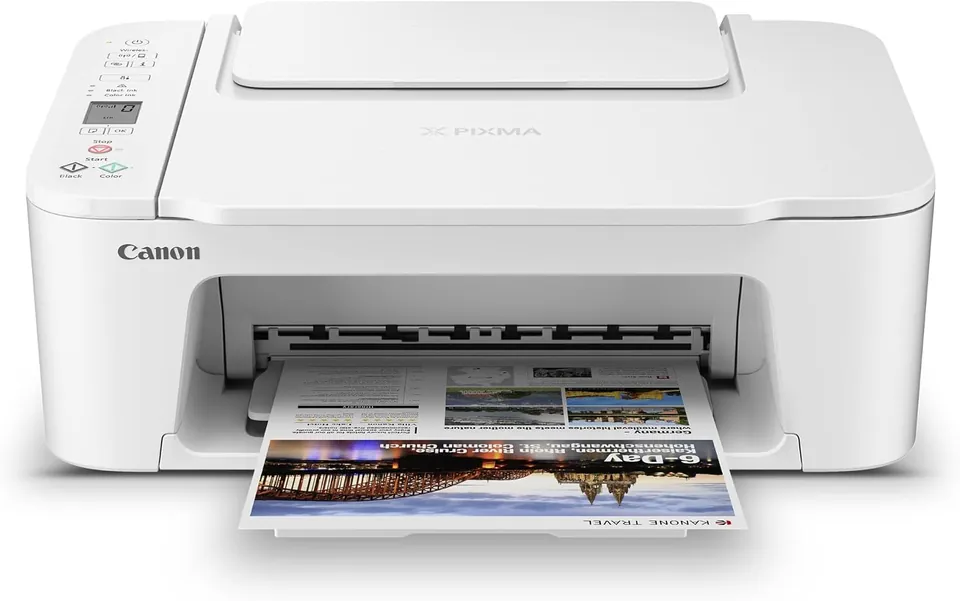
Canon PIXMA TS3720 Wireless All-in-One Printer, White
White U.S. PIXMA TS3720. Canon lists single-sided printing, a rear tray for up to 60 sheets of plain paper, a flatbed scanner for Letter/A4 originals, and PG-275 black plus CL-276 color cartridges.
Model 6671C022
Amazon ASIN B0D1DV6FV5

Canon
Canon PIXMA TR8620a Wireless Home Office All-in-One Printer, Black
Black U.S. PIXMA TR8620a. Canon lists a front cassette and rear tray, five individual ink tanks, automatic two-sided printing, and a flatbed plus ADF. ADF capacity is 20 Letter-size or 5 Legal-size sheets of plain paper.
Model 4451C032
Amazon ASIN B09TRZLPXP
Differences that matter
What matters most to you?
Choose a priority to see what it changes.
Sources for Duplex print workflow
Sources for Scanning multi-page originals
Start with the work, not the feature count
Both are Canon all-in-one printers, but they serve different routines. The TS3720 is a compact two-cartridge, single-sided-listed model with a documented manual-duplex workaround for some Windows jobs. The TR8620a adds a second paper source, individual ink tanks and an ADF, plus automatic duplex printing within Canon's size and media conditions.
A practical first check is to list three things: how often you print two-sided pages, whether you scan stacks of originals, and which ink replacement codes you want to keep at home. These habits make the distinction clearer than a generic 'home versus office' label.
Duplex means different amounts of handling
On the TS3720, Canon's product page says single-sided printing. Its TS3700-series Windows driver nevertheless provides manual duplex: it prints one side, asks you to reload the sheets, then prints the reverse. Canon limits that path to Plain Paper and disables it for Borderless, Tiling/Poster and Booklet layouts. Treat it as an occasional document option that needs your attention, not as automatic duplex.
The TR8620a lists automatic two-sided printing. Canon identifies Letter, A5, A4 and B5 as suitable sizes and tells users to choose a media type suitable for duplex. The cited Windows driver further limits standard Duplex Printing to Plain Paper with Normal-size, Fit-to-Page, Scaled or Page Layout. The driver has a separate booklet-printing setting. Apps and driver versions can affect availability, so check the actual print dialog for the job you need.
Paper trays and document feeding
TS3720 has one rear tray; Canon lists 60 plain sheets. You choose the paper stock when loading, and specialty/photo media can have lower load limits. TR8620a gives you two feed locations: a cassette for A4/B5/A5/Letter plain paper and a rear tray for supported media such as photo paper. Canon's approximate plain-paper limits are 100 sheets per source.
The TR8620a also has a flatbed plus ADF, listed for 20 Letter or 5 Legal plain-paper sheets. This can suit short stacks of forms or multipage originals. Canon lists manual two-sided scanning; automatic print duplex does not establish automatic two-sided scanning. If feeding two-sided originals is essential, verify the full scan workflow before choosing.
Ink codes describe the replacement routine, not its cost
The white TS3720 uses PG-275 pigment black and CL-276 dye color. Canon's series manual describes a replaceable black FINE cartridge and a replaceable color FINE cartridge. TR8620a uses five individual tanks: pigment black PGI-280 PGBK, plus dye-based CLI-281 black, cyan, magenta and yellow; Canon's manual says to replace the tank where ink runs out.
That is a concrete supply-stocking difference: a two-cartridge pair versus individual color tanks. It does not prove which one is cheaper for your pages. Check the full exact ink code and package size against your printer and compare yield conditions for your own text/photo mix rather than using tank count as a cost shortcut.
A quick pre-buy check
Open one recent print job and note its size, media and whether both sides are needed. For TS3720, confirm you can reload the paper and the Windows driver's manual-duplex option is available for that layout. For TR8620a, confirm the size is Letter/A5/A4/B5, the media is suitable and the automatic setting appears in the print dialog.
Then check a real scan job: if pages are one-sided, count the batch and compare it with the TR8620a's 20-sheet Letter or 5-sheet Legal ADF. If pages are two-sided, the published feature is manual two-sided scanning, so decide whether that extra step works for you. Last, compare the replacement codes printed for the exact model and the paper stock you actually use.
Product details
Canon PIXMA TS3720 Wireless All-in-One Printer, White
- Ink
- PG-275 pigment black and CL-276 dye color; black and color FINE cartridges Source
- Paper input
- One rear tray; Canon lists 60 sheets of plain paper Source
- Duplex printing
- Listed as single-sided; TS3700-series Windows driver documents manual duplex for Plain Paper and selected layouts, with sheet reloading Source
- Scanner
- Flatbed; maximum document size 8.5 × 11.7 in (Letter/A4) Source
Canon PIXMA TR8620a Wireless Home Office All-in-One Printer, Black
- Ink
- Five individual tanks: PGI-280 pigment black and CLI-281 dye black, cyan, magenta and yellow Source
- Paper input
- Rear tray and front cassette; Canon lists 100 sheets of plain paper in each source. Cassette accepts A4/B5/A5/Letter plain paper; rear tray accepts supported paper types. Source
- Duplex printing
- Automatic print duplex for Letter/A5/A4/B5 with suitable media; the standard cited Windows driver setting is for Plain Paper and selected layouts Source
- Document feeder
- Flatbed plus ADF; 20 sheets of Letter plain paper or 5 sheets of Legal plain paper. Canon lists manual two-sided scanning, not automatic duplex scanning. Source
Before you buy
Community discussions
Choosing which ink you will need to stock
Canon PIXMA TR8620a Wireless Home Office All-in-One Printer, Black
A TR8620a owner printing high-coverage color pages reported low warnings on cyan, yellow and magenta after about 20 sheets.
What to check
Check which cartridges or tanks you replace separately, and match any yield figure to its stated test conditions.
Common questions
Does the PIXMA TS3720 print automatically on both sides?
No automatic duplex feature is listed for the TS3720. Canon lists single-sided printing, but the TS3700-series Windows driver documents manual duplex for Plain Paper: print one side, reload the pages when prompted, then print the reverse. The option is unavailable for Borderless, Tiling/Poster or Booklet layouts.Canon Support: PIXMA TS3720Canon Inkjet Manuals: TS3700 series Online ManualCanon Inkjet Manuals: TS3700 series Duplex Printing
Does TR8620a automatic duplex printing mean it can automatically scan both sides?
No. Canon lists automatic two-sided printing separately from scanning. For scanning, Canon lists a flatbed and ADF plus manual two-sided scanning; do not assume automatic duplex scanning from the print feature.Canon Support: PIXMA TR8620a
How much paper can each printer hold?
Canon lists the TS3720 rear tray for 60 plain-paper sheets. The TR8620a has a front cassette and rear tray, each listed for about 100 plain sheets; the cassette is for A4/B5/A5/Letter plain paper, while the rear tray supports other compatible media. Check the manual for the load limit of your specific stock.Canon Support: PIXMA TS3720Canon Inkjet Manuals: TR8600 series Paper Load LimitCanon Inkjet Manuals: TR8600 series Paper Sources
Which printer has the cheaper ink?
This comparison cannot establish that. TS3720 uses PG-275/CL-276 black and color FINE cartridges; TR8620a uses five PGI-280/CLI-281 tanks. Compare current exact-code package prices and the manufacturer's yield conditions using your own print mix; more tanks do not by themselves mean lower cost.Canon Support: PIXMA TS3720Canon Inkjet Manuals: TS3700 series Online ManualCanon Support: PIXMA TR8620aCanon Inkjet Manuals: TR8600 series Online Manual
Sources and scope
This is a specification and workflow comparison of the assigned U.S. models (TS3720 White, 6671C022, and TR8620a Black, 4451C032), not a hands-on print test. Canon's series manuals are tied to each model through their official model indexes. Duplex statements are print-only: do not assume the TR8620a automatically scans both sides. Ink tank or cartridge counts do not establish page yield, household cost, print quality, or reliability. Confirm the exact regional model and ink codes on the printer and supply packaging before buying.
- Canon Support: PIXMA TS3720
- Canon Inkjet Manuals: TS3700 series Online Manual
- Canon Inkjet Manuals: TS3700 series Duplex Printing
- Canon Inkjet Manuals: TS3700 series Paper Load Limit
- Canon Inkjet Manuals: TS3700 series Inside View
- Canon Support: PIXMA TR8620a
- Canon Inkjet Manuals: TR8600 series Online Manual
- Canon Inkjet Manuals: TR8600 series Duplex Printing
- Canon Inkjet Manuals: TR8600 series Automatic Duplex Printing Problems
- Canon Inkjet Manuals: TR8600 series Page Setup Tab Description
- Canon Inkjet Manuals: TR8600 series Paper Load Limit
- Canon Inkjet Manuals: TR8600 series Paper Sources
- Canon Inkjet Manuals: TR8600 series Replacing Ink Tanks
Related comparisons

Canon PIXMA TR7120 vs TR8620a: Ink, Paper Feeds and Scanning
Both printers can automatically print on both sides and use an ADF, but neither automatically scans both sides of an original through that feeder. TR7120 holds up to 35 Letter sheets in its ADF; TR8620a holds 20 and adds fax, five individual ink tanks, a 100-sheet rear feed and Ethernet. Match the exact cartridge family and the paper or scan task you do most.
Read comparison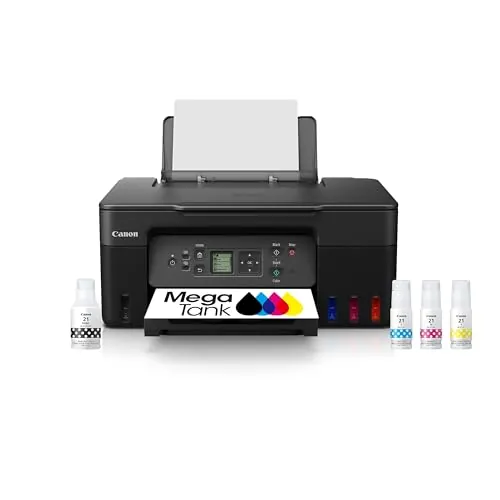
Canon PIXMA TS3720 vs G3270: Cartridge Changes, Tank Refills and Document Handling
The white Canon PIXMA TS3720 (6671C022) uses replaceable PG-275 black and CL-276 color cartridges; the black PIXMA G3270 (5805C002) uses GI-21 bottles and integrated tanks. Both print one side at a time and scan one original at a time on a flatbed, so neither is a fit for automatic duplex or feeder-based handling of a stack of stapled pages. Compare refill habits, rear-tray capacity and the way you process paperwork before choosing.
Read comparison