
Products compared

Canon
Canon PIXMA TR8620a Wireless Home Office All-in-One Printer
U.S. black model; Canon's direct product page identifies the TR8620a, lists color print/copy/scan/fax, and gives part number 4451C032. Confirm package contents on the exact retail listing.
Model TR8620a
Amazon ASIN B09TRZLPXP
Brother
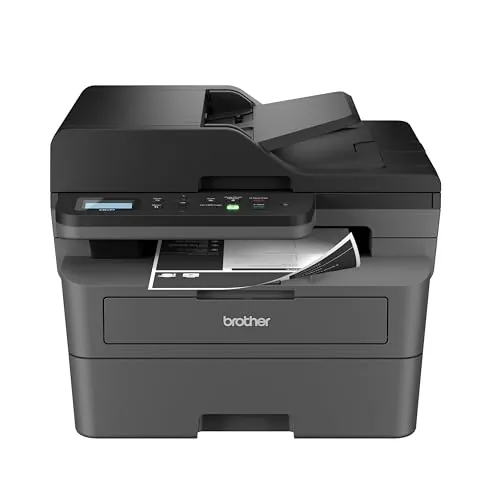
Brother DCP-L2640DW Wireless Monochrome Laser Multi-Function Printer
U.S. monochrome print/copy/scan configuration. Brother lists a 50-page ADF, 250-sheet paper tray, starter toner and DR830 drum in the box; its brochure bases maximum capacity on 20 lb paper.
Model DCP-L2640DW
Amazon ASIN B0CPLFTPCV
Differences that matter
What matters most to you?
Choose a priority to see what it changes.
Sources for How many suitable pages can go in the ADF?
Sources for Do you need automatic two-sided scanning?
Sources for What supply system and paper-loading routine fits?
Start with what your finished page needs to show
If a printed document or copy must preserve color, the Canon PIXMA TR8620a is the choice supported by these two specifications. Canon lists a five-tank system, photo-paper support, and four functions: print, copy, scan, and fax. The Brother DCP-L2640DW is a monochrome print/copy/scan machine. It can scan color, so sending a color original to a file is not the same requirement as producing color on paper.
This split also helps avoid a false ink-versus-toner cost claim. Canon uses individual PGI-280 and CLI-281 ink tanks; Brother lists black TN830-family toner plus a DR830 drum. Those supply systems differ, but page coverage, print mix, current supply prices, and actual yield are not compared here.
Use ADF capacity for batch planning, not speed claims
Canon rates its ADF for up to 20 sheets of plain Letter paper, with five sheets for Legal. Brother lists up to 50 pages, but maximum capacity is based on 20 lb paper; its brochure gives a 16–28 lb ADF range. For a suitable 40-sheet single-sided Letter stack, those limits imply two Canon loads or one Brother load. That is arithmetic from the rated capacities, not a claim that one scans faster.
If your originals are heavier, mixed-size, curled, stapled, or otherwise outside the stated feeding conditions, do not assume the full count applies. Use the relevant manual and prepare the stack as directed.
Separate duplex printing from duplex scanning
Both product pages list automatic two-sided printing. That does not mean the ADF captures both sides of an original in one pass: Canon lists manual two-sided scanning, and Brother's brochure says duplex scanning is not supported. If a large archive of double-sided originals is a routine task, compare a model with an explicitly rated duplex ADF instead of treating either print-duplex feature as a scan feature.
For one-sided documents and color-coded notes, both can scan color. For color output and photo stocks, the Canon's maker-listed media and rear-tray setup are the relevant added capabilities.
Check the refill and paper path before choosing
Canon's product page lists five standard tanks in the box and a front cassette plus rear tray, each holding up to 100 sheets of plain paper; the rear tray's limit changes for photo paper. Brother lists a 250-sheet standard tray and a single-sheet manual feed, and names the starter toner and drum in the carton. Before checkout, confirm the exact retailer bundle and the matching replacement supply numbers. No page-cost estimate follows from the named cartridges alone.
Product details
Canon PIXMA TR8620a Wireless Home Office All-in-One Printer
The Canon is the fit when color must be printed or copied, or when you want its listed photo-paper, fax, and card-slot workflows. The smaller ADF means more reloads for larger scan stacks. Canon's direct page lists a standard five-tank set in the box; check the exact Amazon package before assuming its contents.
- Print output
- Color printing; Canon lists photo and document printing. Source
- Automatic document feeder
- Up to 20 sheets of Letter plain paper, or 5 sheets of Legal plain paper. Source
- Two-sided workflow
- Automatic two-sided printing; Canon lists manual two-sided scanning. Source
- Ink and paper feed
- Five individual ink tanks: PGI-280 pigment black and CLI-281 dye inks. Front cassette and rear tray each hold up to 100 sheets of plain paper; rear tray limits vary for photo stock. Source
Brother DCP-L2640DW Wireless Monochrome Laser Multi-Function Printer
Choose the Brother when black-and-white output is sufficient and the larger rated ADF or paper tray better fits your routine. Its 50-page ADF is not a promise for every stack: use the brochure's 20 lb basis and 16–28 lb ADF range, and verify paper size/type. The carton includes starter toner and a drum; future toner and drum are separate consumable choices.
- Print output
- Monochrome black-and-white printing and copying; color scanning is listed separately. Source
- Automatic document feeder
- 50-page maximum; the brochure says maximum capacities are based on 20 lb paper, and lists an ADF paper-weight range of 16–28 lb. Source
- Two-sided workflow
- Automatic two-sided printing; no duplex scanning. Source
- Toner, drum, and paper feed
- Brother lists a 700-page starter black toner cartridge and DR830 drum in the carton, with TN830-family toner and DR830 replacement supplies. Standard tray holds up to 250 sheets; manual feed accepts one sheet. Source
Before you buy
Community discussions
Comparing a feeder scan with the flatbed
Brother DCP-L2640DW Wireless Monochrome Laser Multi-Function Printer
A Brother DCP-L2640DW owner saw skewed scans through the automatic feeder in macOS Image Capture but reported straight scans on the flatbed. They saw similar skew on the replacement unit, with the cause unresolved.
What to check
If you plan to digitize a stack of forms, try several pages of the same paper through both feeders. Check crop and rotation before relying on a batch workflow.
Testing a scan after adding the printer on Windows
Brother DCP-L2640DW Wireless Monochrome Laser Multi-Function Printer
One Windows 11 user could print a few test pages after adding a DCP-L2640DW, then the printer appeared offline when they tried to scan. They had not found the cause.
What to check
Test both printing and scanning from the computer that will use the printer. Print a page, wait a few minutes, then verify a scan reaches the same host.
Common questions
Can the Brother scan color originals even though it prints in black and white?
Yes. Brother's specifications distinguish monochrome printing/copying from color scanning. If color only needs to be saved digitally, both printers list color scan capability; color on a printed page points to the Canon.DCP-L2640DW Wireless Monochrome Laser Multi-Function Printer — specifications, supplies and box contentsDCP-L2640DW brochurePIXMA TR8620a Wireless Home Office All-in-One Printer — product specifications, supplies and box contents
Does automatic duplex printing mean either one can scan both sides at once?
No. Both list automatic two-sided printing. Canon lists manual two-sided scanning, while Brother's brochure says duplex scan is not supported. Neither has automatic duplex scanning in the cited specifications.PIXMA TR8620a Wireless Home Office All-in-One Printer — product specifications, supplies and box contentsDCP-L2640DW brochure
Can I load 50 sheets into the Brother ADF every time?
Treat 50 as a rated maximum, not a guarantee for every stack. Brother bases maximum capacities on 20 lb paper and lists an ADF range of 16–28 lb. Check the manual for the originals you plan to feed.DCP-L2640DW brochure
Which consumables should I check before buying?
Canon lists PGI-280 pigment black and CLI-281 dye-based ink tanks for the TR8620a. Brother lists TN830-family black toner and the DR830 drum for the DCP-L2640DW. Canon's direct-store box list includes standard ink tanks; Brother's current product page lists starter toner and the drum. Confirm the exact retailer package and supply numbers; this comparison does not estimate running cost.PIXMA TR8620a Wireless Home Office All-in-One Printer — product specifications, supplies and box contentsDCP-L2640DW Wireless Monochrome Laser Multi-Function Printer — specifications, supplies and box contents
Sources and scope
This is a specification-based workflow comparison, not a hands-on print, scan, color, reliability, or cost-per-page test. Brother's 50-page ADF maximum is based on 20 lb paper and the ADF supports 16–28 lb; other original sizes and conditions require checking the maker instructions. Canon's direct-store box contents may not match an Amazon seller's bundle; confirm B09TRZLPXP listing contents. Neither printer automatically scans both sides of an original.
Related comparisons

Canon PIXMA TR7120 vs TR8620a: Ink, Paper Feeds and Scanning
Both printers can automatically print on both sides and use an ADF, but neither automatically scans both sides of an original through that feeder. TR7120 holds up to 35 Letter sheets in its ADF; TR8620a holds 20 and adds fax, five individual ink tanks, a 100-sheet rear feed and Ethernet. Match the exact cartridge family and the paper or scan task you do most.
Read comparison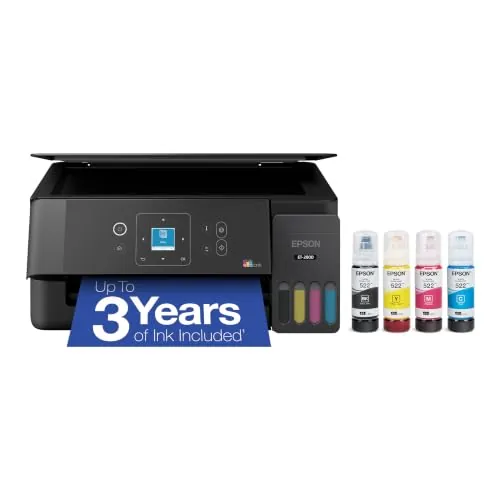
Epson EcoTank ET-2900 vs Canon PIXMA TR8620a: Refill Routine or ADF Workflow?
The black U.S. Epson EcoTank ET-2900 (C11CL63201) uses refillable ink tanks and scans from its flatbed; Epson's shared guide says this model group does not include an ADF or Ethernet. The Canon PIXMA TR8620a (4451C032) uses five individual ink tanks, adds an ADF for supported paper stacks, and lists USB, Wi-Fi, and Ethernet. Pick the workflow that matches your home office; neither maker's documentation establishes lower total ink cost or faster real-world work.
Read comparison