
Products compared
Epson
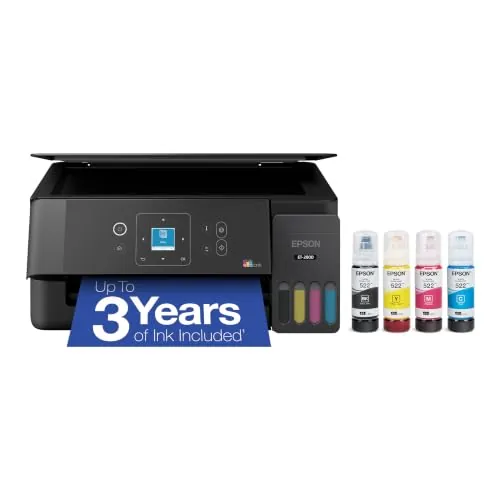
Epson EcoTank ET-2900 Wireless All-in-One Color Supertank Printer – Black
Black U.S. ET-2900; refillable ink tanks, flatbed scanner, USB and Wi-Fi. Epson's shared guide explicitly excludes ADF, fax, and Ethernet from the ET-2900 model group.
Model C11CL63201
Amazon ASIN B0GSSBQGX7

Canon
Canon PIXMA TR8620a Wireless Home Office All-in-One Printer
Black U.S. PIXMA TR8620a; five individual ink tanks, flatbed plus ADF, duplex printing, fax, USB, 2.4 GHz Wi-Fi, and Ethernet as listed by Canon U.S.A.
Model 4451C032
Amazon ASIN B09TRZLPXP
Differences that matter
What matters most to you?
Choose a priority to see what it changes.
Sources for Ink replenishment routine
Sources for Scanning a stack of originals
Sources for Network and device connection
Budget for two different ink routines
The ET-2900 asks you to handle ink as a refill task: open the tank, match the bottle color, fill to the upper line, and reset the estimate. Epson explains that the printer does not directly measure the remaining ink; it estimates from usage. That makes visible tank checks part of the routine, especially after a refill.
The TR8620a uses five individual tanks instead. Canon's instructions say to replace the tank where ink runs out and install it in the matching labeled position. These are distinct replenishment tasks, but the manuals do not settle which will cost less for your mix of pages, photos, paper, and print frequency.
Choose the feeder around the originals you actually scan
Both printers can scan from a flatbed. Canon adds an ADF for stacks of supported same-size plain-paper originals: up to 20 Letter sheets or 5 Legal sheets. Epson's shared guide is explicit that the ET-2900 group has no ADF; ADF instructions and specifications in that document apply to ET-4900/L5390 only. For a photo, single sheet, or original that Canon says is unsuitable for the feeder, use the glass; for a supported one-sided paper stack, the Canon feeder can avoid placing pages individually.
The Canon feeder is not a duplex-scan solution: its manual says duplex originals cannot be scanned automatically by the ADF. It also limits the supported material by size, thickness, weight, and condition. If your routine is invoices or forms with both sides, count the manual handling step before treating the ADF as a fit.
Check network access and daily device handoff
Epson lists USB and built-in Wi-Fi for the ET-2900 and names its Smart Panel app for printing and scanning from computers or wireless mobile devices. The model-family guide lists 2.4 GHz Wi-Fi and explicitly excludes Ethernet from ET-2900. Canon lists USB, Ethernet, and 2.4 GHz Wi-Fi for the TR8620a, with AirPrint, Mopria, and Canon PRINT among its mobile options. Both therefore have a wireless path; Ethernet is a documented distinction for a home office that needs a wired network connection.
Before choosing, check the room's router coverage, whether the printer will be near a USB or Ethernet cable, and which phone or computer will send scans. The published support only establishes supported connection options, not setup success on a particular router or faster transfers from one model.
Product details
Epson EcoTank ET-2900 Wireless All-in-One Color Supertank Printer – Black
Epson's exact U.S. page identifies model C11CL63201. Its refill workflow is a visible tank and bottle routine: choose the matching color, fill to the upper line, then reset the estimate. Epson cautions that remaining ink is estimated from usage, so the display does not directly measure the tank; visual checks remain part of ownership.
- Ink method
- Refillable tanks using color-matched EcoFit ink bottles; refill instructions include checking the tank, filling to the upper line, and resetting the displayed estimate. Source
- Scanner and document feed
- Flatbed scanner; Epson states ADF is available only on ET-4900/L5390, not the ET-2900 model group. Source
- Connections
- Built-in USB and Wi-Fi; the shared guide's Wi-Fi specification lists 2.4 GHz. Ethernet is limited to ET-4900/L5390 in that guide. Source
Canon PIXMA TR8620a Wireless Home Office All-in-One Printer
Canon's U.S. support page identifies the TR8620a and its individual ink system. The ADF is for supported same-size plain-paper originals, not every sheet or bound item; its manual says duplex originals cannot be scanned automatically. Canon also lists wired USB and Ethernet in addition to wireless printing and scanning options.
- Ink method
- Five individual tanks: PGI-280 pigment black and CLI-281 dye-based inks; replace the tank where ink runs out and match its position to the print-head label. Source
- Scanner and document feed
- Flatbed plus ADF; Canon lists up to 20 Letter sheets or 5 Legal sheets of supported plain paper. The ADF does not automatically scan duplex originals. Source
- Connections
- Hi-Speed USB, Ethernet, and 2.4 GHz 802.11b/g/n Wi-Fi; Canon lists AirPrint, Mopria, and Canon PRINT app support. Source
Before you buy
Community discussions
Testing the app you use to print from an iPad
Epson EcoTank ET-2900 Wireless All-in-One Color Supertank Printer – Black
An EcoTank ET-2900 owner reported that a phone and an iPad stopped printing reliably after initially working in Cricut Design Space and Canva. Printing from their Mac continued to work.
What to check
Verify the intended print route on each device. If you normally use an iPad, try one print directly from your usual app and one through the printer’s supported mobile workflow.
Checking which home devices can find the printer
Canon PIXMA TR8620a Wireless Home Office All-in-One Printer
A TR8620a owner joined home Wi-Fi but said the Canon app and a Mac could not find the printer. An iPhone could print over the printer’s own connection.
What to check
Try each device you actually print from. If Wi-Fi setup is essential, confirm app and operating-system support, and check what wired options are available.
Common questions
Does the ET-2900 have an automatic document feeder?
No. Epson's shared guide covers the ET-2900 series and says the ADF is only available on ET-4900/L5390. The ET-2900 uses its flatbed for scans.ET-4900/L5390/ET-2900/ET-2920/L3360 Series User's Guide
How many pages can the TR8620a ADF take?
Canon lists up to 20 A4/Letter sheets of 20 lb plain paper or up to 5 Legal sheets. It also restricts the ADF to supported originals of the same size, thickness, and weight; check the manual for exclusions before loading.Canon TR8600 series: Supported Originals
Can the Canon ADF scan both sides of a stack automatically?
No. Canon's TR8600-series manual says a duplex original cannot be scanned automatically by the ADF. Canon lists manual two-sided scanning as a feature, so the second side requires a manual workflow.Canon TR8600 series: Loading Documents in the ADFCanon Support for PIXMA TR8620a
Do both models support Wi-Fi?
Yes. Epson's ET-2900 page lists Wi-Fi and USB, and Canon lists 2.4 GHz Wi-Fi plus USB and Ethernet for the TR8620a. Check your router and device setup needs; this feature list does not establish a connection-speed advantage.EcoTank ET-2900 Wireless All-in-One Color Supertank Printer – BlackCanon Support for PIXMA TR8620a
Is the Epson ink estimate a direct reading of the tanks?
No. Epson says it estimates remaining ink by internally monitoring usage and recommends checking the visible tank levels. Reset the estimate after refilling so the displayed estimate reflects the refill routine.ET-4900/L5390/ET-2900/ET-2920/L3360 Series User's Guide
Sources and scope
Official-source feature and workflow comparison, not hands-on testing. No relative ink cost, page yield, print quality, scan speed, scan quality, reliability or network-performance conclusion is claimed. Epson's manual is shared across five model families; it explicitly identifies ET-2900 as a covered group and limits ADF, fax, and Ethernet to ET-4900/L5390. Canon's TR8600-series manual landing page explicitly includes TR8620a. ADF limits are restricted to supported originals; live offers and prices are not included.
- EcoTank ET-2900 Wireless All-in-One Color Supertank Printer – Black
- ET-4900/L5390/ET-2900/ET-2920/L3360 Series User's Guide
- Canon Support for PIXMA TR8620a
- Canon Inkjet Manuals – TR8600 series
- Canon TR8600 series: Replacing Ink Tanks
- Canon TR8600 series: Loading Documents in the ADF
- Canon TR8600 series: Supported Originals
Related comparisons

Canon PIXMA TR7120 vs TR8620a: Ink, Paper Feeds and Scanning
Both printers can automatically print on both sides and use an ADF, but neither automatically scans both sides of an original through that feeder. TR7120 holds up to 35 Letter sheets in its ADF; TR8620a holds 20 and adds fax, five individual ink tanks, a 100-sheet rear feed and Ethernet. Match the exact cartridge family and the paper or scan task you do most.
Read comparisonCanon PIXMA TR7120 vs Epson EcoTank ET-2900: Ink, Scanning and Two-Sided Printing
The Canon PIXMA TR7120 (7178C002) and Epson EcoTank ET-2900 (C11CL63201) handle ink and paper differently. Canon replaces PG-295/CL-286 cartridges, feeds stacks of compatible originals through a 35-sheet ADF, and prints two-sided automatically. Epson refills built-in tanks with keyed EcoFit bottles and scans on a flatbed; its computer driver prints odd and even pages separately, asking you to turn the paper between sides. Both list a 100-sheet plain-paper supply, but Canon uses a cassette and Epson a rear feeder.
Read comparison