
Products compared

Canon
Canon PIXMA TR8620a All-in-One Printer
U.S. black, five-ink photo/document all-in-one; listed model 4451C032
Model 4451C032
Amazon ASIN B09TRZLPXP
Canon
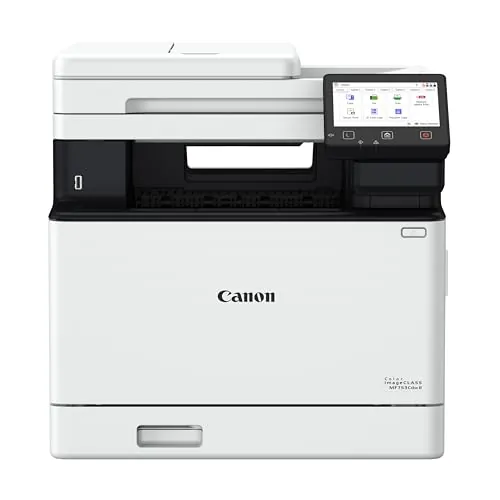
Canon Color imageCLASS MF753Cdw II All-in-One Laser Printer
U.S. color laser all-in-one with fax; exact II generation, item code 7185C011
Model 7185C011
Amazon ASIN B0FP3LJ74G
Differences that matter
Sources for Handling two-sided originals
Sources for Print system and consumables
The actual decision is how often you scan two-sided originals
Do not let automatic two-sided printing answer a scanning question. Canon lists both printers with automatic two-sided printing, but the PIXMA TR8620a's support page lists manual two-sided scanning, while the imageCLASS MF753Cdw II has a 50-sheet automatic feeder for two-sided, one-pass scanning. If you mostly scan single-sided paperwork or only occasionally handle the reverse, the manual step may be acceptable. If duplex originals arrive in recurring batches, decide whether avoiding that step matters enough to accommodate the larger II model.
The published feed limits also differ: Canon lists the TR8620a at 20 Letter or 5 Legal sheets of plain paper, while the II feeder is listed at 50 sheets. These are manufacturer specifications, not a measured workload-time comparison. Keep pages aligned and follow each manual's current originals guidance; the cited specs do not establish how either feeder handles damaged, mixed-size or unusually thin documents.
Choose a paper path that matches your routine
The TR8620a lists a 100-sheet cassette and 100-sheet rear tray, plus photo-media limits for the rear tray. Canon also lists borderless printing, photo and card-sized formats, a five-color individual ink system and SD-family card support. That makes it worth checking if you routinely send photos or nonstandard media through the printer; the listing alone does not establish a print-quality advantage.
For the MF753Cdw II, Canon lists a 250-sheet cassette and 50-sheet multipurpose tray, with an optional 550-sheet PF-K1 cassette. The II brochure documents supported sizes and media types including envelopes and labels. That layout may suit a desk that keeps standard paper in the main cassette and uses the multipurpose path for occasional jobs. Verify the current model-specific manual for the exact paper and envelope settings you need before buying.
Check the installation, not just the footprint
The TR8620a is listed at 17.4 lb and 17.3 × 14.4 × 7.5 inches with paper installed in its cassette. The MF753Cdw II is listed at approximately 48.5 lb and 16.8 × 18.2 × 17 inches in standard desktop configuration. The configuration labels are not identical, and neither set of dimensions tells you how much space is needed to open covers, feed specialty paper or access a tray.
Before ordering, measure the actual desk or shelf and review the exact model's manual for service and operating clearance. Check the supported load of the destination surface, carry path and access to the II model's deeper body, or confirm that the lower TR8620a placement still leaves its rear tray usable. Width alone is not enough to establish fit.
Keep supply names separate from running-cost claims
The TR8620a uses PGI-280 pigment black and CLI-281 dye inks; the MF753Cdw II uses Canon 069 toner, and the II brochure specifies starter toner in the box. Those are different supply systems, so check that a listing really is the 7185C011 II configuration before budgeting replacement supplies.
Do not assume the laser model costs less per page or the inkjet costs less for photos from the cartridge names alone. Print coverage, color use, replacement-supply prices and the seller's included quantities affect the comparison. This guide does not estimate either buyer's operating cost.
Product details
Canon PIXMA TR8620a All-in-One Printer
- Two-sided scanning
- Manual two-sided scan; feeder listed for 20 Letter or 5 Legal sheets of plain paper. Source
- Paper paths
- 100-sheet front cassette and 100-sheet rear tray; rear tray listing also specifies photo-paper load limits. Source
- Print media
- Five individual inks; Canon lists photo sizes, borderless printing, card-sized media, SD-family card support and photo-scanning features. Source
- Listed size and weight
- 17.3 × 14.4 × 7.5 in with paper installed in the cassette; 17.4 lb. Source
Canon Color imageCLASS MF753Cdw II All-in-One Laser Printer
- Two-sided scanning
- 50-sheet automatic document feeder scans both sides in one pass. Source
- Paper paths
- 250-sheet standard cassette and 50-sheet multipurpose tray; a 550-sheet PF-K1 cassette is listed as optional. Source
- Print supplies
- Color laser model using Canon 069 toner; the II brochure lists starter toner in the box. This does not establish cost per page. Source
- Listed size and weight
- 16.8 × 18.2 × 17 in in standard desktop configuration; 48.5 lb unit weight. Source
Before you buy
Community discussions
Occasional photo prints and batches of originals
Canon PIXMA TR8620a All-in-One Printer
A small-office shopper in Europe considered the TR8620a for occasional printing, photos and monthly scans. They wanted a document feeder even though their overall print volume was low.
What to check
Sort typical originals into single- and double-sided stacks, then check what each feeder handles and which photo media you use.
A TR8620a owner compares photo prints on plain paper
Canon PIXMA TR8620a All-in-One Printer
A TR8620a owner posted photos printed on standard Letter paper before and after changing groups of ink tanks.
What to check
Compare the papers and sizes each model supports using the type of photo or document you plan to print.
A TR8620a owner runs repeat cardstock jobs through the rear tray
Canon PIXMA TR8620a All-in-One Printer
An owner printing artwork found that the first sheet fed but subsequent sheets skewed or failed to feed. The problem also happened with thinner stock in that setup.
What to check
If you frequently print cards or artwork, check the supported stock and feed path and run several consecutive sheets of your actual paper.
Common questions
Does automatic two-sided printing mean both models automatically scan both sides?
No. Automatic duplex printing refers to printed output. Canon lists the TR8620a's two-sided scan workflow as manual; the MF753Cdw II has a 50-sheet feeder that scans both sides in one pass.Canon U.S.A. PIXMA TR8620a support and specificationsCanon U.S.A. imageCLASS MF753Cdw II support and specificationsCanon U.S.A. imageCLASS MF753Cdw II / MF751Cdw II brochure
Which has a larger paper cassette?
The MF753Cdw II lists a 250-sheet standard cassette plus a separate 50-sheet multipurpose tray. The TR8620a lists a 100-sheet front cassette and 100-sheet rear tray. Tray types and supported media differ, so compare the paper you use rather than adding the figures as if they were identical paths.Canon U.S.A. PIXMA TR8620a support and specificationsCanon U.S.A. imageCLASS MF753Cdw II support and specificationsCanon U.S.A. imageCLASS MF753Cdw II / MF751Cdw II brochure
Can either model handle ordinary color office jobs?
Canon lists print, scan, copy and fax functions for both exact models. The sources establish that shared function set, not which produces better-looking pages or scans.Canon U.S.A. PIXMA TR8620a support and specificationsCanon U.S.A. imageCLASS MF753Cdw II support and specificationsCanon U.S.A. imageCLASS MF753Cdw II / MF751Cdw II brochure
Can I estimate which will cost less to run from the ink and toner names?
No. The TR8620a uses PGI-280/CLI-281 ink and the MF753Cdw II uses Canon 069 toner, but the cited sources do not calculate your cost per page. Compare current supply prices and yields for your own mix and coverage before estimating ownership cost.Canon U.S.A. PIXMA TR8620a support and specificationsCanon U.S.A. imageCLASS MF753Cdw II / MF751Cdw II brochure
Sources and scope
This is a documentation-based comparison of the U.S. TR8620a model 4451C032 and imageCLASS MF753Cdw II model 7185C011. It does not test print or scan quality, speed, reliability, noise, ownership cost or shelf fit. Published size figures use different configurations, and actual operating clearance must be checked in each model's current manual. Paper capacities and supported media are manufacturer-listed values, not a recommendation to load every tray to capacity.
Related comparisons

Canon PIXMA TR7120 vs TR8620a: Ink, Paper Feeds and Scanning
Both printers can automatically print on both sides and use an ADF, but neither automatically scans both sides of an original through that feeder. TR7120 holds up to 35 Letter sheets in its ADF; TR8620a holds 20 and adds fax, five individual ink tanks, a 100-sheet rear feed and Ethernet. Match the exact cartridge family and the paper or scan task you do most.
Read comparison
Epson EcoTank ET-2900 vs Canon PIXMA TR8620a: Refill Routine or ADF Workflow?
The black U.S. Epson EcoTank ET-2900 (C11CL63201) uses refillable ink tanks and scans from its flatbed; Epson's shared guide says this model group does not include an ADF or Ethernet. The Canon PIXMA TR8620a (4451C032) uses five individual ink tanks, adds an ADF for supported paper stacks, and lists USB, Wi-Fi, and Ethernet. Pick the workflow that matches your home office; neither maker's documentation establishes lower total ink cost or faster real-world work.
Read comparison