
Products compared
Corsair
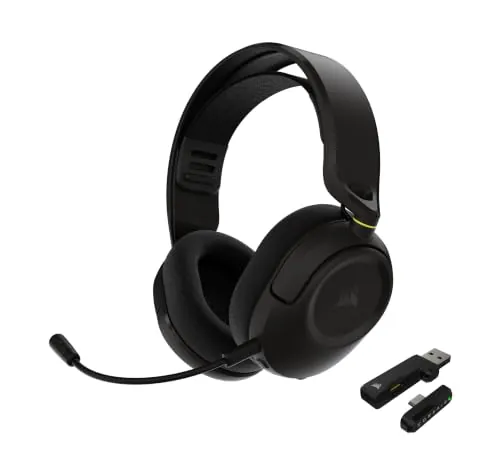
CORSAIR HS35 v3 Wireless Gaming Headset — Carbon
Carbon U.S. listing; wireless headset with listed 2.4GHz, Bluetooth, and USB wired modes.
Model CA-9011401-WW
Amazon ASIN B0GY5LWSR9

HyperX
HyperX Cloud III Wired Gaming Headset — Black
Black wired U.S. listing; product page lists 3.5 mm, USB-C, and USB-A routes.
Model 727A8AA
Amazon ASIN B0C3BSZ56D
Differences that matter
Sources for Connection modes and switching between devices
Sources for What connection hardware is listed in the box
Sources for Headband and ear-cushion construction
Start with the host port and the connection you plan to use
The HS35 v3 Wireless is not wireless-only: Corsair lists USB-transmitter 2.4GHz, Bluetooth, and USB wired audio. It also gives a practical limit that changes the decision: Bluetooth and 2.4GHz cannot be used together. If your routine expects the headset to hear a phone and a game system simultaneously, the page does not support that expectation for those two modes.
The Cloud III is the wired alternative, but it offers more than one wired connector route. HyperX lists 3.5 mm, USB-C, and USB-A. Its current FAQ says 3.5 mm is the route for Xbox or PlayStation controllers; USB is described for supported computers and consoles, with features varying by host and connection. Before ordering, check the actual controller, console, computer, or phone and the feature you need rather than treating a compatibility list as a guarantee for every configuration.
Check the included hardware against your setup
Corsair lists the wireless USB transmitter and a 1.8 m USB charging cable in the HS35 v3 Wireless box. If choosing its 2.4GHz route, make sure the intended host has a usable port for the transmitter; if you need a wired session, confirm the USB route suits your host.
HyperX lists a USB dongle and USB-C-to-USB-A adapter in the Cloud III Wired box, as well as a detachable microphone. HyperX's FAQ also describes connecting through a compatible 3.5 mm headset jack. These are distinct wired options, not proof that every connector provides identical controls or software features on every device.
Treat cushion materials as a preference, not a result
Corsair describes an adjustable floating headband with soft fabric earpads. HyperX describes memory foam in the headband and ear cushions covered in leatherette. That gives buyers a concrete material comparison when the connection options are otherwise workable.
The source wording does not answer which one will suit an individual head shape, glasses, room temperature, or long-session routine. No comfort or fit test is included, so try the model or confirm the seller's return terms if a personal fit result is essential.
Product details
CORSAIR HS35 v3 Wireless Gaming Headset — Carbon
- Documented connection modes
- 2.4GHz wireless through a USB wireless transmitter, Bluetooth, and wired USB audio; Corsair says Bluetooth and 2.4GHz cannot be used simultaneously. Source
- Listed in the box
- USB wireless transmitter and 1.8 m USB charging cable. Source
- Headband and earpads
- Adjustable floating headband and soft fabric earpads, as described by Corsair. Source
HyperX Cloud III Wired Gaming Headset — Black
- Connection options
- HyperX lists 3.5 mm, USB-C, and USB-A connections; its FAQ says use 3.5 mm with an Xbox or PlayStation controller and USB on supported computers and consoles. Source
- Listed in the box
- Headset, detachable microphone, USB dongle, USB-C-to-USB-A adapter, and quick start guide. Source
- Headband and earpads
- Memory foam in the headband and ear cushions wrapped in leatherette, as described by HyperX. Source
Before you buy
Community discussions
Checking ear comfort during a longer session
HyperX Cloud III Wired Gaming Headset — Black
A Cloud III Wired owner reviewing after a week found the headset comfortable during long gaming sessions. The account describes their own fit and does not give measurements.
What to check
Wear the headset through a longer session if possible. Check how the pads sit around your ears and how the cable reaches your intended port.
Common questions
Can the HS35 v3 Wireless play Bluetooth and 2.4GHz audio at the same time?
No. Corsair states that this model does not support simultaneous Bluetooth and 2.4GHz connection. Choose one of those wireless paths at a time, or consider the listed wired USB mode.HS35 v3 Wireless Gaming Headset — Carbon, U.S. product page
Which connection should I use with the wired Cloud III?
HyperX documents 3.5 mm for an Xbox or PlayStation controller and USB-C or the included USB-C-to-USB-A adapter for supported computers and consoles. Confirm your exact device and desired software features before choosing a route.HyperX Cloud III Wired Gaming Headset — Black, U.S. product page
Does one headset have more comfortable earpads?
The manufacturer pages describe different materials: Corsair lists fabric earpads and a floating headband; HyperX lists leatherette-wrapped memory foam in the ear cushions and headband. Those descriptions do not establish personal comfort or fit, so choose by material preference or try the headset if fit is decisive.HS35 v3 Wireless Gaming Headset — Carbon, U.S. product pageHyperX Cloud III Wired Gaming Headset — Black, U.S. product page
Sources and scope
This is a manufacturer-specification comparison, not a sound, microphone, latency, comfort, battery-life, wireless-reliability, or durability test. Listed platform support does not guarantee every host, adapter, port, software feature, or connection path will work in a particular configuration. Confirm the intended device and connection before purchase. Fabric and leatherette-covered memory foam are construction descriptions, not a prediction of individual fit or comfort.
Related comparisons

HyperX Cloud III Wired vs Cloud Alpha Wired: Ports, Adapters and Controls
The black HyperX Cloud III Wired (727A8AA) has documented USB-C, USB-A via its included adapter, and 3.5mm connection options, with USB NGENUITY features on supported Windows PCs. The Black-Red Cloud Alpha Wired (4P5L1AA#ABL) is documented around a 3.5mm connection and includes a detachable headset cable, inline controls, and a PC extension cable. Check the port and cable you will actually use before choosing; this guide compares setup features, not sound or comfort results.
Read comparison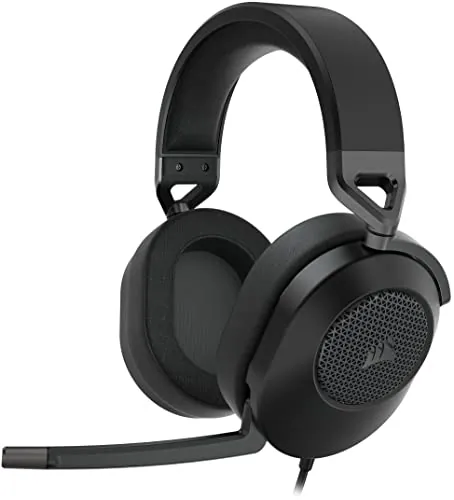
Corsair HS65 Surround vs HyperX Cloud III: Ports, PC Features and Mic Controls
Both wired headsets can connect over 3.5 mm, but their USB paths differ: the exact Corsair HS65 adds an included adapter for iCUE SoundID/Dolby features, while the exact black Cloud III includes a USB dongle and USB-A adapter and lists NGENUITY access on supported Windows PCs. The HS65 boom stays attached and flips to mute; Cloud III's mic detaches and its mute LED shows state.
Read comparison