
Products compared
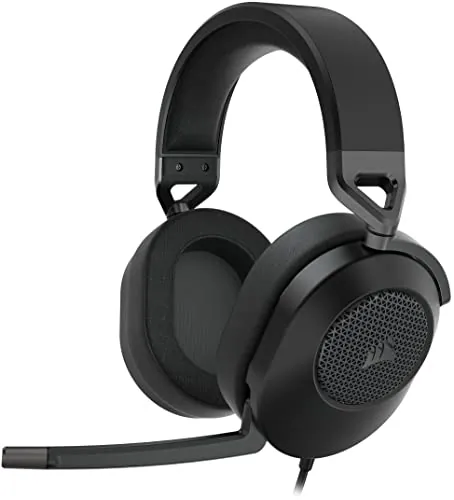
CORSAIR
CORSAIR HS65 SURROUND Wired Gaming Headset — Carbon
US Carbon/black wired headset SKU; 3.5 mm headset with included USB surround adapter
Model HS65 SURROUND (CA-9011270-NA)
Amazon ASIN B09YHQ3Y61

HyperX
HyperX Cloud III Wired Gaming Headset — Black
US black wired Cloud III SKU; 3.5 mm, USB-C and USB-A options with included USB dongle and adapter
Model Cloud III Wired (727A8AA)
Amazon ASIN B0C3BSZ56D
Differences that matter
What matters most to you?
Choose a priority to see what it changes.
Sources for Connection path and included adapter
Sources for Host-specific audio software and surround features
Sources for Microphone removal and mute confirmation
Pick the connection you will actually use
Both are wired and have an analog 3.5 mm path. The HS65 adds an included USB adapter for its iCUE feature set. The exact black Cloud III SKU lists 3.5 mm, USB-C and USB-A options, with a USB dongle and USB-C-to-USB-A adapter in the box. That gives Cloud III more documented connector choices on paper, but the useful question is simpler: which port is available on your controller, laptop or console, and which features do you want through it?
HyperX says its USB connection on a supported Windows PC opens NGENUITY features; settings do not carry over to another system. For Xbox, HyperX directs users to the controller's 3.5 mm jack. For Corsair, its product page describes the included adapter's SoundID/Dolby features through iCUE on PC or Mac, while the included quick-start guide specifies Windows 10 or later. If Mac software is a deciding requirement, check Corsair's latest compatibility guidance before ordering rather than relying on the older guide alone.
The control difference is on the mic boom
Corsair documents a non-detachable HS65 microphone: flip the attached boom up to mute and down to unmute, with volume on an on-ear roller. HyperX includes a detachable Cloud III microphone; the black SKU's product page documents earcup volume/mute controls and an LED mute indicator. Neither arrangement is inherently better. Decide whether you want to remove the boom entirely or keep it attached and flip it out of the way, and whether a visible mute light matters in your setup.
These are hardware and control facts. Manufacturer terms such as noise-cancelling or personalized audio do not show how either headset will sound in your game, room or voice chat; this guide does not rank sound or microphone performance.
A practical compatibility check before checkout
Write down the device model, operating system, port and whether you connect directly or through a controller. Then mark the experience you want: plain stereo over 3.5 mm, PC software controls over USB, or a particular mute style. For the HS65, include its USB adapter in the plan; for Cloud III, distinguish the 3.5 mm controller route from USB on a supported Windows PC. Software effects and virtual surround are host-specific features, not proof of a headset's comparative audio quality.
Last, verify the exact listing still names HS65 Carbon CA-9011270-NA or Cloud III black 727A8AA and includes the documented adapter hardware. Similar family names can refer to another color or a wireless model with a different connector and support path.
Product details
CORSAIR HS65 SURROUND Wired Gaming Headset — Carbon
A 3.5 mm wired headset whose included USB adapter enables Corsair's documented PC audio-software path; its boom mic remains attached and flips up to mute.
- Connections
- 3.5 mm headset plug; included USB adapter for PC audio/software features Source
- PC software features
- SoundID and Dolby Audio 7.1 through the included USB adapter and iCUE; Corsair's current page says PC or Mac, while the quick-start guide specifies Windows 10 or later Source
- Microphone and controls
- Attached flexible boom flips up to mute; on-ear volume roller; mic is not detachable Source
HyperX Cloud III Wired Gaming Headset — Black
A wired headset with three listed connector options and the matching adapter hardware in the box; its microphone detaches and an LED indicates mute status.
- Connections and box contents
- 3.5 mm, USB-C and USB-A options; included USB dongle, USB-C-to-USB-A adapter and detachable microphone Source
- USB software path
- HyperX says USB on a supported Windows PC provides NGENUITY features; settings do not carry over when moved to another system Source
- Microphone controls
- Detachable microphone; earcup mute and volume controls; LED indicates mute Source
Before you buy
Community discussions
Using the Cloud III controls without NGENUITY
HyperX Cloud III Wired Gaming Headset — Black
One Cloud III Wired owner liked the earcup controls after a week using the USB connection. They said they did not need NGENUITY for their setup.
What to check
Compare pressing mute on the Cloud III with raising the HS65 microphone boom. If you use EQ, check which app and connection each headset needs.
Keeping voice chat connected through a game
HyperX Cloud III Wired Gaming Headset — Black
A Windows user reported that the Cloud III Wired microphone intermittently stopped picking up their voice during a game while playback continued. Reconnecting the USB dongle restored the mic temporarily in that setup.
What to check
If you will use the included USB adapter, test the microphone and playback during a full session in the game or chat app you normally use.
Common questions
Can I use either headset with a console controller?
Corsair documents the HS65's 3.5 mm connection for PC, Mac, PS4/PS5, Switch or mobile. HyperX documents Cloud III through 3.5 mm and specifically directs Xbox users to the controller jack; software/spatial features vary by platform and connection. Verify the exact console and feature you need.HS65 SURROUND Quick Start GuideCloud III Wired Gaming Headset — Black, SKU 727A8AA
Which one has a removable microphone?
HyperX lists a detachable microphone in the black Cloud III 727A8AA box contents. Corsair lists the HS65 mic as not detachable and its guide describes flipping the attached boom up to mute.Cloud III Wired Gaming Headset — Black, SKU 727A8AAHS65 SURROUND Wired Gaming Headset — Carbon, SKU CA-9011270-NAHS65 SURROUND Quick Start Guide
Do the PC audio features work over the 3.5 mm cable?
The brands describe their PC software features with USB: Corsair specifies the included USB adapter for iCUE, and HyperX says USB on a supported Windows PC gives access to NGENUITY. Their pages do not establish that these software features operate through a direct analog 3.5 mm connection.HS65 SURROUND Wired Gaming Headset — Carbon, SKU CA-9011270-NAHS65 SURROUND Quick Start GuideCloud III Wired Gaming Headset — Black, SKU 727A8AA
Sources and scope
This guide compares maker-documented connections, accessories, software paths and controls. It does not claim hands-on testing or rank sound, microphone pickup, comfort, positional accuracy or noise reduction. USB feature availability depends on the exact host, connection and current manufacturer software support. Corsair's current product/support pages describe PC and Mac support for SoundID through iCUE, while its quick-start guide names Windows 10 or later for iCUE; confirm current platform support before relying on a Mac workflow.
Related comparisons

HyperX Cloud III Wired vs Cloud Alpha Wired: Ports, Adapters and Controls
The black HyperX Cloud III Wired (727A8AA) has documented USB-C, USB-A via its included adapter, and 3.5mm connection options, with USB NGENUITY features on supported Windows PCs. The Black-Red Cloud Alpha Wired (4P5L1AA#ABL) is documented around a 3.5mm connection and includes a detachable headset cable, inline controls, and a PC extension cable. Check the port and cable you will actually use before choosing; this guide compares setup features, not sound or comfort results.
Read comparisonCorsair HS65 Surround vs HyperX Cloud Alpha: USB Audio, Mic and Cable Setup
These are wired gaming headsets with different setup and handling choices. Corsair's HS65 Surround CA-9011270-NA connects by 3.5 mm and includes a USB surround adapter for iCUE options; its current U.S. product page says PC and Mac, while the model Quick Start Guide scopes virtual 7.1 to PC and iCUE setup to Windows 10+, so confirm Mac support before relying on those USB features. HyperX Cloud Alpha Red SKU 4P5L1AA#ABL uses 3.5 mm and lists a detachable headset cable, detachable mic, inline volume/mic controls and a PC extension cable. Choose based on your host ports, OS and preferred mic/cable routine; no sound or microphone-performance winner is established.
Read comparison