
Products compared
Corsair
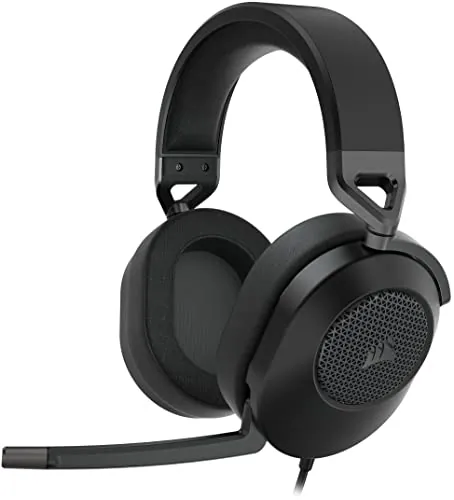
Corsair HS65 Surround Wired Gaming Headset - Carbon
Carbon/black wired model. Corsair lists a 3.5 mm connection and USB surround adapter, with an on-ear volume roller and flip-to-mute microphone. Its product page and Quick Start Guide differ in operating-system scope for USB/iCUE features.
Model CA-9011270-NA
Amazon ASIN B09YHQ3Y61

HyperX
HyperX Cloud Alpha Wired Gaming Headset - Black-Red
Red wired Cloud Alpha configuration. The current HyperX U.S. page identifies SKU 4P5L1AA#ABL and documents 3.5 mm use, a detachable headset cable and mic, inline volume/mic controls, and a PC extension cable in the box.
Model HX-HSCA-RD/AM (SKU 4P5L1AA#ABL)
Amazon ASIN B074NBSF9N
Differences that matter
What matters most to you?
Choose a priority to see what it changes.
Sources for Analog connection and bundled USB adapter
Sources for USB software and operating-system scope
Sources for Microphone and volume-control placement
Sources for Detachable cable and included extension
Choose the connection path you will actually use
Both are wired and have a published 3.5 mm path. Corsair's HS65 also comes with a USB surround adapter. Its Quick Start Guide says stereo can connect through 3.5 mm to PC, Mac, console or mobile; the included adapter enables virtual 7.1 on PC and needs a high-power USB 2.0-or-better port. That is a practical distinction if your console/controller has a headset jack but your computer setup also has a suitable USB port.
Before choosing the HS65 for its USB feature, resolve the operating-system details. Corsair's current U.S. page says SoundID/Dolby Audio via iCUE on PC and Mac, while the model guide describes virtual 7.1 on PC and iCUE setup on Windows 10+. The sources do not justify promising identical Mac features.
Compare the physical mic and volume controls
HS65 puts the volume roller on the earcup and mutes by flipping its fixed microphone up. Cloud Alpha places its volume and microphone-mute controls on the cable and lets you unplug the microphone when you do not want it attached. Those are different ways to reach mute and volume while seated; the sources do not establish which mic sounds clearer.
Pick based on where you want to reach and whether removing the microphone between sessions is useful. Do not use the product pages' promotional sound or clarity statements as a comparative listening result.
Check cable and box needs before ordering
HyperX lists a detachable braided headset cable and a PC extension cable in the Cloud Alpha box. Corsair lists an included USB adapter and warranty card for HS65; the reviewed Corsair specification does not say whether the headset cable detaches. If replaceable or removable headset wiring matters, the Cloud Alpha documentation gives a direct answer while the HS65 point remains unknown here.
The product identifiers are easy to confuse because HP's older official listing information identifies 4P5L1AA#ABL to the legacy Cloud Alpha Red name HX-HSCA-RD/AM. That document is used only for the SKU/name bridge, not its old price. Verify the current listing says the wired Black-Red/Red configuration and the intended model number.
Product details
Corsair HS65 Surround Wired Gaming Headset - Carbon
- Connection and adapter
- 3.5 mm stereo connection; includes a USB surround adapter. The Quick Start Guide says the adapter enables virtual 7.1 on PC and requires a USB 2.0-or-better high-power port. Source
- USB software scope
- Corsair's current page describes SoundID and Dolby Audio through the adapter on PC or Mac; the model Quick Start Guide scopes 7.1 to PC and iCUE installation to Windows 10 or later. Verify the exact OS feature before purchase. Source
- Mic and controls
- Non-detachable microphone with flip-to-mute operation and an on-ear volume roller. The product page's package contents list the headset, USB surround sound adapter and warranty card. Source
HyperX Cloud Alpha Wired Gaming Headset - Black-Red
- Connection and supported hosts
- Wired 3.5 mm connection; HyperX lists PC, PlayStation, Xbox, Nintendo Switch and mobile devices with a 3.5 mm port. Source
- Cable, microphone and inline controls
- Detachable braided headset cable and detachable microphone; volume and mic-mute controls are on the cable. Source
- Box contents
- Headset, detachable headset cable, detachable mic, PC extension cable and quick-start guide. Source
Before you buy
Community discussions
A Cloud Alpha owner looks for a replacement cable after one channel drops in and out
HyperX Cloud Alpha Wired Gaming Headset - Black-Red
One HyperX Cloud Alpha owner says audio in the right ear began flickering after the cable stopped working correctly, and asks about a replacement. The post does not establish a cable failure cause or verify a compatible replacement part.
What to check
If a detachable cable is important to your purchase, check replacement-cable availability and confirm the part is intended for the exact Cloud Alpha model before ordering. This single report does not establish how often cables fail or which replacement will work.
A Cloud Alpha owner reports using the microphone on a replacement cable
HyperX Cloud Alpha Wired Gaming Headset - Black-Red
One Cloud Alpha owner says a replacement cable with an inline microphone caused their headset to use the cable microphone instead of the headset microphone. They had been looking for the model-specific detachable cable. This report does not establish compatibility for other cable models or devices.
What to check
If replacing the Cloud Alpha cable, check the exact cable model and decide whether its inline microphone and controls match your intended setup. Do not infer compatibility from connector appearance alone.
An HS65 Surround owner reports quiet sidetone at the maximum software setting
Corsair HS65 Surround Wired Gaming Headset - Carbon
One Corsair HS65 Surround owner says sidetone remained difficult to hear with the software setting at 100%. This is an individual report, not a comparison of microphone or sidetone quality across headsets.
What to check
If hearing your own voice is important, try the sidetone range in iCUE with the exact headset and computer you plan to use. This account does not show how the feature behaves for other users or settings.
Common questions
Can both headsets connect through a 3.5 mm jack?
Yes. Corsair lists a 3.5 mm path for HS65 stereo, and HyperX lists Cloud Alpha use on devices with a 3.5 mm port. The HS65 also includes a USB adapter for additional software/audio features; check your device ports before buying.HS65 Surround Quick Start GuideCloud Alpha Gaming Headset - HyperX US
Does the HS65 USB adapter provide virtual 7.1 on Mac?
The current Corsair U.S. product page says its adapter features are available through iCUE on PC and Mac, but the model Quick Start Guide says virtual 7.1 is on PC and documents iCUE setup on Windows 10 or later. Confirm the current Mac feature you need with Corsair rather than assuming parity.HS65 SURROUND Wired Gaming Headset - CarbonHS65 Surround Quick Start Guide
Which one has a detachable cable and microphone?
HyperX explicitly lists both the Cloud Alpha headset cable and microphone as detachable, and lists a PC extension cable in the box. The Corsair specification reviewed here calls the HS65 microphone non-detachable but does not state whether its headset cable detaches.Cloud Alpha Gaming Headset - HyperX USHS65 SURROUND Wired Gaming Headset - Carbon
Is either headset proven to sound or record better?
No comparative listening or microphone test is included here. The choice is limited to documented connection, software prerequisites, controls, cable and mic handling; no audio-quality or microphone-performance winner is claimed.HS65 SURROUND Wired Gaming Headset - CarbonCloud Alpha Gaming Headset - HyperX US
Sources and scope
This guide covers the exact U.S. Corsair Carbon HS65 Surround and HyperX Cloud Alpha Black-Red wired configurations identified below. It summarizes published connection, software and handling information; it does not test audio quality, microphone capture, comfort, durability or gaming performance. Corsair's current product page and its model Quick Start Guide describe different operating-system scopes for USB/iCUE features, so check Corsair's current support for your exact computer before relying on them. The Corsair source reviewed here does not establish whether its headset cable detaches. Seller bundles may differ.
Related comparisons

HyperX Cloud III Wired vs Cloud Alpha Wired: Ports, Adapters and Controls
The black HyperX Cloud III Wired (727A8AA) has documented USB-C, USB-A via its included adapter, and 3.5mm connection options, with USB NGENUITY features on supported Windows PCs. The Black-Red Cloud Alpha Wired (4P5L1AA#ABL) is documented around a 3.5mm connection and includes a detachable headset cable, inline controls, and a PC extension cable. Check the port and cable you will actually use before choosing; this guide compares setup features, not sound or comfort results.
Read comparisonCorsair HS65 Surround vs HyperX Cloud III: Ports, PC Features and Mic Controls
Both wired headsets can connect over 3.5 mm, but their USB paths differ: the exact Corsair HS65 adds an included adapter for iCUE SoundID/Dolby features, while the exact black Cloud III includes a USB dongle and USB-A adapter and lists NGENUITY access on supported Windows PCs. The HS65 boom stays attached and flips to mute; Cloud III's mic detaches and its mute LED shows state.
Read comparison