
Products compared
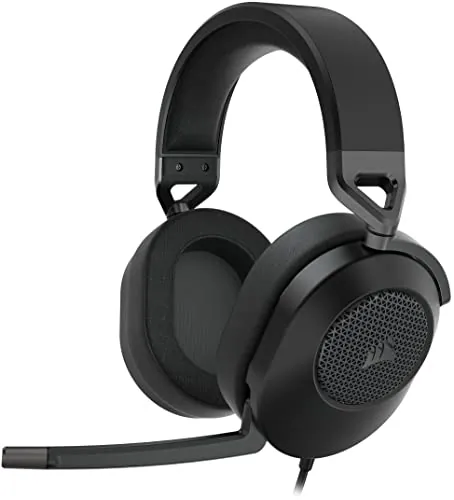
Corsair
Corsair HS65 Surround Wired Gaming Headset — Carbon
Exact assigned Corsair Carbon US SKU CA-9011270-NA. Corsair lists 3.5mm stereo as its wired connection and identifies an included USB surround adapter for specified PC/Mac software features. The attached boom mutes by flipping it up; it is not listed as detachable.
Model CA-9011270-NA
Amazon ASIN B09YHQ3Y61
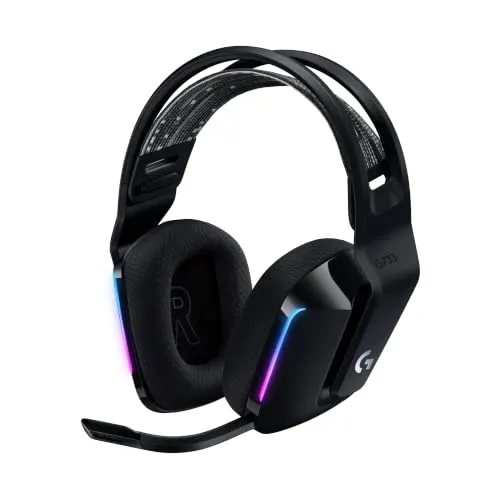
Logitech G
Logitech G733 LIGHTSPEED Wireless RGB Gaming Headset — Black
Exact assigned black US Logitech G733 SKU 981-000863. Logitech specifies LIGHTSPEED wireless audio through USB and a USB-C port for charging, not wireless audio. The boom is detachable and the headset has a physical mute/unmute button. Its setup guide describes optional G HUB software for advanced features.
Model 981-000863
Amazon ASIN B081415GCS
Differences that matter
What matters most to you?
Choose a priority to see what it changes.
Sources for Connection path and host ports
Sources for Microphone placement and mute action
Sources for Software-dependent audio features
Start with the port on your device
The HS65's 3.5mm stereo connection is its straightforward wired path. Corsair lists PC, Mac, console/controller and mobile use for that jack, while the included USB adapter provides separate virtual 7.1 and software features for supported computers. The adapter needs a high-power USB 2.0 or better port; Corsair's quick-start guide says iCUE installation is for Windows 10 or later.
G733 audio is wireless through its USB LIGHTSPEED receiver. The USB-C connector on the headset charges it; it does not carry the wireless audio connection. Logitech's setup guide demonstrates receiver setup on a PC and marks G HUB as optional for advanced features. Check the exact USB host and platform before choosing a receiver-based path, especially for consoles.
Mute and remove the mic in different ways
Corsair's HS65 instructions say to flip the attached boom up to mute and lower it to unmute. The Carbon product page lists it as non-detachable and places a volume roller on the headset. This is a direct physical action rather than a separate mute button.
Logitech's G733 documentation lists a detachable boom and a physical mute/unmute button. G HUB is optional for advanced controls, including button assignment. Prefer the HS65 control if lifting the boom is natural for you; prefer G733 if you want the mic removable and a separate button. The documents do not establish a voice-quality winner.
A pre-buy connection and control check
Write down the exact device you will use, then check whether it has a usable 3.5mm jack or a USB port supported by the headset connection you choose. For HS65, decide whether 3.5mm stereo is enough or whether you will use the USB adapter; if using the adapter, verify its port and software requirements. For G733, make room in your routine for charging and confirm receiver support for that exact system. Then choose your preferred mute action: flip an attached boom up, or press a separate button and detach the G733 mic when needed.
This checklist maps manufacturer-described ports and controls to your setup. It does not test audio or promise compatibility with every computer, console, adapter or game.
Product details
Corsair HS65 Surround Wired Gaming Headset — Carbon
- Audio connections
- Wired 3.5mm connection; included USB adapter enables specified PC/Mac features. The quick-start guide says virtual 7.1 mode needs a high-power USB 2.0 or better port. Source
- Microphone controls
- Attached, non-detachable boom; flip up to mute and down to unmute; on-ear volume roller. Source
Logitech G733 LIGHTSPEED Wireless RGB Gaming Headset — Black
Before you buy
Community discussions
Checking how much of your own voice you can hear
Corsair HS65 Surround Wired Gaming Headset — Carbon
An HS65 SURROUND owner said they could barely hear their voice through sidetone even after increasing it in the software.
What to check
Try sidetone during a short call with the host and software you will use. Check how easy it is to find the control.
Common questions
Does the Logitech G733 use USB-C for wireless audio?
No. Logitech's specification says G733 audio connects over LIGHTSPEED wireless via USB; its built-in Type-C port is for charging. The setup guide shows the receiver being inserted into the host's USB port.Specification — G733Logitech G733 Setup Guide
Can I use the Corsair HS65 without its USB adapter?
Corsair documents a 3.5mm stereo connection. Its included USB adapter is a separate route for virtual 7.1 and other specified computer features; the quick-start guide says the adapter needs a high-power USB 2.0 or better port, and its iCUE instructions specify Windows 10 or later.HS65 SURROUND Wired Gaming Headset — Carbon, CA-9011270-NAHS65 Surround Quick Start Guide
Which microphone can I remove?
Logitech identifies the G733 boom as detachable. Corsair lists the HS65 microphone as non-detachable and explains that flipping its attached boom up mutes it. This is about physical design and mute control, not microphone quality.Specification — G733HS65 Surround Quick Start GuideHS65 SURROUND Wired Gaming Headset — Carbon, CA-9011270-NA
Sources and scope
This is a feature-fit comparison based on Corsair US product documentation and HS65 setup instructions plus Logitech's G733 setup guide, support specifications and black 981-000863 product page. It does not test audio, microphone quality, comfort, latency, wireless range or battery life. The G733 setup guide illustrates a USB receiver connected to a PC; confirm support for the exact console, adapter or host you intend to use. Corsair's 3.5mm connection and its USB-adapter software features are separate paths with different host requirements.
Related comparisons

Logitech G733 vs G522: Wireless Modes, USB Setup and Mic Controls
For the exact US black G733 (981-000863) versus G522 (981-001491), the practical difference is how you connect and manage the headset. Logitech lists the G733 with LIGHTSPEED wireless through its USB receiver; the G522 adds LIGHTSPEED, Bluetooth and USB wired audio. G522 switches between Bluetooth and LIGHTSPEED rather than mixing their audio, and USB wired mode disables LIGHTSPEED. Its headset mic EQ and signal-cleanup options work across its listed modes, while voice modulation still depends on G HUB. Pick G733 if your setup is a receiver-based PC/console workflow and you do not need Bluetooth; choose G522 if you want to switch among receiver, phone Bluetooth and USB audio. Check your platform, available USB port and the exact listing's box contents before ordering.
Read comparison
Corsair HS65 Surround vs HyperX Cloud III: Ports, PC Features and Mic Controls
Both wired headsets can connect over 3.5 mm, but their USB paths differ: the exact Corsair HS65 adds an included adapter for iCUE SoundID/Dolby features, while the exact black Cloud III includes a USB dongle and USB-A adapter and lists NGENUITY access on supported Windows PCs. The HS65 boom stays attached and flips to mute; Cloud III's mic detaches and its mute LED shows state.
Read comparison