
Products compared
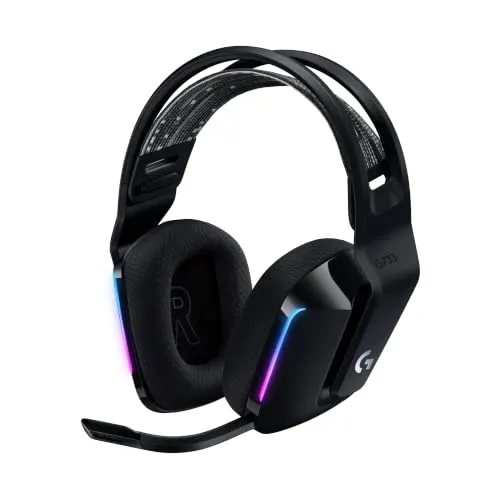
Logitech G
Logitech G733 LIGHTSPEED Wireless Gaming Headset (Black)
The assigned US listing data product is the black G733, SKU 981-000863. Logitech documents LIGHTSPEED wireless through the included USB receiver and G HUB for advanced configuration. The supplied G733 manual shows a removable boom microphone, USB receiver and USB charging cable. Confirm the exact seller listing for box contents and the USB connector/adapter your device needs.
Model G733, 981-000863
Amazon ASIN B081415GCS

Logitech G
Logitech G522 LIGHTSPEED Gaming Headset (Black)
The assigned US listing data product is the black G522, SKU 981-001491. Logitech lists LIGHTSPEED, Bluetooth and USB wired modes. You switch between Bluetooth and LIGHTSPEED; plugging in for USB audio disables LIGHTSPEED. Logitech's support spec lists the headset, receiver, charging cable and boom microphone in the box. Verify the exact retailer listing and host-device requirements before purchase.
Model G522, 981-001491
Amazon ASIN B0FFM5SP6M
Differences that matter
What matters most to you?
Choose a priority to see what it changes.
Sources for Connection choices
Sources for Mode switching and mixed audio
Sources for Microphone controls and app dependence
Sources for USB setup and included pieces
Sources for Platform and host check
Start with the connection each device needs
For the exact US black SKUs, Logitech describes the G733 as a LIGHTSPEED USB-receiver headset. The G522 adds Bluetooth and USB wired audio. That extra choice matters if your gaming headset also needs to connect to a phone or a host where wired USB audio is useful. If your only required path is a LIGHTSPEED receiver, the G733 covers that documented setup.
Do not read G522's three modes as one combined connection. Logitech describes toggling between Bluetooth and LIGHTSPEED; when USB wired audio is connected, LIGHTSPEED is unavailable. Logitech's FAQ also says Bluetooth and LIGHTSPEED do not mix their audio. If simultaneous phone calls and game audio are a requirement, confirm that capability explicitly before selecting either model.
Check mic controls separately from mic quality
Both products expose physical headset controls, and G HUB provides advanced configuration for the G733. G522 has a distinct documented mic workflow: its FAQ says mic EQ and signal cleanup run on the headset and are available in LIGHTSPEED or Bluetooth. Voice modulation remains a G HUB feature; G Mobile can enable mic EQ in any mode.
These are documented options for configuring and switching the microphone, not a comparative recording test. If you depend on a particular app, filter or console control, confirm that function on the operating system and host you use. The reviewed evidence does not establish a measured microphone winner.
Verify your host ports and what arrives in the box
Write down the exact device and USB connection you will use before ordering. The G733 manual shows a USB receiver setup, USB charging cable, detachable boom microphone and physical mute/volume controls. G522 support identifies a USB-A receiver and lists the headset, receiver, charging cable and boom microphone as box contents. A USB-C charging port or cable is not the same as wired USB audio; Logitech separately documents USB audio as a G522 mode.
Logitech's materials describe platform and device compatibility at different levels. G522 support lists Windows/macOS and PS5 requirements, while its product page names Nintendo Switch and Switch 2 compatibility. Those statements do not guarantee every headset feature on every host. Confirm the exact platform, chat function, app support and USB adapter needs with current Logitech support and the retailer's exact-SKU listing.
A quick pre-buy check for your setup
1. Confirm the black US SKU: G733 981-000863 or G522 981-001491. 2. List the hosts: gaming PC, console, phone or handheld. 3. For each host, write the required connection and confirm its USB port/adapter; mark Bluetooth only where the host needs it. 4. Decide whether switching between G522 modes is enough, since Logitech does not describe simultaneous Bluetooth-plus-LIGHTSPEED audio. 5. Check the exact box contents, receiver connector and whether your chosen app runs on that host. 6. If you need wired USB audio, the reviewed Logitech materials document that mode for G522, not G733.
This checklist turns the manufacturers' connection and package documentation into a setup decision. It cannot predict sound quality, wireless stability, comfort or performance for your particular room and device.
Product details
Logitech G733 LIGHTSPEED Wireless Gaming Headset (Black)
- Documented connection
- LIGHTSPEED wireless using the USB receiver; the model-specific Logitech comparison page lists no Bluetooth or USB wired audio mode for G733 Source
- USB and headset setup
- Model manual shows a USB receiver, USB charging cable, detachable boom microphone, on/off, mute and volume roller; G HUB is optional for advanced features Source
Logitech G522 LIGHTSPEED Gaming Headset (Black)
- Documented connection modes
- LIGHTSPEED wireless, Bluetooth and USB wired audio; USB wired mode disables LIGHTSPEED, and the Bluetooth/LIGHTSPEED button switches modes rather than mixing them Source
- Mic controls and software
- Logitech says G522 mic EQ and signal cleanup are processed on-headset and available in LIGHTSPEED/Bluetooth; voice modulation still needs G HUB. G Mobile can enable mic EQ in any mode Source
- Documented box contents
- Logitech support lists headset, receiver, charging cable and boom microphone; check the exact US retailer listing for the package being sold Source
Before you buy
Community discussions
G733 recipient suspects a receiver mix-up while pairing a gifted headset
Logitech G733 LIGHTSPEED Wireless Gaming Headset (Black)
A person who received a G733 as a gift suspected its USB receiver might have been mixed up with receivers from other headsets. They report that their reset and setup attempts did not connect it; the post does not confirm the cause.
What to check
For a used or gifted G733, confirm that the receiver belongs with the headset and test the connection before depending on it. This report does not establish a receiver mismatch or a remedy.
Common questions
Does the Logitech G733 have Bluetooth?
The Logitech G733 manual and exact-pair comparison page document LIGHTSPEED through a USB receiver. The reviewed official sources do not document Bluetooth or USB wired audio for G733, so do not assume those modes are included.Logitech G522 LIGHTSPEED vs G733 comparisonG733 Wireless RGB Headset Setup Manual
Can the G522 play PC audio and Bluetooth phone audio at the same time?
Logitech documents a button to switch between Bluetooth and LIGHTSPEED, not mix them. Its FAQ says USB wired mode disables LIGHTSPEED and Bluetooth/LIGHTSPEED audio are not combined. Treat the G522 as a mode-switching headset for this workflow.How do I switch between Bluetooth and LIGHTSPEED connectivity mode on my G522?G522 LIGHTSPEED Frequently Asked Questions (Logitech PDF)
Can G522 mic EQ work over Bluetooth, and does it need G HUB?
Logitech's G522 FAQ says mic EQ and signal cleanup are processed on the headset and available in LIGHTSPEED and Bluetooth modes. Voice modulation still depends on G HUB, while G Mobile can enable mic EQ in any mode. These details describe controls, not measured voice quality.G522 LIGHTSPEED Frequently Asked Questions (Logitech PDF)
What should I verify about the box before buying?
Logitech's G522 support spec lists the headset, receiver, charging cable and boom microphone. The G733 manual illustrates a receiver, charging cable and detachable boom microphone. Because retailer bundles can vary, confirm the contents and USB fit on the exact listing for your chosen ASIN.Specification - G522 LIGHTSPEED Gaming HeadsetG733 Wireless RGB Headset Setup Manual
Sources and scope
This is a feature and setup comparison of the US black Logitech G733 981-000863 and G522 981-001491, using Logitech US product/support materials and model-specific manuals. It does not compare measured sound, microphone quality, latency, comfort, wireless range or battery runtime. Logitech's comparative page contains battery-runtime figures that conflict with current support/product materials; runtime is omitted. G522's Bluetooth and LIGHTSPEED modes are switchable, not a promise of simultaneous mixed PC-and-phone audio. Check the exact seller listing for current packaging and regional platform compatibility.
- G733 LIGHTSPEED Wireless RGB Gaming Headset (US, Black, 981-000863)
- G522 LIGHTSPEED Gaming Headset (US, Black, 981-001491)
- Logitech G522 LIGHTSPEED vs G733 comparison
- Specification - G733
- G733 Wireless RGB Headset Setup Manual
- Specification - G522 LIGHTSPEED Gaming Headset
- How do I switch between Bluetooth and LIGHTSPEED connectivity mode on my G522?
- G522 LIGHTSPEED Frequently Asked Questions (Logitech PDF)
- What is Blue VO!CE?
Related comparisons

SteelSeries Arctis Nova 5 vs Logitech G522: Console, Audio Switching and Setup
This U.S. comparison is for the black Arctis Nova 5 model 61670 (B0D2YBQQ1P) and Logitech G522 black model 981-001491 (B0FFM5SP6M). Both offer a headset control to switch between gaming wireless and Bluetooth. SteelSeries describes QuickSwitch between the USB-C dongle and Bluetooth; Logitech explicitly says G522 cannot mix LIGHTSPEED and Bluetooth audio. G522 also supports wired USB audio, which disables LIGHTSPEED while connected. Check the console, available USB port, app settings and exact mic preference before buying.
Read comparison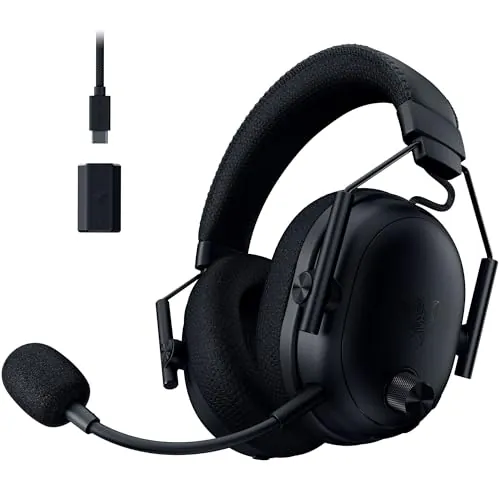
Logitech G522 vs Razer BlackShark V3 Pro: Dual Audio, USB, and ANC
This comparison is about how the exact black Logitech G522 (981-001491) and black PC Razer BlackShark V3 Pro (RZ04-05400100-R3U1) route audio. Logitech says the G522 switches between LIGHTSPEED and Bluetooth rather than mixing them, and USB wired audio disables LIGHTSPEED. Razer documents simultaneous 2.4 GHz plus Bluetooth listening, along with USB and 3.5 mm modes. Razer also documents hybrid ANC controls; the sources reviewed do not establish whether G522 has headphone ANC. No sound, microphone, comfort, latency, or ANC-effectiveness winner is claimed.
Read comparison