
Products compared

Logitech G
Logitech G522 LIGHTSPEED Gaming Headset, Black
Black U.S. G522 variant. Logitech lists a USB-A LIGHTSPEED receiver, Bluetooth and USB wired audio. Its support pages say Bluetooth and LIGHTSPEED cannot be mixed, and USB wired mode disables LIGHTSPEED.
Model 981-001491
Amazon ASIN B0FFM5SP6M
Razer
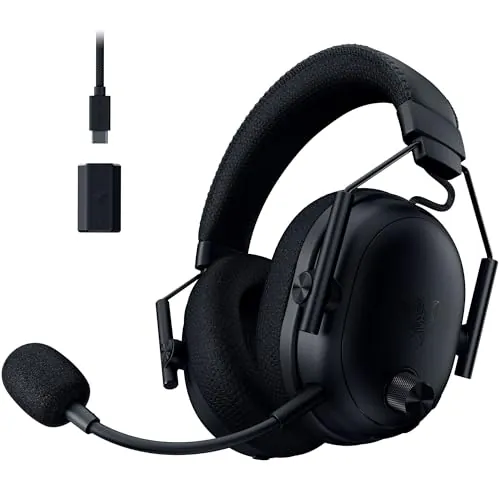
Razer BlackShark V3 Pro Wireless ANC Gaming Headset for PC, Black
Black PC edition. Razer documents simultaneous 2.4 GHz and Bluetooth audio, plus USB and 3.5 mm modes. The PC option is separate from the BlackShark V3 Pro Xbox and PlayStation selections.
Model RZ04-05400100-R3U1
Amazon ASIN B0F3QDLZKG
Differences that matter
What matters most to you?
Choose a priority to see what it changes.
Sources for Can game audio and phone audio play together?
Start with the two-source question
If you keep a phone connected for calls while playing over a wireless game connection, the product documents point to the Razer BlackShark V3 Pro. Razer says its headset can use 2.4 GHz and Bluetooth simultaneously; its FAQ explains that you connect both, then double-tap SmartSwitch to enter simultaneous mode. Logitech is explicit that the G522 cannot mix LIGHTSPEED and Bluetooth audio and can only switch between modes. That is a concrete workflow difference, not a claim about audio quality or call performance.
If you normally listen to one source at a time, the G522 still offers LIGHTSPEED, Bluetooth, and wired USB audio. Its left-earcup Bluetooth-logo control toggles modes. USB changes the workflow: Logitech says USB wired audio takes priority and turns off LIGHTSPEED while connected.
Check the ports before choosing a wired or dongle setup
Logitech lists the G522 LIGHTSPEED receiver as USB-A and the headset as supporting corded USB audio. If the computer or dock you will use has only USB-C, plan for a suitable adapter or hub and verify its fit with your setup. Also decide whether you are willing to give up LIGHTSPEED temporarily when the USB audio cable is connected.
Razer lists USB and 3.5 mm connections as options for the BlackShark V3 Pro in addition to its simultaneous wireless mode. Match the connection you expect to use to the actual PC, controller, or dock ports; the listed modes do not guarantee that every device has the required jack or supports every feature.
Treat ANC and spatial audio as setup choices, not test results
Razer documents hybrid ANC with four adjustable levels in Synapse or the Razer Audio app. Its on-headset ANC button cycles between ANC On, Ambient Mode, and Off. Logitech's G522 specification and support pages cited here do not establish its ANC status, so a buyer who needs to know whether both headphones have ANC should confirm directly with Logitech rather than read silence as absence.
Razer's product page also says full THX Spatial Audio 7.1.4 requires Windows 11 version 23H2 or later. If that format is central to the purchase, check the PC version first. These are documented feature and system requirements, not proof that the Razer sounds more positional or performs better in games.
Confirm the exact Razer platform edition
The assigned Razer listing is the black PC model RZ04-05400100-R3U1. Razer's U.S. product selector shows PC as a separate option from the Xbox-and-PC and PlayStation-and-PC editions. If you are buying for a console, verify its exact edition and SKU instead of assuming the PC listing is interchangeable.
Product details
Logitech G522 LIGHTSPEED Gaming Headset, Black
Razer BlackShark V3 Pro Wireless ANC Gaming Headset for PC, Black
- Documented audio paths
- Simultaneous 2.4 GHz plus Bluetooth, USB, or 3.5 mm Source
- On-headset controls
- SmartSwitch selects 2.4 GHz, Bluetooth, or simultaneous audio; a separate ANC button cycles ANC On, Ambient Mode, and ANC Off Source
- THX 7.1.4 requirement
- Full 7.1.4 support requires Windows 11 version 23H2 or later Source
Before you buy
Community discussions
Testing phone playback and microphone input separately
Logitech G522 LIGHTSPEED Gaming Headset, Black
A G522 owner connected a Pixel 7 Pro over Bluetooth and could hear audio but said the phone did not offer the headset mic for calls.
What to check
Check whether your phone offers the headset for calls in addition to media. Try it while you are connected to the device you normally game on.
Common questions
Can the Logitech G522 play LIGHTSPEED game audio and Bluetooth phone audio at the same time?
No. Logitech says G522 cannot mix LIGHTSPEED and Bluetooth sources and can only switch between those modes. Razer documents simultaneous 2.4 GHz and Bluetooth audio on BlackShark V3 Pro.Can I mix Bluetooth and LIGHTSPEED audio sources using my G522 LIGHTSPEED headset?Razer BlackShark V3 Pro — U.S. product features, connectivity, ANC, and support FAQ
Does USB keep LIGHTSPEED active on the G522?
No. Logitech says the G522 prioritizes wired USB when plugged in, disables LIGHTSPEED, and cannot use LIGHTSPEED while USB wired mode is active.Audio is interrupted when I plug my G522 LIGHTSPEED headset into my PC or console via USB cableHow do I switch between Bluetooth and LIGHTSPEED connectivity mode on my G522 LIGHTSPEED headset?
Does the Razer BlackShark V3 Pro support full THX 7.1.4 on any PC?
Razer states that full THX Spatial Audio 7.1.4 support requires Windows 11 version 23H2 or later. Other audio features or operating-system compatibility are not expanded here beyond the manufacturer's stated condition.Razer BlackShark V3 Pro — U.S. product features, connectivity, ANC, and support FAQ
Does the G522 lack ANC?
The Logitech product specifications and support pages used here do not establish G522 ANC status. This guide does not infer that the feature is absent. Razer's BlackShark V3 Pro documentation does describe hybrid ANC and ANC/Ambient/Off controls.G522 LIGHTSPEED Gaming Headset — SpecificationsRazer BlackShark V3 Pro — U.S. product features, connectivity, ANC, and support FAQ
Sources and scope
This guide is based on manufacturer product and support documentation for the assigned black Logitech G522 and black PC Razer BlackShark V3 Pro. It does not compare measured sound, mic quality, comfort, latency, wireless reliability, or ANC effectiveness. Logitech explicitly says G522 cannot mix LIGHTSPEED and Bluetooth and documents USB as a mode that disables LIGHTSPEED. Razer's PC/black selection is distinct from the Xbox and PlayStation product options; check the exact SKU and platform before purchase. Razer documents hybrid ANC for its headset, but the reviewed Logitech material does not establish G522 ANC status, so this guide does not say G522 lacks ANC.
- G522 LIGHTSPEED Gaming Headset — Specifications
- Can I mix Bluetooth and LIGHTSPEED audio sources using my G522 LIGHTSPEED headset?
- Audio is interrupted when I plug my G522 LIGHTSPEED headset into my PC or console via USB cable
- How do I switch between Bluetooth and LIGHTSPEED connectivity mode on my G522 LIGHTSPEED headset?
- Razer BlackShark V3 Pro — exact U.S. Black PC model selection
- Razer BlackShark V3 Pro — U.S. product features, connectivity, ANC, and support FAQ
Related comparisons

SteelSeries Arctis Nova 5 vs Logitech G522: Console, Audio Switching and Setup
This U.S. comparison is for the black Arctis Nova 5 model 61670 (B0D2YBQQ1P) and Logitech G522 black model 981-001491 (B0FFM5SP6M). Both offer a headset control to switch between gaming wireless and Bluetooth. SteelSeries describes QuickSwitch between the USB-C dongle and Bluetooth; Logitech explicitly says G522 cannot mix LIGHTSPEED and Bluetooth audio. G522 also supports wired USB audio, which disables LIGHTSPEED while connected. Check the console, available USB port, app settings and exact mic preference before buying.
Read comparison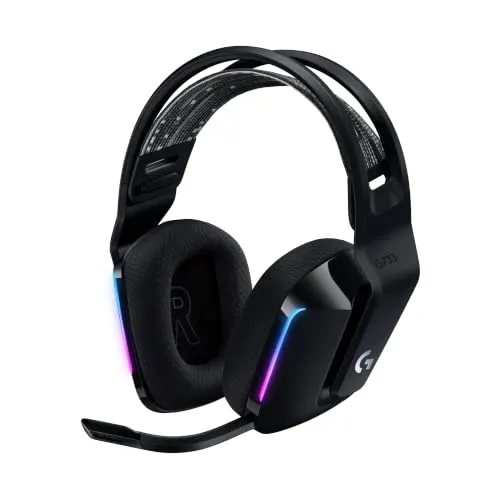
Logitech G733 vs G522: Wireless Modes, USB Setup and Mic Controls
For the exact US black G733 (981-000863) versus G522 (981-001491), the practical difference is how you connect and manage the headset. Logitech lists the G733 with LIGHTSPEED wireless through its USB receiver; the G522 adds LIGHTSPEED, Bluetooth and USB wired audio. G522 switches between Bluetooth and LIGHTSPEED rather than mixing their audio, and USB wired mode disables LIGHTSPEED. Its headset mic EQ and signal-cleanup options work across its listed modes, while voice modulation still depends on G HUB. Pick G733 if your setup is a receiver-based PC/console workflow and you do not need Bluetooth; choose G522 if you want to switch among receiver, phone Bluetooth and USB audio. Check your platform, available USB port and the exact listing's box contents before ordering.
Read comparison