
Products compared
Corsair
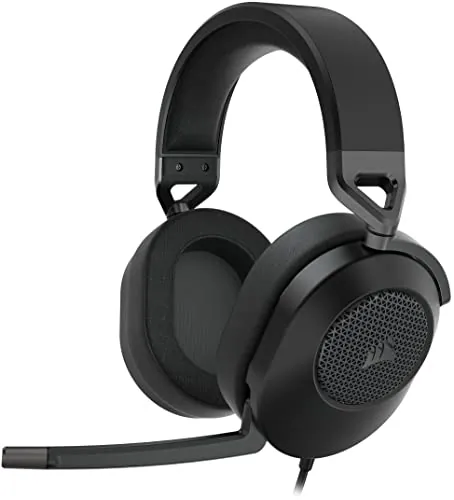
CORSAIR HS65 SURROUND Wired Gaming Headset - Carbon
Carbon U.S. HS65 SURROUND wired headset, manufacturer SKU CA-9011270-NA.
Model CA-9011270-NA
Amazon ASIN B09YHQ3Y61
Razer
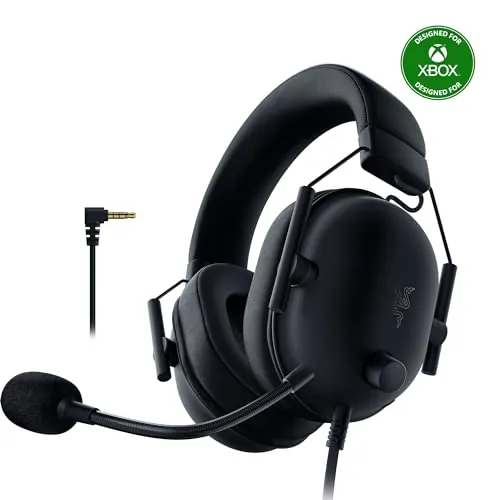
Razer BlackShark V2 X for Xbox Gaming Headset - Black
Black Xbox-licensed BlackShark V2 X; model RZ04-03240900-R3U1. Distinguish it from other BlackShark V2 X platform editions.
Model RZ04-03240900-R3U1
Amazon ASIN B0CXGTGPZQ
Differences that matter
What matters most to you?
Choose a priority to see what it changes.
Sources for Basic wired connection
Sources for Software and spatial audio
Sources for Mic mute action and physical controls
Sources for Cable reach and desk layout
Start with the jack you will actually use
Both headsets are wired, and both have a 3.5 mm route. Corsair's U.S. page says the HS65 can plug into a console/controller through 3.5 mm; Razer identifies the Xbox BlackShark as an analog 3.5 mm headset. Check the actual controller or device socket before buying, especially if your planned host has no headset jack.
The HS65 also has a separate USB surround adapter. That adapter changes the computer software path; it is not required by Corsair's described direct 3.5 mm console route. Razer's Xbox edition instead lists Windows Sonic for Xbox Series X|S, Xbox One and Windows 10/11.
Treat the USB software path as a setup choice
Corsair's U.S. page describes iCUE features such as EQ, SoundID and Dolby Audio through the included adapter, including PC/Mac language for those features. The quick-start guide says the adapter must be connected to a PC for iCUE and gives Windows 10 or later as its setup requirement. If you need Mac iCUE specifically, check current Corsair support before counting on that workflow.
Razer's Xbox-edition documents specify a 3.5 mm connection and Windows Sonic support on Xbox and Windows. The reviewed official sources do not define an equivalent Razer app EQ workflow for this edition. Do not use details from other BlackShark models to fill that gap.
Pick the microphone control you will reach for
The HS65 mutes when you flip its boom up and unmutes when you bring it down. Razer's Xbox guide specifies a click-to-mute earcup button. If you often mute between rounds, choose the action that fits your habit; neither instruction says anything about comparative voice pickup.
Cable reach is another practical check. Corsair lists 1.8 m; Razer lists 1.3 m for the Xbox edition. Measure the route from your controller or computer to the chair and leave room for ordinary head movement.
Product details
CORSAIR HS65 SURROUND Wired Gaming Headset - Carbon
The HS65 is the more software-oriented setup in this pair if you will use its included adapter and iCUE features. The 3.5 mm jack remains the straightforward wired route for a console/controller; check the actual host port before choosing the connection.
- Audio connections and included adapter
- 3.5 mm wired stereo; a USB surround adapter is included for Corsair iCUE features. The current U.S. product page lists console/controller use through 3.5 mm. Source
- iCUE features
- Corsair lists EQ, SoundID personalization and Dolby Audio 7.1 via the included adapter; its quick-start guide says connect the adapter to a PC for iCUE and specifies Windows 10 or later. Source
- Microphone controls and cable
- Flip the boom up to mute and down to unmute; listed headset cable length is 1.8 m. Source
Razer BlackShark V2 X for Xbox Gaming Headset - Black
The Xbox BlackShark V2 X is the simple wired option when its 3.5 mm connection and earcup mute button match your controller and in-game routine. Razer names Windows Sonic support for Xbox and Windows; this comparison does not infer a Razer software EQ feature from other editions.
- Connection and cable
- Analog 3.5 mm audio + mic connection; the Xbox-edition master guide lists a 1.3 m / 4.27 ft cable. Source
- Xbox and Windows spatial audio
- Razer documents Windows Sonic on Xbox Series X|S, Xbox One and Windows 10/11. Source
- Microphone and on-ear controls
- The Xbox-edition guide lists a click-to-mute mic button and on-earcup volume and mic-mute controls. Source
Before you buy
Community discussions
Choosing a headset for a controller connection
CORSAIR HS65 SURROUND Wired Gaming Headset - Carbon
An HS65 Surround owner wanted to use the wired headset through the 3.5mm jack on their Xbox One controller.
What to check
Check the output and microphone support of your exact controller or console. Compare the analog plug and any USB adapter in each headset’s package.
Common questions
Do I need the HS65's USB adapter just to use it with a console?
Corsair describes a direct 3.5 mm connection for console/controller use. Its included USB adapter is the documented path for iCUE software features; check that your host has the matching 3.5 mm headset connection.HS65 SURROUND Wired Gaming Headset - Carbon U.S. product page
How does the Xbox BlackShark V2 X mute its microphone?
Razer's Xbox-edition guide lists a click-to-mute function and an on-earcup mic-mute toggle. This is a physical control; it does not tell us how the mic compares in clarity to the HS65.Razer BlackShark V2 X for Xbox Licensed Master Guide
Can I use the HS65's SoundID and Dolby features on Mac?
Corsair's current U.S. product page says SoundID and Dolby Audio work through the included adapter on PC and Mac. Its quick-start guide describes iCUE setup on a Windows 10-or-later PC, so check Corsair's current Mac-specific steps if that is your main use.HS65 SURROUND Wired Gaming Headset - Carbon U.S. product pageHS65 SURROUND Quick Start Guide
Which headset has the longer listed cable?
Corsair lists 1.8 m for HS65 SURROUND; Razer lists 1.3 m / 4.27 ft for the Xbox BlackShark V2 X. Measure the distance from your selected host jack to your seat.HS65 SURROUND Wired Gaming Headset - Carbon U.S. product pageRazer BlackShark V2 X for Xbox Licensed Master Guide
Sources and scope
This guide covers the Corsair HS65 SURROUND Carbon model CA-9011270-NA and the black Xbox-licensed Razer BlackShark V2 X model RZ04-03240900-R3U1. It does not compare measured sound, microphone clarity, comfort, latency, reliability, or noise isolation. Corsair's current U.S. product page describes iCUE SoundID and Dolby Audio via the included adapter on PC and Mac, while the quick-start guide describes iCUE setup on Windows 10 or later; if Mac software support is essential, verify the current iCUE support path with Corsair. Razer sources establish the Xbox edition's 3.5 mm connection and Windows Sonic scope, but do not establish an equivalent Razer app EQ workflow for this exact edition.
Related comparisons

Corsair HS65 Surround vs HyperX Cloud III: Ports, PC Features and Mic Controls
Both wired headsets can connect over 3.5 mm, but their USB paths differ: the exact Corsair HS65 adds an included adapter for iCUE SoundID/Dolby features, while the exact black Cloud III includes a USB dongle and USB-A adapter and lists NGENUITY access on supported Windows PCs. The HS65 boom stays attached and flips to mute; Cloud III's mic detaches and its mute LED shows state.
Read comparison
Corsair HS65 Surround vs HyperX Cloud Alpha: USB Audio, Mic and Cable Setup
These are wired gaming headsets with different setup and handling choices. Corsair's HS65 Surround CA-9011270-NA connects by 3.5 mm and includes a USB surround adapter for iCUE options; its current U.S. product page says PC and Mac, while the model Quick Start Guide scopes virtual 7.1 to PC and iCUE setup to Windows 10+, so confirm Mac support before relying on those USB features. HyperX Cloud Alpha Red SKU 4P5L1AA#ABL uses 3.5 mm and lists a detachable headset cable, detachable mic, inline volume/mic controls and a PC extension cable. Choose based on your host ports, OS and preferred mic/cable routine; no sound or microphone-performance winner is established.
Read comparison