
Products compared
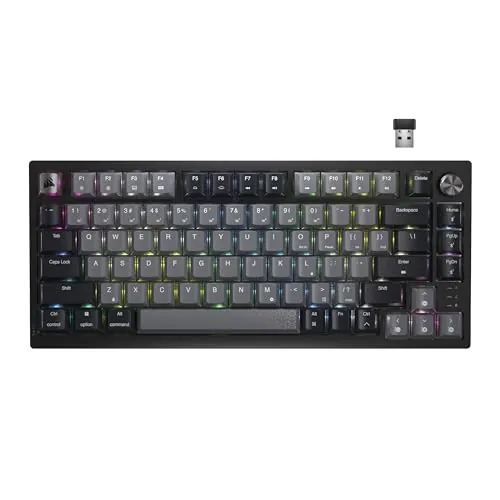
CORSAIR
CORSAIR K65 PLUS WIRELESS 75% Mechanical Gaming Keyboard — Black/Gray
U.S./North American Black/Gray configuration; compact 75% mechanical keyboard with three documented connection modes.
Model RGP0156 / SKU CH-91D401L-NA
Amazon ASIN B0CQ31VFT4
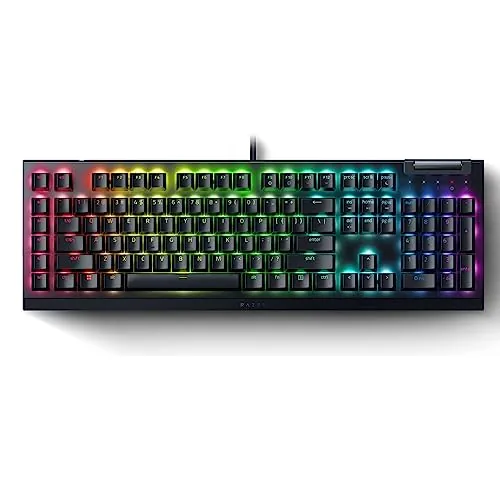
Razer
Razer BlackWidow V4 X Mechanical Gaming Keyboard — Black, Yellow Switch, US Layout
Exact U.S. Black configuration with Razer Yellow linear switches and US keyboard layout.
Model RZ03-04701900-R3U1
Amazon ASIN B0C8QYB8W6
Differences that matter
Sources for Connection routine at your desk
Start by checking desk space and your key map
CORSAIR calls the K65 PLUS a compact 75% keyboard and says it keeps arrow and utility keys. Razer classifies the BlackWidow V4 X as full-size. That difference matters when the keyboard shares a desk with a mouse, notebook or work surface, but no exact board-width comparison is needed to make the first check: measure your available area and review the exact key layout before ordering.
If you rely on a particular key or cluster, do not infer it from a percentage label alone. CORSAIR's text identifies the arrow and utility keys it retains but does not enumerate every omitted key. Razer's U.S. configuration is the US layout; confirm that layout on the exact listing.
Choose by how the keyboard connects
The K65 PLUS has three manufacturer-listed modes: 2.4 GHz wireless, Bluetooth and USB wired. CORSAIR lists a receiver and USB charging/data cable in the box. This suits a buyer who needs connection options, provided the exact package contains the receiver for 2.4 GHz mode.
Razer specifies the BlackWidow V4 X with an attached wired cable and cable routing. For a keyboard that remains at one desk, this may fit a fixed-cable routine; it is not the pick if wireless operation is a requirement. The documentation here does not compare latency, wireless reliability or response in games.
Decide whether you want physical macro keys
The K65 PLUS SKU lists zero dedicated macro keys, but CORSAIR documents software macro programming in iCUE and a dial that can be reprogrammed for other controls. A buyer who prefers to configure actions in software can still use macros without six extra physical keys.
The BlackWidow V4 X has six dedicated macro keys, secondary media keys and a multifunction roller. Razer says the macro keys can be programmed through Synapse or recorded on the keyboard. Choose this layout if those separate controls fit your routine; the feature count does not prove that they improve a particular game or task.
Match the switch and SKU before checkout
The CORSAIR K65 PLUS is SKU CH-91D401L-NA, identified by CORSAIR as a North American layout and listed with MLX Red linear switches. CORSAIR describes the switches as hot-swappable. The other product string shown in some listings is RGP0156; CORSAIR's page uses CH-91D401L-NA as its part number.
The Razer part number RZ03-04701900-R3U1 selects Black, Yellow switches and U.S. layout on Razer's U.S. page. Razer also offers a Green-switch version, so check the switch selector rather than relying on the wider V4 X family name. This reports the listed switch configuration and does not claim a better typing feel, sound or gaming result.
Product details
CORSAIR K65 PLUS WIRELESS 75% Mechanical Gaming Keyboard — Black/Gray
- Layout and macro keys
- Compact 75%; CORSAIR says it retains arrow and utility keys. The exact SKU spec lists zero dedicated macro keys; iCUE supports software-programmed macros. Source
- Connections and box check
- 2.4 GHz wireless, Bluetooth and USB-A wired; the listed package includes a USB wireless receiver and USB charging/data cable. Source
- Included switch
- CORSAIR MLX Red linear switches, pre-lubed; the K65 PLUS is described as hot-swappable. Source
Razer BlackWidow V4 X Mechanical Gaming Keyboard — Black, Yellow Switch, US Layout
- Exact U.S. variant
- Black finish; Yellow Switch; US Layout. Source
- Layout and connection
- Razer's exact-model sources specify full-size form factor and attached wired connection. Source
- Physical command controls
- Six dedicated macro keys, a multifunction roller and secondary media keys; Razer lists Synapse 4 and on-the-fly macro recording. Source
Before you buy
Community discussions
Keeping work keys while considering a smaller board
CORSAIR K65 PLUS WIRELESS 75% Mechanical Gaming Keyboard — Black/Gray
A shopper likes the K65 Plus volume knob after it is suggested, yet says they still use the full layout for work.
What to check
List the work keys and media controls you use every day. Check which remain dedicated keys on the smaller board.
Matching new keycaps to the exact keyboard layout
CORSAIR K65 PLUS WIRELESS 75% Mechanical Gaming Keyboard — Black/Gray
Someone who tried a German-layout K65 Plus Wireless asks how to find keycaps that fit a lighter-colored desk setup.
What to check
Check the actual U.S. keyboard layout, key sizes, and kit contents if you plan to replace the caps.
Common questions
Does the K65 PLUS have physical macro keys?
CORSAIR lists zero dedicated macro keys for this SKU, but its product page documents macro programming in iCUE. The BlackWidow V4 X has six dedicated macro keys and supports Synapse/on-the-fly recording.K65 PLUS WIRELESS 75% RGB Mechanical Gaming Keyboard — exact SKU CH-91D401L-NARazer BlackWidow V4 X | RZ03-0470 Support & FAQs
Can I use the K65 PLUS without a cable?
CORSAIR documents both 2.4 GHz wireless and Bluetooth, and lists a USB wireless receiver in the package contents. The board also supports USB-A wired connectivity, so check that the seller box includes the receiver if you plan to use 2.4 GHz mode.K65 PLUS WIRELESS 75% RGB Mechanical Gaming Keyboard — exact SKU CH-91D401L-NA
Are the Razer Yellow switches the same as the K65 PLUS MLX Red switches?
They are different manufacturer switch families. CORSAIR lists pre-lubed MLX Red linear switches on the K65 Plus CH-91D401L-NA; Razer identifies the selected BlackWidow V4 X U.S. variant as Yellow. Product descriptions do not amount to a matched typing-feel or acoustic test.K65 PLUS WIRELESS 75% RGB Mechanical Gaming Keyboard — exact SKU CH-91D401L-NABlackWidow V4 X — Black, Yellow Switch, US Layout, SKU RZ03-04701900-R3U1
Which keyboard is quieter or better for gaming?
No matched test was performed for typing sound, latency, reliability or game performance. CORSAIR and Razer provide their own switch descriptions and feature lists; choose by layout, connection, switch configuration and macro controls unless you find an applicable comparative test for the result you care about.K65 PLUS WIRELESS 75% RGB Mechanical Gaming Keyboard — exact SKU CH-91D401L-NABlackWidow V4 X — Black, Yellow Switch, US Layout, SKU RZ03-04701900-R3U1
Sources and scope
This compares manufacturer documentation, not hands-on typing. The Razer U.S. product page confirms the Black, Yellow-switch, U.S.-layout configuration; its exact-model support article and technical specifications describe the full-size wired design and controls. No matched typing, switch-sound, latency, reliability or game-performance test is available here. CORSAIR's official page states that K65 Plus retains arrow and utility keys but does not enumerate every omitted key in the text used here, so check the key map if a particular key is essential.
Related comparisons
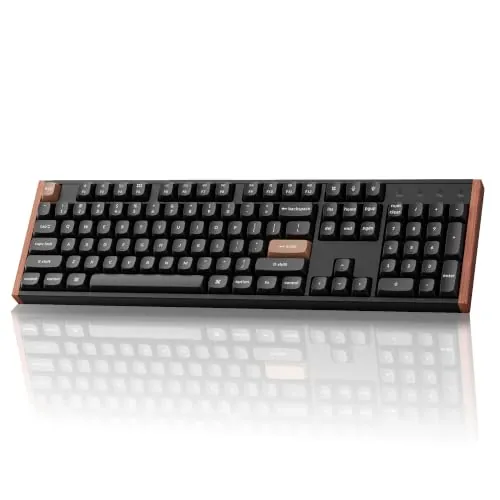
Keychron K10 HE vs CORSAIR K65 Plus Wireless: Full-Size or 75%?
The Keychron K10 HE is a full-size magnetic keyboard with tri-mode connection and browser-based Launcher; the CORSAIR K65 Plus is a 75% mechanical keyboard with MLX Red switches and tri-mode connection. Keychron's actuation range depends on switch version, and its selector does not identify the version included with K10H-F1. Check that exact configuration before choosing by travel range.
Read comparison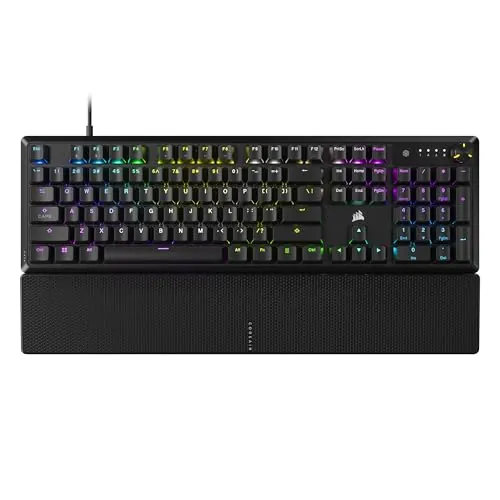
Corsair K65 Plus Wireless vs K70 CORE: Layout, Switches and Connection Modes
The black/gray Corsair K65 Plus Wireless (CH-91D401L-NA) keeps arrow and utility keys in a 75% layout and switches among 2.4GHz, Bluetooth and wired USB modes. The black Corsair K70 CORE with palm rest (CH-910981E-NA) is full-size with a 104-key matrix and wired USB Type-A. Both use Corsair MLX Red linear switches, but the K65 page explicitly describes its switches as hot-swappable and calls them MLX Red, while K70's page calls its switches MLX Red v2. Both support iCUE; choose by layout and host workflow rather than an untested typing-feel claim.
Read comparison