
Products compared
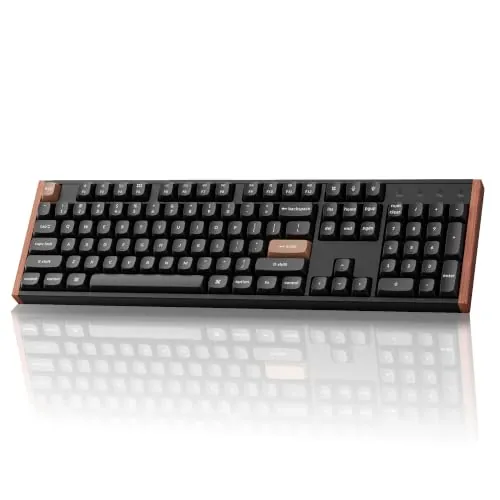
Keychron
Keychron K10 HE Wireless Magnetic Switch Keyboard
Black U.S. listing; check for K10H-F1 and confirm the exact magnetic-switch version on the offer or package before relying on an actuation range.
Model K10H-F1
Amazon ASIN B0DXZ97PCG
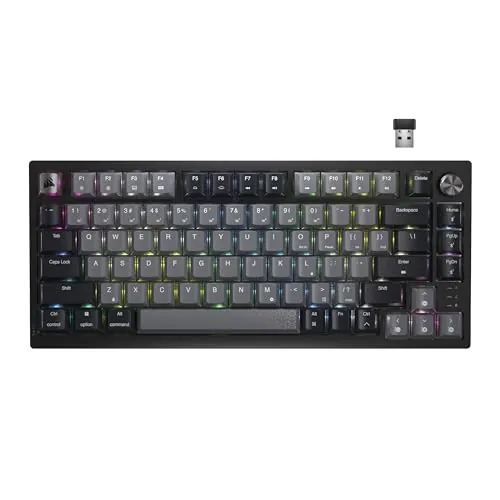
CORSAIR
CORSAIR K65 Plus Wireless 75% RGB Mechanical Gaming Keyboard
North American Black/Gray Original (Midnight Grey) variant; confirm CH-91D401L-NA on the exact listing.
Model CH-91D401L-NA
Amazon ASIN B0CQ31VFT4
Differences that matter
What matters most to you?
Choose a priority to see what it changes.
Sources for Switch mechanism and actuation
Decide how many keys belong on your desk
If your normal work includes frequent number entry, the K10 HE's 100% full-size layout is the relevant starting point. CORSAIR lists the K65 Plus at 75% and says it retains arrow and utility keys. Put the two product layout images side by side and check the keys you reach for daily rather than choosing only by the percentage label.
The 75% option is intended for a more compact board layout, while full-size preserves the standard numeric-keypad arrangement. The listing's layout diagrams are the practical check for the exact key group you need; this comparison makes no claim about typing speed or productivity gains.
Compare magnetic actuation with the K65 stock switch point
Keychron describes the K10 HE family as a magnetic-switch keyboard with per-key adjustable actuation through its Launcher. The range varies by switch version, and Keychron says each version accepts only its matching magnetic-switch family. The selector does not identify which version corresponds to K10H-F1, so check the exact listing or package before choosing by actuation range.
CORSAIR identifies the K65 Plus's included switch as MLX Red and publishes a 1.9 mm actuation point. It also describes the PCB as hot-swappable, but replacement switches must be checked against the maker's compatibility information. These specifications do not establish typing feel or response.
Check how you connect and configure the keyboard
Both manufacturers list 2.4 GHz, Bluetooth, and wired options, so connection type alone does not separate the pair. Keychron calls its wired connector USB-C; CORSAIR lists USB Type-A for wired connectivity. Check your computer's ports and whether you plan to use a wireless receiver, Bluetooth, or a cable.
The software workflows differ. Keychron's Launcher web app handles key remapping, macros, and HE settings; Keychron instructs users to connect by wire and use a current Chrome, Opera, or Edge browser. CORSAIR lists the exact US CH-91D401L-NA as iCUE-enabled for per-key RGB and dial settings, and provides a Windows driver on the product page. CORSAIR also documents certain other suffix/model listings that are not iCUE-compatible, so verify the full SKU and current app support for your system.
Product details
Keychron K10 HE Wireless Magnetic Switch Keyboard
The K10 HE is the full-size choice when the number pad matters. Keychron documents magnetic-switch versions, tri-mode connection and Launcher customization. Actuation ranges vary by switch version; verify the exact one supplied with K10H-F1 before relying on a numeric setting.
- Layout
- 100% full-size layout Source
- Connection modes
- 2.4 GHz, Bluetooth, and wired USB-C Source
- Switch family
- Magnetic-switch versions offer adjustable actuation; Keychron's selector does not identify the range supplied with K10H-F1. Source
- Configuration app
- Keychron Launcher web app for key remapping/macros; configure over wired mode in a supported current browser Source
CORSAIR K65 Plus Wireless 75% RGB Mechanical Gaming Keyboard
The K65 Plus is the 75% layout choice. CORSAIR identifies the North American CH-91D401L-NA variant, its included MLX Red switch's 1.9 mm actuation point, three connection modes, and iCUE control. Its PCB is described as hot-swappable, but CORSAIR does not provide a complete compatible replacement-switch list on the reviewed product page.
- Layout
- 75%; CORSAIR says arrow and utility keys remain Source
- Stock switch
- CORSAIR MLX Red conventional mechanical linear switch; listed actuation point 1.9 mm Source
- Connection modes
- 2.4 GHz, Bluetooth, and USB wired Source
- Configuration app
- iCUE support listed for exact US SKU; per-key RGB and dial controls can be customized in iCUE Source
Before you buy
Community discussions
Freeing desk space while switching between computers
CORSAIR K65 Plus Wireless 75% RGB Mechanical Gaming Keyboard
A K65 Plus Wireless owner describes choosing a smaller keyboard after finding their old full-size board too large for a desk shared between a PC and a Mac.
What to check
Mark how much width the keyboard can use on your desk. List the keys you need on both computers and check how the exact model switches between them.
Common questions
Which keyboard has a number pad?
Keychron lists the K10 HE as a 100% full-size layout; CORSAIR lists the K65 Plus as a 75% layout that keeps arrow and utility keys. Check the exact layout illustration if you depend on a specific key.Keychron K10 HE Wireless Magnetic Switch Custom KeyboardK65 PLUS WIRELESS 75% RGB Mechanical Gaming Keyboard (CH-91D401L-NA)
What actuation range does the exact K10H-F1 include?
The current Keychron page reviewed lists multiple K10 HE switch versions with different ranges, but its current rendered selector did not identify K10H-F1. Confirm the switch version with the exact seller or package; this comparison does not assign a numeric range to K10H-F1.Keychron K10 HE Wireless Magnetic Switch Custom Keyboard
What is the K65 Plus stock switch actuation point?
CORSAIR identifies the included MLX Red switch and lists a 1.9 mm actuation point for the CH-91D401L-NA product page. The PCB is hot-swappable, but the page does not list every replacement switch that is compatible.K65 PLUS WIRELESS 75% RGB Mechanical Gaming Keyboard (CH-91D401L-NA)
Do both keyboards support wireless and wired connections?
Yes. The reviewed Keychron page lists 2.4 GHz, Bluetooth, and wired connections; the CORSAIR page lists 2.4 GHz, Bluetooth, and USB wired. Verify the port and mode needed for your computer or device.Keychron K10 HE Wireless Magnetic Switch Custom KeyboardK65 PLUS WIRELESS 75% RGB Mechanical Gaming Keyboard (CH-91D401L-NA)
Sources and scope
This compares sourced features, not hands-on typing. No typing feel, sound, latency, durability, reliability or gaming-performance result is claimed. Keychron's current selector shows multiple K10 HE switch variants but does not identify which version is included with K10H-F1; no numeric actuation range for that exact version is established here. CORSAIR's support article excludes some K65 Plus SKUs from iCUE, while its U.S. CH-91D401L-NA page identifies iCUE support. Confirm the exact model suffix and software requirements for your computer.
Related comparisons
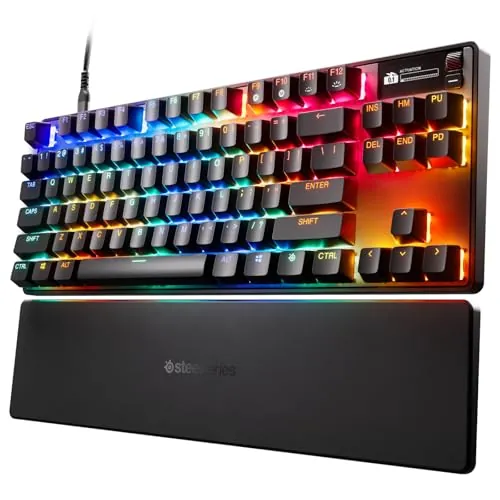
Keychron K10 HE vs SteelSeries Apex Pro TKL Gen 3: Full-Size or TKL?
This comparison covers the black Keychron K10 HE (model K10H-F1) and the black wired SteelSeries Apex Pro TKL Gen 3 (model 64740). The K10 HE is full-size and supports Bluetooth pairing for up to three devices, 2.4 GHz, and wired USB-C modes. The Apex is tenkeyless and wired; its manual documents actuation changes from the OLED menu or hotkeys, with per-key settings in SteelSeries GG. Keychron's current page describes adjustable actuation for two switch versions, but does not confirm which version is included with K10H-F1. Check the exact listing before comparing actuation ranges. These are layout, connection, and setup differences, not typing or gaming results.
Read comparison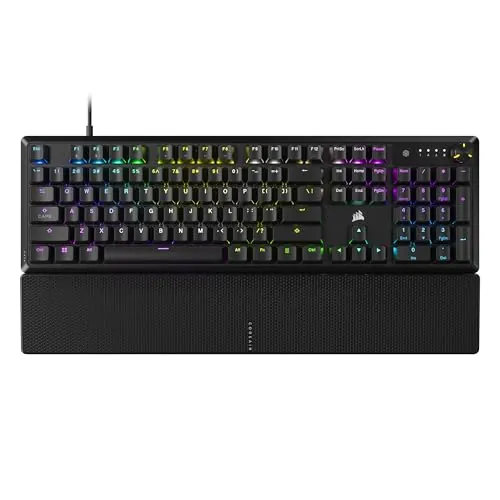
Corsair K65 Plus Wireless vs K70 CORE: Layout, Switches and Connection Modes
The black/gray Corsair K65 Plus Wireless (CH-91D401L-NA) keeps arrow and utility keys in a 75% layout and switches among 2.4GHz, Bluetooth and wired USB modes. The black Corsair K70 CORE with palm rest (CH-910981E-NA) is full-size with a 104-key matrix and wired USB Type-A. Both use Corsair MLX Red linear switches, but the K65 page explicitly describes its switches as hot-swappable and calls them MLX Red, while K70's page calls its switches MLX Red v2. Both support iCUE; choose by layout and host workflow rather than an untested typing-feel claim.
Read comparison