
Products compared
Keychron
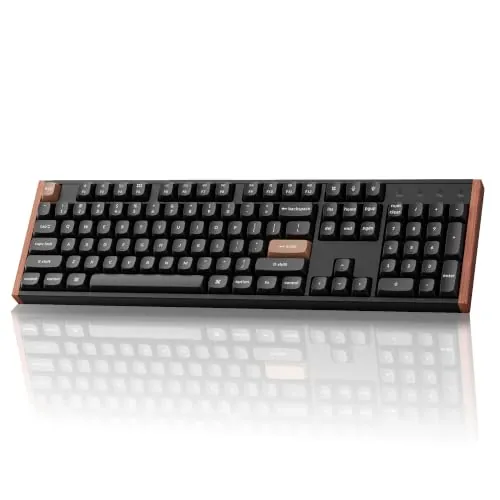
Keychron K10 HE Full-Size Wireless Keyboard, Black Wood Edition
The compared item is the black Keychron K10 HE, model K10H-F1. Keychron describes the K10 HE family as a full-size 100% keyboard with Bluetooth, 2.4 GHz, and wired USB-C connection options. Its current page shows two magnetic-switch versions; the exact switch included with K10H-F1 has not been established here.
Model K10H-F1
Amazon ASIN B0DXZ97PCG
SteelSeries
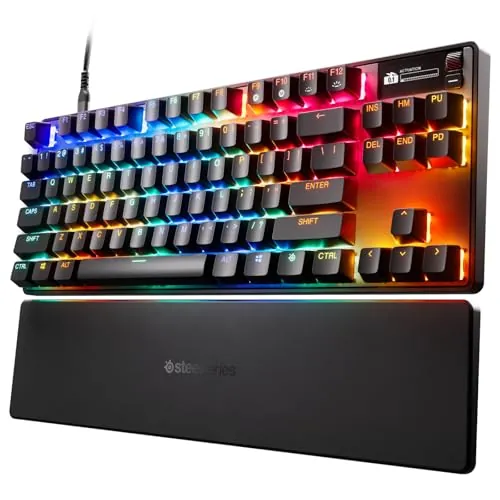
SteelSeries Apex Pro TKL Gen 3 Wired Gaming Keyboard, Black
This is the black, wired tenkeyless Apex Pro TKL Gen 3. SteelSeries lists adjustable OmniPoint actuation from 0.1 to 4.0 mm. Its guide explains OLED or hotkey adjustment and per-key configuration in SteelSeries GG Engine. The guide lists PC, Mac, Xbox, and PlayStation connections, with a note that not all software features are supported on Mac.
Model 64740
Amazon ASIN B0DGZLHN8G
Differences that matter
What matters most to you?
Choose a priority to see what it changes.
Sources for Full-size number pad or tenkeyless
Sources for Wireless device switching or fixed wired setup
Sources for Where and how you configure the keyboard
Sources for Adjustable actuation and the exact switch variant
Start with the layout you use
The Keychron K10 HE is the full-size option in this pair. Its 100% layout includes a dedicated number pad, which can be useful when entering figures or using a full-width desktop arrangement. The black wired Apex Pro TKL Gen 3, model 64740, is a tenkeyless board. If you rely on direct numeric entry, that layout distinction may settle the choice before you compare switch settings.
Both manufacturers document magnetic-switch customization for their product lines, but the Keychron page currently shows two K10 HE switch variants with different adjustment ranges. It does not say which version is included with K10H-F1. Treat the switch option as a pre-buy verification item rather than attributing either family range to this SKU.
Match the connection and configuration workflow to your host
Keychron lists Bluetooth 5.2 pairing for up to three devices, 2.4 GHz, and USB-C wired operation for K10 HE. Its Launcher web app provides keymap and HE configuration; Keychron instructs users to connect in wired mode and use a recent Chrome, Opera, or Edge browser. That means the keyboard can offer wireless daily use while setup changes require a wired session.
The selected SteelSeries Apex Pro TKL Gen 3 64740 is the wired model. Its guide lists PC, Mac, Xbox, and PlayStation connections; it also notes that not all software features are supported on Mac. For per-key actuation, SteelSeries points to Engine in SteelSeries GG, while the keyboard's OLED menu and hotkeys handle documented actuation changes. Check the software requirement against your main host before ordering.
Treat switch ranges as model-specific
SteelSeries lists the wired TKL Gen 3's OmniPoint actuation range as 0.1–4.0 mm and shows how to change levels on the OLED or with hotkeys, with per-key settings in Engine. Keychron's K10 HE page lists 0.2–3.8 mm for Gateron Double-Rail and 0.2–3.3 mm for Keychron Ultra-fast Lime.
Those Keychron numbers apply to the named switch versions, not automatically to the listing data's K10H-F1. The current source does not bridge the exact listing to one of the two versions. If a particular switch, range, or compatible replacement is central to the purchase, verify the version on the retailer listing or packaging first. No range here predicts how fast or comfortable either keyboard will feel.
Product details
Keychron K10 HE Full-Size Wireless Keyboard, Black Wood Edition
- Layout and connections
- 100% full-size layout; Bluetooth 5.2 for up to three devices, 2.4 GHz, and USB-C wired mode Source
- Configuration workflow
- Keychron Launcher web app; manufacturer says use a recent Chrome, Opera, or Edge browser and connect the keyboard in wired mode Source
- Switch version listed for K10H-F1
- Unknown: the K10 HE page describes Gateron Double-Rail and Keychron Ultra-fast Lime versions but does not map either to K10H-F1 Source
SteelSeries Apex Pro TKL Gen 3 Wired Gaming Keyboard, Black
- Layout and connection
- Tenkeyless black wired keyboard; this is not the separate Apex Pro TKL Wireless Gen 3 Source
- Actuation adjustment
- OmniPoint adjustment from 0.1 to 4.0 mm; OLED menu or hotkeys, with per-key configuration in SteelSeries GG Engine Source
- Documented host scope
- PC, Mac, Xbox, PlayStation; the guide notes that not all software features are supported on Mac Source
Before you buy
Community discussions
A casual player asks which TKL Gen 3 controls matter
SteelSeries Apex Pro TKL Gen 3 Wired Gaming Keyboard, Black
A buyer asked whether the Apex Pro TKL Gen 3 made sense for casual play. A wired-model owner said they used the on-keyboard actuation settings. Their keyboard had a UK layout.
What to check
Choose layout and connection needs first, then decide whether per-key actuation controls are features you expect to use. The post does not compare the Gen 3 with Keychron or establish how either keyboard feels to you.
A renewed TKL Gen 3 owner wants a different wrist-rest angle
SteelSeries Apex Pro TKL Gen 3 Wired Gaming Keyboard, Black
Someone who bought a renewed Apex Pro TKL Gen 3 said that they would prefer the wrist rest to sit a little higher.
What to check
Check whether the number pad and any wrist rest fit comfortably with your keyboard and mouse in the space you have.
Common questions
Does the Keychron K10 HE have a number pad?
Keychron describes the K10 HE as a 100% full-size keyboard. The compared SteelSeries model 64740 is TKL, so choose based on whether you want a dedicated number-entry block.Keychron K10 HE Wireless Magnetic Switch Custom Keyboard — manufacturer family product pageApex Pro TKL Gen 3 - US — black, wired, English, TKL configuration
Can the K10 HE connect to multiple devices?
Keychron lists Bluetooth 5.2 for up to three devices and also lists 2.4 GHz and USB-C wired modes. Use the documented connection mode that matches the host you plan to use.Keychron K10 HE Wireless Magnetic Switch Custom Keyboard — manufacturer family product page
How do I adjust actuation on the wired Apex Pro TKL Gen 3?
SteelSeries documents actuation changes through the OLED menu or hotkeys. Its guide says per-key actuation can be configured in Engine inside SteelSeries GG.Apex Pro TKL Gen 3 Product Information Guide — SteelSeries
Which actuation range does the K10H-F1 listing include?
The exact K10H-F1 switch option is not established by the current manufacturer page. The K10 HE family page lists two variants with different ranges, so check the exact retail listing or package before buying for a specific range.Keychron K10 HE Wireless Magnetic Switch Custom Keyboard — manufacturer family product page
Sources and scope
The Keychron item compared here is model K10H-F1. Keychron's current official K10 HE page lists two magnetic-switch versions and different actuation ranges, but does not map this listing to either switch option. This guide therefore does not attribute either range, switch compatibility, or switch-specific performance to K10H-F1. SteelSeries documentation applies to the black wired TKL Gen 3 model 64740, not the separate wireless TKL model. No hands-on typing, latency, gaming, or comfort comparison is claimed.
Related comparisons
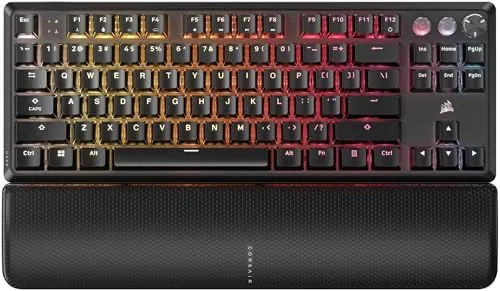
Corsair K70 PRO TKL vs SteelSeries Apex Pro TKL Gen 3: Which Key Controls Fit Your Game?
Both are wired tenkeyless magnetic keyboards with 61 adjustable keys. The Corsair K70 PRO TKL adds A/D FlashTap priority settings and up to five manually saved device-memory profiles. SteelSeries' Apex Pro TKL Gen 3 adds Rapid Tap, Protection Mode, an OLED adjustment menu and game-linked QuickSet. These are different control workflows, not evidence of a speed or accuracy winner.
Read comparison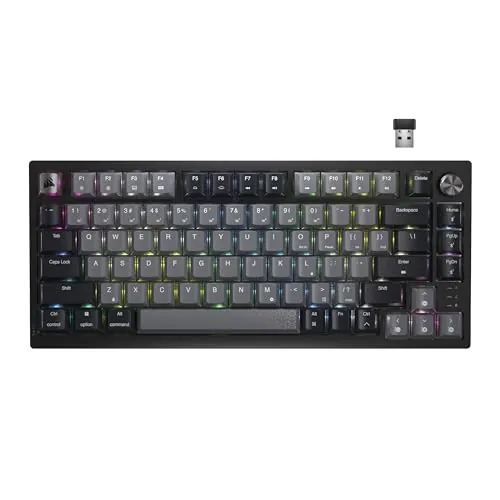
Keychron K10 HE vs CORSAIR K65 Plus Wireless: Full-Size or 75%?
The Keychron K10 HE is a full-size magnetic keyboard with tri-mode connection and browser-based Launcher; the CORSAIR K65 Plus is a 75% mechanical keyboard with MLX Red switches and tri-mode connection. Keychron's actuation range depends on switch version, and its selector does not identify the version included with K10H-F1. Check that exact configuration before choosing by travel range.
Read comparison