
Products compared
CORSAIR
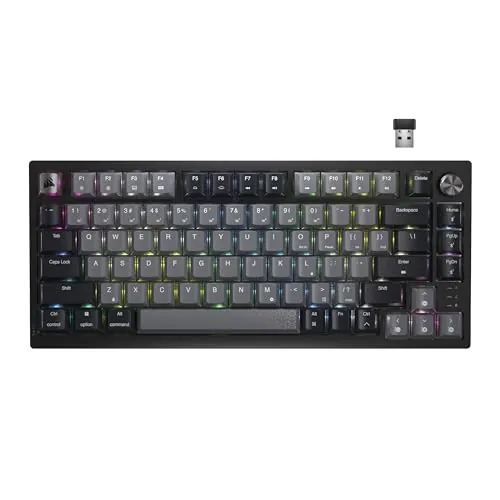
CORSAIR K65 PLUS WIRELESS 75% RGB Mechanical Gaming Keyboard (Original Midnight Grey)
Original Midnight Grey US/NA keyboard variant. Corsair’s exact product page identifies SKU CH-91D401L-NA; verify that the offer is the Original edition rather than a Mac, tactile or other color edition.
Model CH-91D401L-NA
Amazon ASIN B0CQ31VFT4

Logitech
Logitech MX Keys S Wireless Illuminated Keyboard (Graphite)
Graphite MX Keys S standard model. Logitech’s US product page identifies MX Keys S and Graphite; model 920-011558 is the exact listing data SKU. Confirm the selected listing is not the Mini or Mac-specific bundle.
Model 920-011558
Amazon ASIN B0BKW3LB2B
Differences that matter
What matters most to you?
Choose a priority to see what it changes.
Sources for Key mechanism and customization
Start with the keys you need every day
The clearest desk decision is the number pad. Corsair’s Original K65 Plus is a 75% layout measuring 320 mm wide in the maker’s overview; it keeps the arrow cluster and function row while leaving out the numpad. The Graphite MX Keys S retains a full-size layout and Logitech lists a 430.2 mm width. Measure your working area and consider how often you use number entry before choosing the more compact board.
If the K65 would send you to a separate numpad, measure both pieces with your mouse space. If you enter figures often, MX Keys S keeps the keypad attached. These listed dimensions describe the keyboards themselves, not a promise that either fits every desk or posture.
Match the switch and control style to your routine
K65 Plus ships with CORSAIR MLX Red linear mechanical switches and its PCB is 5-pin hot-swap compatible. Its dial can be set for functions such as volume, scroll, backlight or zoom; Corsair’s documentation separates iCUE software mode from saved onboard hardware profiles. That makes the board configurable, but it does not establish a faster or longer-lasting typing result.
MX Keys S uses low-profile scissor keys and a full-size navigation cluster. Logitech documents media-key and F-key behavior that can be toggled with Fn+Esc, and its Options+ app adds features such as Smart Actions. If a shortcut or macro matters, check whether the computer allows the required app and whether a physical key or Fn combination better matches your work.
Plan your computer, tablet and phone connections
K65 Plus offers a distinct USB wired mode, 2.4 GHz through its receiver and Bluetooth. Its manual says Bluetooth can save three host pairings and move between them with Fn shortcuts. To use USB as the input connection, set the three-way switch to Off; merely plugging in the cable while in wireless mode leaves wireless active as it charges. The rear Win/Mac switch changes the keyboard’s OS mode.
MX Keys S connects through Bluetooth Low Energy or its Logi Bolt receiver and can pair up to three devices with a dedicated Easy-Switch channel key. Logitech lists basic keyboard support across Windows, Mac, iOS/iPadOS, Android, Linux and Chrome OS, while Options+ is for Windows and Mac. For a phone or tablet, confirm Bluetooth compatibility and expect basic input rather than desktop customization features.
Check function-key access before ordering
The compact K65 retains a function row but some navigation actions are Fn shortcuts: Corsair’s Windows-mode guide maps Insert and End to Fn combinations. The dial also changes between functions with Fn shortcuts. If a work app expects frequent Insert, End or a particular dial setting, try those steps mentally or on a similar layout before deciding.
MX Keys S retains a number pad and navigation cluster; its setup guide uses Fn+Esc to swap the default media behavior with F-key behavior. Neither manual proves one layout is easier to use. Count the keys and shortcuts your own apps require, then choose the layout that keeps the routine you value most direct.
Product details
CORSAIR K65 PLUS WIRELESS 75% RGB Mechanical Gaming Keyboard (Original Midnight Grey)
- Layout and width
- 75% layout; manufacturer overview lists 320 × 136 × 35 mm. The 75% layout keeps arrows and function keys but omits the integrated number pad. Source
- Switches and dial
- Pre-lubed CORSAIR MLX Red linear mechanical switches, 5-pin hot-swap compatibility and a multi-function rotary dial; do not treat switch replaceability as a measured lifespan or typing-performance advantage. Source
- Connection modes
- USB wired, 2.4 GHz wireless receiver or Bluetooth; Bluetooth can store three host pairings and switch among them with Fn shortcuts. Source
- Windows and Mac controls
- Rear Win/Mac switch selects OS mode; documented Windows Fn shortcuts include Insert and End, while Mac mode changes modifier-key mapping. iCUE availability and controls depend on the software/connection mode. Source
Logitech MX Keys S Wireless Illuminated Keyboard (Graphite)
- Layout and width
- Full-size layout with integrated number pad; official support specification lists a 430.2 mm keyboard width. Source
- Key mechanism
- Low-profile scissor keys with backlighting; Logitech lists the key mechanism in its MX Keys S specification. Source
- Connections and device switching
- Bluetooth Low Energy or included Logi Bolt USB receiver; Easy-Switch pairs up to three devices and changes channel with a key press. Source
- OS, charging and software
- Supports Windows, macOS, iOS/iPadOS, Linux, Chrome OS and Android at the documented basic-input level; Options+ adds controls on Windows and Mac. The USB-C cable supports typing while charging. Source
Before you buy
Community discussions
Reconnecting a keyboard and mouse to a tablet
Logitech MX Keys S Wireless Illuminated Keyboard (Graphite)
Someone paired an MX Keys S and MX Master 3S to a Galaxy Tab S9 Ultra. On startup their tablet often reconnected to just one device.
What to check
Test the keyboard and mouse together with your exact tablet OS and connection mode. Check reconnecting as well as the first pairing.
Common questions
Does the K65 Plus Wireless include a number pad?
No. Corsair describes the compared Original K65 Plus as a 75% layout that omits the number pad while retaining arrows and function keys. If you need a separate numpad, add its footprint to your desk measurement.CORSAIR K65 PLUS WIRELESS: Everything you need to know — 75% layout and exact Original Black/Gray dimensions
Can the K65 Plus connect to a phone or tablet?
Corsair documents Bluetooth pairing with a phone or tablet and up to three stored Bluetooth hosts switched with Fn shortcuts. The rear switch selects Windows or Mac mode; check the device and feature you need, since desktop iCUE controls are not the same as basic Bluetooth typing.K65 PLUS WIRELESS Manual / Quick Start Guide — controls, connections, Fn, Windows and Mac modesIs the K65 PLUS compatible with Mac PCs and iPads? — Corsair setup guidance
Can MX Keys S switch among a computer and tablet?
Logitech says MX Keys S can pair up to three devices and switch channels with its Easy-Switch key. It can connect through Bluetooth or the included Logi Bolt receiver; confirm which connection your tablet or computer supports.Getting Started — MX Keys S: receiver/Bluetooth setup, Easy-Switch and operating systemsSpecification — MX Keys S
Is the K65 wired whenever its USB cable is plugged in?
Not necessarily. Corsair’s guide says to set its three-way mode switch to Off for USB wired mode; in 2.4 GHz or Bluetooth mode, plugging in the cable leaves it in wireless mode while charging.K65 PLUS WIRELESS Manual / Quick Start Guide — controls, connections, Fn, Windows and Mac modes
Are these keyboards faster, quieter or more comfortable than one another?
The available manufacturer material describes the switch mechanisms, layouts and controls but does not establish a matched typing-speed, acoustic, latency or comfort result. Choose from the verified layout and device workflow, not an unmeasured winner claim.K65 PLUS WIRELESS 75% RGB Mechanical Gaming Keyboard — CH-91D401L-NA, Original Midnight GreySpecification — MX Keys S
Sources and scope
This guide covers the Original Midnight Grey US/NA Corsair K65 Plus Wireless CH-91D401L-NA and Logitech MX Keys S Graphite 920-011558. It does not transfer features or packaging from K65 Apple/Mac special editions, tactile editions, other color SKUs, or MX Keys Mini/Mac bundles. Published width and layout do not predict typing comfort or desk fit with other accessories. No matched testing establishes typing speed, acoustics, latency, reliability, gaming performance or a comfort winner. Logitech Options+ and Corsair iCUE functions depend on supported software/connection conditions; basic keyboard input and extra software controls are not the same thing.
- K65 PLUS WIRELESS 75% RGB Mechanical Gaming Keyboard — CH-91D401L-NA, Original Midnight Grey
- CORSAIR K65 PLUS WIRELESS: Everything you need to know — 75% layout and exact Original Black/Gray dimensions
- K65 PLUS WIRELESS Manual / Quick Start Guide — controls, connections, Fn, Windows and Mac modes
- Is the K65 PLUS compatible with Mac PCs and iPads? — Corsair setup guidance
- MX Keys S — Graphite US, product 920-011558
- Specification — MX Keys S
- Getting Started — MX Keys S: receiver/Bluetooth setup, Easy-Switch and operating systems
Related comparisons

Logitech MX Keys S vs Wave Keys: Choose by Lighting, Layout and Power
These two Logitech keyboards share Bluetooth, an included Logi Bolt receiver and Easy-Switch workflows, so connection alone does not settle the choice. MX Keys S (920-011558) has a low-profile layout, adaptive backlighting and a USB-C charging port you can use while typing. Wave Keys (920-011898) has a wave-shaped layout with an attached cushioned palm rest, uses two included AAA batteries, and its Logitech consumer FAQ says its keys are not backlit. Check your lighting, desk layout, host operating systems and power preference before choosing; neither model is a universal comfort winner.
Read comparison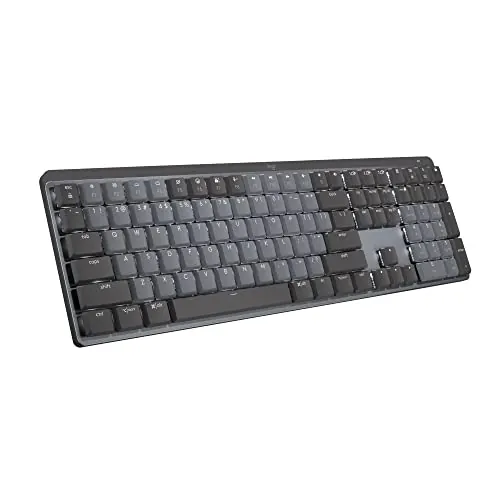
Logitech MX Keys S vs MX Mechanical: Scissor or Tactile Quiet?
The Graphite MX Keys S uses scissor keys; the assigned full-size MX Mechanical is the Tactile Quiet low-profile mechanical version. Logitech lists 1.8 mm total travel for MX Keys S and 3.2 mm for MX Mechanical. Both support lighting, Bluetooth LE or a Logi Bolt receiver, and switching among up to three devices. Choose by a typing style you already know you want; these specifications do not establish typing speed, comfort or sound superiority.
Read comparison