
Products compared
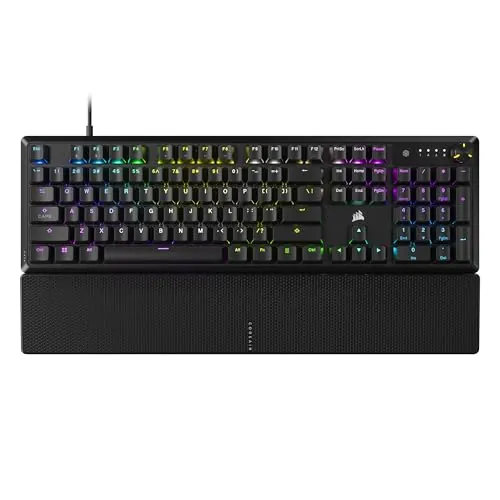
CORSAIR
CORSAIR K70 CORE RGB Mechanical Gaming Keyboard with Palm Rest — Black
Exact U.S. black, North American layout, full-size wired listing. Verify CH-910981E-NA on the offer; the detachable magnetic palm rest is listed in this SKU's package contents.
Model CH-910981E-NA
Amazon ASIN B0CH3MRGK7
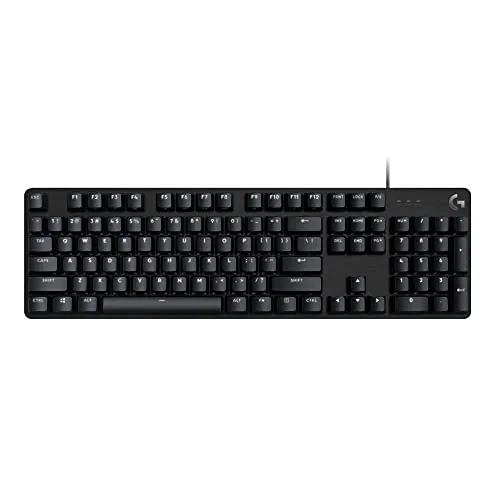
Logitech G
Logitech G413 SE Full-Size Mechanical Gaming Keyboard — Black
Exact U.S. black full-size wired G413 SE. Confirm model 920-010433; exclude details that the manufacturer page attributes specifically to the separate G413 TKL SE.
Model 920-010433
Amazon ASIN B08Z6X4NK3
Differences that matter
Sources for Lighting and configuration
Sources for Full-size package and setup
Start with switch feedback
The selected Corsair SKU uses pre-lubricated MLX Red v2 linear switches. Logitech identifies tactile switches on the full-size G413 SE page. These are different switch descriptions, not a performance score: what feels right depends on the typist, so use a hands-on sample if the switch sensation is the deciding factor.
Both selected products are full-size wired keyboards. Don't let the G413 TKL SE copy elsewhere on Logitech's page turn this into a size comparison: 920-010433 is the full-size G413 SE.
Compare the control routine
Corsair's page describes a multifunction dial for volume, zoom and scrolling, and lists per-key RGB, macros and remapping through iCUE. Its specifications name USB Type-A and an internet connection for downloading iCUE, along with stated PC/Mac and OS requirements. If you plan to use those customization options, verify the exact computer and software requirements first; this comparison did not test basic keyboard operation with or without iCUE.
Logitech's G413 SE guide documents FN shortcuts and onboard lighting patterns and Windows-key locking. The PDF diagram does not preserve exact shortcut mappings clearly enough to list key-by-key actions here. Treat it as a check-the-guide workflow, not evidence that the board lacks other functions.
Check the package and host before checkout
The exact Corsair page includes a detachable magnetic soft-touch palm rest and names the North American 104-key layout. Logitech identifies 920-010433 as the full-size G413 SE; the separate G413 TKL SE is a different model, so check the identifier on the selected offer. Both are wired models; verify the expected connection and layout with your computer and desk setup.
Pick based on the documented feature fit, not claims about which keyboard is faster, quieter, more comfortable or better for gaming. The cited pages and guide are manufacturer materials, not a controlled comparison; no current offer price is presented.
Product details
CORSAIR K70 CORE RGB Mechanical Gaming Keyboard with Palm Rest — Black
A preference fit for someone who wants the documented linear switch type, dial and iCUE options, or the included detachable palm rest. The page's software and host requirements should be checked against the buyer's actual computer.
- Switch type
- Pre-lubricated CORSAIR MLX Red v2 linear mechanical switches Source
- Controls and lighting
- Multifunction dial; per-key RGB, macros and remapping are listed through iCUE Source
- Connection and host
- Wired USB Type-A; CORSAIR lists PC or Mac with USB 3.0/3.1 Type-A, Windows 10 or macOS 10.15+, and internet access for iCUE download Source
- Included support
- Detachable magnetic soft-touch palm rest is listed in package contents Source
Logitech G413 SE Full-Size Mechanical Gaming Keyboard — Black
A preference fit for a buyer who wants tactile switches and the G413 SE's documented FN/onboard control workflow. The quick-start guide's shortcut illustration is not clear enough in text to state exact key-to-action mappings here.
- Switch type
- Tactile mechanical switches, as listed for the full-size G413 SE Source
- Lighting and onboard controls
- White LED lighting; the G413 SE quick-start guide documents FN shortcuts, five onboard lighting patterns and Windows-key locking Source
- Layout
- The exact U.S. page identifies this as the full-size G413 SE; do not substitute the separate TKL model's details Source
- Connection
- Wired keyboard; check the actual computer's port and OS needs against the exact offer and current manufacturer support information Source
Before you buy
Community discussions
A K70 Core owner is looking for a full-size wired board with a volume wheel
CORSAIR K70 CORE RGB Mechanical Gaming Keyboard with Palm Rest — Black
A K70 Core RGB owner looking for a full-size wired keyboard wanted a volume wheel and key legends they could read with the backlight off. At their desk, the keyboard light reflected in the monitor during darker games.
What to check
Check the legends with the keyboard lighting turned down, especially if the backlight tends to reflect in your monitor.
Common questions
Which keyboard has the better switches?
Neither is a universal winner based on these sources. The exact CORSAIR CH-910981E-NA is listed with MLX Red v2 linear switches; Logitech lists tactile switches for the G413 SE. Pick the feedback style you personally prefer. No controlled test here compares typing speed, sound, comfort or gaming results.K70 CORE RGB Mechanical Gaming Keyboard with Palm Rest — Black, SKU CH-910981E-NAG413 SE Mechanical Gaming Keyboard, U.S. page for full-size 920-010433
Do both keyboards have dedicated dial controls?
The CORSAIR page lists a multifunction media dial. The Logitech guide documents FN shortcuts and onboard lighting/Windows-key controls; it does not establish an equivalent dial. Choose based on the routine you want and check the exact guide for supported controls.K70 CORE RGB Mechanical Gaming Keyboard with Palm Rest — Black, SKU CH-910981E-NALogitech G413 SE Mechanical Gaming Keyboard Quick Start Guide
Is the Corsair palm rest included, and what about the Logitech?
CORSAIR lists a detachable magnetic soft-touch palm rest in the exact CH-910981E-NA package contents. The cited Logitech G413 SE page and guide do not establish an included palm rest for 920-010433; verify the listing contents if one is important to you.K70 CORE RGB Mechanical Gaming Keyboard with Palm Rest — Black, SKU CH-910981E-NAG413 SE Mechanical Gaming Keyboard, U.S. page for full-size 920-010433
Sources and scope
This is a source-based feature-fit comparison, not hands-on testing. It does not establish switch quality, typing or gaming results, latency, acoustics, comfort, durability, or price value. The Logitech guide's FN shortcut illustration does not support reliable exact key mappings here; its silence on additional software options is not evidence that none exist. Confirm exact SKU, host requirements and current package before purchase.
Related comparisons
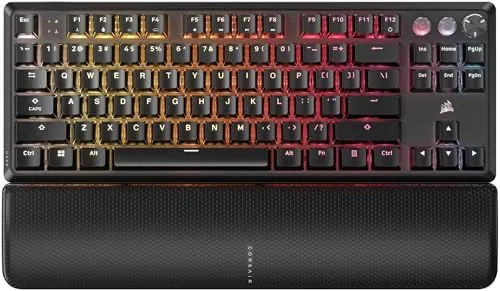
Corsair K70 PRO TKL vs K70 CORE: Adjustable Keys or a Full-Size Numpad?
Both are wired, North American-layout Corsair keyboards with a rotary dial and FlashTap support. The decision turns on layout and switch controls: K70 CORE keeps a full-size number pad and uses pre-lubed MLX Red linear mechanical switches; K70 PRO TKL removes the numpad and adds adjustable actuation and Rapid Trigger on its supported MGX magnetic keys. Neither spec sheet proves a faster, quieter or more comfortable typing experience.
Read comparison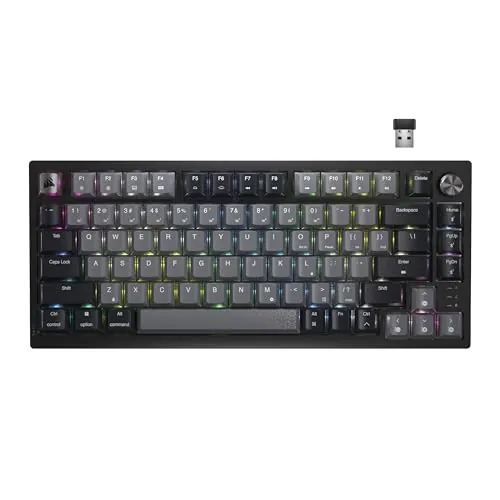
Corsair K65 Plus Wireless vs K70 CORE: Layout, Switches and Connection Modes
The black/gray Corsair K65 Plus Wireless (CH-91D401L-NA) keeps arrow and utility keys in a 75% layout and switches among 2.4GHz, Bluetooth and wired USB modes. The black Corsair K70 CORE with palm rest (CH-910981E-NA) is full-size with a 104-key matrix and wired USB Type-A. Both use Corsair MLX Red linear switches, but the K65 page explicitly describes its switches as hot-swappable and calls them MLX Red, while K70's page calls its switches MLX Red v2. Both support iCUE; choose by layout and host workflow rather than an untested typing-feel claim.
Read comparison