
Products compared
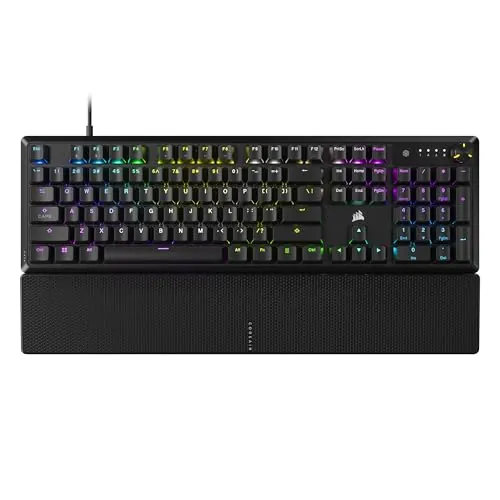
CORSAIR
CORSAIR K70 CORE RGB Mechanical Gaming Keyboard with Palm Rest — Black
North America Black wired K70 CORE RGB offer with magnetic palm rest; listing identity matches CORSAIR SKU CH-910981E-NA.
Model CH-910981E-NA (NA layout)
Amazon ASIN B0CH3MRGK7

Logitech
Logitech MX Keys S Wireless Illuminated Keyboard, Graphite
Graphite U.S. MX Keys S listed variants; the exact Logitech product route identifies the 920-011558 offer. Product-family support documents describe the MX Keys S connection and charging workflow.
Model 920-011558
Amazon ASIN B0BKW3LB2B
Differences that matter
What matters most to you?
Choose a priority to see what it changes.
Sources for How you operate media and shortcuts
Sources for Connection to one or several hosts
Sources for Power and charging routine
Sources for What to measure or check at the desk
Decide whether you want mechanical switches or low-profile keys
CORSAIR’s exact K70 CORE NA listing identifies 104 keys in a full-size layout and pre-lubricated MLX Red v2 linear mechanical switches. Its Black package lists a detachable magnetic palm rest. Logitech describes the exact Graphite MX Keys S product as low profile; its model-specific support specification identifies scissor keys.
Those are different mechanisms and physical arrangements. If you already know which one you prefer, that may settle the purchase. If not, try the exact switch types or compare them at a store; these manufacturer pages do not establish which one feels better, types faster, or sounds quieter to you.
Match the connection to the computers on your desk
The K70 CORE is a wired keyboard using USB Type-A. CORSAIR lists PC or Mac compatibility with a USB 3.0 or 3.1 Type-A port and a North American layout. Count the intended host and available port before checkout.
MX Keys S supports Bluetooth Low Energy and the included Logi Bolt receiver. Logitech documents up to three paired computers, with a 3-second hold to pair a channel and a short press to switch. Write down the hosts that will occupy those channels and ensure each one can use Bluetooth or a USB port for the receiver.
Choose the controls you will actually reach
K70 CORE places a multi-function rotary dial on the keyboard for volume and other media functions. CORSAIR’s page says iCUE can configure per-key RGB, macros and remapping. MX Keys S uses Easy-Switch for changing hosts; Logitech lists Smart Actions and lets you customize backlighting in Options+.
Think through a normal desk task: turning media volume at the keyboard, assigning macros and RGB, or moving the same keyboard between a desktop and a laptop. The pages document those controls, but do not compare how quickly or easily you will use them.
Plan power and desk space
The CORSAIR connection is wired Type-A. MX Keys S operates wirelessly and uses a USB-C charge cable; Logitech says you can continue typing while charging. The connection guidance describes the charging cable as power input, not a wired keyboard-data mode.
Both are full-size boards. For the K70, leave room for the included magnetic palm rest as well as the keyboard. For MX Keys S, check desk space and map the Easy-Switch channels to your actual hosts. No desk-fit promise is possible without measuring your own setup.
Verify the exact offer and bundle
The assigned CORSAIR offer is the Black NA K70 CORE RGB, SKU CH-910981E-NA; its product page lists the magnetic palm rest in the box. Avoid confusing it with other K70 variants such as SE or TKL models.
The assigned Logitech offer is Graphite MX Keys S, product code 920-011558. The MX Keys S support page lists a USB receiver and USB-C charging cable, and its Getting Started page identifies the receiver as Logi Bolt. Check the exact seller offer still matches those model and package details.
Product details
CORSAIR K70 CORE RGB Mechanical Gaming Keyboard with Palm Rest — Black
- Layout and key count
- Full-size NA layout; 104-key matrix Source
- Switch and connection
- CORSAIR MLX Red v2 linear mechanical switches; wired USB Type-A connectivity Source
- Physical controls
- Multi-function rotary dial; media controls; per-key RGB, macros and remapping are configurable with CORSAIR iCUE Source
- Included support
- Magnetic palm rest listed in package contents Source
Logitech MX Keys S Wireless Illuminated Keyboard, Graphite
- Key mechanism and layout
- Low-profile scissor-key design; Graphite MX Keys S product-page variant Source
- Host connections
- Bluetooth Low Energy or Logi Bolt USB receiver; Easy-Switch supports up to three paired computers Source
- Charging
- USB-C charge cable; you can continue typing while the keyboard charges Source
- Package note
- MX Keys S support specification lists a USB receiver and USB-C charging cable in the box; Getting Started specifies the receiver as Logi Bolt. Check that the selected seller bundle matches. Source
Before you buy
Community discussions
Switching a keyboard and mouse across two computers
Logitech MX Keys S Wireless Illuminated Keyboard, Graphite
An MX Keys S and MX Master 3S owner uses a laptop over Bluetooth and a desktop over a Bolt receiver. They say they must switch the keyboard and mouse separately and ask whether one keyboard action can switch both; the post does not establish synchronized switching.
What to check
If you want to move a keyboard and mouse between hosts together, decide whether separate switching steps work for you and check each device's controls. Logitech documents multi-computer switching for MX Keys S, but this owner's question does not confirm that both devices can switch in sync.
Common questions
Can the MX Keys S switch between multiple computers?
Yes. Logitech says MX Keys S can pair with up to three computers. Hold the selected Easy-Switch button for three seconds to start pairing, connect by Bluetooth or the Logi Bolt receiver, then short-press the button to change channels.Getting Started — MX Keys S
Does MX Keys S include a Logi Bolt receiver?
The MX Keys S Getting Started page says to use its included Logi Bolt receiver or connect via Bluetooth. Logitech’s product-family specifications also list a USB receiver and USB-C charging cable. Confirm the contents of the exact seller offer.Getting Started — MX Keys SLogitech MX Keys S Specifications
Can I keep typing while MX Keys S is plugged in to charge?
Logitech’s setup page says to plug the USB-C cable into the top-right of the keyboard and that you can continue typing while it charges. It is a wireless keyboard with wired charging; this source does not describe USB-C as a data connection.Getting Started — MX Keys SLogitech MX Keys S Specifications
What switch type does each model use?
The K70 CORE page identifies CORSAIR MLX Red v2 linear mechanical switches. Logitech’s MX Keys S specification identifies scissor keys and its product page describes a low-profile design. These are mechanism descriptions, not a ranking of feel, noise or typing speed.CORSAIR K70 CORE RGB Mechanical Gaming Keyboard with Palm Rest — Black, SKU CH-910981E-NALogitech MX Keys S SpecificationsLogitech MX Keys S Graphite, product listing for 920-011558
Which layout or port should I check before buying?
K70 CORE is listed as a full-size NA 104-key board with wired USB Type-A. The Graphite MX Keys S offer is a full-size low-profile keyboard with Bluetooth or Logi Bolt receiver pairing. Check your preferred layout and the ports or wireless options on every intended host.CORSAIR K70 CORE RGB Mechanical Gaming Keyboard with Palm Rest — Black, SKU CH-910981E-NALogitech MX Keys S Graphite, product listing for 920-011558Logitech MX Keys S SpecificationsGetting Started — MX Keys S
Sources and scope
This guide compares documented layouts, switch mechanisms, controls, connection and charging workflows. It does not claim comparative typing feel, sound, latency, gaming performance, durability or measured productivity. The MX Keys S setup and specifications pages apply to the MX Keys S product family; the exact Graphite product route is 920-011558. Confirm the selected seller bundle and host compatibility. No price comparison is included.
Related comparisons
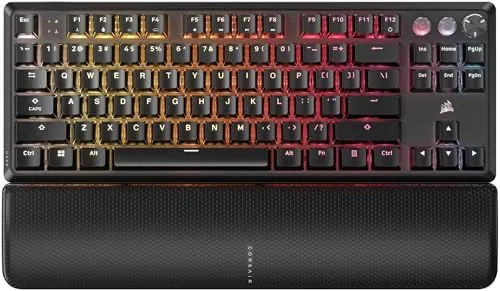
Corsair K70 PRO TKL vs K70 CORE: Adjustable Keys or a Full-Size Numpad?
Both are wired, North American-layout Corsair keyboards with a rotary dial and FlashTap support. The decision turns on layout and switch controls: K70 CORE keeps a full-size number pad and uses pre-lubed MLX Red linear mechanical switches; K70 PRO TKL removes the numpad and adds adjustable actuation and Rapid Trigger on its supported MGX magnetic keys. Neither spec sheet proves a faster, quieter or more comfortable typing experience.
Read comparison
Logitech MX Keys S vs Wave Keys: Choose by Lighting, Layout and Power
These two Logitech keyboards share Bluetooth, an included Logi Bolt receiver and Easy-Switch workflows, so connection alone does not settle the choice. MX Keys S (920-011558) has a low-profile layout, adaptive backlighting and a USB-C charging port you can use while typing. Wave Keys (920-011898) has a wave-shaped layout with an attached cushioned palm rest, uses two included AAA batteries, and its Logitech consumer FAQ says its keys are not backlit. Check your lighting, desk layout, host operating systems and power preference before choosing; neither model is a universal comfort winner.
Read comparison