
Products compared
CORSAIR
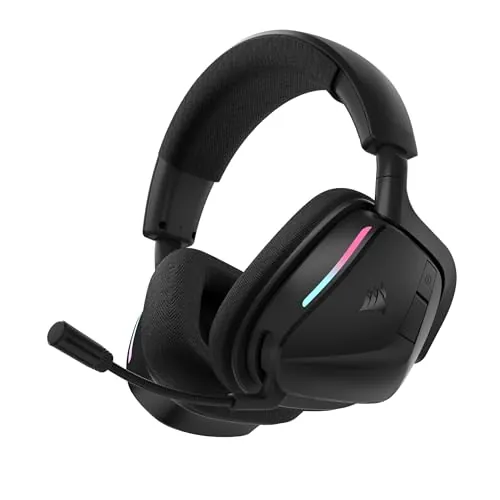
CORSAIR VOID WIRELESS v2 Gaming Headset, Carbon (CA-9011379-WW)
A wireless headset with a USB RF transmitter and a separate Bluetooth mode. The manufacturer’s guide documents the USB receiver route for PC and PS4/PS5, and says the power button switches between RF and Bluetooth modes.
Model CA-9011379-WW
Amazon ASIN B0DYVD72P2

HyperX
HyperX Cloud III Wired Gaming Headset, Black (727A8AA)
A wired headset with manufacturer-listed 3.5 mm, USB-C and USB-A connection options. For Xbox, HyperX specifies the controller’s 3.5 mm headset jack; the included USB adapter is not supported on Xbox.
Model 727A8AA
Amazon ASIN B0C3BSZ56D
Differences that matter
Sources for Connection route and host fit
Sources for Mode switching vs staying wired
Sources for Microphone mute action
Sources for What to plan for from the box and software
Start with the connection you need
These are not two versions of the same connection setup. The VOID WIRELESS v2 ships with a USB wireless transmitter, and Corsair’s quick guide describes its PC USB-A and PS4/PS5 receiver setup. Bluetooth is another mode selected on the headset; it is not simultaneous audio on this model.
Cloud III Wired is the option with a maker-documented Xbox controller path: connect through the controller’s 3.5 mm headset jack. HyperX lists 3.5 mm, USB-C and USB-A connection choices, but warns that its included USB adapter does not function on Xbox and that the bundled DTS license is PC-only. Verify the exact host and connector before choosing.
Then choose the mute action and setup routine
The VOID’s microphone mute is tied to boom position: lift to mute, lower to unmute, with an audible cue. Cloud III places the mute switch on the earcup and uses an LED to show the manufacturer-described mute state; the earcup also has a volume wheel.
For VOID on PC, Corsair says iCUE needs the USB receiver connected and that some features are unavailable without software. HyperX’s product page says NGENUITY features are available on supported Windows PC over USB and that NGENUITY settings do not carry to another system. These are setup considerations, not sound or microphone-quality results.
Check the exact versions in the listing
The selected Corsair item is VOID WIRELESS v2 Carbon, model CA-9011379-WW. Corsair describes simultaneous Bluetooth plus 2.4 GHz as a VOID v2 MAX distinction; the original wireless v2 toggles modes. The selected HyperX item is Cloud III Wired, SKU 727A8AA, not Cloud III Wireless.
Use the listed bundle as a final checklist: Corsair names the wireless transmitter and a 0.5 m charging cable; HyperX names a detachable microphone, USB dongle and USB-C-to-USB-A adapter. The model names and included adapters do not establish an unlisted Xbox USB route or guarantee every retailer bundle.
Product details
CORSAIR VOID WIRELESS v2 Gaming Headset, Carbon (CA-9011379-WW)
- Documented wireless paths
- 2.4 GHz RF through the supplied USB transmitter or Bluetooth; quick-pressing the power button toggles between modes. Source
- Mute and software controls
- Raise the boom to mute and lower it to unmute; the headset sounds a cue. iCUE on a PC with the USB receiver enables the full feature set; some features are disabled without software. Source
- Listed box contents
- VOID WIRELESS v2 headset, USB wireless transmitter, 0.5 m USB charging cable and warranty card. Source
HyperX Cloud III Wired Gaming Headset, Black (727A8AA)
- Documented connection choices
- HyperX lists 3.5 mm, USB-C and USB-A connectors and compatibility with PC, PlayStation, Xbox, Nintendo Switch, Mac and mobile; use the Xbox controller’s 3.5 mm jack. Source
- Mute and volume controls
- Press the earcup mute button to toggle the microphone; the LED is on when muted and off when active. A wheel adjusts volume. Source
- Listed box contents
- Gaming headset, detachable microphone, USB dongle, USB-C-to-USB-A adapter and quick-start guide. The included USB adapter does not function on Xbox; the DTS license is PC-only. Source
Before you buy
Community discussions
Deciding what you need from a wireless replacement
HyperX Cloud III Wired Gaming Headset, Black (727A8AA)
A Cloud III Wired owner who liked the headset wanted to move to wireless for gaming. They placed more weight on microphone quality than on having Bluetooth.
What to check
Identify the exact device where you want to lose the cable and check the receiver support for it. If you also play on Xbox, check the controller’s documented wired headset path separately.
Common questions
Can I use the Cloud III’s included USB adapter on Xbox?
No. HyperX says the adapter does not function on Xbox and its included DTS license is PC-only. Its product FAQ directs Xbox users to a controller’s 3.5 mm headset jack instead.Cloud III DTS not available on XboxHyperX Cloud III Wired Gaming Headset — Black, US
Does the VOID WIRELESS v2 mix Bluetooth phone audio with USB wireless game audio?
Corsair distinguishes the original VOID WIRELESS v2, which toggles between RF and Bluetooth, from VOID v2 MAX, which can use both simultaneously. When the original is in RF mode with a phone paired over Bluetooth, Corsair’s guide says it receives phone calls only; Bluetooth audio requires switching modes.VOID WIRELESS v2 Quick Start GuideCORSAIR VOID v2 MAX vs VOID v2 WIRELESS: What's the Difference?
How do the mute controls differ?
Corsair documents raising/lowering the boom to mute/unmute, with an audible cue. HyperX documents an earcup mute button and LED state indicator. Neither description is a tested guarantee of how every host or chat application presents mute state.VOID WIRELESS v2 Quick Start GuideCloud III Mic Mute Button and Volume Wheel
Sources and scope
This guide compares Corsair VOID WIRELESS v2 Carbon SKU CA-9011379-WW with HyperX Cloud III Wired Black SKU 727A8AA. It uses manufacturer-published setup, product and support information only. No hands-on sound, microphone, latency, comfort, battery-life or reliability comparison was performed. Corsair’s cited platform list names PC, PlayStation, Nintendo Switch and mobile/tablet; an Xbox connection for this exact VOID configuration is not established by these sources. Verify the exact listing and your host ports before ordering.
Related comparisons

SteelSeries Arctis Nova 5 vs CORSAIR VOID Wireless v2
For Nintendo Switch, the Nova 5 has clearer USB-dongle guidance: SteelSeries lists the Nova 5 family for Switch and Switch 2, with a firmware/USB-audio caveat on Switch 2. CORSAIR's product page shows Switch compatibility, but its support chart does not list the VOID Wireless v2 for Switch. For PC or PlayStation, compare Bluetooth switching and mic controls: the Nova 5 changes between 2.4GHz and Bluetooth; the VOID v2 can take phone calls in RF mode but requires Bluetooth mode for Bluetooth media.
Read comparison
HyperX Cloud III Wired vs Cloud Alpha Wired: Ports, Adapters and Controls
The black HyperX Cloud III Wired (727A8AA) has documented USB-C, USB-A via its included adapter, and 3.5mm connection options, with USB NGENUITY features on supported Windows PCs. The Black-Red Cloud Alpha Wired (4P5L1AA#ABL) is documented around a 3.5mm connection and includes a detachable headset cable, inline controls, and a PC extension cable. Check the port and cable you will actually use before choosing; this guide compares setup features, not sound or comfort results.
Read comparison