
Products compared
CORSAIR
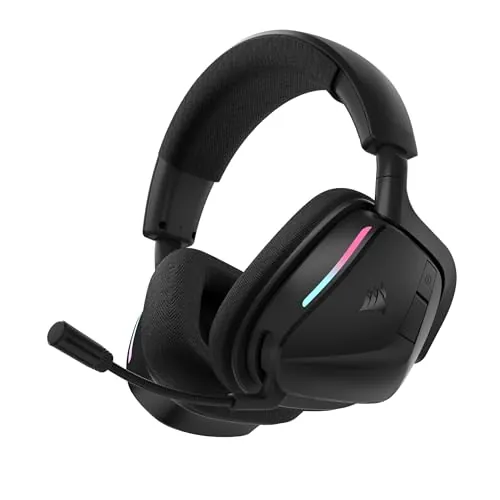
CORSAIR VOID WIRELESS v2 Gaming Headset - Carbon (CA-9011379-WW)
Carbon/Black U.S. VOID WIRELESS v2 configuration; dual wireless modes; USB wireless transmitter and USB charging cable listed in the package contents.
Model CA-9011379-WW
Amazon ASIN B0DYVD72P2

Logitech G
Logitech G522 LIGHTSPEED Wireless Gaming Headset - Black (981-001491)
Black G522 LIGHTSPEED U.S. configuration; box contents list a receiver, charging cable and boom mic.
Model 981-001491
Amazon ASIN B0FFM5SP6M
Differences that matter
What matters most to you?
Choose a priority to see what it changes.
Sources for Microphone mute controls and software dependencies
Sources for Exact transmitter/receiver in the box
Sources for Charging cable and audio mode while plugged in
Map every host to a connection mode first
For VOID WIRELESS v2, CORSAIR documents a USB wireless transmitter for PC/PlayStation setup and a button that switches between RF wireless and Bluetooth. Its U.S. product page lists PC, PlayStation, Nintendo Switch and Mobile & Tablet compatibility. The page does not spell out a complete mode-by-platform microphone matrix, so check the exact platform and chat setup you plan to use.
G522 supports LIGHTSPEED through its included USB-A dongle, Bluetooth and USB wired audio. Logitech's specification lists Windows 10/11, macOS 13–15 (at release), and a USB 2.0 port for Windows/macOS or PS5. The U.S. G522 listing also shows Nintendo Switch/Switch 2 compatibility; confirm which route and microphone controls apply to your console.
Compare the mute action and required PC software
The CORSAIR quick-start guide says to raise the boom mic to mute and lower it to unmute; the headset signals the change. Its U.S. listing says NVIDIA Broadcast requires a compatible GeForce RTX card. CORSAIR says the receiver must be connected to the PC to access the full iCUE feature set.
G522 has earcup power, mute, volume and connectivity controls, plus a triple-color LED indicator. These are feature and setup differences, not evidence that either microphone sounds clearer in use; if you play on a console, verify whether the software features you want are available in that exact path.
Check what is in the box and what USB does during play
CORSAIR lists the VOID WIRELESS v2 headset, USB wireless transmitter, 0.5m USB charging cable and warranty card. Its quick-start guide connects the transmitter to USB Type-A on PC and the charging cable to a working PC USB port.
Logitech lists the G522 headset, receiver, charging cable and boom mic; its support specification identifies the receiver as USB-A LIGHTSPEED. A key caveat for wired-up charging: Logitech says plugging a G522 into a PC or console by USB makes USB audio the active mode and disables LIGHTSPEED while connected. If you want to keep LIGHTSPEED, check the manufacturer's current guidance for your charging arrangement rather than assuming USB to the host is charge-only.
Product details
CORSAIR VOID WIRELESS v2 Gaming Headset - Carbon (CA-9011379-WW)
- Wireless connection
- 2.4GHz RF through the included USB wireless transmitter or Bluetooth; the headset's power button toggles modes. Source
- Included transmitter and charging cable
- Package contents list a USB wireless transmitter and a 0.5m USB charging cable. Source
- Mic mute control
- Raise the boom mic to mute and lower it to unmute; the headset gives an audible mute/unmute signal. Source
- Optional PC mic processing
- The product page says NVIDIA Broadcast requires a compatible GeForce RTX graphics card; CORSAIR iCUE's full feature set requires the USB wireless receiver connected to a PC. Source
Logitech G522 LIGHTSPEED Wireless Gaming Headset - Black (981-001491)
- Connection modes
- LIGHTSPEED through the USB-A receiver, Bluetooth 5.3, or wired USB audio. Logitech lists Windows 10/11 and macOS 13–15 at release, and a USB 2.0 port on Windows/macOS or PS5 as a system requirement. Source
- Included receiver and other box contents
- Logitech lists a receiver, charging cable and boom mic; the receiver is specified as a USB-A LIGHTSPEED dongle. Source
- Mute and mic software
- The headset specification lists earcup power, mute, volume and connectivity controls, plus a triple-color LED indicator. Source
- USB charging/audio behavior
- When USB is connected to a PC or console, USB wired audio takes priority and LIGHTSPEED is disabled while wired mode is active. Source
Before you buy
Community discussions
Testing phone playback and microphone input separately
Logitech G522 LIGHTSPEED Wireless Gaming Headset - Black (981-001491)
A G522 owner connected a Pixel 7 Pro over Bluetooth and could hear audio but said the phone did not offer the headset mic for calls.
What to check
Try phone playback and a short call with the exact headset, device and connection you plan to use.
Common questions
What USB receiver comes with each headset?
CORSAIR lists a USB wireless transmitter with VOID WIRELESS v2; its quick guide connects it to USB Type-A on PC. Logitech lists a receiver with G522 and specifies a USB-A LIGHTSPEED dongle. These are different receiver systems.VOID WIRELESS v2 Gaming Headset - Carbon (CA-9011379-WW)VOID WIRELESS v2 Quick Start GuideSpecification - G522 LIGHTSPEED Gaming Headset
How do I mute the microphones?
CORSAIR documents raising the VOID WIRELESS v2 boom mic to mute and lowering it to unmute, with an audible state signal. Logitech lists earcup power, mute, volume and connectivity controls with a triple-color LED on G522.VOID WIRELESS v2 Quick Start GuideSpecification - G522 LIGHTSPEED Gaming Headset
Will the G522 stay on LIGHTSPEED while charging over USB?
Logitech says a USB connection to a PC or console selects wired USB audio and disables LIGHTSPEED while that mode is active. Plan around that if you expect to plug in during use.Audio is interrupted when I plug my G522 LIGHTSPEED headset into my PC or console via USB cable
Does NVIDIA Broadcast work on any computer?
CORSAIR says this VOID WIRELESS v2 feature requires a compatible GeForce RTX graphics card. Its guide also says the wireless receiver must be connected to a PC to use the full iCUE feature set.VOID WIRELESS v2 Gaming Headset - Carbon (CA-9011379-WW)VOID WIRELESS v2 Quick Start Guide
Sources and scope
This is a feature and setup comparison of CORSAIR CA-9011379-WW and Logitech 981-001491. It does not test sound quality, microphone quality, latency, comfort, battery life or gaming performance. Platform lists do not establish that every connection or microphone feature works on every console or operating system; verify your exact setup with both manufacturers.
Related comparisons

SteelSeries Arctis Nova 5 vs CORSAIR VOID Wireless v2
For Nintendo Switch, the Nova 5 has clearer USB-dongle guidance: SteelSeries lists the Nova 5 family for Switch and Switch 2, with a firmware/USB-audio caveat on Switch 2. CORSAIR's product page shows Switch compatibility, but its support chart does not list the VOID Wireless v2 for Switch. For PC or PlayStation, compare Bluetooth switching and mic controls: the Nova 5 changes between 2.4GHz and Bluetooth; the VOID v2 can take phone calls in RF mode but requires Bluetooth mode for Bluetooth media.
Read comparisonSteelSeries Arctis Nova 5 vs Logitech G522: Console, Audio Switching and Setup
This U.S. comparison is for the black Arctis Nova 5 model 61670 (B0D2YBQQ1P) and Logitech G522 black model 981-001491 (B0FFM5SP6M). Both offer a headset control to switch between gaming wireless and Bluetooth. SteelSeries describes QuickSwitch between the USB-C dongle and Bluetooth; Logitech explicitly says G522 cannot mix LIGHTSPEED and Bluetooth audio. G522 also supports wired USB audio, which disables LIGHTSPEED while connected. Check the console, available USB port, app settings and exact mic preference before buying.
Read comparison