
Products compared
TP-Link
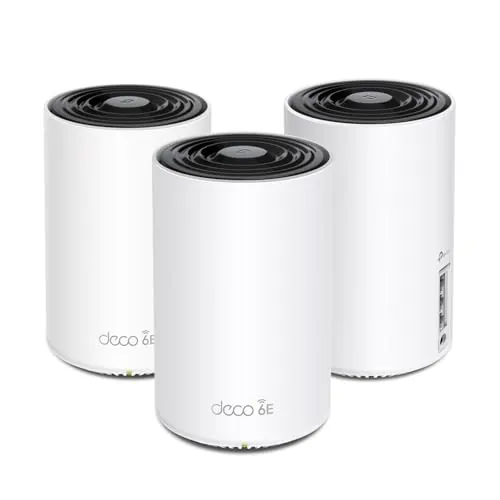
TP-Link Deco XE75 AXE5400 Tri-Band Wi-Fi 6E Mesh System (3-Pack)
listing identity is the three-unit XE75 bundle. TP-Link documents three Gigabit WAN/LAN ports per unit and optional Ethernet backhaul. The exact topology and where each node can be wired depend on the home layout.
Model Deco XE75, U.S. 3-pack
Amazon ASIN B0B88T5RDY
TP-Link
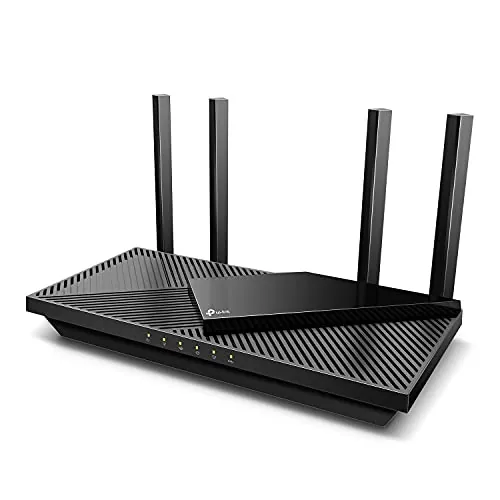
TP-Link Archer AX55 AX3000 Dual-Band Wi-Fi 6 Router
listing identity is one Archer AX55 router, not an XE75 node bundle. TP-Link lists a dedicated Gigabit WAN, four Gigabit LAN ports and USB 3.0. Check the unit's hardware revision and matching firmware/support page before relying on a particular mesh feature.
Model Archer AX55, U.S. hardware revision varies by unit
Amazon ASIN B09G5W9R6R
Differences that matter
Sources for Starting topology and units
Sources for 6 GHz use
Sources for Ethernet and port budget
Sources for Expansion compatibility
Sources for Pack planning and physical setup
Start with a room-and-cable plan
These are not two bundle sizes of the same system. The assigned XE75 item is a three-unit Deco Mesh kit; the AX55 is one Archer router. If the modem is at one end of a home and you want coordinated nodes elsewhere, the XE75 package gives you a multi-node starting point. If one central router is enough for your intended layout, the AX55 gives you a simpler single-box plan. Manufacturer descriptions do not predict how either option will perform through your walls.
Before buying, mark the modem, each outlet where a node could sit, and any Ethernet route. For a wired XE75 backhaul, each planned connection needs an available cable path and port. The U.S. datasheet lists one Ethernet cable in the box; it does not supply an in-wall run between rooms. Keep this floor-plan check separate from a promised coverage radius.
Understand what XE75's 6 GHz band is doing
TP-Link's XE75 guide says the 6 GHz band is reserved for backhaul by default, which is the link between Deco nodes. The setting can be changed to make a 6 GHz client network available. A connected client must itself support Wi-Fi 6E; the 6 GHz label on the router does not add that capability to older devices.
AX55 is listed as a dual-band Wi-Fi 6 router using 2.4 and 5 GHz. If your purchase question is whether your current devices can join 6 GHz, check those device specifications first. These manufacturer materials describe supported bands, not a measured speed advantage or a guarantee that a particular band will reach a particular room.
Count usable ports and keep one mesh family
TP-Link lists three Gigabit WAN/LAN ports on each XE75 unit; with Ethernet backhaul, the role assigned to a port affects how many wired clients can use that unit. AX55 lists one Gigabit WAN, four Gigabit LAN and USB 3.0. Count the modem uplink, node links and client cables separately rather than comparing only the largest port number.
Both products carry TP-Link branding, but that does not make their mesh systems interchangeable. TP-Link says Deco Mesh, OneMesh and EasyMesh are separate families that cannot be combined into one seamless mesh. If reusing nodes is essential, identify their exact family before choosing. For AX55, the U.S. support page lists several hardware revisions with revision-specific downloads; check the unit label and matching firmware notes before relying on a specific expansion mode.
A simple pre-buy worksheet
1. Write down where the modem is and list the devices that need Ethernet there. 2. Mark power outlets for any added node and draw the Ethernet path if you intend to use wired backhaul. 3. Note whether any clients actually support Wi-Fi 6E and whether they need 6 GHz access. 4. Identify the mesh family of equipment you already own. If you cannot confirm the AX55 revision offered or the family compatibility you need, pause and verify the seller's exact unit before ordering.
This checklist helps rule out a mismatched topology or port plan. It does not predict coverage, speed, stability or whether a particular floor plan needs one or three nodes.
Product details
TP-Link Deco XE75 AXE5400 Tri-Band Wi-Fi 6E Mesh System (3-Pack)
- Radio bands
- Tri-band Wi-Fi 6E: 2.4 GHz, 5 GHz and 6 GHz Source
- Wired ports
- Three Gigabit WAN/LAN ports per Deco unit; ports can serve backhaul or wired devices according to the setup Source
- 6 GHz default role
- The XE75 guide says 6 GHz is dedicated to backhaul by default; client use requires changing the setting and a Wi-Fi 6E-capable client Source
- Pack contents
- U.S. datasheet lists three Deco units, three power adapters, one RJ45 Ethernet cable and a quick installation guide Source
TP-Link Archer AX55 AX3000 Dual-Band Wi-Fi 6 Router
- Radio bands
- Dual-band Wi-Fi 6: 2.4 GHz and 5 GHz; no 6 GHz band listed Source
- Wired ports
- One Gigabit WAN, four Gigabit LAN and one USB 3.0 port Source
- Mesh revision check
- TP-Link's U.S. support page lists multiple AX55 hardware revisions and revision-specific firmware; verify the label on the exact unit Source
Before you buy
Community discussions
Using the AX55 behind an ISP fiber router
TP-Link Archer AX55 AX3000 Dual-Band Wi-Fi 6 Router
One owner used the Archer AX55 in access-point mode while their ISP fiber terminal handled routing. They asked about other layouts after being disappointed with their own results when routing with PPPoE on the AX55.
What to check
If the ISP gateway will stay in place, decide whether the AX55 would act as a single access point or whether you need to distribute Deco nodes across multiple rooms.
When a gigabit WAN link negotiates at 100 Mbps
TP-Link Archer AX55 AX3000 Dual-Band Wi-Fi 6 Router
An AX55 user reported that the Ethernet link from their fiber terminal negotiated at 100 Mbps. Forcing 1 Gbps made the router report the WAN cable as unplugged. They did not establish a cause.
What to check
Check the negotiated link between the gateway and the first router or mesh node before evaluating coverage or internet speed.
Common questions
Is the Deco XE75 offer one router or multiple units?
The selected listing is the U.S. three-pack. TP-Link's U.S. datasheet lists three Deco units, three adapters and one RJ45 Ethernet cable. Check the exact seller variation still matches that pack when ordering.Deco XE75 U.S. datasheet
Can the XE75's 6 GHz band connect a phone or laptop?
The XE75 guide says 6 GHz is dedicated to node backhaul by default. It can be changed to a Wi-Fi network for clients, and TP-Link specifies that client devices need Wi-Fi 6E support. Otherwise, use the 2.4 or 5 GHz bands available to the client.Deco XE75 User Guide
Can I use Deco XE75 and Archer AX55 together as one TP-Link mesh?
Do not assume that. TP-Link distinguishes Deco Mesh from OneMesh and EasyMesh and says those systems cannot be combined into one seamless mesh. Select compatible devices from one mesh family instead.TP-Link Mesh compatibility FAQ
How many wired devices can I connect?
The AX55 page lists one Gigabit WAN and four Gigabit LAN ports. Each XE75 unit has three Gigabit WAN/LAN ports; their roles depend on how the node is connected, including whether you use Ethernet backhaul. Count the modem uplink and any backhaul before counting free client ports.Archer AX55 product page (TP-Link U.S.)Deco XE75 product family (TP-Link U.S.)
Will either router cover my entire home?
The manufacturer pages give product and pack descriptions, but they cannot establish coverage in your particular home. Wall materials, placement, clients and wired routes vary. Map node positions and test the intended layout rather than treating a published area figure as a guarantee.Deco XE75 product family (TP-Link U.S.)Archer AX55 product page (TP-Link U.S.)
Sources and scope
Related comparisons

Deco X55 3-Pack vs Archer AX55: Do You Need Three Wi-Fi Nodes?
The assigned Deco X55 is a three-unit Wi-Fi 6 mesh kit; the Archer AX55 offer is one Wi-Fi 6 router. That difference changes where Wi-Fi and Ethernet connections are available. X55 gives you three units to place in separate locations, optional Ethernet backhaul, and three Gigabit ports per unit. AX55 concentrates one Gigabit WAN, four Gigabit LAN ports, and a USB 3.0 port at the router. Before buying, map the modem, rooms that need another node, power outlets, wall Ethernet runs, and wired devices. Both support router and access-point operation, but Archer expansion uses a compatible OneMesh or EasyMesh path and cannot merge with Deco mesh; check the exact AX55 hardware version and firmware if expansion matters.
Read comparison
TP-Link Archer BE400 vs AX55: Do You Need 2.5-Gigabit Links?
These are two single-router US listings: Archer BE400 ASIN B0DVBP5L6Y and Archer AX55 ASIN B09G5W9R6R. TP-Link lists BE400 as a dual-band BE6500 Wi-Fi 7 router with one 2.5Gbps WAN, one 2.5Gbps LAN and three 1Gbps LAN ports. AX55 is a dual-band AX3000 Wi-Fi 6 router with one Gigabit WAN and four Gigabit LAN ports. Both have four LAN jacks, but one BE400 LAN jack is multi-gig. If your modem, plan and a wired endpoint can use over 1Gbps, BE400 offers a path AX55 does not; if your network and clients are Gigabit/Wi-Fi 6, the AX55 feature set may already match. Before buying, map modem-to-WAN, then assign the fastest wired endpoint and count remaining LAN clients. The BE400 Amazon listing also has a model/box-field conflict that needs seller confirmation. Neither ASIN page identifies the router's hardware revision.
Read comparison