
Products compared

Elgato
Elgato Facecam 4K
Black. The product listing listed model code: 20WAF9901. Elgato’s US product page lists retail SKU 10WAF9901; keep the two identifiers distinct when checking a listing.
Model 20WAF9901
Amazon ASIN B0DVZG36J8
Anker
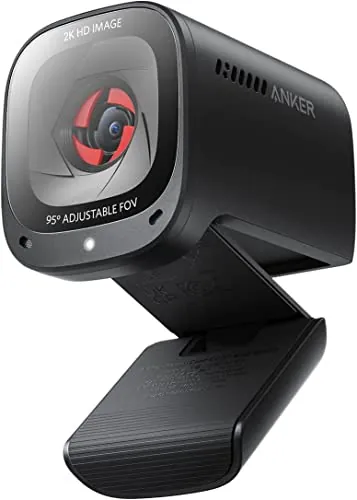
Anker PowerConf C200
Black. Exact C200 hardware model A3369; Anker manual and product page describe this model. Confirm the Amazon listing still selects the intended C200 variant.
Model A3369
Amazon ASIN B09MFMTMPD
Differences that matter
What matters most to you?
Choose a priority to see what it changes.
Sources for Capture modes and connection ceiling
Sources for Camera distance, focus and framing
Sources for Microphone and app setup
Sources for Cable, mount and extra equipment
First check the mode your recording app can actually use
Facecam 4K’s 2160p60 mode requires USB 3 and MJPG. The same manufacturer spec lists 2160p30 with NV12 or MJPG, while USB 2 modes stop at 1080p60. If you are choosing it for a recording workflow, check both the host connection and the app’s capture-mode list; a 4K label by itself leaves out the important conditions.
The C200 A3369 manual lists a maximum of 2K at 30 fps. Anker’s support FAQ cautions that third-party conferencing software can output below the camera’s maximum. If your main use is calls, confirm the resolution available to your account and organization in that service. Neither camera’s hardware specification guarantees what remote participants receive.
Measure your usual camera-to-face distance
Elgato describes Facecam 4K as fixed focus: at 4K, its listed range is 30–120 cm; at 1080p, the listed range begins at 25 cm and extends to infinity. C200 uses automatic focus, with the A3369 manual listing 15 cm–3 m. Measure from the lens to where you normally sit, rather than assuming a small desk or laptop placement will work the same for every model.
For framing, C200 offers selectable 65°, 78° and 95° views in AnkerWork software; Facecam 4K lists 90°. Pick the view based on whether you want to include more of the room or keep the composition tighter, then verify it in your actual setup. These documented controls do not rank image quality or guarantee focus behavior while moving.
Decide whether the webcam also needs to supply audio
Facecam 4K has no built-in microphone. Its buyer needs to keep a headset, computer microphone or separate microphone in the setup. C200 includes dual stereo microphones, but its manual says the camera and microphones may need to be chosen separately in the operating system or application.
Do a short camera-and-mic selection check in the app you will use. The C200 privacy slider covers the lens and turns the camera off; Anker’s FAQ says its microphones can still be used with the cover closed. Treat camera privacy and microphone mute as separate controls.
Count the port, cable and mounting pieces before you order
Elgato’s US page lists a monitor mount and detachable 2 m USB-C-to-USB-C 3.0 cable in the box. A USB-C-to-A adapter is not included. For 2160p60, an adapter or hub must not turn your connection into a USB 2 path.
C200’s A3369 manual describes a supplied cable with USB-C at the camera and USB-A at the computer. It also shows an adjustable clip/stand and a 1/4-inch tripod thread, with a tripod not included. Compare these pieces with the ports and mount you already have; count only any extra adapter, audio source or tripod needed for your actual desk.
Product details
Elgato Facecam 4K
The 2160p60 mode is a specific USB 3 plus MJPG option, not a general promise about every application. Facecam 4K has fixed focus and no built-in microphone, so check your seated distance and plan a separate audio input.
- Highest documented mode
- 2160p60 over USB 3 using MJPG only; 2160p30 supports NV12 or MJPG. USB 2 modes top out at 1080p60. Source
- Focus and view
- Fixed focus; 30–120 cm at 4K, 25 cm to infinity at 1080p; 90° field of view. Source
- In the box and audio
- US page lists a monitor mount and 2 m USB-C-to-USB-C 3.0 cable; no built-in microphone. USB-C-to-A adapter is not included. Source
Anker PowerConf C200
C200 combines the camera with dual microphones and offers three software-selectable framing angles. The manual says to select its camera and microphones in the computer or app when needed; Anker also cautions that third-party conferencing software can restrict the delivered video mode.
- Maximum documented capture mode
- 2K at 30 fps in the A3369 manual; Anker’s FAQ says the camera supports 30 fps, while third-party app output may be lower. Source
- Focus and framing
- Automatic focus; 15 cm–3 m focus distance; 65°, 78° or 95° field of view. Source
- Microphone and connection
- Dual stereo microphones; supplied cable connects USB-C at the webcam to USB-A at the computer. The system or app may need the camera and microphones selected separately. Source
Before you buy
Community discussions
C200 recognition differed on one MacBook
Anker PowerConf C200
One C200 owner reported that a MacBook Pro running macOS 14.5 did not recognize the camera or its microphones through a hub or direct connection; the same owner said it worked on their Linux and Windows systems.
What to check
Test camera and microphone recognition on the exact Mac, macOS version, and connection path you plan to use. This single MacBook report does not establish general macOS incompatibility or a camera defect.
Common questions
Can Facecam 4K record uncompressed 2160p60?
Elgato lists 2160p60 as MJPG only. Its 2160p30 mode supports NV12 or MJPG. Match the resolution, frame rate, codec and USB connection to the capture app you plan to use.Elgato Facecam 4K Technical Specifications
Will either webcam guarantee 4K or 2K video in a call?
No. The supported camera modes do not guarantee what a conferencing app or service captures and sends. Anker’s A3369 FAQ gives examples of lower app limits, so check your current app settings and plan before buying for a resolution target.PowerConf C200 A3369 FAQElgato Facecam 4K Technical Specifications
Does the C200’s privacy cover mute its microphones?
No. Anker says the microphones can still be used while the lens cover is on. Close the camera cover for the lens and mute or deselect the microphone separately in the system or app.PowerConf C200 A3369 FAQ
Which model is easier to place at a desk?
That depends on your measured distance, view and available ports. Facecam 4K’s 4K focus range is 30–120 cm and fixed; C200’s manual lists autofocus from 15 cm to 3 m and three field-of-view settings. Check monitor thickness and cable routing against the actual mount and port locations before ordering.Elgato Facecam 4K Technical SpecificationsPowerConf C200 A3369 User Manual
Sources and scope
This is a feature and setup comparison, not a hands-on test. Manufacturer capture specifications do not establish image quality or what a meeting service sends to other participants. Anker’s current product page available for this review is its Canadian A3369 page, and its linked manual dates to 2022; use it for the A3369 hardware instructions and verify current software support for your own computer and app.
Related comparisons
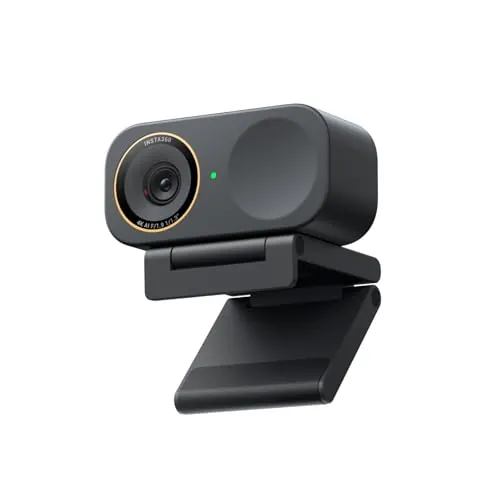
Elgato Facecam 4K vs Insta360 Link 2C Pro: 4K60 or Autofocus and Built-In Audio?
These webcams suit different desk routines. Elgato lists Facecam 4K at 2160p60 over USB 3.0 in MJPG, with fixed focus tuned for a desk position and no built-in microphone. Insta360 lists Link 2C Pro at up to 4K30, with autofocus, software auto-framing and two microphones. Your video app, USB port, subject distance, audio setup and privacy routine matter more than the resolution label alone.
Read comparison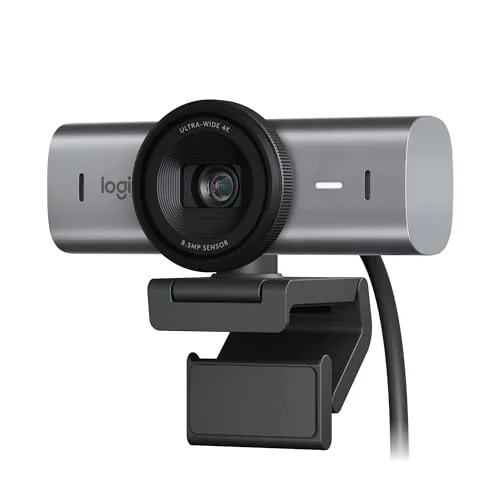
Elgato Facecam 4K vs Logitech MX Brio: Frame Rates, Focus and Desk Use
Elgato Facecam 4K can output 4K60, but only as MJPG over USB 3.0; USB 2.0 tops out at 1080p60. Logitech MX Brio's published maximum is 4K30 or 1080p60 and requires USB-C with USB 3.0 support. The Elgato uses fixed focus and has no built-in mic; MX Brio adds autofocus, dual mics and a rotating privacy shutter.
Read comparison