
Products compared

Elgato
Elgato Facecam 4K Studio Webcam — Black
Black Facecam 4K selected listing; official Elgato page lists SKU 10WAF9901 and monitor mount plus USB-C-to-C USB 3.0 cable
Model Facecam 4K (listed model 20WAF9901; Elgato page SKU 10WAF9901)
Amazon ASIN B0DVZG36J8
Logitech
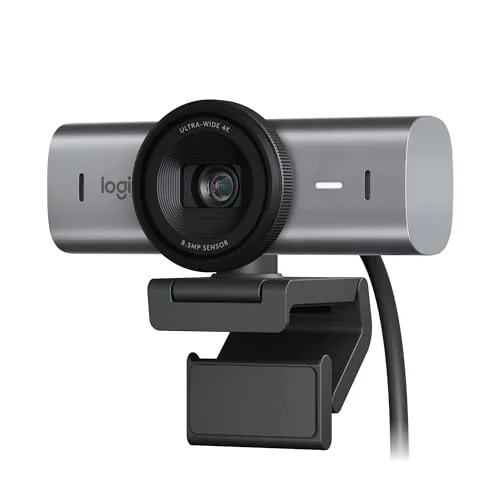
Logitech MX Brio UHD 4K Webcam — Graphite
Graphite MX Brio selected listing; USB-C 3.0 webcam with included USB-C cable and mount clip
Model MX Brio (960-001545; support hardware M/N VU0066)
Amazon ASIN B0BFJ4CRKD
Differences that matter
What matters most to you?
Choose a priority to see what it changes.
Sources for Frame rate, format and host port
Sources for Focus and where you sit or present
Sources for Microphone and physical privacy control
Sources for Operating system and camera controls
First check the output mode against your computer
The headline numbers describe different setups. Elgato Facecam 4K lists 2160p60 only over USB 3.0 and only in MJPG; its quick-start guide recommends a direct USB 3.0-or-later port and cable instead of a hub. USB 2.0 is a supported fallback, but the listed video modes top out at 1080p60. If your streaming or conferencing app must receive 4K60, verify it accepts MJPG and that the host port is actually USB 3.0 or later.
Logitech MX Brio's listed maximum is 4K30 or 1080p60, and Logitech requires USB-C supporting USB 3.0. It is a better match to consider when 4K30 is enough and you want its other documented desk features; do not buy it expecting a 4K60 mode just because the computer can produce one.
Fixed focus versus autofocus and Show Mode
Facecam 4K is fixed focus: Elgato lists 30–120 cm at 4K and 25 cm to infinity at 1080p. It is a defined desk-distance choice, so measure your seated distance rather than assuming it will refocus as you lean in or out.
Logitech documents autofocus on MX Brio and says you can disable it and adjust focus manually. Its Show Mode is a separate desk workflow: tilt the camera down to show notes or sketches during a call. Those published features help describe how the webcam can be operated; they do not establish faster focusing, sharper output or better image quality in a real meeting.
Plan audio and privacy as part of the camera setup
Elgato explicitly says Facecam 4K has no built-in microphone, so include the microphone you plan to use in the overall budget and desk layout. Logitech's MX Brio specifies two integrated microphones, but that is not a comparative test of voice pickup or noise handling.
Logitech documents a rotating physical privacy shutter that blocks the camera when closed. The Elgato materials consulted list Facecam 4K, monitor mount and USB-C cable in the box but do not establish an integrated shutter; check the exact retail listing or plan a separate cover if that physical control matters.
Product details
Elgato Facecam 4K Studio Webcam — Black
A fixed-focus webcam with a higher listed maximum frame rate, conditional on USB 3.0, and no built-in microphone.
- Maximum listed video modes
- USB 3.0: up to 2160p60 (MJPG only); USB 2.0: up to 1080p60 Source
- Focus
- Fixed; 30–120 cm at 4K and 25 cm to infinity at 1080p Source
- Microphone and software
- No built-in microphone; Camera Hub for supported Windows, Mac and iPadOS versions Source
- Connection
- USB-C; maker recommends direct USB 3.0 or later rather than a hub for best performance Source
Logitech MX Brio UHD 4K Webcam — Graphite
A USB-C/USB 3 webcam whose official page tops out at 4K30, with autofocus, integrated microphones and a physical shutter.
- Maximum listed video modes
- 4K at 30 fps or 1080p at 60 fps Source
- Host port
- USB-C port supporting USB 3.0; USB-C-to-C cable is listed in the box Source
- Focus, microphone and privacy
- Autofocus can be disabled for manual focus; integrated dual beamforming microphones; rotating built-in privacy shutter Source
- Desk use
- Show Mode: tilt the webcam downward to share notes or sketches on a desk during a call Source
Before you buy
Community discussions
Testing a high-resolution webcam mode
Logitech MX Brio UHD 4K Webcam — Graphite
An MX Brio owner reported a momentary freeze and a settings warning after selecting 4K or 1080p at 60 frames per second.
What to check
Try the resolution and frame rate you will actually use, on the intended cable, port and capture app. Confirm there are no interruptions while recording.
Common questions
Can Facecam 4K record 4K60 over USB 2.0?
No. Elgato lists 2160p60 only over USB 3.0 and only with MJPG encoding. Its USB 2.0 modes top out at 1080p60. For 4K60, also check the computer port, cable and capture app.Facecam 4K — Premium 4K 60FPS WebcamElgato Facecam 4K Quick Start Guide
Does MX Brio support 4K60?
Logitech lists 4K at 30 fps or 1080p at 60 fps as MX Brio's maximum modes. Its support page also requires USB-C with USB 3.0 support.MX Brio UHD 4K Webcam — Graphite, 960-001545Specification — MX BRIO
Which webcam can focus when I move or show something on my desk?
Elgato lists Facecam 4K as fixed focus with a 30–120 cm range at 4K. Logitech documents MX Brio autofocus (which can be disabled for manual focus) and Show Mode, where the camera tilts down to share desk notes or sketches. Neither fact predicts tracking or image quality in a particular room.Facecam 4K — Premium 4K 60FPS WebcamGetting Started — MX BRIOMX Brio UHD 4K Webcam — Graphite, 960-001545
Sources and scope
This is a maker-specification and setup guide, not a camera test. A published resolution or frame rate does not establish image quality, low-light performance, latency, skin tone, autofocus tracking or performance in a specific video app. Capture modes depend on ports, cable, OS, host and software. Exact camera bundle contents must be checked on the retailer listing.
Related comparisons
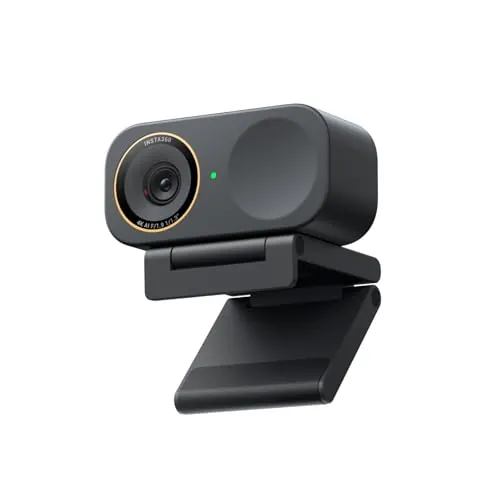
Elgato Facecam 4K vs Insta360 Link 2C Pro: 4K60 or Autofocus and Built-In Audio?
These webcams suit different desk routines. Elgato lists Facecam 4K at 2160p60 over USB 3.0 in MJPG, with fixed focus tuned for a desk position and no built-in microphone. Insta360 lists Link 2C Pro at up to 4K30, with autofocus, software auto-framing and two microphones. Your video app, USB port, subject distance, audio setup and privacy routine matter more than the resolution label alone.
Read comparison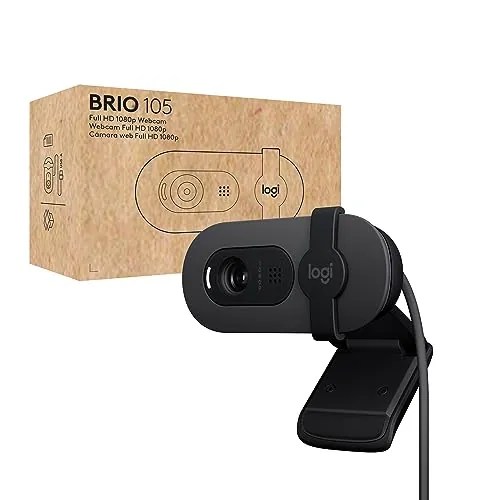
Logitech Brio 105 960-001579 vs MX Brio 960-001545: 1080p Calls or 4K Capture?
The Graphite Logitech Brio 105 (960-001579) tops out at 1080p/30, has fixed focus and an attached USB-A cable. The Graphite MX Brio (960-001545) lists 4K/30 and 1080p/60 modes, a USB-C 3.0 connection, advanced Logitech software controls and a tilt-down Show Mode. These are published capabilities, not an image-quality test: check your video app, computer port and software policy before choosing the higher-spec camera.
Read comparison