
Products compared
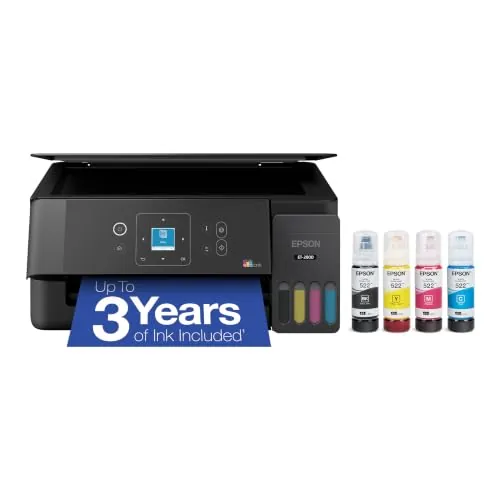
Epson
Epson EcoTank ET-2900 Wireless All-in-One Color Supertank Printer — Black
Exact black U.S. ET-2900 with color printing, refillable EcoFit tanks, USB and Wi-Fi. Its scanner is a flatbed with no automatic document feeder; originals are placed on the glass. The North American manual documents Epson 522 black, cyan, magenta and yellow bottles and a refill/level-reset procedure.
Model C11CL63201
Amazon ASIN B0GSSBQGX7
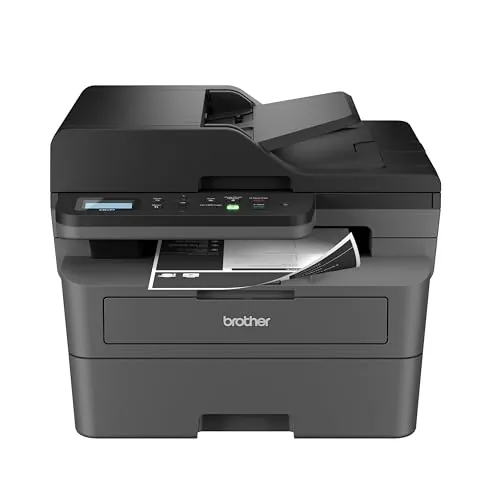
Brother
Brother DCP-L2640DW Wireless Monochrome Laser Multi-Function Printer
Exact U.S. monochrome all-in-one. It prints and copies in black and white while its scanner can capture color originals. Brother lists a 50-page automatic document feeder, a flatbed, automatic two-sided printing, and Ethernet, dual-band Wi-Fi and USB 2.0. Its feeder scans one side at a time; Brother's separate toner and drum supplies require distinct replacement planning.
Model DCPL2640DW
Amazon ASIN B0CPLFTPCV
Differences that matter
What matters most to you?
Choose a priority to see what it changes.
Sources for Color on the printed page
Sources for Ink, toner and maintenance routine
Sources for Scanning loose sheets, books and stacks
Sources for Two-sided output versus two-sided capture
Start with what must appear on paper
The first question is output color. The ET-2900 is a color printer with four refillable ink tanks. The DCP-L2640DW is a black-and-white printer and copier, although its scanner can capture color. If you only need a color scan to a computer or phone, Brother's monochrome printing does not automatically disqualify it; if the final page must be color, it does.
The supply labels do not answer what the running cost will be. Epson's North American manual describes four separate 522 inks, tank-level checks, refill and level-reset steps. Brother lists a TN830-family black toner cartridge and a distinct DR830 drum. Compare those maintenance routines with your actual color mix and supply prices; this guide does not convert advertised yield figures into an ownership-cost winner.
Match the scanner to the originals you handle
ET-2900 scanning is flatbed-only: lift the lid, position one original on the glass, scan, then replace it for the next page. That is a clear routine for occasional single pages or originals that should stay flat, but it does not feed a stack for you.
DCP-L2640DW combines a flatbed with a 50-page ADF maximum. Brother's brochure bases that maximum on 20 lb stock, and the feeder scans one side at a time. Treat the ADF as help for supported loose sheets, not as a promise for every paper or as automatic handling of two-sided originals. For books or fragile pages, the flatbed remains the relevant path.
Separate duplex printing from duplex scanning
Brother lists automatic two-sided printing for supported media. The brochure separately says duplex scanning is not available and duplex copying is not available. That distinction matters: a printer can turn a sheet over for the output side without its scanner reading both sides of an original in one pass.
For ET-2900, the series manual describes manual two-sided printing in the Windows driver: complete one side, turn and reload the paper, then print the other side. Supported media, driver options and connection conditions apply. If your requirement is effortless duplex printing across any device, or automatic two-sided scanning, verify those exact workflows before ordering; neither product is a documented duplex-scanning solution.
Use a short pre-buy worksheet for paper and setup
Before choosing, write down: (1) pages that need color on paper; (2) whether originals are loose sheets or books; (3) whether two-sided work means printing, copying or scanning; (4) the paper sizes and weights you use; and (5) whether the printer will connect by Wi-Fi, USB or Ethernet. This prevents one feature label—EcoTank, laser, ADF or duplex—from standing in for the whole workflow.
Brother specifies a 250-sheet tray and single-sheet manual feed; its brochure ties capacity maxima to 20 lb paper. Epson's product page lists a 100-sheet tray, while the manual gives more specific media loading instructions, including lower limits for some stocks. Compare the exact paper you load rather than the headline numbers. Epson lists USB and Wi-Fi; Brother adds Ethernet alongside dual-band Wi-Fi and USB 2.0. Check your space, network and available ports against the exact manuals and current OS support pages.
Product details
Epson EcoTank ET-2900 Wireless All-in-One Color Supertank Printer — Black
- Exact U.S. edition
- EcoTank ET-2900 Wireless All-in-One Color Supertank Printer, Black, model C11CL63201 Source
- Print and scan workflow
- Color printing; built-in scanner is a flatbed without an automatic document feeder, so originals are placed on the glass individually Source
- Ink routine
- Separate Epson 522 black, cyan, magenta and yellow inks; check tank levels, refill the matching tank and reset the level estimate as directed Source
- Connections
- Built-in USB and Wi-Fi; Epson Smart Panel supports printer or scanner operations from iOS and Android Source
Brother DCP-L2640DW Wireless Monochrome Laser Multi-Function Printer
- Exact U.S. model
- Brother DCP-L2640DW Wireless Monochrome Laser Multi-Function Printer, model DCPL2640DW Source
- Print, copy and scan
- Monochrome print/copy; scanner can scan in color. Automatic duplex printing is supported; duplex scanning is not. Source
- Original and paper handling
- 50-page ADF and 250-sheet tray maximums; brochure specifies 20 lb paper basis for the maxima. The ADF scans one side at a time. Source
- Supplies
- TN830-family black toner cartridge and separate DR830 drum unit Source
- Connections
- Ethernet, dual-band wireless and Hi-Speed USB 2.0 Source
Before you buy
Community discussions
Planning for occasional black-and-white paperwork
Brother DCP-L2640DW Wireless Monochrome Laser Multi-Function Printer
A US home user comparing the DCP-L2640DW with a Canon laser needed to scan and print black-and-white paperwork a few times a month. They wanted to print without internet service.
What to check
If you print only occasionally, count how many jobs require color. Then compare the Epson’s tank care and the Brother’s toner, feeder, and local connection for your real paperwork.
Comparing a feeder scan with the flatbed
Brother DCP-L2640DW Wireless Monochrome Laser Multi-Function Printer
A Brother DCP-L2640DW owner saw skewed scans through the automatic feeder in macOS Image Capture but reported straight scans on the flatbed. They saw similar skew on the replacement unit, with the cause unresolved.
What to check
Test a small paper stack in the Brother feeder if that is the workflow you want. Compare it with how you would scan the same pages on the Epson flatbed.
Common questions
Can the Brother DCP-L2640DW scan a color original?
Yes. Brother documents color scanning, even though the DCP-L2640DW prints and copies in black and white. If you need color on the page you print, choose a color-printing model such as the ET-2900 instead.Brother DCP-L2640DW Wireless Monochrome Laser Multi-Function PrinterEcoTank ET-2900 Wireless All-in-One Color Supertank Printer — Black, C11CL63201
Does Brother's automatic duplex printing mean it scans both sides of a sheet?
No. The automatic duplex function is for printing. The DCP-L2640DW feeder scans one side at a time, and Brother lists duplex scanning as unavailable. Its brochure also lists duplex copying as unavailable.Brother DCP-L2640DW U.S. Product Brochure
Can the Epson ET-2900 feed a stack of pages into its scanner?
No. The ET-2900 series guide identifies flatbed scanning and no automatic document feeder; place originals on the scanner glass one at a time. The Brother ADF is a distinct advantage only for supported loose-sheet originals.Epson ET-2900 Series User's Guide, North American editionBrother DCP-L2640DW U.S. Product Brochure
Can I use only black ink in the ET-2900 when printing text?
Epson's North American guide says all ink colors must be available for printing and are also used in maintenance. Check the tanks and follow Epson's matching-bottle refill and level-reset steps; this guide does not estimate refill timing or ink cost.Epson ET-2900 Series User's Guide, North American edition
Which model is cheaper to own?
This comparison cannot determine that without your print mix, current supply prices and replacement timing. ET-2900 uses four refillable 522 ink bottles; DCP-L2640DW uses a TN830-family black toner cartridge and a separate DR830 drum. Compare current exact supplies for your workload rather than treating the refill or laser label as a cost result.Epson ET-2900 Series User's Guide, North American editionBrother DCP-L2640DW Wireless Monochrome Laser Multi-Function Printer
Sources and scope
This guide covers the U.S. black Epson EcoTank ET-2900 model C11CL63201 (selected ASIN B0GSSBQGX7) and Brother DCP-L2640DW (DCPL2640DW; selected ASIN B0CPLFTPCV). Epson's ET-2900 manual is a North American series guide linked by its exact-model support page; its detailed manual guidance is not established by the available sources, so the article reuses previously reviewed exact-model sources. Brother's exact model page and brochure establish its listed functions and media limits. The 50-page ADF and 250-sheet input capacity are maximums with paper-specific conditions, not promises for every stock. Brother's duplex function is for printing; it does not automatically scan both sides. No hands-on comparison, print/scan quality ranking, speed result, reliability claim or total-cost conclusion is made.
Related comparisons

Canon PIXMA TR7120 vs Epson EcoTank ET-2900: Ink, Scanning and Two-Sided Printing
The Canon PIXMA TR7120 (7178C002) and Epson EcoTank ET-2900 (C11CL63201) handle ink and paper differently. Canon replaces PG-295/CL-286 cartridges, feeds stacks of compatible originals through a 35-sheet ADF, and prints two-sided automatically. Epson refills built-in tanks with keyed EcoFit bottles and scans on a flatbed; its computer driver prints odd and even pages separately, asking you to turn the paper between sides. Both list a 100-sheet plain-paper supply, but Canon uses a cassette and Epson a rear feeder.
Read comparison
Epson EcoTank ET-2900 vs Canon PIXMA TS6520: Ink, Duplex, and Desk Fit
The black Epson EcoTank ET-2900 (C11CL63201) uses four refillable tanks and Epson’s keyed EcoFit bottles; its refill routine includes checking the color, filling to the upper line, and resetting the ink estimate. The white Canon PIXMA TS6520 (7179C002) uses black and color FINE cartridges. For supported letter- or A4-size computer print jobs, Canon documents an automatic duplex path, while Epson’s ET-2900 guide describes separate odd/even passes with a paper-turn prompt and says the feature is unavailable for borderless printing. Both are flatbed scan-and-copy machines without an automatic document feeder. Use each maker’s operating dimensions to check shelf space, then allow room to reach the feeder, output area, scanner lid, and controls; neither source establishes a universal extra clearance gap.
Read comparison