
Products compared
Epson
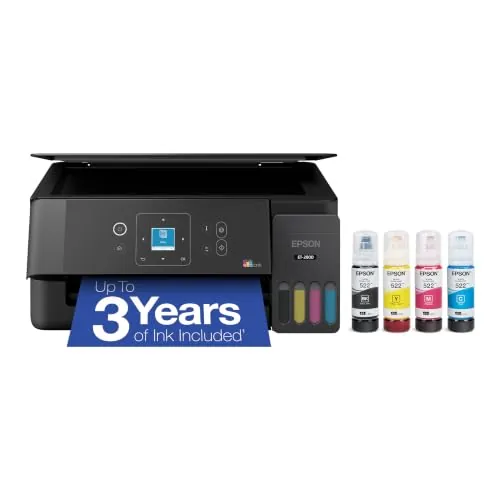
Epson EcoTank ET-2900 Wireless All-in-One Color Supertank Printer (Black)
Black U.S. model C11CL63201. Epson identifies keyed EcoFit bottle refills, a 100-sheet rear paper feeder, and a flatbed scanner.
Model C11CL63201
Amazon ASIN B0GSSBQGX7

Canon
Canon PIXMA TS6520 Wireless Multi-Function Home Printer (White)
White U.S. SKU 7179C002. Canon’s U.S. support page specifies a hybrid two-cartridge ink system, flatbed scanner, no ADF, duplex capability, and dimensions with paper installed.
Model 7179C002
Amazon ASIN B0FMBTJLX6
Differences that matter
What matters most to you?
Choose a priority to see what it changes.
Sources for Refill routine versus cartridge replacement
Sources for Two-sided printing and paper choice
Sources for Scanning and multi-page handling
Sources for Desk footprint and access while working
Start with the recurring job
For occasional mixed home printing, first decide which supply task suits you. Epson’s ET-2900 uses separate ink tanks and keyed EcoFit bottles; refill by matching the bottle to the tank, filling to the line, then resetting the displayed estimate. Canon’s TS6520 uses black and color FINE cartridges and its manual explains how to remove an empty one and install its replacement. The refill checklist is more hands-on than dropping in a cartridge, but the available sources do not say which routine is cheaper for your usage.
Epson also says that users should visually check the actual tank levels because displayed estimates depend on correctly resetting them. Treat that as a routine step when comparing maintenance, not as a claim about a particular refill interval.
Check what your duplex job really needs
Canon lists duplex printing for the TS6520 and its driver has a separate option for manual duplex; the Canon duplex procedure describes the automatic Letter/A4 path. Epson’s ET-2900 Series guide describes a computer job in which odd and even pages print in separate passes and the user turns over the paper when prompted. Epson says the described feature is unavailable for borderless printing. Its computer guide uses Windows as the example and warns Mac steps or feature support can differ, so confirm your exact driver and operating system if two-sided printing is a deciding factor.
Practical pre-buy check: list the paper sizes and media you use most, and whether borderless photos are part of that routine. Do not assume either listed duplex path applies to every paper size, media type, or driver combination.
Budget for each sheet and each side of the desk
Both machines scan originals on a flatbed and neither has an automatic document feeder in its product specification. Epson’s manual lists ADF among the ET-4900/L5390-only functions, while its ET-2900 guide describes placing an original and starting a control-panel scan to a computer. Canon lists a flatbed scanner with ADF capacity N/A, plus scan-to-computer, email, and Canon PRINT destinations. For a multi-page packet, assume you will position pages one by one on the glass.
Epson gives a useful storage-versus-printing example: its ET-2900 Series envelope grows from 14.2 in wide × 12.5 in deep × 6.4 in high to 14.2 in wide × 22.2 in deep × 8.1 in high during printing. Canon lists the TS6520 closed at 14.8 in long × 14 in wide × 6.7 in high and 14.8 in long × 21 in wide × 6.7 in high with paper installed. Tape these stated envelopes on the shelf before you buy, then open the scanner lid and check rear loading and output pickup. The figures do not supply extra wall, side, or overhead clearance requirements.
The Canon support page currently marks the TS6520 no longer available from Canon’s shop. That does not resolve the live status, condition, or seller of the selected Amazon ASIN, so check the exact listing before purchase.
Product details
Epson EcoTank ET-2900 Wireless All-in-One Color Supertank Printer (Black)
- Ink handling
- Four-color tanks use uniquely keyed EcoFit bottles. The manual describes matching bottle and tank color, filling to the upper line, then resetting the displayed ink estimate. Source
- Duplex and paper feed
- The model-scoped guide describes a computer duplex routine that prints odd and even pages in separate passes with the user turning the sheets. Epson says this feature is unavailable for borderless printing. The rear feeder and paper support extend for use. Source
- Scan workflow
- Flatbed scanning can be started from the control panel to a computer; the guide lists JPEG/PDF choices and Epson ScanSmart software. ET-2900 is in the manual family for which ADF is not listed as a feature. Source
- Storage and printing envelope
- The ET-2900 Series guide lists 14.2 in W × 12.5 in D × 6.4 in H when stored and 14.2 in W × 22.2 in D × 8.1 in H while printing. These are operating dimensions, not a recommended room-clearance measurement. Source
Canon PIXMA TS6520 Wireless Multi-Function Home Printer (White)
- Ink handling
- Canon identifies a hybrid black-and-color FINE cartridge system. Its TS6500 series replacement procedure, whose model list includes TS6520, describes removing the empty cartridge and installing the replacement in its designated slot. Source
- Duplex and media limit
- Canon lists duplex printing for TS6520. Its Windows driver guide distinguishes automatic from manual duplex, and the duplex procedure lists Letter and A4 paper sizes for automatic duplex. Source
- Scan workflow
- Canon lists a flatbed scanner and no ADF. Supported scan destinations include a computer, email, and the Canon PRINT app; the TS6520 is explicitly listed in Canon’s TS6500 series manual. Source
- Closed and paper-installed dimensions
- Canon lists 14.8 in L × 14 in W × 6.7 in H closed, and 14.8 in L × 21 in W × 6.7 in H with paper installed. Preserve Canon’s L/W labels when comparing shelf orientation; these figures do not state a separate wall or lid-opening clearance. Source
Before you buy
Community discussions
Testing the app you use to print from an iPad
Epson EcoTank ET-2900 Wireless All-in-One Color Supertank Printer (Black)
An EcoTank ET-2900 owner reported that a phone and an iPad stopped printing reliably after initially working in Cricut Design Space and Canva. Printing from their Mac continued to work.
What to check
Test a small project from the app and device you use to create it. Include a separate print from a computer if it will be your fallback.
Proofing sticker colors on your normal paper
Canon PIXMA TS6520 Wireless Multi-Function Home Printer (White)
A PIXMA TS6520 owner tried matte sticker paper and plain paper. Both gave color that looked less saturated than they wanted, even after trying different print sources.
What to check
Print a small color sample on the media you use before committing to larger runs. Check ink replacement or refill steps after you know which output suits your projects.
Common questions
Does the Epson ET-2900 automatically print both sides?
The ET-2900 Series computer guide describes separate odd/even print passes and a prompt to turn the paper over. It also says the feature is unavailable for borderless printing. Epson’s computer steps use Windows as the example and warn Mac steps or feature support may differ.Epson User’s Guide: Printing on 2-SidesEpson User’s Guide: Introduction and explicit model/feature scope
Which paper sizes does Canon list for automatic duplex on the TS6520?
Canon’s TS6500 series duplex guide lists Letter and A4 for automatic duplex printing. Confirm the current driver, paper type, and settings for your particular job.Canon TS6500 series: Duplex Printing size and setup limitsCanon Online Manual: TS6500 series includes TS6520
Can either printer scan a stack of pages automatically?
Neither product’s official specification lists an automatic document feeder. Both are flatbed workflows, so expect to place each original on the glass unless the exact version you are considering has a separately verified configuration difference.Epson User’s Guide: Introduction and explicit model/feature scopeCanon Support for PIXMA TS6520: specifications, scan type, dimensions, and availability status
Which printer is cheaper to run?
The cited material does not establish a cost winner. Compare current genuine ink options and your own document/photo mix, because tank versus cartridge design alone does not establish your long-term spending or page yield.EcoTank ET-2900 Wireless All-in-One Color Supertank Printer – Black (C11CL63201)Canon Support for PIXMA TS6520: specifications, scan type, dimensions, and availability status
What should I measure before putting one on a shelf?
Measure the usable desk width and depth with the printer positioned for paper loading and output pickup, then check space above for the scanner lid. Epson publishes a W×D×H printing envelope; Canon publishes a closed dimension and a separate paper-installed dimension labeled L×W×H. Neither cited page supplies an extra wall-clearance rule.Epson User’s Guide: Dimensions for ET-2900 SeriesEpson User’s Guide: Printing Documents and rear paper feed contextEpson User’s Guide: Scanning Originals to a ComputerCanon Support for PIXMA TS6520: specifications, scan type, dimensions, and availability status
Sources and scope
This is a feature and workflow comparison from current U.S. manufacturer product, support, and manual sources. It does not compare print quality, measured speed, reliability, scan quality, ink yield, refill frequency, supply cost, or total cost of ownership. Epson’s ET-2900 Series computer-printing guide uses Windows as its example and warns Mac steps or feature support may differ; its listed two-sided workflow is unavailable for borderless printing. Canon’s automatic duplex manual lists Letter and A4 as the supported paper-size choices for that path. Listed operating dimensions are not manufacturer-recommended wall, ventilation, or lid-opening clearances. At research time Canon’s U.S. shop page marked the TS6520 discontinued; that does not determine whether a particular Amazon offer is currently available or its condition, so verify the exact ASIN and seller listing.
- EcoTank ET-2900 Wireless All-in-One Color Supertank Printer – Black (C11CL63201)
- Epson ET-2900 Support (U.S., model C11CL63201)
- Epson User’s Guide: Introduction and explicit model/feature scope
- Epson User’s Guide: Refilling the Ink Tanks
- Epson User’s Guide: Reset the Ink Level
- Epson User’s Guide: Printing on 2-Sides
- Epson User’s Guide: Scanning from the Control Panel
- Epson User’s Guide: Dimensions for ET-2900 Series
- Epson User’s Guide: Printing Documents and rear paper feed context
- Epson User’s Guide: Scanning Originals to a Computer
- PIXMA TS6520 U.S. product page (SKU 7179C002)
- Canon Support for PIXMA TS6520: specifications, scan type, dimensions, and availability status
- Canon Online Manual: TS6500 series includes TS6520
- Canon TS6500 series: Replacing a FINE Cartridge
- Canon TS6500 series Windows driver: Page Setup Tab Description
- Canon TS6500 series: Duplex Printing size and setup limits
Related comparisons

Canon PIXMA TR7120 vs TS6520: ADF, Ink, Duplex & Space Compared
The Canon PIXMA TR7120 adds a 35-sheet letter / 5-sheet legal automatic document feeder (ADF); the TS6520 scans from its flatbed only. Both use PG-295 black and CL-286 color ink, list a 100-sheet plain-paper cassette, and print automatically on both sides. Compare the feeder's real workflow value with the height and access your space allows.
Read comparison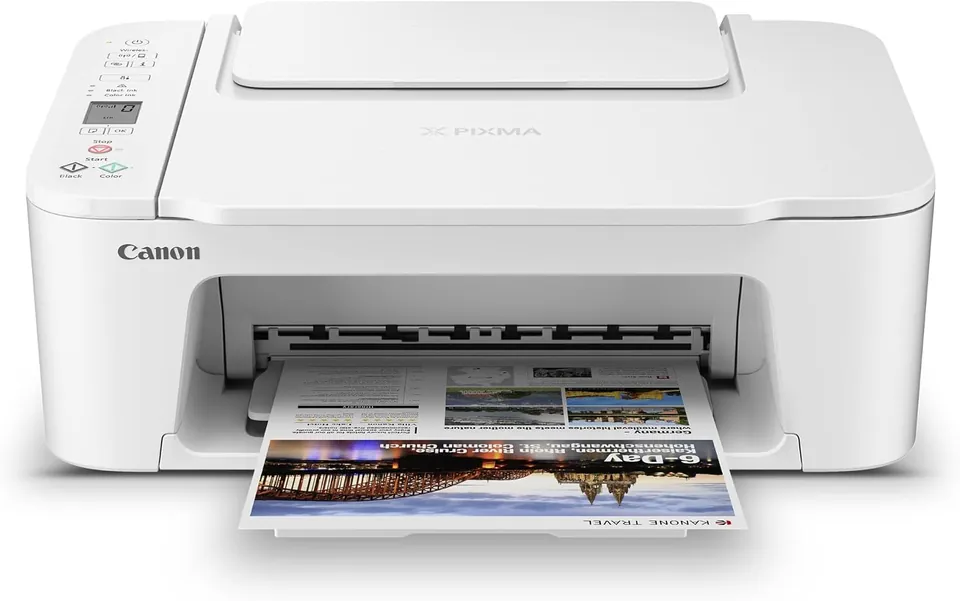
Canon PIXMA TS3720 vs TS6520: Duplex, Ink and Paper Loading
For the exact white U.S. models TS3720 (6671C022) and TS6520 (7179C002), choose around how you print: the TS6520 adds automatic duplex, borderless output through Letter, and a 100-sheet cassette. The TS3720 lists simplex capability, with manual duplex instructions in Canon's Windows driver; it loads up to 60 plain sheets at the rear. Their ink families differ, and Canon's published yield data is not directly comparable, so this guide does not name a lower-cost printer.
Read comparison