
Products compared
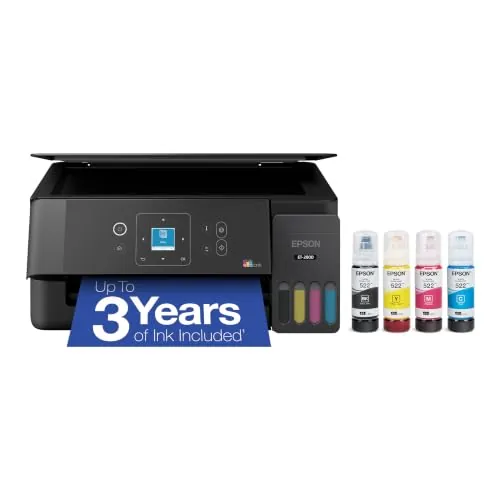
Epson
Epson EcoTank ET-2900 Wireless All-in-One Color Supertank Printer – Black
Black U.S. model; refillable EcoTank ink, print/scan/copy, flatbed scanner, rear paper feeder and Wi-Fi/USB.
Model C11CL63201
Amazon ASIN B0GSSBQGX7
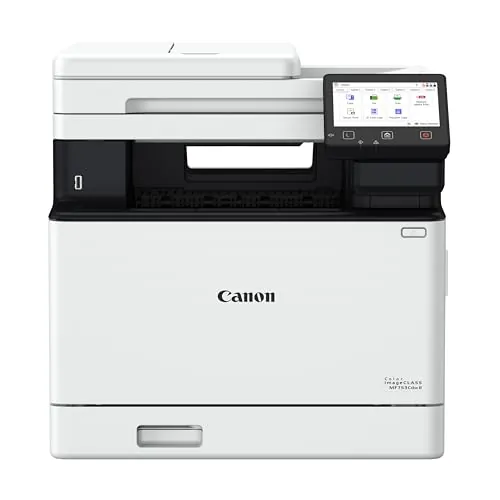
Canon
Canon Color imageCLASS MF753Cdw II
U.S. MF753Cdw II color laser all-in-one; print/scan/copy/fax with 50-sheet duplex ADF, standard cassette and multipurpose tray.
Model 7185C011
Amazon ASIN B0FP3LJ74G
Differences that matter
What matters most to you?
Choose a priority to see what it changes.
Sources for Originals: flatbed versus batch feeding
Sources for Ink/toner replenishment format
Start with the originals you scan
The clearest workflow difference is how a stack of paperwork enters the scanner. Epson’s ET-2900 guide identifies a flatbed and explicitly excludes ADF from the ET-2900 series. Canon lists a 50-sheet automatic two-sided feeder for the MF753Cdw II; the matching manual says its feeder handles up to 50 Letter sheets and identifies this model as an automatic 2-sided document feeder. If you regularly scan the front and back of forms or packets, that feature is a concrete reason to favor the Canon. For an occasional book, receipt, or single sheet, the Epson flatbed can be enough.
Canon also lists fax on the exact MF753Cdw II. Do not transfer that feature to the ET-2900 from the shared Epson guide: Epson explicitly scopes its fax instructions to ET-4900/L5390 models. This is a feature-fit answer, not a measured productivity ranking.
Check paper access and duplex steps
The ET-2900 feeds from the rear and lists a 100-sheet tray. Canon lists a 250-sheet standard cassette and a 50-sheet multipurpose tray. Think through your placement: can you reach the Epson’s rear support to load paper, and do you want a cassette plus a separate tray for the Canon? The maker capacities are specifications; this page does not predict how often you will refill them.
For two-sided output, Epson’s guide describes a manual process that asks you to turn the pages. Canon lists two-sided printing for the MF753Cdw II. If that is a frequent job, the difference is operationally relevant; there is no timed test or promise about how long either job takes.
Map the printer to the desk and network
Epson lists the ET-2900 family at 14.2 × 12.5 × 6.4 inches in storage position and 14.2 × 22.2 × 8.1 inches in printing position. The Canon MF753Cdw II body is listed at 16.8 × 18.2 × 17 inches. The numbers are not like-for-like operating-clearance diagrams: leave room to raise/open feed parts, access paper, collect output and route cables. Measure those areas on your actual desk before buying.
Connection options also differ: Epson lists USB and Wi-Fi; Canon lists USB, Wi-Fi/Wi-Fi Direct and Gigabit Ethernet. If the printer must join a wired LAN, Canon has the documented port. If wireless or a direct USB connection is your plan, both list those routes.
Compare the supply format without guessing total cost
The Epson has tanks refilled using keyed EcoFit bottles. Canon specifies the toner 069 family for the MF753Cdw II. That distinction helps you identify the supply routine you would maintain, but it does not tell you which printer costs less to own: actual usage, color mix, replacement timing and current supply prices matter, and no matched cost-per-page analysis was performed.
Product details
Epson EcoTank ET-2900 Wireless All-in-One Color Supertank Printer – Black
The ET-2900 is the simpler document station here: put individual originals on its flatbed, feed paper from the rear, and refill its tanks with compatible Epson EcoFit bottles. Epson’s shared-family guide explicitly excludes fax, ADF and Ethernet instructions from the ET-2900 series.
Canon Color imageCLASS MF753Cdw II
The MF753Cdw II is configured for a busier paperwork chain: it can feed a stack of originals through its two-sided ADF, fax, print on both sides automatically, and connect by wired Ethernet as well as Wi-Fi or USB. Its stated body dimensions do not include the room your chosen paper and cable setup needs.
Before you buy
Community discussions
A small-office shopper measures the printer space
Epson EcoTank ET-2900 Wireless All-in-One Color Supertank Printer – Black
The OP is considering an ET-2900 for a small office and gives a 15.75-by-20-inch file-cabinet top as the available space. They want to print, scan and copy documents and connect directly to a Windows laptop by USB-A. This is a shopping question, not a fit result.
What to check
Measure the printer footprint and leave room to access its scanning and paper paths; also check the cable route and whether the chosen unit’s document workflow fits your office. The post does not confirm that either printer fits the cabinet.
A home shopper names the MF753Cdw II for two-sided scanning
Canon Color imageCLASS MF753Cdw II
A U.S. shopper looking for a color laser that can scan both sides lists the Canon imageCLASS MF753Cdw II and a Brother model. They also mention having a separate Epson sheetfed scanner. This is a requirement question, not an ownership or performance report.
What to check
Decide whether two-sided scanning needs to be built into the printer or whether your separate scanner already covers it. Check the exact MF753Cdw II scanning workflow, and distinguish scanning both sides from duplex printing.
Common questions
Does the Epson ET-2900 have fax or an automatic document feeder?
No such feature is documented for the ET-2900 series in Epson’s shared manual. That guide says its fax and ADF instructions apply only to the ET-4900/L5390 series.ET-4900 Series / ET-2900 Series User’s Guide
Can both printers automatically print double-sided pages?
The Canon MF753Cdw II supports two-sided printing. Epson describes manual duplex printing for the ET-2900 family, with the pages turned when prompted.ET-4900 Series / ET-2900 Series User’s GuideCanon MF753Cdw II / MF751Cdw II User’s Guide – Basic SpecificationsCanon Color imageCLASS MF753Cdw II (7185C011)
Which one suits a home office with a wired printer network?
Canon lists Gigabit Ethernet, along with Wi-Fi and USB. Epson lists Wi-Fi and built-in USB for the ET-2900; Ethernet in the shared Epson manual is limited to other models in that guide.EcoTank ET-2900 Wireless All-in-One Color Supertank Printer – Black (C11CL63201)ET-4900 Series / ET-2900 Series User’s GuideCanon Color imageCLASS MF753Cdw II (7185C011)
Sources and scope
This is a manufacturer-specification comparison, not a hands-on test. No print quality, speed, reliability, supply-cost or cost-per-page ranking is made. Epson dimensions and weight are grouped ET-2900/ET-2920/L3360 figures in a guide that explicitly includes ET-2900 Series; use the printer in printing position for the depth check. Canon dimensions describe the unit and do not establish a specific desk fit or cable/paper clearance.
- EcoTank ET-2900 Wireless All-in-One Color Supertank Printer – Black (C11CL63201)
- ET-4900 Series / ET-2900 Series User’s Guide
- Epson ET-2900 Support (C11CL63201)
- Canon Color imageCLASS MF753Cdw II (7185C011)
- Canon MF753Cdw II / MF751Cdw II User’s Guide – Feeder Specifications
- Canon MF753Cdw II / MF751Cdw II User’s Guide – Basic Specifications
- Canon MF753Cdw II / MF751Cdw II User’s Guide — Placing Originals
- Canon MF753Cdw II / MF751Cdw II User’s Guide — Supported Functions and Options
Related comparisons

Canon PIXMA TR7120 vs Epson EcoTank ET-2900: Ink, Scanning and Two-Sided Printing
The Canon PIXMA TR7120 (7178C002) and Epson EcoTank ET-2900 (C11CL63201) handle ink and paper differently. Canon replaces PG-295/CL-286 cartridges, feeds stacks of compatible originals through a 35-sheet ADF, and prints two-sided automatically. Epson refills built-in tanks with keyed EcoFit bottles and scans on a flatbed; its computer driver prints odd and even pages separately, asking you to turn the paper between sides. Both list a 100-sheet plain-paper supply, but Canon uses a cassette and Epson a rear feeder.
Read comparison
Epson EcoTank ET-2900 vs Canon PIXMA TS6520: Ink, Duplex, and Desk Fit
The black Epson EcoTank ET-2900 (C11CL63201) uses four refillable tanks and Epson’s keyed EcoFit bottles; its refill routine includes checking the color, filling to the upper line, and resetting the ink estimate. The white Canon PIXMA TS6520 (7179C002) uses black and color FINE cartridges. For supported letter- or A4-size computer print jobs, Canon documents an automatic duplex path, while Epson’s ET-2900 guide describes separate odd/even passes with a paper-turn prompt and says the feature is unavailable for borderless printing. Both are flatbed scan-and-copy machines without an automatic document feeder. Use each maker’s operating dimensions to check shelf space, then allow room to reach the feeder, output area, scanner lid, and controls; neither source establishes a universal extra clearance gap.
Read comparison