
Products compared
Epson
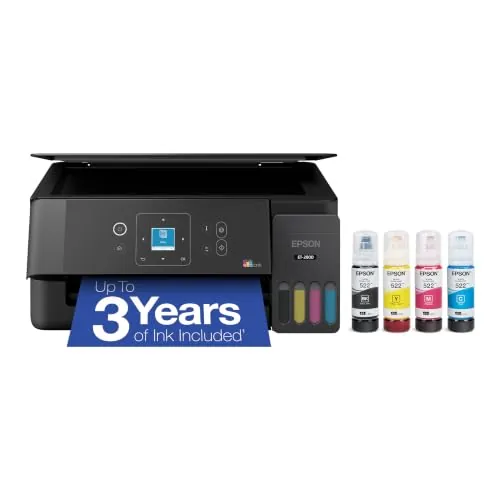
Epson EcoTank ET-2900 Wireless All-in-One Color Supertank Printer
Black US EcoTank ET-2900. Epson identifies model C11CL63201 and documents four refillable color tanks using the 522 bottle family, plus a flatbed scanner, a 1.44-inch color display, USB and Wi-Fi.
Model C11CL63201
Amazon ASIN B0GSSBQGX7
Canon
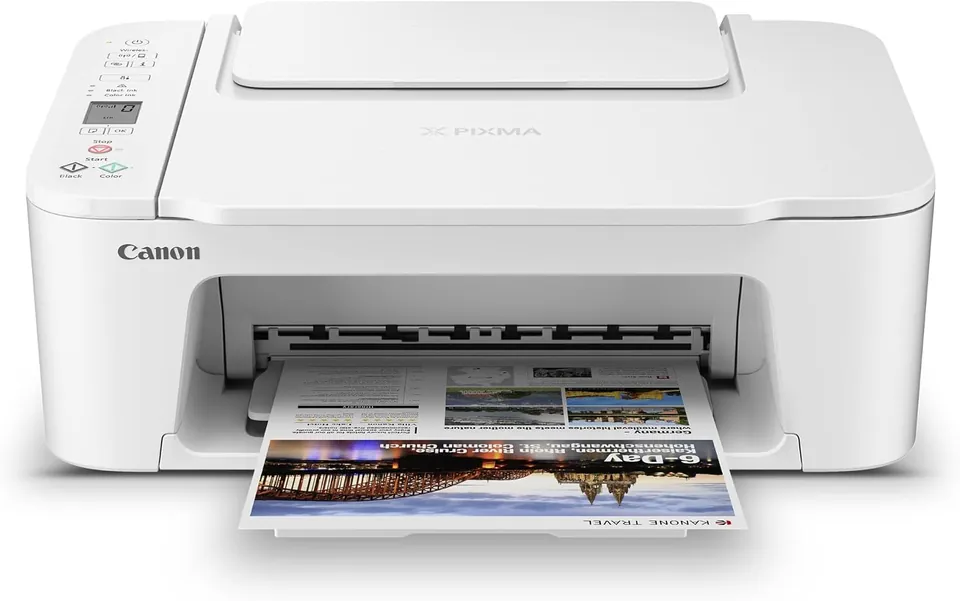
Canon PIXMA TS3720 Wireless Home All-in-One Printer
White US PIXMA TS3720. Canon's US product page identifies SKU 6671C022 and documents a two-cartridge FINE system, simplex print specification, flatbed scanning, USB and Wi-Fi.
Model 6671C022
Amazon ASIN B0D1DV6FV5
Differences that matter
What matters most to you?
Choose a priority to see what it changes.
Sources for Ink replenishment and user steps
Sources for Scanning, panel and device connection
Choose the ink routine you want to manage
The ET-2900 has separate black, cyan, magenta and yellow tanks filled with the specified Epson 522 bottles. The manual's refill sequence is to check each tank, match the bottle, fill to its mark and reset the level. The TS3720 uses two FINE cartridges: PG-275 black and CL-276 combined color. Canon's replacement steps have you remove the empty cartridge, fit the replacement and align the print head.
This is a handling choice, not a print-cost comparison. Refill bottles mean you manage tank levels and filling; cartridges mean you replace the black or combined-color unit. Actual supply use depends on what and how often you print, so the product names and package type do not establish a lower ownership cost.
Do not mistake manual duplex for automatic page turning
The ET-2900-series Windows guide documents two-sided output with a user reload after the first side. The TS3720 product page lists its print capability as single-sided, while the TS3700 Windows driver manual also describes a manual duplex option that pauses for paper reloading. Read these as a user-handled route, not a built-in automatic paper-flipping promise.
Canon's Windows manual-duplex instructions say the option is unavailable for non-plain media and for borderless, tiling/poster or booklet layouts. Both guides are host-specific. If you print from macOS, mobile or an app-specific workflow, check its exact instructions; if unattended automatic duplex is required, choose a model that explicitly lists automatic duplex.
Load paper for the jobs you actually print
The ET-2900 headline tray figure is not the limit for every stock. Epson's North American table associates 100 sheets with Epson Multipurpose Plus Letter paper and specifies one plain Legal sheet at a time. Canon lists 60 sheets of plain paper, but its TS3700-series table says about 10 Legal sheets; Canon also lists about 10 plain sheets for the output tray.
For recurring Legal forms, Canon's cited input table accepts a small stack where Epson's table requires one sheet at a time. For Letter and specialty media, check the rows that match the paper you buy and follow the feed conditions. A larger input stack does not mean unattended output stacking or prove faster printing.
Compare the flatbed and connection path
Both product pages describe print/copy/scan functions and a flatbed scanner. Epson pairs the ET-2900's glass scanner with a 1.44-inch color display and the Smart Panel app; its exact C11CL63201 support page lists printer and scanner operations on iOS and Android. Canon pairs the TS3720 flatbed with a 1.5-inch segment display and lists wireless scanning plus scan-to-Canon-PRINT app functions.
The documented connections include USB and Wi-Fi for both. Before ordering, confirm that the app, driver and wireless requirements match your phone, computer and network. If your work means scanning stacks of pages without placing originals one by one, verify an explicitly stated feeder configuration rather than assuming every all-in-one includes one.
Product details
Epson EcoTank ET-2900 Wireless All-in-One Color Supertank Printer
- Ink system
- Separate black, cyan, magenta and yellow tanks; refill with the specified Epson 522 bottles. The user guide describes checking levels, filling to the upper mark and resetting the ink-level indicator. Source
- Two-sided documents
- The ET-2900-series Windows guide documents manual two-sided printing: the user turns/reloads the paper after the first side. The guide does not establish automatic duplex hardware. Source
- Paper load
- Epson lists a 100-sheet tray; its North American manual table specifies that this figure applies to Epson Multipurpose Plus Letter paper, while plain Legal is loaded one sheet at a time. Source
- Scan and connection
- Flatbed scanner, 1.44-inch color display, USB and Wi-Fi; Epson's exact C11CL63201 support page says Smart Panel can perform printer or scanner operations from iOS and Android devices. Source
Canon PIXMA TS3720 Wireless Home All-in-One Printer
- Ink system
- Uses PG-275 pigment black and CL-276 dye-color FINE cartridges. Canon's model-series manual shows removing and replacing each cartridge and aligning the print head afterward. Source
- Two-sided documents
- Canon lists the TS3720 printing capability as single-sided (simplex). Its TS3700-series Windows driver guide separately documents manual duplex with a paper reload; it is not an automatic flip path. Source
- Plain-paper loading
- Canon lists 60 sheets in the rear tray for plain paper; the TS3700-series manual reduces that to about 10 Legal sheets and lists about 10 plain sheets for the output tray. Source
- Scan and connection
- Flatbed scanner for up to Letter/A4 originals; Canon lists USB, Wi-Fi, wireless scanning and scan-to-Canon-PRINT-app functions. TS3700-series manual index explicitly lists TS3720 in the covered model family. Source
Before you buy
Community discussions
A first-time shopper weighs the ET-2900 supply routine
Epson EcoTank ET-2900 Wireless All-in-One Color Supertank Printer
The OP compares the ET-2900 with a Brother Work Smart MFC-J1260W for black-and-white and color printing, and is deciding between filling separate tanks and replacing cartridges. This is a shopping question, with no use result in the post.
What to check
Match the refill and cartridge steps to your expected print mix and how often you print. The thread captures a supply-routine question, not a direct test of the Canon model.
A TS3720 shopper asks about wireless setup and refills
Canon PIXMA TS3720 Wireless Home All-in-One Printer
The OP is considering a Canon PIXMA TS3720 for occasional home-office documents and asks about wireless setup and refillable versus replacement supplies. The post does not report ownership or a purchase outcome, and it does not identify the country or exact retail SKU.
What to check
Confirm the regional TS3720 model and selected package before applying this question to the U.S. white SKU in this guide. Then check the connection and supply routine you need against that exact model.
Common questions
Does the Epson ET-2900 automatically print both sides?
The cited ET-2900-series Windows instructions describe manual two-sided printing: after the first side, you turn or reload the paper as prompted. They do not establish an automatic duplexer. Check the instructions for your operating system and chosen media.Epson ET-2900 Series User's Guide, US/North America, NPD7649-02 EN
Can the Canon PIXMA TS3720 print a two-sided document?
Canon's product specification describes the TS3720 as single-sided, but its TS3700-series Windows driver guide describes manual duplex: print one side, reload the paper as prompted, then print the reverse. The guide limits manual duplex for non-plain media and some layouts; it does not document automatic paper flipping.PIXMA TS3720 Wireless Home All-in-One Printer, US SKU 6671C022Canon TS3700 Series Windows Driver: Manual Duplex PrintingCanon TS3700 Series Online Manual; model list includes TS3720
Which printer loads more plain Legal paper at one time?
Canon's TS3700-series paper table lists about 10 Legal sheets in the rear tray. Epson's North American ET-2900 table lists one plain Legal sheet at a time. These are model-manual limits, not a comparison of output quality or overall productivity.Epson ET-2900 Series User's Guide, US/North America, NPD7649-02 ENCanon TS3700 Series: Paper Load LimitCanon TS3700 Series Online Manual; model list includes TS3720
What is the scanner and phone-app setup on these all-in-ones?
Both product pages document flatbed scanning. Epson's exact C11CL63201 support page lists Smart Panel scanner/printer operations for iOS and Android; Canon lists wireless scanning and scan-to-Canon-PRINT-app features. Confirm the app's current OS and network requirements for your devices before choosing.Epson ET-2900, exact model C11CL63201 US support pageEcoTank ET-2900 Wireless All-in-One Color Supertank Printer – Black, model C11CL63201PIXMA TS3720 Wireless Home All-in-One Printer, US SKU 6671C022
Sources and scope
This guide covers the US black Epson ET-2900, model C11CL63201, and white Canon PIXMA TS3720, SKU 6671C022. It compares documented consumable, paper and host workflows only; it does not rank print quality, speed, reliability, ink cost or long-term ownership cost. Epson's ET-2900-series manual and Canon's TS3700-series online manual/driver guide are scoped through the exact-model support/product pages or the Canon manual's model list. Both cited Windows two-sided procedures require the user to reload paper; Canon's product spec also describes its printer as simplex, so do not infer automatic duplex hardware. Paper capacities depend on media and conditions. For a multi-page scan workload, confirm the selected model's exact feeder configuration; the product pages document flatbed scanning, not an automatic document feeder. Before checkout, confirm the seller's current offer is for the white PIXMA TS3720, SKU 6671C022, and review its box list. This guide does not verify a particular offer's stock or package contents.
- EcoTank ET-2900 Wireless All-in-One Color Supertank Printer – Black, model C11CL63201
- Epson ET-2900, exact model C11CL63201 US support page
- Epson ET-2900 Series User's Guide, US/North America, NPD7649-02 EN
- PIXMA TS3720 Wireless Home All-in-One Printer, US SKU 6671C022
- Canon TS3700 Series Online Manual; model list includes TS3720
- Canon TS3700 Series: Replacing a FINE Cartridge
- Canon TS3700 Series: Paper Load Limit
- Canon TS3700 Series Windows Driver: Manual Duplex Printing
Related comparisons
Canon PIXMA TS3720 vs G3270: Cartridge Changes, Tank Refills and Document Handling
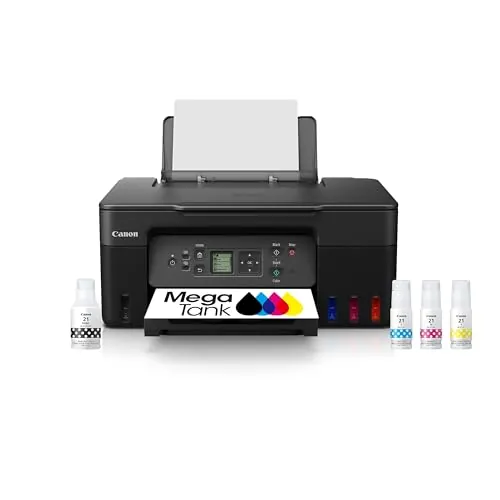
The white Canon PIXMA TS3720 (6671C022) uses replaceable PG-275 black and CL-276 color cartridges; the black PIXMA G3270 (5805C002) uses GI-21 bottles and integrated tanks. Both print one side at a time and scan one original at a time on a flatbed, so neither is a fit for automatic duplex or feeder-based handling of a stack of stapled pages. Compare refill habits, rear-tray capacity and the way you process paperwork before choosing.
Read comparison
Canon PIXMA TS3720 vs TS6520: Duplex, Ink and Paper Loading
For the exact white U.S. models TS3720 (6671C022) and TS6520 (7179C002), choose around how you print: the TS6520 adds automatic duplex, borderless output through Letter, and a 100-sheet cassette. The TS3720 lists simplex capability, with manual duplex instructions in Canon's Windows driver; it loads up to 60 plain sheets at the rear. Their ink families differ, and Canon's published yield data is not directly comparable, so this guide does not name a lower-cost printer.
Read comparison