
Products compared
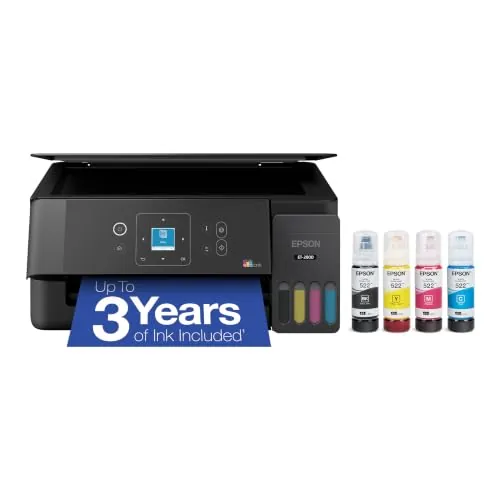
Epson
Epson EcoTank ET-2900 Wireless All-in-One Color Supertank Printer – Black
Black U.S. model, manufacturer model C11CL63201. The cited Epson manual groups ET-2900 Series with other printers; ADF, fax and Ethernet statements for ET-4900/L5390 do not apply here.
Model C11CL63201
Amazon ASIN B0GSSBQGX7
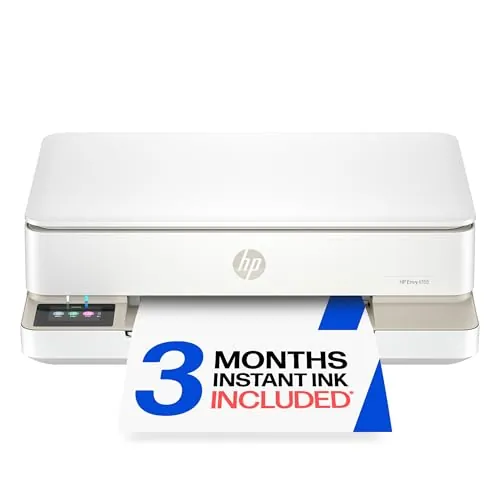
HP
HP Envy 6155 All-in-One Printer
Portobello U.S. product-number variant C2WR7A#B1H. Check the product number on the listing; adjacent Envy models can have different scan hardware.
Model C2WR7A#B1H
Amazon ASIN B0GMKRR64P
Differences that matter
What matters most to you?
Choose a priority to see what it changes.
Sources for Scanning a multipage original
Sources for On-printer screen and paper access
Sources for Closed footprint versus printing position
Start with how you want to replenish ink
The ET-2900 is the refill-tank option. Epson's current U.S. product page identifies the Black C11CL63201 and lists EcoFit bottle refilling. The model-matched section of Epson's grouped manual explains the routine in useful detail: start Fill Ink from Maintenance, use the correctly colored bottle, stop at the tank's upper line, then reset the ink estimate. That is more involvement than replacing a cartridge, and a buyer should be comfortable with bottle handling and keeping the displayed estimate aligned with the tank.
The exact HP Envy 6155 page identifies product C2WR7A#B1H and lists two cartridges: black and tri-color. It also advertises an Instant Ink offer, but that is an optional service, not a requirement to use the printer. HP says enrollment requires an internet-connected eligible printer and that its subscription cartridges stop working after the current billing cycle if the plan is cancelled; standard HP Original cartridges are a separate replacement route. Compare the routines and current terms, not a claimed cost or print volume advantage.
Separate duplex printing from scanning originals
The HP lists automatic two-sided printing. Epson's guide describes manual duplex: it prints odd and even pages in separate passes and asks the owner to turn the paper. That difference matters for recurring double-sided documents, though it does not tell us which printer is faster or prints better.
For scanning and copying, check the document path you need. The Epson guide is shared across several models and explicitly limits its ADF to ET-4900/L5390; the ET-2900 is in the non-ADF model group. HP lists a flatbed for C2WR7A#B1H, with an 8.5 × 11.7-inch maximum scan size. Therefore neither exact model is documented here as a feeder for a stack. An automatic print-duplex feature also does not establish that either one can scan both sides of an original automatically.
Check controls, shelf depth and paper access together
Epson lists a 1.44-inch color display and 100-sheet tray; HP lists a 2.4-inch color capacitive touchscreen, 100-sheet input and a 25-sheet output tray. The HP offers the larger on-printer screen as a documented feature, not a proven easier interface. If you use print and copy controls at the device, weigh that preference alongside ink handling.
For placement, compare the dimensions with trays and supports extended. Epson's manual lists the ET-2900 Series at 14.2 × 12.5 × 6.4 inches stored and 14.2 × 22.2 × 8.1 inches in printing position. HP lists 17.05 × 14.21 × 5.35 inches stored and maximum dimensions of 17.05 × 20.19 × 5.35 inches. Leave the documented in-use depth plus access to load paper and collect output; a shelf that fits only the closed footprint may be too shallow for the working paper path.
Before checkout, write down the exact product number, the largest original you scan, whether you want to turn paper during duplex jobs, and which supply method you prefer. Check whether you have the right space and, if planning USB, the cable: HP says its USB cable is sold separately. Verify the live seller bundle for all included ink and accessories.
Product details
Epson EcoTank ET-2900 Wireless All-in-One Color Supertank Printer – Black
- Ink workflow
- Refillable tanks use keyed EcoFit bottles; Epson's manual includes a fill-and-reset routine. Source
- Printing
- Manual 2-sided printing is performed by printing odd and even pages separately and turning the paper when prompted; not automatic duplex. Source
- Paper and display
- Epson lists a 100-sheet tray and 1.44-inch color display. Source
- Scanner workflow
- The grouped manual names ET-2900 Series and specifies ADF only for ET-4900/L5390; use the scanner glass for originals on this model. Source
- Workspace envelope
- ET-2900 Series dimensions: 14.2 × 12.5 × 6.4 in stored; 14.2 × 22.2 × 8.1 in in printing position. Source
HP Envy 6155 All-in-One Printer
- Ink workflow
- Two print cartridges: HP 68 black and tri-color; exact product box lists HP 68 setup cartridges. HP 68e EvoMore black is also listed as a replacement option. Source
- Optional plan
- The exact HP product page advertises an Instant Ink trial. Enrollment is optional; subscription cartridges stop working after the billing cycle when cancelled. Source
- Printing
- Automatic duplex printing; 100-sheet input and 25-sheet output trays. Source
- Scanner and controls
- Flatbed scanner, maximum scan size 8.5 × 11.7 in, and 2.4-inch color capacitive touchscreen. Source
- Workspace envelope
- 17.05 × 14.21 × 5.35 in stored; 17.05 × 20.19 × 5.35 in maximum dimensions with the paper path open. Source
Before you buy
Community discussions
A first-time shopper weighs the ET-2900 supply routine
Epson EcoTank ET-2900 Wireless All-in-One Color Supertank Printer – Black
The OP compares the ET-2900 with a Brother Work Smart MFC-J1260W for black-and-white and color printing, and is deciding between filling separate tanks and replacing cartridges. This is a shopping question, with no use result in the post.
What to check
Compare whether you would rather refill the ET-2900 tanks or replace the Envy 6155 cartridge set for your expected print mix. The thread captures a supply-routine question, not a direct test of either printer.
Common questions
Does the Epson ET-2900 automatically print on both sides?
The Epson guide documents manual 2-sided printing: the printer finishes one set of sides, then prompts you to turn the paper for the remaining pages. HP lists automatic duplex printing for the Envy 6155 C2WR7A#B1H.User's Guide: ET-4900 Series, L5390 Series, ET-2900 Series, ET-2920 Series, L3360 SeriesHP Envy 6155 All-in-One Printer, product C2WR7A#B1H
Can either exact model scan a stack of pages automatically?
The Epson manual says its ADF is only on ET-4900/L5390, not the ET-2900 Series. HP's exact C2WR7A#B1H listing specifies a flatbed scanner. Plan to place originals on the glass one at a time, or select a model whose exact product number lists a feeder.User's Guide: ET-4900 Series, L5390 Series, ET-2900 Series, ET-2920 Series, L3360 SeriesHP Envy 6155 All-in-One Printer, product C2WR7A#B1H
Is HP Instant Ink required for the Envy 6155?
No. HP says there is no requirement to enroll. If you do enroll and cancel, HP says Instant Ink cartridges stop working after the current billing cycle; standard HP Original cartridges can be used afterward.HP Envy 6155 All-in-One Printer, product C2WR7A#B1HHP Instant Ink: subscription and cancellation terms
What should I measure before placing either printer on a shelf?
Compare the shelf opening with the product's printing-position dimensions, not just its stored body. Epson lists the ET-2900 Series at 14.2 × 22.2 × 8.1 inches in printing position; HP lists maximum dimensions of 17.05 × 20.19 × 5.35 inches. Leave room for paper access and output, and check the manual for the exact installation space.User's Guide: ET-4900 Series, L5390 Series, ET-2900 Series, ET-2920 Series, L3360 SeriesHP Envy 6155 All-in-One Printer, product C2WR7A#B1H
Sources and scope
This is a U.S. source-based feature and workflow comparison, not a print-quality, speed, reliability or cost-per-page test. Epson's manual covers multiple models; only its ET-2900 Series-specific sections are used. HP's offer, Instant Ink enrollment, renewal terms and seller bundle may change. Confirm the product number and live terms before ordering.
Related comparisons

Canon PIXMA TR7120 vs Epson EcoTank ET-2900: Ink, Scanning and Two-Sided Printing
The Canon PIXMA TR7120 (7178C002) and Epson EcoTank ET-2900 (C11CL63201) handle ink and paper differently. Canon replaces PG-295/CL-286 cartridges, feeds stacks of compatible originals through a 35-sheet ADF, and prints two-sided automatically. Epson refills built-in tanks with keyed EcoFit bottles and scans on a flatbed; its computer driver prints odd and even pages separately, asking you to turn the paper between sides. Both list a 100-sheet plain-paper supply, but Canon uses a cassette and Epson a rear feeder.
Read comparison
Epson EcoTank ET-2900 vs Canon PIXMA TS6520: Ink, Duplex, and Desk Fit
The black Epson EcoTank ET-2900 (C11CL63201) uses four refillable tanks and Epson’s keyed EcoFit bottles; its refill routine includes checking the color, filling to the upper line, and resetting the ink estimate. The white Canon PIXMA TS6520 (7179C002) uses black and color FINE cartridges. For supported letter- or A4-size computer print jobs, Canon documents an automatic duplex path, while Epson’s ET-2900 guide describes separate odd/even passes with a paper-turn prompt and says the feature is unavailable for borderless printing. Both are flatbed scan-and-copy machines without an automatic document feeder. Use each maker’s operating dimensions to check shelf space, then allow room to reach the feeder, output area, scanner lid, and controls; neither source establishes a universal extra clearance gap.
Read comparison