
Products compared
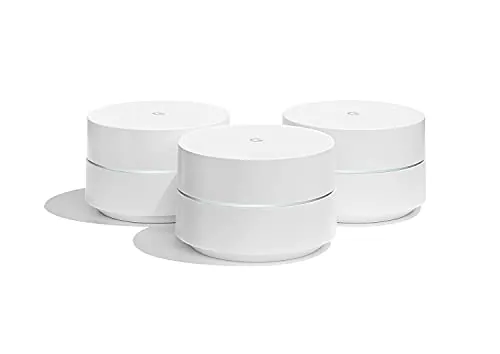
Google Wifi AC1200 Mesh Wi-Fi System (NLS-1304-25, 3-Pack)
The selected listing is Google Wifi NLS-1304-25, White, three-pack. Google’s regulatory page lists the NLS-1304-25 model; its current support comparison identifies Google Wifi as dual-band Wi-Fi 5 with two Ethernet ports. A retailer’s model record corroborates NLS-1304-25 as the 3-pack version. Confirm that the seller’s exact listing is the three-node bundle and check its condition before checkout.
Model NLS-1304-25
Amazon ASIN B01MAW2294

TP-Link
TP-Link Deco X55 AX3000 Whole Home Mesh Wi-Fi 6 System (3-Pack)
selected listing is the TP-Link Deco X55 three-pack. TP-Link’s US page lists a three-pack configuration and three X55 units in the package; it does not identify the selected Amazon ASIN’s hardware revision, so confirm the current listing and model before ordering.
Model Deco X55
Amazon ASIN B09PRB1MZM
Differences that matter
What matters most to you?
Choose a priority to see what it changes.
Sources for Wi-Fi generation and client upgrade
Sources for Port count at each mesh point
Sources for Keeping an existing gateway or router
Sources for What is in the assigned three-packs?
The buying decision in one minute
Google Wifi is the original 2016 mesh system, model NLS-1304-25 in the selected listing record. It uses Wi-Fi 5, dual-band 2.4 GHz and 5 GHz, with two Ethernet ports per point. The TP-Link Deco X55 is a dual-band Wi-Fi 6 system with optional Ethernet backhaul and three Gigabit ports per node.
That describes product features, not a tested result. No source compares these exact kits in the same floor plan, so there is no basis here to promise that X55 will be faster or cover more of your home. If your Google network already meets your needs, count the ports and write down the feature gap before replacing it.
A Wi-Fi 6 label does not settle the upgrade question
The X55 supports Wi-Fi 6; the original Google Wifi is Wi-Fi 5. Both are dual-band systems. A Wi-Fi 6 client can still connect to a Wi-Fi 5 network, operating with the Wi-Fi 5 capabilities it shares with that router. The useful check is your device list: which clients support Wi-Fi 6, and is your present network actually limiting a need you can identify?
Google says its Google Wifi points can mesh with Google/Nest Wifi family products (but not Nest Wifi Pro). TP-Link describes Deco mesh units and Deco operating modes. Neither manufacturer documents these Google points as Deco satellites. Treat a move to Deco as a system transition, not an assumption that old Google points will extend the new mesh.
Count the Ethernet connections before choosing
At each node, write down every planned cable: the connection toward the modem/router, any wired backhaul to another mesh point, and local equipment such as a TV or desktop. Google lists two ports per point. X55 lists three Gigabit auto-sensing ports per unit and optional Ethernet backhaul. A port used for a link is not available for another device, so the count depends on your actual topology.
For example, if a satellite X55 uses one port for its wired backhaul and you need two local wired device connections, its three listed ports cover those three connections on paper. Check the main unit separately because its WAN/uplink connection may consume a port too. The comparison does not confirm multi-gig Ethernet on either assigned model.
If you are replacing Google Wifi mainly to hardwire nodes, try the existing system first: Google documents wiring each point downstream of the primary router. The X55’s third port may be the more relevant change if you also need multiple wired devices at that point.
Switching from Google Wifi without creating a confusing network
First identify whether your ISP box is modem-only or a combined modem/router, and whether a separate router currently manages your home network. Draw the existing cable chain and decide which device should remain the router. Google describes Google Wifi as a system that replaces a traditional router and requires an ISP and modem; TP-Link supports Deco Router and Access Point modes for different network roles.
If an existing router will continue to manage the network, TP-Link recommends Access Point mode when adding Deco. If Deco will take over routing, follow TP-Link’s Router-mode topology: only the main Deco should connect directly to the existing router in that mode, since connecting several that way can create a network loop. TP-Link says mode selection can be changed after setup, but follow the current app guidance for your own gateway and X55 unit.
Verify the bundle you are actually buying
The selected listing says Google Wifi NLS-1304-25, White, three-pack. Google’s official regulatory list confirms NLS-1304-25 as a Google Wifi model, and Google’s 2016 launch post confirms that an original three-pack was offered. A retailer record corroborates that NLS-1304-25 was sold as a 3-PACK and lists three nodes. These sources do not verify the condition or contents of every current Amazon offer tied to the ASIN, so open the exact seller listing and check model code, number of nodes and condition.
TP-Link’s US X55 page separately lists the 3-pack and specifies three X55 units, one Ethernet cable, three power adapters and a quick installation guide. Do not assume one included cable covers every wired-backhaul run in a three-node layout; check your cable plan and box contents before checkout.
Product details
Google Wifi AC1200 Mesh Wi-Fi System (NLS-1304-25, 3-Pack)
This is the original Google Wifi mesh generation, not Nest Wifi or Nest Wifi Pro. Google says the original points are Wi-Fi 5 and can mesh with Google Wifi and Nest Wifi family devices, but Google’s product-family documentation does not describe them as Deco nodes. If the existing network is stable and already reaches your rooms, the useful question is whether you need a documented X55 feature or a different layout—not whether the X55's newer Wi-Fi label guarantees a faster result in your house.
- Generation and bands
- Original Google Wifi system introduced in 2016; Wi-Fi 5, dual-band 2.4 GHz and 5 GHz. Source
- Ethernet ports
- Google lists two Ethernet ports on each Google Wifi point. Source
- Assigned bundle identity
- listing information maps the selected ASIN to NLS-1304-25, White, three-pack; a retailer model listing identifies NLS-1304-25 3-PACK and three included nodes. Source
TP-Link Deco X55 AX3000 Whole Home Mesh Wi-Fi 6 System (3-Pack)
The X55 is a dual-band Wi-Fi 6 mesh system with optional Ethernet backhaul. Its third Gigabit port on each node can matter when that node must serve a wired uplink or backhaul plus local wired equipment; count the actual ports your topology uses before treating the extra port as available. TP-Link offers both Router and Access Point operating modes for different relationships with an existing router.
- Generation and bands
- Wi-Fi 6, dual-band 2.4 GHz and 5 GHz. Source
- Ethernet ports and backhaul
- Three Gigabit Ethernet ports per Deco unit with WAN/LAN auto-sensing; optional Ethernet backhaul is listed. Source
- Three-pack contents
- TP-Link lists three X55 units, one RJ45 cable, three power adapters and a Quick Installation Guide. Source
Before you buy
Community discussions
Testing connectivity at a satellite on another floor
TP-Link Deco X55 AX3000 Whole Home Mesh Wi-Fi 6 System (3-Pack)
An owner with four Deco X55 nodes on wireless backhaul reported occasional trouble getting a newly started device online near a satellite. Restarting that satellite restored connectivity temporarily in their setup.
What to check
Before replacing working nodes, check connection quality in the rooms where you need more coverage. Test a device after it reconnects to a satellite and note where Ethernet is available.
Common questions
Is the Google Wifi in this comparison the original model or Nest Wifi?
It is the original Google Wifi generation. Google introduced Google Wifi in 2016, and the selected listing is NLS-1304-25. Google’s 2019 Nest Wifi announcement refers to Google Wifi as the earlier system and introduces Nest Wifi as a separate next generation. Google’s current comparison lists Google Wifi as Wi-Fi 5 and says it is no longer sold by Google.Introducing a new kind of Wi-Fi system — GoogleBoost your home's signal and style with Nest Wifi — GoogleSafety & regulatory information for Google Nest & streaming devices — Google Home and Nest HelpCompare Wifi products — Google Home and Nest Help
Can Google Wifi points become satellites in a Deco X55 mesh?
Do not plan on that. Google documents Google Wifi as a Google/Nest-family mesh and says Google Wifi cannot be an extender or repeater for a current router. TP-Link’s Deco setup guide describes the Deco system and its own operating modes. Neither source documents Google Wifi points joining Deco mesh, so cross-brand satellite compatibility is unverified.What is Google Wifi? — Google Home and Nest HelpCompare Wifi products — Google Home and Nest HelpHow to Connect the TP-Link Deco Mesh System to an Existing Router — TP-Link US
Can I keep my ISP router when I set up the Deco X55?
Yes. TP-Link describes Deco Access Point mode for adding Deco to a network where the existing router stays in charge. If Deco instead takes over as the router, TP-Link says only the main Deco should connect directly to the existing router in Router mode; connecting more than one can cause a network loop. Check the Deco app and your exact gateway setup during installation.How to Connect the TP-Link Deco Mesh System to an Existing Router — TP-Link US
Will switching from Google Wifi to Wi-Fi 6 X55 automatically make my home faster?
The sources do not prove that. They establish the systems’ Wi-Fi generations and listed features, not a controlled test in your home. Client Wi-Fi capability, node placement, walls, interference, backhaul and internet service all affect the outcome. Choose based on the X55 features and port layout you will use, and keep performance expectations open until the new system is set up and measured in your home.Compare Wifi products — Google Home and Nest HelpDeco X55 AX3000 Whole Home Mesh Wi-Fi 6 System — TP-Link US
How many devices come in the assigned Google Wifi and Deco X55 bundles?
The selected listing identifies Google Wifi NLS-1304-25 as a three-pack, and the Best Buy model record calls NLS-1304-25 a 3-pack with three nodes; Google’s official pages establish the NLS model and original three-pack launch but do not confirm every current Amazon seller's package. TP-Link lists three X55 units in its US three-pack configuration. Verify the exact listing, seller and condition before checkout.Safety & regulatory information for Google Nest & streaming devices — Google Home and Nest HelpGoogle Wifi AC1200 Dual-Band Mesh Wi-Fi System (3-Pack), model NLS-1304-25 — Best BuyIntroducing a new kind of Wi-Fi system — GoogleDeco X55 AX3000 Whole Home Mesh Wi-Fi 6 System — TP-Link US
Sources and scope
The Google product was introduced in 2016 and Google now says Google Wifi is no longer sold by Google. Its official support page identifies the NLS-1304-25 model and Google Wifi features, while a retailer model listing corroborates that NLS-1304-25 was sold as a three-pack; neither source directly maps Amazon ASIN B01MAW2294 to every current seller's box, condition or contents. Check the exact listing and included units before purchase. TP-Link’s X55 US page lists a three-pack configuration but does not bind ASIN B09PRB1MZM to a hardware revision. No controlled test compares these exact systems in the same home, so this guide makes no speed, coverage, latency or reliability winner claim.
- Introducing a new kind of Wi-Fi system — Google
- Boost your home's signal and style with Nest Wifi — Google
- Compare Wifi products — Google Home and Nest Help
- What is Google Wifi? — Google Home and Nest Help
- Safety & regulatory information for Google Nest & streaming devices — Google Home and Nest Help
- Google Wifi AC1200 Dual-Band Mesh Wi-Fi System (3-Pack), model NLS-1304-25 — Best Buy
- Deco X55 AX3000 Whole Home Mesh Wi-Fi 6 System — TP-Link US
- How to Connect the TP-Link Deco Mesh System to an Existing Router — TP-Link US
- Hardwire Google Wifi with Ethernet — Google Home and Nest Help
Related comparisons
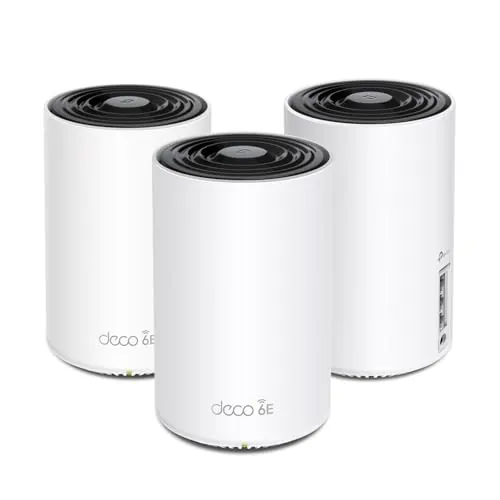
TP-Link Deco X55 vs XE75 (3-Pack): Wired Backhaul or Wi-Fi 6E?
Both assigned packages are three-unit Deco systems with optional Ethernet backhaul and three Gigabit ports on each node. The X55 is dual-band Wi-Fi 6; the XE75 adds a 6 GHz band and tri-band Wi-Fi 6E. If you can wire the satellite nodes and your important devices do not support Wi-Fi 6E, start by asking whether you need the XE75’s extra client band. If nodes must link wirelessly, verify the XE75’s exact hardware and current app behavior first: TP-Link’s Rev 2 guide describes 6 GHz dedicated-backhaul and client-network choices, while its current support page lists a newer guide that does not document the same setting. Published radio and coverage figures are not a head-to-head real-home speed result.
Read comparison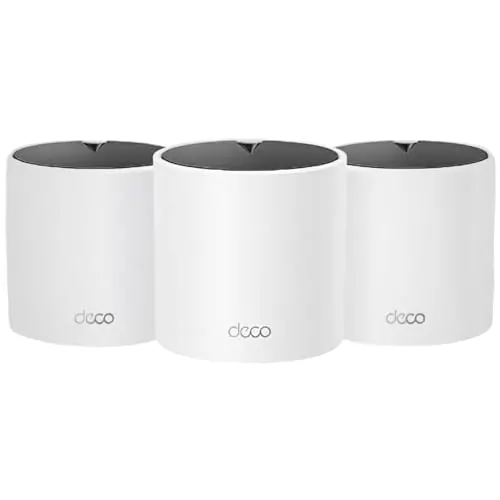
TP-Link Deco X15 vs X55 3-Pack: How Many Ethernet Ports Do You Need?
Both assigned TP-Link Deco bundles are three-packs of dual-band Wi-Fi 6 mesh units and both model pages list optional Ethernet backhaul. The X15 has two Gigabit Ethernet ports per unit; the X55 has three, so the X55 adds one physical port at each of the three nodes. For a useful pre-buy check, sketch your modem, main Deco and two satellite locations, then draw each wired backhaul and wired device connection. A node that needs three separate Ethernet connections can exceed the X15's two-port count; the X55 offers a third port, while a compatible switch is another possible layout choice. TP-Link's X55 page also lists an HE160 5 GHz mode, but the selected ASIN is not tied to a hardware revision here. Treat product-page wireless rates as specifications, not a measured speed comparison.
Read comparison