
Products compared
Insta360
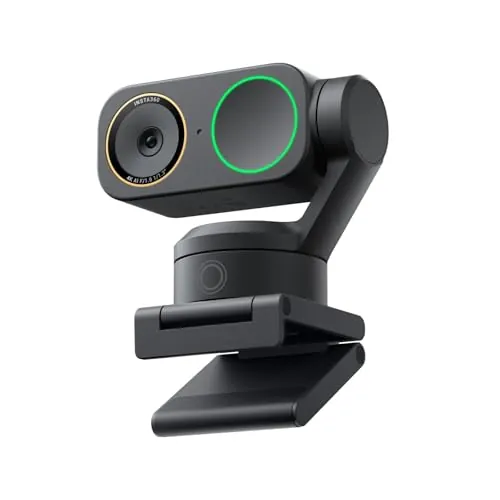
Insta360 Link 2 Pro Webcam
Graphite Black Link 2 Pro, model CINSABPA; distinct from the earlier non-Pro Link 2.
Model CINSABPA
Amazon ASIN B0G3T1QKWL
Insta360
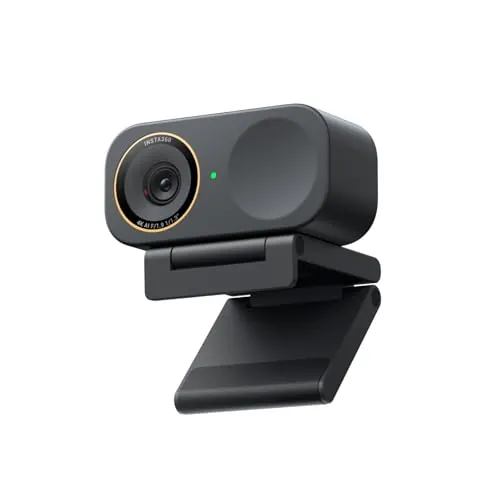
Insta360 Link 2C Pro Webcam
Graphite Black Link 2C Pro, model CINSABPB; distinct from the earlier non-Pro Link 2C.
Model CINSABPB
Amazon ASIN B0G3SSQMJQ
Differences that matter
What matters most to you?
Choose a priority to see what it changes.
Sources for Presenter framing
Sources for Privacy and microphone routine
Sources for DeskView setup
Sources for Capture options listed for both
Sources for Mounting and desk placement
Choose physical movement or fixed-camera reframing
Link 2 Pro’s two-axis gimbal physically pans and tilts. Insta360’s support FAQ lists AI Tracking only for Link 2 Pro and describes single/group tracking choices. Link 2C Pro has no gimbal; its Auto Framing uses digital zoom and cropping to reframe while the body stays fixed. That makes the first question practical: will you move around during calls, or stay inside a fixed camera view?
The exact product page lists both at landscape 4K up to 30 fps, HDR, a 1/1.3-inch sensor and up to 4× digital zoom. The device specs do not turn the Pro into a higher listed resolution choice. The product page notes that platform limits can affect resolution, so check the conferencing or streaming app you actually use.
Pick the privacy action and microphone step you will follow
When no platform is using Link 2 Pro audio or video, its instructions say it tilts down after 10 seconds into sleep; you can also tilt it down manually. In Privacy Mode the camera and its microphone are disabled. Link 2C Pro uses a physical switch to block the lens view, but the manual says to disable its microphone input separately in Link Controller or third-party software.
This is a difference in documented steps, not a guarantee that one setup is more private overall. A call can use an external microphone, so confirm the audio input selected in your meeting app.
Plan DeskView, mounting and computer requirements
For DeskView, Link 2 Pro angles down using its gimbal. Link 2C Pro requires manually adjusting its magnetic mount and fine-tuning the view in Link Controller. Both packages list a magnetic mount, USB-C cable, USB-C-to-USB-A adapter and whiteboard markers; both cameras also list a 1/4-inch tripod point. Allow room for your mount and cable rather than assuming a particular monitor edge will fit.
The manufacturer lists the same Link Controller baseline for both: Windows 10 or later (ARM-based Windows unsupported) and macOS 11 or later. Virtual Camera needs macOS 13 or later, and some software features require stronger computer/GPU specifications. The Link 2 Pro body with mount is listed as 167.5 g versus 113.5 g for Link 2C Pro; use the dimensions and weight as placement information, not as a stability or fit result.
Product details
Insta360 Link 2 Pro Webcam
- Framing hardware
- Two-axis gimbal; manufacturer says it physically pans and tilts. Source
- Published video modes
- Landscape 4K at 24/25/30 fps; HDR supported. The same mode list is shown for Link 2C Pro. Source
- Camera body with mount
- 167.5 g with magnetic mount; body 71.3 × 58.9 × 38 mm. Source
- Computer requirements
- Link Controller lists Windows 10 or later (not ARM Windows) and macOS 11 or later; Virtual Camera requires macOS 13 or later. Source
Insta360 Link 2C Pro Webcam
- Framing hardware
- No gimbal; Auto Framing uses digital zoom/cropping while the camera body remains fixed. Source
- Published video modes
- Landscape 4K at 24/25/30 fps; HDR supported. The same mode list is shown for Link 2 Pro. Source
- Camera body with mount
- 113.5 g with magnetic mount; body 62.7 × 30.2 × 26 mm. Source
- Computer requirements
- Link Controller lists Windows 10 or later (not ARM Windows) and macOS 11 or later; Virtual Camera requires macOS 13 or later. Source
Before you buy
Community discussions
A home-office buyer weighs a moving gimbal against a fixed camera
Insta360 Link 2C Pro Webcam
For work calls from one spot, a shopper asked whether the Link 2 Pro’s moving gimbal might distract viewers and considered the Link 2C Pro.
What to check
Think about how often you move out of frame. If you stay seated, check which camera can keep the fixed view you want.
Common questions
Does Link 2C Pro have the same physical tracking as Link 2 Pro?
No. Insta360’s support FAQ says AI Tracking is supported only on Link 2 Pro. Link 2C Pro instead supports Auto Framing using digital zoom/cropping while its body stays fixed. This does not establish which framing performs better.Insta360 Link Series AI Tracking FAQLink 2C Pro & Link 2 Pro User Manual (English)
Are their listed 4K and HDR modes different?
The manufacturer’s detailed table lists the same landscape 4K rates (24, 25 and 30 fps) and HDR support for both models. It says output resolution can depend on the platform; confirm your app and computer requirements.Insta360 Link 2 Pro & Link 2C Pro product page and detailed specifications
Does the Link 2C Pro privacy switch mute the microphone?
The manual describes the switch as physically blocking the lens view and says to disable the microphone input separately in Link Controller or third-party software. Check the audio device selected by your call app.Insta360 Link Series Privacy Protection FAQLink 2C Pro & Link 2 Pro User Manual (English)
Which one is easier for overhead desk demos?
Link 2 Pro tilts into DeskView with its gimbal. Link 2C Pro uses a manually adjusted mount and software angle fine-tuning. The instructions describe setup, not comparative setup time.Insta360 Link 2C Pro DeskView Mode instructions
Sources and scope
This is a feature and setup comparison, not a test of tracking accuracy, image or audio quality, low-light performance, privacy effectiveness or reliability. Insta360’s product-page comparison graphic and its detailed specifications conflict on microphone count; this guide does not compare mic quantity or audio performance and uses only the manual’s model-specific privacy/mic steps.
- Insta360 Link 2 Pro & Link 2C Pro product page and detailed specifications
- Insta360 Link Series Hardware Specs: Link 2 Pro and Link 2C Pro
- Insta360 Link Series AI Tracking FAQ
- Insta360 Link Series Privacy Protection FAQ
- Link 2C Pro & Link 2 Pro User Manual (English)
- Insta360 Link 2C Pro DeskView Mode instructions
Related comparisons
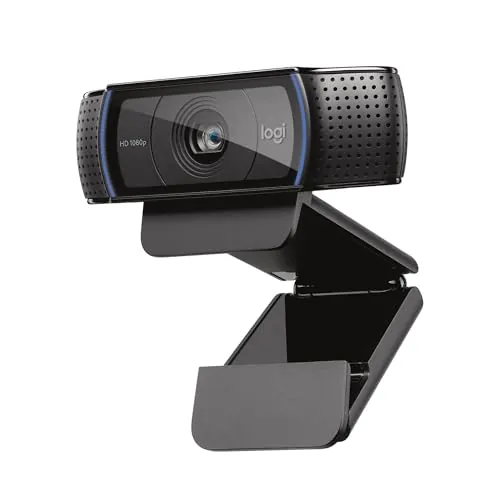
Logitech C920x vs Insta360 Link 2C Pro: Framing, Mounting and Privacy Fit
The Logitech C920x guide documents an attached USB-A cable, a universal mounting clip and tripod thread, while Link 2C Pro offers documented 4K and portrait modes, a magnetic adjustable mount, DeskView and a physical privacy-cover switch. Start with the resolution and framing tools you need, then check your computer, monitor edge, tripod plan and whether camera privacy must be physical. Logitech’s exact C920x guide does not state its field-of-view angle or current OS/app requirements, so those points need an exact-product check.
Read comparison
Elgato Facecam 4K vs Insta360 Link 2C Pro: 4K60 or Autofocus and Built-In Audio?
These webcams suit different desk routines. Elgato lists Facecam 4K at 2160p60 over USB 3.0 in MJPG, with fixed focus tuned for a desk position and no built-in microphone. Insta360 lists Link 2C Pro at up to 4K30, with autofocus, software auto-framing and two microphones. Your video app, USB port, subject distance, audio setup and privacy routine matter more than the resolution label alone.
Read comparison