
Products compared
Insta360
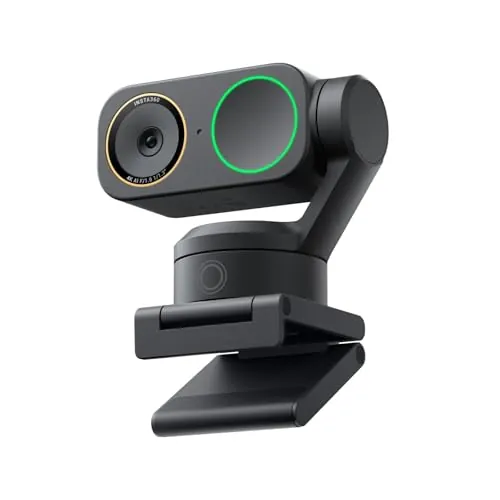
Insta360 Link 2 Pro 4K Webcam, Graphite Black
Insta360 identifies the model code as CINSABPA. Its specifications list a two-axis gimbal and AI Tracking on Link 2 Pro, while Link 2C Pro uses a fixed camera.
Model CINSABPA
Amazon ASIN B0G3T1QKWL
Logitech
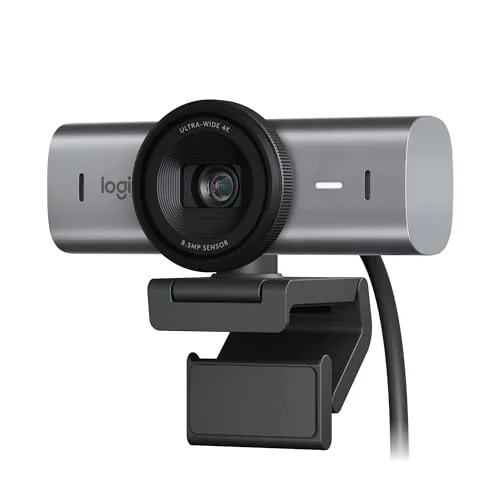
Logitech MX Brio 4K Webcam, Graphite
Logitech lists the MX Brio as graphite, model 960-001545. Its documented controls include Show Mode by tilting the webcam down, Fine Controls in Logi Options+ and G Hub, and a rotatable camera shutter.
Model 960-001545
Amazon ASIN B0BFJ4CRKD
Differences that matter
What matters most to you?
Choose a priority to see what it changes.
Sources for Framing while the presenter moves
Sources for Showing notes or a work surface
Sources for Software setup and controls
Sources for Shared listed capture modes and camera privacy controls
Start with how the camera should move
Link 2 Pro is the motion-led option in this pair: Insta360 documents a two-axis gimbal that physically pans and tilts while AI Tracking is active. Link Controller can define tracking and pause-track areas, and the camera’s touch key can toggle tracking when that control is enabled in settings. Use it when those framing controls are part of your call or presentation routine, not because a spec promises better tracking accuracy.
The Logitech material reviewed here explains Show Mode and image adjustment controls but does not settle whether MX Brio has comparable tracking-zone functions. If you need that feature, confirm it with Logitech before choosing; do not read the missing detail as a confirmed absence.
Compare the desk-view action and the physical setup
Both manufacturers describe a way to show work on the desk. Link 2 Pro’s DeskView mode moves the camera down through its gimbal; Insta360 says the magnetic mount can be adjusted to refine the angle. MX Brio Show Mode instead starts by tilting the webcam down to show notes or sketches.
Before buying for frequent overhead demonstrations, check where the camera sits relative to your monitor, desk and cable path. The source documents describe the controls but do not compare view coverage or guarantee a particular angle on your setup.
Choose the software controls and camera privacy routine you prefer
Insta360’s Link Controller controls movement and tracking boundaries. Logitech’s Fine Controls in Logi Options+ and G Hub adjust lighting, white balance, ISO, shutter speed, tint and vibrance, with Auto mode also listed. These are different software workflows; consider whether you will configure the camera’s path or adjust its image settings.
The two cameras also use different documented camera controls between sessions. Link 2 Pro turns its lens downward into sleep after 10 seconds when no platform is using audio or video; moving its gimbal down 90° manually enters Privacy Mode, which mutes its microphone. MX Brio has a rotating shutter that blocks the camera. Logitech’s cited page does not state what happens to its microphones when that shutter is closed.
Do not use the resolution line as a picture-quality verdict
Both product pages list 4K at 30 fps and 1080p at 60 fps among their modes. Insta360 explicitly notes that platform limits affect video resolution. These mode labels describe supported capture configurations, not a comparative image-quality or conference-call result. Check the host and application requirements for the mode you intend to use.
Product details
Insta360 Link 2 Pro 4K Webcam, Graphite Black
- Camera movement and tracking
- Two-axis gimbal; Link 2 Pro physically pans and tilts for AI Tracking. Link Controller supports tracking areas and pause-track areas. Source
- Desk and mount workflow
- DeskView tilts the camera down through its gimbal; the magnetic mount can be adjusted manually for the overhead angle. The magnetic mount is listed as included. Source
- Listed video modes
- Landscape and portrait options include 4K at 30 fps and 1080p at 60 fps; available resolution can depend on the platform. Source
- Idle/privacy controls
- With no platform using audio or video, the lens turns down into sleep after 10 seconds; manually moving the gimbal down 90° enters Privacy Mode, which automatically mutes the microphone. Source
Logitech MX Brio 4K Webcam, Graphite
- Desk and privacy controls
- Show Mode shares desk notes or sketches by tilting the webcam down; the built-in privacy shutter rotates to block the camera. Source
- Software controls
- Fine Controls in Logi Options+ and G Hub adjust lighting, white balance, ISO, shutter speed, tint and vibrance; Auto mode is also listed. Source
- Listed video modes
- UHD 4K at 30 fps or 1080p at 60 fps. These are manufacturer-listed modes, not a comparative image-quality result. Source
Before you buy
Community discussions
Deciding whether the camera should follow you on calls
Insta360 Link 2 Pro 4K Webcam, Graphite Black
A standard Link 2 owner considering the Link 2 Pro for a mostly fixed home-office seat asks whether camera movement would distract people on calls.
What to check
Decide whether you need the camera to move during calls. Check how to set fixed framing for the meetings where you want it.
Common questions
Do both webcams list 4K at 30 fps?
Yes. Insta360 lists 4K at 30 fps for Link 2 Pro and notes that platform limits can affect resolution; Logitech lists UHD 4K at 30 fps for MX Brio. That shared mode does not determine image quality.Insta360 Link 2 Pro & Link 2C Pro product page and specificationsLogitech MX Brio Graphite 4K Webcam, part 960-001545
Which one moves to follow a presenter?
Insta360 documents Link 2 Pro’s physical pan-and-tilt gimbal and tracking controls. The cited Logitech product page does not answer whether MX Brio offers comparable tracking-zone controls, so verify that requirement with Logitech.Insta360 Link 2 Pro Support: AI Tracking and Auto FramingLogitech MX Brio Graphite 4K Webcam, part 960-001545
How do they show a desk or notes?
Link 2 Pro uses its gimbal to tilt down in DeskView, after which its magnetic mount can be adjusted. MX Brio Show Mode uses a downward manual tilt. Neither source compares the resulting view.Insta360 Link Series: DeskView ModeLogitech MX Brio Graphite 4K Webcam, part 960-001545
Does Link 2 Pro mute its microphone whenever it idles?
The manual says that when no platform is using Link 2 Pro audio or video, the camera turns down into sleep after 10 seconds. Separately, entering Privacy Mode—also available by manually moving the gimbal down 90°—automatically mutes the microphone.Insta360 Link Series: Privacy Protection (applicable models include Link 2 Pro)
Sources and scope
This is a feature and setup comparison from current manufacturer pages and support instructions, not a hands-on webcam test. Link 2 Pro and Link 2C Pro share an Insta360 product page; claims here use the portions explicitly labeled for Link 2 Pro or its exact-model support instructions. The Logitech page identifies the exact Graphite 960-001545 variant. The cited Logitech material does not establish whether MX Brio offers tracking-zone controls comparable to Link 2 Pro. Neither product’s listed modes establish image, microphone, tracking or conferencing outcomes.
Related comparisons

Elgato Facecam 4K vs Logitech MX Brio: Frame Rates, Focus and Desk Use
Elgato Facecam 4K can output 4K60, but only as MJPG over USB 3.0; USB 2.0 tops out at 1080p60. Logitech MX Brio's published maximum is 4K30 or 1080p60 and requires USB-C with USB 3.0 support. The Elgato uses fixed focus and has no built-in mic; MX Brio adds autofocus, dual mics and a rotating privacy shutter.
Read comparison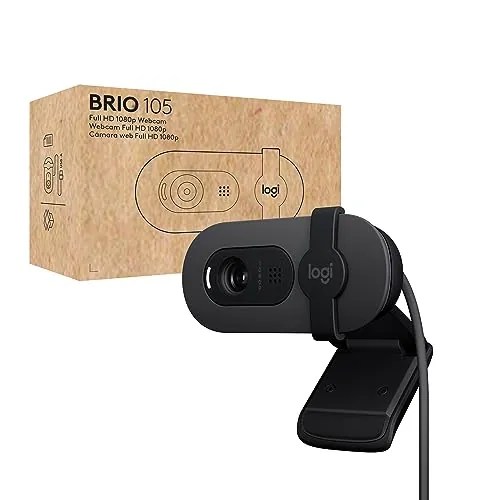
Logitech Brio 105 960-001579 vs MX Brio 960-001545: 1080p Calls or 4K Capture?
The Graphite Logitech Brio 105 (960-001579) tops out at 1080p/30, has fixed focus and an attached USB-A cable. The Graphite MX Brio (960-001545) lists 4K/30 and 1080p/60 modes, a USB-C 3.0 connection, advanced Logitech software controls and a tilt-down Show Mode. These are published capabilities, not an image-quality test: check your video app, computer port and software policy before choosing the higher-spec camera.
Read comparison