
Products compared
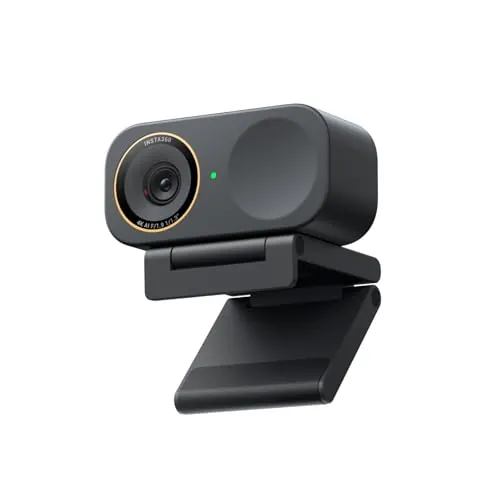
Insta360
Insta360 Link 2C Pro 4K Webcam (Graphite Black)
Fixed camera with documented Auto Framing, digital zoom/crop and listed 4K30 and 1080p60 earlier product-page information modes. The listing data identifies model CINSABPB and part CINSABPB-S-B.
Model CINSABPB-S-B
Amazon ASIN B0G3SSQMJQ
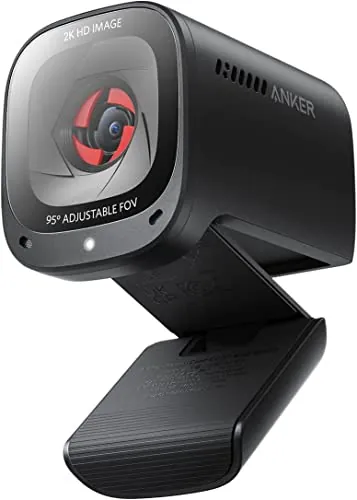
Anker
Anker PowerConf C200 2K Webcam (Black)
Fixed webcam with manually selected view options in AnkerWork, a privacy cover, adjustable monitor clip/stand and tripod thread. The listing data identifies model A3369, part A3369011, Black.
Model A3369 / A3369011
Amazon ASIN B09MFMTMPD
Differences that matter
What matters most to you?
Choose a priority to see what it changes.
Sources for How the composition changes
Sources for Capture mode required by the actual job
Sources for Control software and capture path
Sources for Mounting and desk placement
Separate automatic framing from capture resolution
Link 2C Pro has a useful distinction from the moving-gimbal models in its own family: Insta360's basic-use page says its AI Tracking or Auto Framing centers the subject through digital zoom and crop. Auto Framing is enabled in Link Controller or by a palm gesture; the model's gesture control is disabled by default. This is a composition feature, not a promise about tracking accuracy.
C200 offers a different choice: select 65°, 78° or 95° manually through AnkerWork. It can suit a seat or desk position where you choose the crop and leave it. The cited C200 pages do not establish automatic reframing, but they also do not rule out every third-party software feature.
Choose the capture mode independently. Link lists landscape 4K30 and 1080p60; C200's exact-model manual lists modes up to 2K30. A stationary presenter can still need a higher capture mode, while an ordinary call can benefit from auto composition at a lower mode.
Check the route your host and app will use
A listed camera mode is not the same as the video stream your meeting or recording app receives. Insta360 says Link 2C Pro can be used directly by third-party platforms or through Link Controller, while Insta360 Virtual Camera does not support 50fps or 60fps. It also lists Controller support for Windows 10+ and macOS 10.13+ (with virtual camera requiring macOS 13+) and says Windows ARM is unsupported. Basic Linux UVC/UAC use is distinct from installing Link Controller, for which Insta360 lists no Linux version.
C200's manual shows USB-C at the camera and a USB-C-to-USB-A cable to the computer, then asks users to select the webcam and built-in microphones in the computer or application if needed. Anker's page names AnkerWork as the utility for changing FOV. On a managed work computer, software installation and camera permissions can matter as much as the webcam itself.
Before purchase, open the intended app on the target computer and check available camera sources, portrait/landscape handling, resolution, fps and codec. For Link portrait 4K or 1080p60, the manufacturer says H.264 is unavailable; Controller defaults to MJPEG and does not switch format within its client.
Plan where the camera will sit
C200's owner manual illustrates a tilting adjustable clip/stand on a monitor or laptop display and a 1/4-inch thread for a tripod, which it says is not provided. Link 2C Pro's compatibility guide lists a magnetic mount and USB-C cable as compatible accessories and a mini tripod as sold separately; check the exact offer for included pieces. These are setup options, not a comparative stability test.
Measure your display edge and note whether you want a screen-mounted camera or a separate stand. Then check the host's available port and cable path. For a Link 2C Pro, remember that automatic reframing crops within its fixed view, so place and aim the camera to include the area you expect to use. Verify the exact U.S. Amazon listing's selected model and included pieces; the C200 Japan-hosted manual cannot establish a U.S. seller's bundle or warranty.
Product details
Insta360 Link 2C Pro 4K Webcam (Graphite Black)
- Auto Framing
- The applicable Link 2C Pro documentation describes keeping a subject centered through digital zoom and crop; the camera does not physically pan to follow movement. Source
- Listed capture modes
- Landscape: 4K up to 30fps and 1080p up to 60fps. Portrait 4K and portrait 1080p at 60fps do not support H.264. Source
- Video path and software
- Direct use with third-party platforms is supported. Insta360 Virtual Camera does not support 50/60fps; Link Controller is not supported on Windows ARM, and no Linux version is listed (basic Linux UVC/UAC use is separately supported). Source
Anker PowerConf C200 2K Webcam (Black)
- Manual framing choices
- Anker lists 65°, 78° and 95° viewing-angle settings selected through software; the C200 manual lists the same FOV options. Source
- Listed capture modes
- The exact A3369 manual lists 2K, 1080p and 720p at 30fps; maximum video capture is listed as 2K at 30fps. Source
- Mount and connection
- The manual shows an adjustable clip/stand for a monitor or laptop display and a 1/4-inch tripod thread (tripod not included); the illustrated included cable connects camera USB-C to computer USB-A. Source
Before you buy
Community discussions
Checking whether a webcam keeps its framing
Anker PowerConf C200 2K Webcam (Black)
A PowerConf C200 owner said their crop changed after closing AnkerWork and returned when they opened it again.
What to check
Check how each webcam remembers the framing you use. Try the actual meeting app after closing the setup software.
Common questions
Does Link 2C Pro turn to follow the speaker?
The exact Link 2C Pro basic-use page says it uses digital zoom and cropping to keep a subject centered; the physical gimbal movement wording on that page applies to Link 2 Pro. Do not buy the 2C Pro expecting the camera head to pan after you.Link 2C Pro: Basic Use (No Client Required)
Can I get Link's listed 1080p60 mode through Insta360 Virtual Camera?
No. Insta360 says Virtual Camera currently does not support 50fps or 60fps. It separately says the camera can be connected directly to third-party platforms. Confirm the capture mode offered by the exact route and app you plan to use.Link Series: CompatibilityLink Series: Photo & Video Specifications
Does C200 autofocus automatically change the framing?
No conclusion like that follows from autofocus. The C200's cited manual lists autofocus, while Anker separately describes manually changing field of view in AnkerWork. The cited sources do not establish automatic reframing for C200.Anker PowerConf C200 User Manual (A3369)Anker PowerConf C200 2K Webcam
Will either camera deliver its listed mode in every meeting app?
Not established. The maker specifications describe camera modes and supported paths, not every computer/app combination's delivered recording. Verify the source selection, orientation and output settings in the actual software before relying on a mode for a production requirement.Link Series: CompatibilityLink Series: Photo & Video SpecificationsAnker PowerConf C200 User Manual (A3369)
Sources and scope
This guide compares published model documentation, not recorded samples. It does not rank image quality, low-light results, autofocus behavior, microphone quality, tracking accuracy or reliability. A resolution or frame-rate specification does not guarantee that a computer, cable, operating system or third-party app will expose that mode. The C200 manual is an official Anker document hosted by Anker Japan and supports model features, not U.S. package or warranty terms. Confirm the selected U.S. listing shows the assigned model before ordering.
Related comparisons
Logitech C920x vs Insta360 Link 2C Pro: Framing, Mounting and Privacy Fit
The Logitech C920x guide documents an attached USB-A cable, a universal mounting clip and tripod thread, while Link 2C Pro offers documented 4K and portrait modes, a magnetic adjustable mount, DeskView and a physical privacy-cover switch. Start with the resolution and framing tools you need, then check your computer, monitor edge, tripod plan and whether camera privacy must be physical. Logitech’s exact C920x guide does not state its field-of-view angle or current OS/app requirements, so those points need an exact-product check.
Read comparison
Elgato Facecam 4K vs Insta360 Link 2C Pro: 4K60 or Autofocus and Built-In Audio?
These webcams suit different desk routines. Elgato lists Facecam 4K at 2160p60 over USB 3.0 in MJPG, with fixed focus tuned for a desk position and no built-in microphone. Insta360 lists Link 2C Pro at up to 4K30, with autofocus, software auto-framing and two microphones. Your video app, USB port, subject distance, audio setup and privacy routine matter more than the resolution label alone.
Read comparison