
Products compared
Keychron
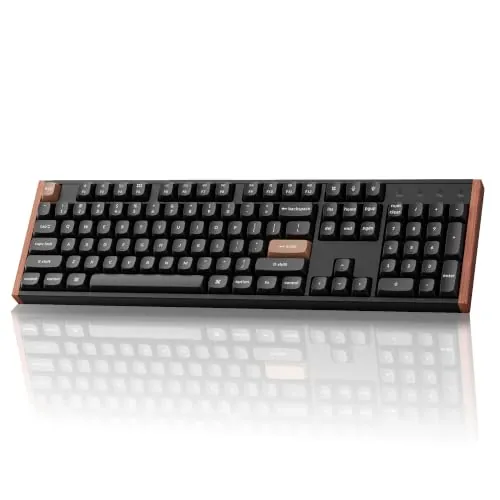
Keychron K10 HE Special Edition Full-Size Keyboard, Black
Black K10 HE Special Edition, model KBKCK10HF1. Keychron’s matching model-code page specifies Gateron Double-Rail Magnetic Nebula switches; its U.S. K10 HE page describes family-level connection and customization features. Do not transfer the other K10 HE switch version’s compatibility or actuation range.
Model KBKCK10HF1
Amazon ASIN B0DXZ97PCG
Logitech
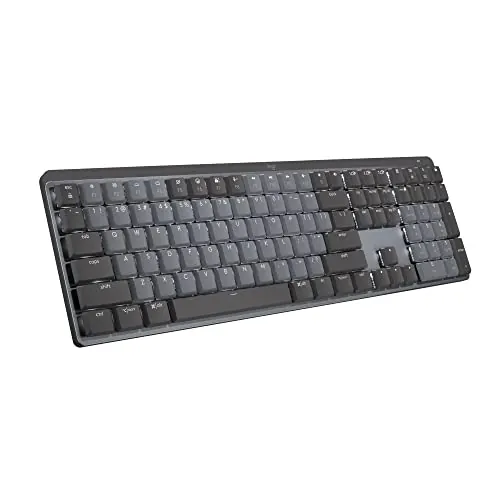
Logitech MX Mechanical Full-Size Wireless Illuminated Keyboard, Tactile Quiet, Graphite
Full-size Graphite Tactile Quiet MX Mechanical, model 920-010547, not MX Mechanical Mini. Logitech documents receiver or Bluetooth connection and Easy-Switch across up to three computers. The USB-C cable charges the keyboard; it does not provide wired keyboard input.
Model 920-010547
Amazon ASIN B09LK1P1RD
Differences that matter
What matters most to you?
Choose a priority to see what it changes.
Sources for Wired input versus wireless host connections
Choose the switch control you will actually use
The K10 HE’s magnetic switch lets you set how far a key travels before actuation. Keychron describes the K10 HE as configurable with QMK/Launcher. The MX Mechanical uses low-profile mechanical switches, and Logitech lists Tactile Quiet, Clicky and Linear styles across the line. Model 920-010547 is the Tactile Quiet Graphite version. This is a difference in switch format and controls, not evidence that one will feel or perform better.
The K10 HE model code matters if switch replacement is a reason to buy it. KBKCK10HF1 maps to Keychron's black Special Edition with Gateron Double-Rail Magnetic Nebula switches. Keychron says this version supports only that Double-Rail switch family; its other K10 HE magnetic switch version has a different supported switch. Check the exact replacement model before treating hot-swap as a general magnetic-switch socket.
Check cable and host switching before ordering
Keychron lists a Type-C wired mode alongside 2.4 GHz and Bluetooth; Bluetooth pairing can store up to three devices. Its Launcher instructions call for connecting the keyboard in wired mode and using a supported browser when configuring keys. This makes the K10 HE the documented fit if you require USB-C wired keyboard input or want to make Keychron-specific actuation/remapping part of setup.
Logitech's MX Mechanical pairs by its included Logi Bolt receiver or Bluetooth Low Energy, then switches among up to three computer channels through Easy-Switch. Its USB-C lead is charging-only, so do not choose it as a wired-input keyboard. Logitech points users to Options+ for software controls and lists Windows and Mac for the setup app; check your host and ports if those steps matter.
A short pre-buy setup check
Write down the computers or tablets you plan to use, whether one needs a cable-connected keyboard, and whether you will actually change actuation or key mappings. If a receiver is part of the Logitech setup, the support specification lists a Logi Bolt receiver in the box; the K10 HE offers a different 2.4 GHz/Bluetooth/wired choice. Compare the connection you need with the available USB port or Bluetooth capability on each host.
For K10 HE switch swaps, match the chosen part to the listed KBKCK10HF1 Double-Rail variant. For MX Mechanical, match the product code and switch label rather than relying on a family name; the line includes three switch choices. Neither vendor documentation establishes a universal comfort, noise or typing-speed winner.
Product details
Keychron K10 HE Special Edition Full-Size Keyboard, Black
- Layout and switch variant
- 100% full-size layout; official model-code page lists KBKCK10HF1 as black Special Edition with Gateron Double-Rail Magnetic Nebula switches. Source
- Switch adjustment and replacement scope
- Keychron lists adjustable actuation for the Double-Rail switch and states that this version supports only Gateron Double-Rail Magnetic Switches; it does not support other magnetic switch families. Source
- Connection and configuration modes
- K10 HE documentation lists USB-C wired, 2.4 GHz and Bluetooth connections, Bluetooth pairing with up to three devices, and QMK/Keychron Launcher key customization. Confirm browser and wired-mode requirements before planning configuration. Source
Logitech MX Mechanical Full-Size Wireless Illuminated Keyboard, Tactile Quiet, Graphite
- Keyboard form and switch
- Full-size MX Mechanical with integrated number pad and low-profile mechanical keys; 920-010547 is the Graphite Tactile Quiet selection on Logitech's U.S. product page. Source
- Connections and host switching
- Logitech support lists the included Logi Bolt receiver and Bluetooth Low Energy; the keyboard can pair with up to three computers using Easy-Switch. Source
- USB-C and software
- The USB-C cable is for charging only. Logitech directs users to Options+ for supported customization; the setup article lists Windows and Mac for the software. Source
Before you buy
Community discussions
Trying the sound and feel of Tactile Quiet keys
Logitech MX Mechanical Full-Size Wireless Illuminated Keyboard, Tactile Quiet, Graphite
A commenter who uses a Tactile Quiet MX Mechanical with a number pad found it more audible than their previous MX Keys and preferred its tactile feel.
What to check
Type the same short passage on each switch type. Check how the keys feel under light and firm presses and listen from your normal work position.
Common questions
Can the Logitech MX Mechanical type over its USB-C cable?
No. Logitech says the USB-C cable is for charging only. The documented keyboard connections are the Logi Bolt receiver or Bluetooth Low Energy.Getting Started - MX Mechanical (U.S. Logitech Support)Specification - MX Mechanical (Logitech Support)
Can I replace the K10 HE's magnetic switches with any Hall-effect switch?
No. Keychron identifies model KBKCK10HF1 as the Gateron Double-Rail version and lists only Gateron Double-Rail Magnetic switches as compatible. Check the exact K10 HE version and replacement part before ordering.Keychron K10 HE Wireless Magnetic Switch Custom Keyboard (KBKCK10HF1 model-code page)Keychron K10 HE Wireless Magnetic Switch Custom Keyboard (U.S. product page)
Can either one switch between several computers?
Both manufacturers document multi-device workflows, but they differ: K10 HE supports Bluetooth pairing with up to three devices; MX Mechanical pairs with up to three computers and uses its Easy-Switch channel key. Logitech also offers receiver pairing.Keychron K10 HE Wireless Magnetic Switch Custom Keyboard (U.S. product page)Getting Started - MX Mechanical (U.S. Logitech Support)
Does choosing either keyboard prove it will feel better or type faster?
No. This comparison uses manufacturer feature and setup documentation and does not report a controlled typing, latency, comfort or noise test. Choose by the switch controls, connection modes and software workflow you need.Keychron K10 HE Wireless Magnetic Switch Custom Keyboard (U.S. product page)MX Mechanical Wireless Keyboard 920-010547 (U.S. product page)
Sources and scope
This guide compares documented features; it does not test typing, latency, noise, comfort, durability or gaming performance. Keychron’s K10 HE comes in distinct switch versions; model KBKCK10HF1 is the Double-Rail version, whose documented replacement compatibility is limited to that magnetic switch family. Logitech’s MX Mechanical has three switch choices; model 920-010547 is the Graphite Tactile Quiet version. Check the exact product code before purchase. Logitech’s USB-C cable charges the keyboard, while Keychron documents USB-C wired keyboard input. Neither difference establishes typing quality or speed.
- Keychron K10 HE Wireless Magnetic Switch Custom Keyboard (U.S. product page)
- Keychron K10 HE Wireless Magnetic Switch Custom Keyboard (KBKCK10HF1 model-code page)
- MX Mechanical Wireless Keyboard 920-010547 (U.S. product page)
- Getting Started - MX Mechanical (U.S. Logitech Support)
- Specification - MX Mechanical (Logitech Support)
Related comparisons

Logitech MX Keys S vs MX Mechanical: Scissor or Tactile Quiet?
The Graphite MX Keys S uses scissor keys; the assigned full-size MX Mechanical is the Tactile Quiet low-profile mechanical version. Logitech lists 1.8 mm total travel for MX Keys S and 3.2 mm for MX Mechanical. Both support lighting, Bluetooth LE or a Logi Bolt receiver, and switching among up to three devices. Choose by a typing style you already know you want; these specifications do not establish typing speed, comfort or sound superiority.
Read comparison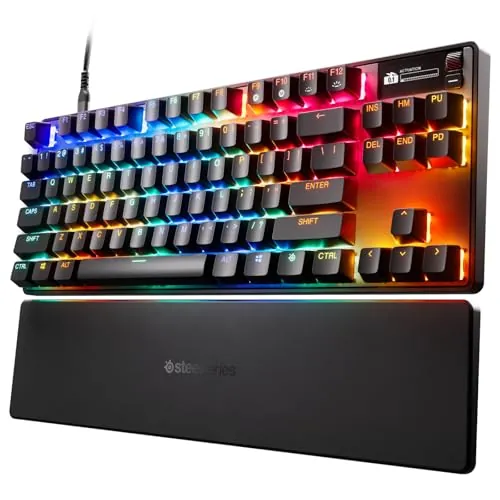
Keychron K10 HE vs SteelSeries Apex Pro TKL Gen 3: Full-Size or TKL?
This comparison covers the black Keychron K10 HE (model K10H-F1) and the black wired SteelSeries Apex Pro TKL Gen 3 (model 64740). The K10 HE is full-size and supports Bluetooth pairing for up to three devices, 2.4 GHz, and wired USB-C modes. The Apex is tenkeyless and wired; its manual documents actuation changes from the OLED menu or hotkeys, with per-key settings in SteelSeries GG. Keychron's current page describes adjustable actuation for two switch versions, but does not confirm which version is included with K10H-F1. Check the exact listing before comparing actuation ranges. These are layout, connection, and setup differences, not typing or gaming results.
Read comparison