
Products compared
LG
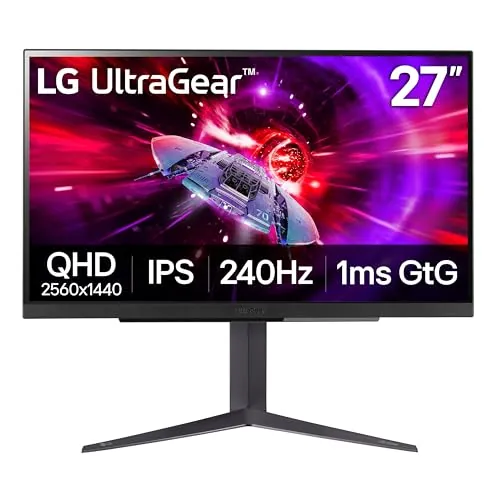
LG 27GR83Q-B.AUS 27-inch QHD 240Hz UltraGear Monitor
Black U.S. variant; 27-inch 2560 × 1440 IPS gaming monitor.
Model 27GR83Q-B.AUS
Amazon ASIN B0C63HDHPR
ASUS
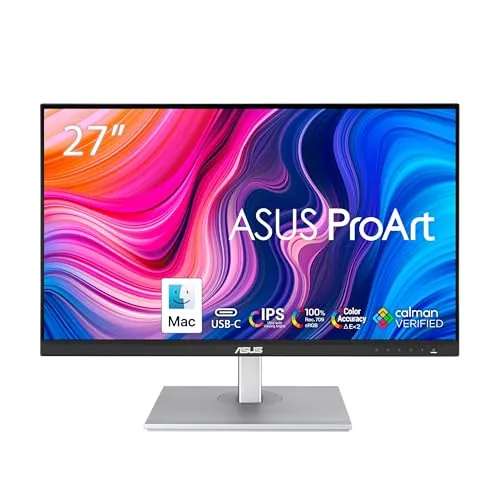
ASUS ProArt Display PA278CV 27-inch QHD Monitor
U.S. listing; 27-inch 2560 × 1440 IPS monitor with USB-C and an ergonomic stand.
Model PA278CV
Amazon ASIN B08LCPY1TR
Differences that matter
What matters most to you?
Choose a priority to see what it changes.
Sources for Listed QHD refresh ceiling and required host path
Sources for Laptop video, USB peripherals, and power
Sources for Stand movement and multi-monitor wiring
Start with your source device and target refresh
The LG is the clear fit on paper when a compatible PC setup needs a QHD refresh ceiling above 75Hz: LG lists 2560 × 1440 at up to 240Hz and says a graphics card supporting DisplayPort 1.4 or HDMI 2.1 is required for that maximum. ASUS lists the PA278CV at 75Hz maximum. That difference only settles the choice if your source can actually output the mode you plan to use; it does not establish that one screen looks clearer or performs better in a test.
Before buying for a high-refresh setup, verify the specific GPU output, cable path, resolution, and refresh option for the computer or console you will connect. LG's product page also gives different G-SYNC-compatible GPU generation conditions for DisplayPort and HDMI 2.1, so check those notes if that feature is part of your setup.
Map the laptop cable and charging path
PA278CV is the more integrated laptop-desk option when the host supports USB-C DisplayPort Alt Mode and up to 65W is enough for the laptop. Its manual says USB-C can take DisplayPort video, output power, and enable the monitor's USB-A downstream ports; a USB-C-to-A connection only enables those USB-A ports and does not provide the same described video path.
LG lists HDMI 2.1 and DisplayPort video inputs, USB upstream, and two USB downstream ports. Its U.S. feature list does not list USB-C display or USB-C power delivery. For LG, plan a supported video cable and the laptop's separate charging route; for the ASUS, check DP Alt Mode and required watts instead of assuming every USB-C laptop will work the same way.
Check stand movement and the limits of daisy chaining
Both product pages list an adjustable stand that can tilt, raise, and pivot. ASUS publishes the specific PA278CV range: +35° to -5° tilt, ±45° swivel, ±90° pivot, and 0–150mm height adjustment. LG's U.S. page lists tilt, height, and pivot but does not give numeric ranges there. If exact travel matters for a narrow desk, monitor arm, or portrait setup, use the exact model guide and measure your desk rather than guessing from a product photo.
The ASUS also has a DisplayPort output, but its manual's daisy-chain instructions are narrow: the described chain is at 2560 × 1440 and 30Hz, with no USB-C device connected, DisplayPort Stream set to 1.2, and Auto Source Detection off. If that mode does not suit your displays or workflow, plan separate video outputs or another connection layout before purchase.
Product details
LG 27GR83Q-B.AUS 27-inch QHD 240Hz UltraGear Monitor
- Resolution and maximum refresh rate
- 2560 × 1440 QHD; up to 240Hz. LG says a graphics card supporting DisplayPort 1.4 or HDMI 2.1 is required for up to 240Hz. Source
- Video and USB ports listed by LG
- 2 × HDMI 2.1, DisplayPort, USB upstream, and 2 × USB downstream; the listed interface set does not include USB-C video or USB-C power delivery. Source
- Stand adjustment
- Tilt, height, and pivot adjustment are listed; the U.S. product page does not give numeric ranges. Source
ASUS ProArt Display PA278CV 27-inch QHD Monitor
- Resolution and maximum refresh rate
- 2560 × 1440 QHD; 75Hz maximum listed refresh rate. Source
- USB-C display and laptop power path
- USB-C with DisplayPort Alt Mode, USB data, and up to 65W power delivery; the host must support DP Alt Mode for video over USB-C. Source
- Ports and stand adjustment
- USB-C, HDMI 1.4, DisplayPort input and output, 4 × USB-A downstream ports; tilt +35° to -5°, swivel ±45°, pivot ±90°, and 0–150mm height adjustment. Source
Before you buy
Community discussions
Using one cable for a laptop and its peripherals
ASUS ProArt Display PA278CV 27-inch QHD Monitor
A PA278CV owner used USB-C with an M1 Pro MacBook so the monitor could also connect the mouse and audio interface.
What to check
List what the cable must carry at your desk: video, charging and attached peripherals. Test all three with your laptop if you rely on one cable.
Common questions
Can the LG 27GR83Q-B run at 240Hz from any computer?
No. LG says a graphics card supporting DisplayPort 1.4 or HDMI 2.1 is required for up to 240Hz. Confirm the specific computer, connection, and desired QHD mode; the monitor's maximum is not a guarantee for every host.27 Inch UltraGear QHD 1440P 240Hz Gaming Monitor with NVIDIA G-SYNC Compatible (27GR83Q-B), LG USA
Will the ASUS PA278CV charge any laptop over USB-C?
ASUS lists up to 65W power delivery and says the host must support DP Alt Mode for video, audio, and data over USB-C. Check the laptop's USB-C video support and charging requirement before relying on the monitor as its power source.PA278CV Series LCD Monitor User Guide, ASUS
Can the PA278CV daisy-chain multiple displays at full refresh?
Do not assume so from the port name. Its manual describes chain operation at 2560 × 1440 and 30Hz with no USB-C device connected, DisplayPort Stream set to 1.2, and Auto Source Detection off. Check the complete source-and-monitor chain against those conditions.PA278CV Series LCD Monitor User Guide, ASUS
Sources and scope
This guide compares published specifications and setup instructions; no matched image-quality, color, response-time, motion, or gaming test was performed. LG lists the 27GR83Q-B family on its U.S. product page and identifies the exact U.S. support code 27GR83Q-B.AUS on its support page. ASUS PA278CV daisy-chain support is conditional, not an unrestricted multi-monitor promise. Actual refresh, USB-C video, and charging depend on the host, cable, and selected configuration.
Related comparisons

ASUS ROG Strix XG27ACS vs LG 27GR83Q-B.AUS: Refresh Rate, USB-C, and Stand Fit
Both are 27-inch QHD gaming displays, but the useful refresh ceiling depends on your cable path. ASUS XG27ACS carries video over USB-C DisplayPort Alt Mode and supports 180Hz through USB-C/DisplayPort, with HDMI listed to 144Hz. LG 27GR83Q-B.AUS offers two HDMI 2.1 inputs and DisplayPort, with up to 240Hz when the graphics card supports the required interface. Check the exact host output, cable and stand movement your desk needs before buying.
Read comparison
ASUS ProArt PA278CV vs PA279CRV: QHD or 4K for Your Desk?
Both are 27-inch ProArt IPS monitors with factory calibration claims, USB-C video, and daisy-chain connections. The PA278CV is 2560×1440 at 109 PPI, rated up to 75Hz, and lists 100% sRGB/100% Rec.709 with 65W USB-C power. The PA279CRV is 3840×2160 at 163 PPI, 60Hz, and lists 99% Adobe RGB and 99% DCI-P3 with 96W USB-C power. Choose by your deliverable color space, laptop charging needs, and host support for multi-display output.
Read comparison