
Products compared
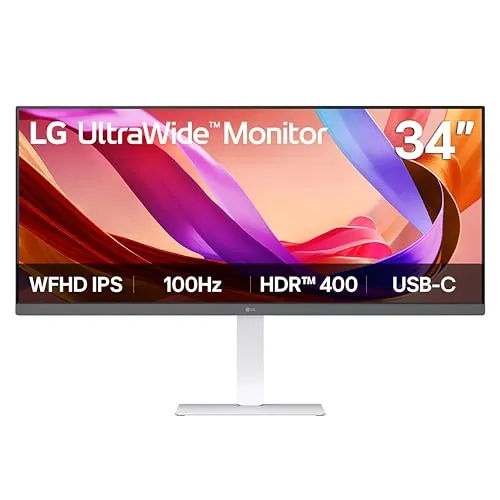
LG
LG 34U530A-W UltraWide Monitor
White U.S. tracked listing; 34-inch 21:9 IPS UltraWide Full HD configuration.
Model 34U530A-W.AUS
Amazon ASIN B0FLLSJ5PC
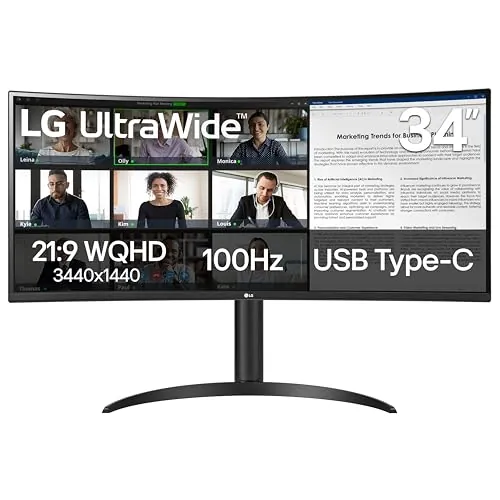
LG
LG 34WR55QK-B UltraWide Monitor
Black U.S. tracked listing; 34-inch curved 21:9 WQHD configuration.
Model 34WR55QK-B.AUS
Amazon ASIN B0DQF8LRGZ
Differences that matter
What matters most to you?
Choose a priority to see what it changes.
Sources for Native display resolution
Sources for Supplied-stand adjustment types
Sources for USB-C laptop charging evidence
Start with the requirement you cannot compromise on
These are both 34-inch LG ultrawides, but their documented trade-off is concrete: the 34U530A-W is 2560 × 1080 and its supplied stand includes swivel; the 34WR55QK-B is 3440 × 1440 with a height-and-tilt stand. If your desk requires the larger native grid, start with the B. If you often rotate the screen toward another person, start with the A and decide whether its resolution suits your work.
Neither description establishes measured image quality, gaming performance, or how comfortable a given text size will look to you. Match the resolution to the host computer and applications you actually use.
A pre-buy desk and laptop check
Before ordering, confirm three separate things: your computer can output the selected monitor's native resolution and refresh rate; the included stand has the adjustment you need in the actual space; and any USB-C charging plan meets the laptop's power requirement. LG lists USB-C on the A page without a PD wattage. For the B, LG documents USB-C power delivery up to 65W. That ceiling is not a claim that every laptop will charge at 65W or that every USB-C cable and host supports the same mode.
If the only reason to prefer the A is swivel but you plan to use a separate arm, verify that arm and monitor mounting compatibility from current model-specific documentation. This guide does not assume an arm is included or that a mount solves desk-clearance constraints.
When neither combination fits
If 3440 × 1440 and supplied-stand swivel are both mandatory, neither documented setup meets the whole brief. Look for a model whose current U.S. documentation lists both, or compare a separately selected stand only after verifying the monitor's exact mounting pattern, weight limit, and required hardware. If laptop charging above 65W is essential, the B's listed maximum may not meet that requirement; the A's page does not establish an alternative wattage.
Product details
LG 34U530A-W UltraWide Monitor
The model to shortlist when the specified 2560 × 1080 format is suitable and you want swivel built into the supplied stand. Check laptop charging needs separately: the accessible LG page names USB-C but gives no PD wattage.
LG 34WR55QK-B UltraWide Monitor
The model to shortlist when 3440 × 1440 is the required native format or the documented USB-C power-delivery feature suits your laptop setup. Its listed stand has height and tilt adjustment; do not expect built-in swivel.
Before you buy
Community discussions
A remote worker looks for more room for two side-by-side apps
LG 34WR55QK-B UltraWide Monitor
A buyer looking at the LG 34WR55QK-B found their 27-inch screen cramped when using Teams and Chrome side by side.
What to check
Open the two apps you use most and decide how much room each needs. Compare that with the listed resolutions and the display scaling you prefer.
Common questions
Which monitor has the higher native resolution?
The 34WR55QK-B is listed at 3440 × 1440 WQHD. The 34U530A-W is 2560 × 1080. Select the mode you want to run and check that your computer and cable support it; this specification comparison does not test visual quality.LG 34U530A-W UltraWide Monitor (U.S. product page)LG 34WR55QK-B UltraWide Monitor (U.S. product page)
Does the LG 34U530A-W's USB-C port charge a laptop?
LG's accessible U.S. product page lists USB-C connectivity but does not state this model's power-delivery wattage. Treat charging output as unverified and check current model documentation before planning a one-cable charging setup. LG lists up to 65W USB-C PD for the 34WR55QK-B; confirm that is enough for your laptop.LG 34U530A-W UltraWide Monitor (U.S. product page)LG 34WR55QK-B UltraWide Monitor (U.S. product page)
Which supplied stand swivels?
LG lists height, tilt, and swivel adjustment for the 34U530A-W. LG's 34WR55QK-B listing names height and tilt. The pages do not provide adjustment ranges in the cited summary, so confirm the current manual if a particular angle or clearance matters.LG 34U530A-W UltraWide Monitor (U.S. product page)LG 34WR55QK-B UltraWide Monitor (U.S. product page)
Sources and scope
This is a specification-based fit guide, not a display test. LG's accessible U.S. 34U530A-W page lists USB-C but does not specify laptop power delivery; do not assume a charging wattage. Stand adjustment types are documented, but exact adjustment ranges, visual quality, host compatibility, and hands-on performance were not tested.
Related comparisons
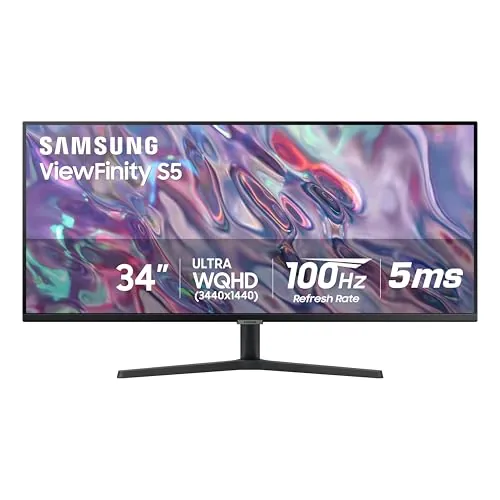
Samsung ViewFinity S50GC vs LG 34WR55QK-B: Desk Fit and USB-C Setup
Both are 34-inch, 3440 × 1440 ultrawides. The exact Samsung LS34C502GANXZA is listed as flat, with HDMI and DisplayPort inputs, PIP/PBP, and a tilt stand. LG's U.S. 34WR55QK-B.AUS is curved and adds USB-C video with up to 65W power delivery plus height-and-tilt adjustment. Check your laptop ports and measure desk depth before choosing.
Read comparison
ASUS PA278QV vs LG 34WR55QK-B: Choose by Desktop Layout and Ports
Both monitors have 1440 native rows in landscape, but their layouts and desk connections differ. The 27-inch ASUS PA278QV has a narrower footprint, a stand that pivots to portrait, one HDMI input and four USB-A downstream ports that need a separate upstream cable. The 34-inch LG 34WR55QK-B.AUS adds horizontal pixels, two HDMI inputs and USB-C with up to 65W power delivery, while taking more desk width and providing two downstream USB ports. Check your desk and host ports before choosing.
Read comparison