
Products compared
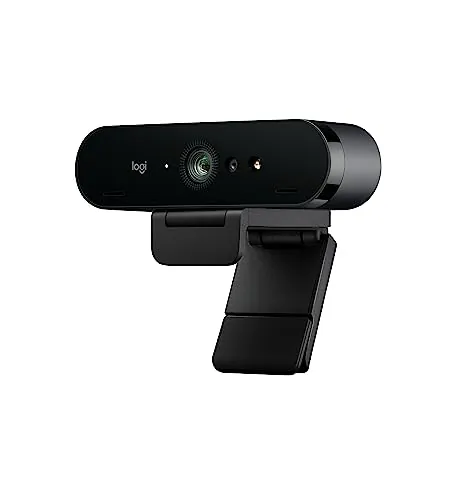
Logitech
Logitech Brio 4K Webcam
Black U.S. model; Logitech datasheet maps America part number 960-001105 to Brio 4K.
Model 960-001105
Amazon ASIN B01N5UOYC4
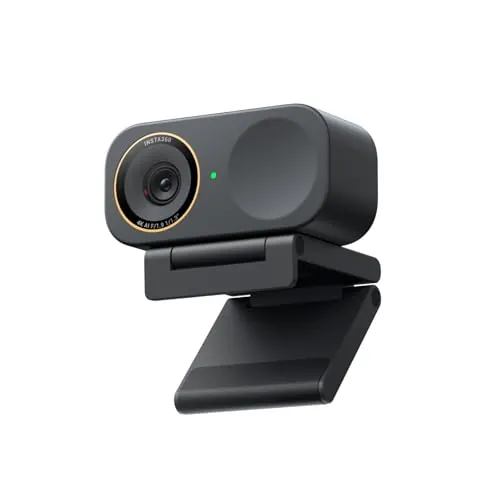
Insta360
Insta360 Link 2C Pro Webcam
Graphite Black version; Insta360 identifies Link 2C Pro hardware as CINSABPB. The U.S. retailer part number may include the suffix “-S-B”.
Model CINSABPB
Amazon ASIN B0G3SSQMJQ
Differences that matter
What matters most to you?
Choose a priority to see what it changes.
Sources for Mounting method and physical fit
Sources for Framing and presenter controls
Sources for Physical privacy control
Sources for USB, included pieces and software path
Choose how the camera will sit on the display
Brio 4K uses a detachable universal clip for monitors, displays or laptops and has a 1/4-inch tripod thread in the clip. Link 2C Pro uses a magnetic mount; Insta360's setup guide has the camera centered over the screen and the mount angle adjusted toward the presenter. If your display edge is unusual, measure it and verify which mount suits it before choosing.
For a tripod workflow, compare the actual package lists: Brio's datasheet says the tripod is not included, and Insta360 lists its mini tripod as sold separately. Link 2C Pro's included mount has a 1/4-inch screw point, while vertical shooting requires a tripod according to Insta360.
Separate view selection from software framing
Brio's Logi Tune workflow lets you select a 65°, 78° or 90° diagonal field of view. Link 2C Pro is fixed-position rather than a gimbal camera; its Auto Framing uses digital zoom and crop. Use the method that matches your presentation routine, and do not read those differences as an image-quality or tracking-accuracy result.
Link 2C Pro can provide basic video and audio through a third-party conferencing platform without Link Controller. Advanced effects use Insta360 Virtual Camera, and Insta360 lists OS and feature-specific requirements; verify these before planning to rely on Whiteboard or virtual-camera controls.
Check privacy and audio as separate controls
Both products document a physical way to cover the lens: Brio's attachable shutter flips over it, while Link 2C Pro has an on-camera privacy switch. Insta360 explicitly says that the Link 2C Pro switch does not mute the microphone; turn off the camera audio input separately in Link Controller or your conferencing software.
The practical pre-buy check is to test your chosen conferencing app's camera and microphone selections after connecting the camera. This is a setup check, not an assessment of privacy or call performance.
Product details
Logitech Brio 4K Webcam
- Field-of-view presets
- 65°, 78° or 90° diagonal; adjustment requires Logi Tune on Windows or macOS Source
- Mounting and privacy
- Detachable universal monitor/display/laptop clip, 1/4-inch tripod thread, attachable flip shutter Source
- Included connection kit
- 1.5 m USB-A to USB-C cable; third-party USB-C adapter not included Source
Insta360 Link 2C Pro Webcam
- Mounting and lens privacy
- Magnetic mount with 1/4-inch screw point; physical privacy switch blocks the lens view Source
- Auto Framing
- Fixed-position camera uses digital zoom and crop to center the subject; no gimbal rotation Source
- Included connection kit
- USB-C cable, USB-C-to-USB-A adapter, magnetic mount and whiteboard recognition markers; mini tripod sold separately Source
Before you buy
Community discussions
Framing a work call from a fixed desk
Insta360 Link 2C Pro Webcam
For work calls from one spot, a shopper asked whether the Link 2 Pro’s moving gimbal might distract viewers and considered the Link 2C Pro.
What to check
Decide whether you stay in one spot or move around during calls. Check the camera controls available for your exact model and software before deciding how to frame yourself.
Common questions
Does Link 2C Pro move to follow someone around the room?
No gimbal movement is listed for Link 2C Pro. Its manual says Auto Framing uses digital zoom and cropping to keep a subject centered; Brio's documentation instead describes selectable FOV presets.Link 2C Pro & Link 2 Pro User ManualLink Series: Hardware SpecificationsBRIO Product Specifications Datasheet
Does the Link 2C Pro privacy switch mute audio too?
No. Insta360 says the switch physically blocks lens view; disable audio input separately in Link Controller or the third-party software.Link 2C Pro & Link 2 Pro User ManualLink Series: Privacy Mode
Can I use Link 2C Pro without installing Link Controller?
Yes for basic video and audio through a recognized third-party platform. Insta360 says advanced virtual-camera effects require Link Controller and selecting Insta360 Virtual Camera as the source; check host OS and feature requirements.Link 2C Pro & Link 2 Pro User ManualLink Series: Compatibility — Link 2 Pro / Link 2C Pro
What comes with the cameras for mounting and USB?
Logitech lists a clip, USB-A-to-USB-C cable and attachable shutter for Brio. Insta360 lists a magnetic mount, USB-C cable, USB-C-to-USB-A adapter and whiteboard markers for Link 2C Pro; its mini tripod is sold separately.BRIO Product Specifications DatasheetLink 2C Pro & Link 2 Pro User ManualLink Series: Compatibility — Link 2 Pro / Link 2C Pro
Sources and scope
This guide compares manufacturer-documented hardware, controls and host requirements; it does not test image, audio, focus, tracking, reliability, call performance or privacy outcomes. Insta360 identifies Link 2C Pro hardware as CINSABPB; the U.S. retailer part number may add the suffix “-S-B”. Check the exact listing and included items for the Graphite Black version before buying.
- Brio 4K Business Webcam — Logitech U.S.
- BRIO Product Specifications Datasheet
- Link 2C Pro & Link 2 Pro User Manual
- Link Series: Hardware Specifications
- Link 2C Pro: Setting Up the Device
- Link Series: Privacy Mode
- Link Series: Compatibility — Link 2 Pro / Link 2C Pro
- Insta360 Link 2C Pro Safety Guidelines — U.S. Supplier Declaration
Related comparisons
Logitech C920x vs Insta360 Link 2C Pro: Framing, Mounting and Privacy Fit
The Logitech C920x guide documents an attached USB-A cable, a universal mounting clip and tripod thread, while Link 2C Pro offers documented 4K and portrait modes, a magnetic adjustable mount, DeskView and a physical privacy-cover switch. Start with the resolution and framing tools you need, then check your computer, monitor edge, tripod plan and whether camera privacy must be physical. Logitech’s exact C920x guide does not state its field-of-view angle or current OS/app requirements, so those points need an exact-product check.
Read comparison
Elgato Facecam 4K vs Insta360 Link 2C Pro: 4K60 or Autofocus and Built-In Audio?
These webcams suit different desk routines. Elgato lists Facecam 4K at 2160p60 over USB 3.0 in MJPG, with fixed focus tuned for a desk position and no built-in microphone. Insta360 lists Link 2C Pro at up to 4K30, with autofocus, software auto-framing and two microphones. Your video app, USB port, subject distance, audio setup and privacy routine matter more than the resolution label alone.
Read comparison