
Products compared
Logitech
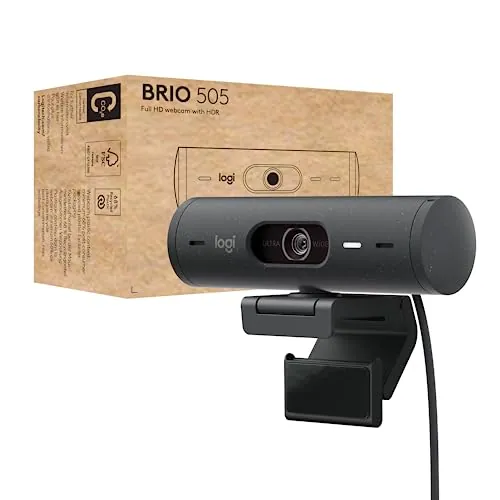
Logitech Brio 505 Full HD Webcam, Graphite
Exact Graphite U.S./Canada part listed by Logitech as TAA-compliant; attached USB-C cable and integrated privacy shutter.
Model 960-001522
Amazon ASIN B0BMQQQHC2
Logitech
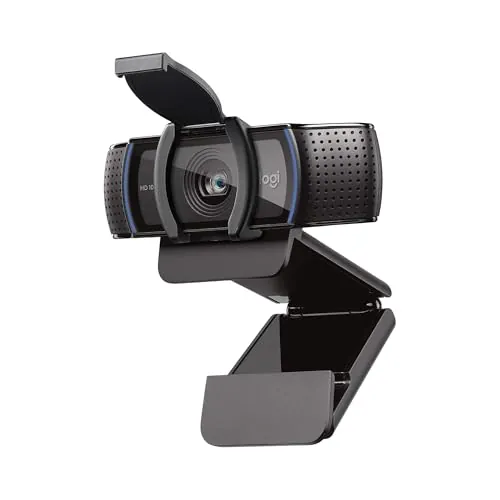
Logitech C920e Business Webcam, Black
Exact C920e mic-enabled part identified by Logitech as 960-001401; fixed 78° view and attached USB-A cable. Confirm microphone setup on the host and in the meeting app.
Model 960-001401
Amazon ASIN B09DVGV7BH
Differences that matter
What matters most to you?
Choose a priority to see what it changes.
Sources for Desk demonstrations and framing workflow
Sources for Cable at the computer and companion-software dependency
Sources for Microphone and first-call setup
Sources for Privacy and physical placement
A desk-demo camera or a fixed meeting view?
The practical split is presentation workflow. Logitech documents Brio 505 Show Mode for tilting the camera toward physical objects, plus selectable fields of view and RightSight Auto Framing. Those named controls require Logi Tune; RightSight is unavailable on ARM computers, and Logi Tune is unavailable on ChromeOS.
C920e is specified with a fixed 78° view. If you sit in one place and do not need Brio's documented presentation controls, start by checking whether that view and its included USB-A cable fit your room and computer. This is a documented feature comparison, not an image-quality ranking.
Check the host port before choosing
Brio 505 ships with an attached USB-C cable; Logitech says a USB-A host needs a third-party adapter not included. C920e's datasheet lists an attached USB-A cable. Trace the cable from camera to computer and check the port on the actual work device before ordering.
A USB connection does not guarantee software controls. Logitech lists Logi Tune desktop for Windows 10 and later and macOS 11 and later; its Brio datasheet says Logi Tune is unavailable on ChromeOS. Confirm your employer permits the software if framing or presentation controls are part of the reason for buying.
Treat the microphone label and live setup as separate checks
For the assigned C920e part, Logitech distinguishes 960-001401 as Mic Enabled from 960-001384 as Mic Disabled. A separate Logitech support article describes a Logi Tune activation step, but is marked AI-translated. Use that as a prompt to verify the actual webcam input, OS permission and meeting-app mute state; a part-number label cannot tell you the present state of a particular unit.
The Brio 505 datasheet lists dual beamforming microphones. No source reviewed here measures either microphone against the other, so choose by your audio setup and verify the selected input in the application you will use.
Finish with placement and privacy
Brio 505 lists an integrated privacy shutter and detachable monitor/laptop clip. C920e lists an attachable privacy shade, adjustable monitor/laptop clip and tripod thread; the tripod itself is not included. Compare how each camera sits on your screen and how you want to cover the lens between calls.
Both manufacturers list video capture modes, but the mode available in a live call depends on the host and meeting application. The reviewed materials do not provide a controlled image, audio, autofocus or reliability comparison.
Product details
Logitech Brio 505 Full HD Webcam, Graphite
- Presentation controls
- Show Mode tilts the camera down to present physical items; the datasheet lists 65°, 78° and 90° diagonal fields of view and RightSight Auto Framing. Named features require Logi Tune; RightSight is unavailable on ARM computers and Logi Tune is unavailable on ChromeOS. Source
- Cable and privacy
- Attached 1.5 m USB-C cable; a USB-A host requires a third-party adapter that is not included. Integrated shutter covers the lens. Source
- Listed video modes
- 1080p at 30 fps; 720p at 30 or 60 fps. These are manufacturer-listed modes, not a claim about what a meeting app transmits. Source
Logitech C920e Business Webcam, Black
- View and mounting
- Fixed 78° diagonal field of view; adjustable laptop/monitor clip and 1/4-inch tripod thread (tripod not included). Source
- Cable and privacy
- Attached 5 ft USB-A cable and attachable privacy shade are listed in the C920e datasheet. Source
- Microphone configuration
- Logitech's C920e support specification distinguishes part 960-001401 (Mic Enabled) from 960-001384 (Mic Disabled). A separate Logitech support article says microphone activation requires a Logi Tune desktop setup step; that article is AI-translated, so check the actual host and app settings. Source
Before you buy
Community discussions
Checking whether C920e framing settings persist in OBS
Logitech C920e Business Webcam, Black
A C920e owner who streams with OBS says their zoom setting no longer stays after they close OBS. They ask whether this is the webcam or something in their setup; the post does not resolve the cause.
What to check
If you rely on a saved crop, set it in the capture tool you plan to use, close and reopen OBS, then confirm the framing still suits your shot on your computer.
Common questions
Can Brio 505 point down at a product or document on my desk?
Logitech describes Show Mode as tilting the camera down to present physical items. Its datasheet says Show Mode and framing controls require Logi Tune, so confirm the host can run Tune before relying on that workflow.Brio 505 Product Specifications
Does C920e include USB-C?
The exact C920e datasheet lists an attached 5 ft USB-A cable. If your computer only has USB-C, verify the adapter or connection path you plan to use; the cited C920e materials do not establish that an adapter is included with every selected listing.C920e HD Webcam — Key Features and Product Specifications
Does ASIN B09DVGV7BH identify the C920e mic-enabled part?
The current listing data maps B09DVGV7BH to model/part 960-001401, and Logitech support documentation labels 960-001401 mic-enabled versus 960-001384 mic-disabled. Check host permissions, device selection and app mute settings separately; Logitech's microphone activation article is AI-translated.Specifications — C920e Business WebcamHow do I activate the microphones on my webcam?
Which webcam has better image or microphone quality?
The sources used here document modes and hardware features, not a controlled comparison. They do not establish a quality winner. Check the specific video mode and audio workflow your computer and meeting software will use.Brio 505 Product SpecificationsC920e HD Webcam — Key Features and Product Specifications
Sources and scope
This guide compares Logitech Brio 505 Graphite U.S./Canada part 960-001522 (ASIN B0BMQQQHC2) with Logitech C920e Black part 960-001401 (ASIN B09DVGV7BH). It uses manufacturer documentation and does not report camera, microphone, autofocus, call, or reliability testing. C920e support documentation about microphone activation is marked AI-translated; treat it as a setup check and confirm the device and app settings on the actual computer. A part labeled mic-enabled does not establish the current OS permission, app selection, or mute state.
- Brio 505 Business Webcam — U.S. Graphite SKU 960-001522
- Brio 505 Product Specifications
- C920e Business Webcam — U.S. SKU 960-001401
- C920e HD Webcam — Key Features and Product Specifications
- Specifications — C920e Business Webcam
- How do I activate the microphones on my webcam?
- Logi Tune supported operating systems
Related comparisons
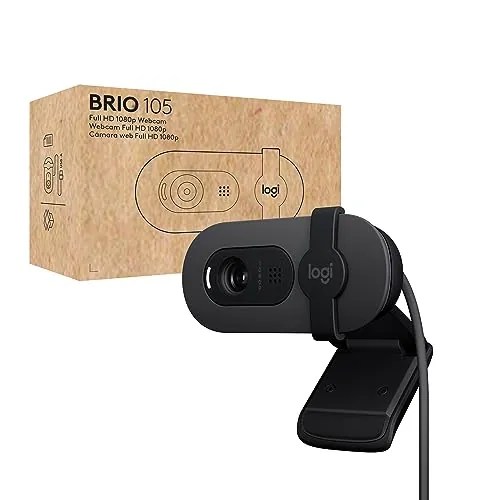
Logitech Brio 505 vs Brio 105: Framing, USB and Host Setup
Both exact U.S. graphite models are listed for Full HD 1080p/30. The purchase difference is the setup around that resolution: Brio 505 adds selectable 65°/78°/90° framing, autofocus, 4x digital zoom and a tilting Show Mode, with Logi Tune and host limitations for its special controls. Brio 105 keeps a fixed 58° view and fixed focus and ships with an attached USB-A cable. Check the computer's port, operating system, camera position and need for listed meeting certifications before choosing. No hands-on image, focus-speed or microphone comparison was performed.
Read comparisonLogitech Brio 105 vs C920e: Focus, Framing, Microphones and Setup
Both are USB-A business webcams with 1080p/30 fps video, but the day-to-day setup differs. Brio 105 (960-001579) is fixed focus, lists a 58° diagonal field of view, has one built-in microphone and an integrated sliding shutter. C920e (960-001401, mic-enabled SKU) lists a 78° view and autofocus, plus manual focus and microphone activation through Logi Tune. Its built-in microphones are deactivated by default according to Logitech's support instructions. Check your monitor framing, available USB-A connection and ability to run the desktop setup app before choosing.
Read comparison