
Products compared
Logitech
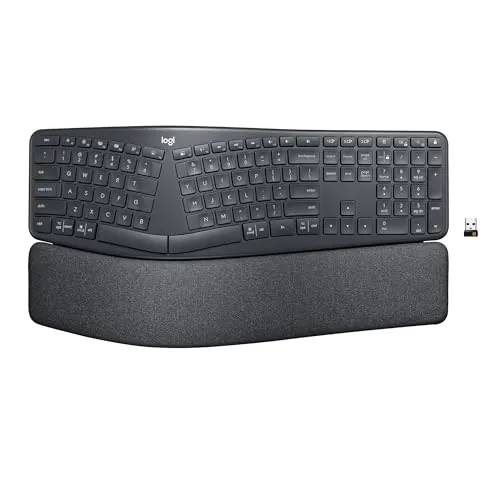
Logitech ERGO K860 Wireless Split Keyboard
Graphite consumer ERGO K860 keyboard-only configuration with curved split keyframe and integrated palm rest.
Model 920-009166
Amazon ASIN B07ZWK2TQT
Apple
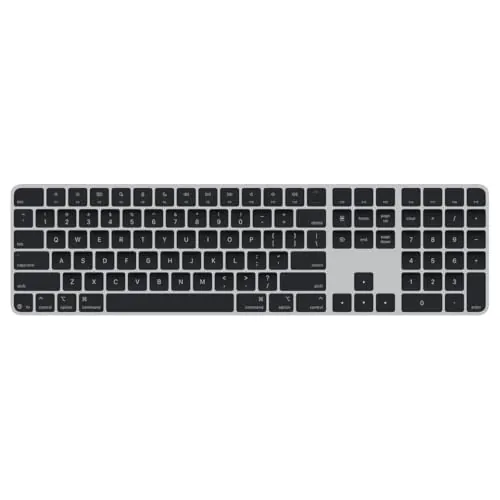
Apple Magic Keyboard with Touch ID and Numeric Keypad (USB-C)
US English, Black Keys, USB-C configuration with extended layout and numeric keypad; requires an eligible Mac for Touch ID.
Model MXK83LL/A
Amazon ASIN B0DL6L189W
Differences that matter
What matters most to you?
Choose a priority to see what it changes.
Sources for Split frame or conventional extended layout
Sources for Switching across computers
Sources for Whether external Touch ID will work
Sources for Authentication expectations
The choice: split shape or external Touch ID
The Logitech ERGO K860 and Apple Magic Keyboard with Touch ID and Numeric Keypad (USB-C) ask you to choose different physical and host workflows. K860 is a curved split keyboard with an integrated palm rest and a key for switching among paired computers. Apple keeps an unsplit extended layout and adds Touch ID for a Mac that meets the stated requirements.
Choose K860 if you intentionally want the split arrangement or its Easy-Switch channel key. Choose Apple if you want the unsplit layout and Touch ID on an eligible Mac. Neither choice proves better comfort or typing performance.
Start with the layout you want on your desk
K860 has a curved split keyframe and pillowed palm rest. Logitech documents three palm-lift positions: 0°, -4° and -7°. If you currently use a straight, unsplit keyboard, this is a deliberate change in hand placement and desk feel. The product description does not show how comfortable the change will be for you; use the layout itself as the purchase criterion.
Apple’s USB-C model has an unsplit extended layout with a numeric keypad, document-navigation controls and full-size arrow keys. This comparison covers MXK83LL/A, US English with Black Keys. Match that model and layout to the seller listing before checkout.
Check the host before you buy for Touch ID
For this USB-C Touch ID model, Apple’s documented host requirements are an Apple-silicon Mac and macOS 15.1 or later. Check the processor family and OS version on the Mac you plan to use. If your host does not meet those requirements, do not count on external-keyboard Touch ID; assess ordinary keyboard use as a separate question.
Apple also scopes secure Touch ID pairing to one Mac at a time. That is a biometric pairing constraint, not a statement that the keyboard cannot connect to other computers for ordinary typing. Apple’s Touch ID support notes that some situations still call for a password, so keep that expectation in mind even on an eligible Mac.
How K860 handles a multi-computer desk
Logitech’s K860 getting-started guide documents Bluetooth and Unifying receiver setup. It says the keyboard can pair with up to three computers and switch channels with Easy-Switch. To add a computer, select its channel, hold the channel key to enter pairing mode, then pair through Bluetooth or connect through the Unifying receiver. Before buying, confirm that the exact listing’s package and your computer ports suit the connection you plan to use.
Do not treat Apple’s one-Mac Touch ID association as a general claim about its keyboard connection support. It only limits the secure biometric pairing described by Apple. This guide recommends K860 for its explicit channel-selection routine, not on the assumption Apple cannot be used as a keyboard elsewhere.
Pre-buy checklist for these exact variants
1. Confirm Logitech model 920-009166 and Graphite on ASIN B07ZWK2TQT; this guide is for the consumer keyboard-only K860, not a Business edition or mouse bundle. 2. Confirm Apple MXK83LL/A, USB-C, US English and Black Keys on ASIN B0DL6L189W; do not substitute the earlier Lightning configuration. 3. For Touch ID, verify Apple silicon and macOS 15.1 or later. 4. For K860, choose Bluetooth or Unifying receiver, confirm the selected seller’s box contents, and decide whether Easy-Switch channels are useful. 5. Choose a key arrangement you already know you want; no health, speed or typing-quality winner is established here.
Product details
Logitech ERGO K860 Wireless Split Keyboard
- Key layout
- Curved, split keyframe with pillowed palm rest; integrated palm-lift legs offer 0°, -4° and -7° positions. Source
- Connection paths
- Logitech documents Bluetooth and a Unifying USB receiver. Easy-Switch can pair the keyboard with up to three computers and change channels with a short press. Source
Apple Magic Keyboard with Touch ID and Numeric Keypad (USB-C)
- Layout
- Unsplit extended layout with numeric keypad, document-navigation controls and full-size arrow keys. Source
- Touch ID host requirement
- Apple’s USB-C Touch ID external-keyboard instructions require an Apple-silicon Mac and macOS 15.1 or later. This requirement is for Touch ID; it does not establish that ordinary typing or other connection modes are unavailable on other hosts. Source
- Biometric pairing scope
- Apple documents secure Touch ID pairing with one Mac at a time. This is a biometric pairing limit, not a general statement that the keyboard cannot be typed on with other computers. Source
Before you buy
Community discussions
Comparing low-profile keys with the K860’s fixed split layout
Logitech ERGO K860 Wireless Split Keyboard
A buyer who has used an Apple Magic Keyboard for a long time says they prefer its low-profile keys and found the K860 acceptable, but wanted a no-numpad keyboard with a different split arrangement. The Apple model generation is not stated, so this is not evidence about Touch ID or the exact USB-C model.
What to check
Check whether you want a single keyboard with a fixed split keyframe or independently positioned halves, and compare the key profile to the Apple keyboard you use. Confirm the exact Apple model and numpad layout before applying the comparison.
Common questions
Will Touch ID work with any Mac connected to the USB-C Magic Keyboard?
Apple’s stated requirement for Touch ID on this external USB-C keyboard is an Apple-silicon Mac with macOS 15.1 or later. Verify both before buying for biometric authentication. This does not establish whether ordinary typing works with a different host.Apple Magic Keyboard with Touch ID and Numeric Keypad (USB-C): Tech SpecsIf Touch ID isn't working on Mac
Can the K860 switch between computers?
Logitech says it can pair with up to three different computers. Select and pair a channel, then use the Easy-Switch key to move between channels. Setup is through Bluetooth or a Unifying USB receiver.Getting Started: ERGO K860
Does Apple’s one-Mac Touch ID pairing mean the keyboard cannot connect to another computer?
No such general connection conclusion follows from Apple’s note. Its one-Mac statement concerns secure biometric Touch ID pairing. Treat that as a limit on the Touch ID association, and verify any non-Touch-ID connection mode for your intended host separately.Magic Keyboard with Touch ID: Apple Platform Security
Is the split K860 proven to improve comfort or typing?
This comparison does not claim that. Logitech describes the K860’s design and palm support, but the cited manufacturer materials are not a matched independent comparison and cannot predict an individual comfort or typing outcome.Logitech ERGO K860 Wireless Split Keyboard, SKU 920-009166Getting Started: ERGO K860
Sources and scope
Check the keyboard layout and part number on the box. Compare the graphite K860 920-009166 with Apple’s US English black-key USB-C MXK83LL/A. Confirm the Apple Touch ID requirements for the Mac you will use.
- Logitech ERGO K860 Wireless Split Keyboard, SKU 920-009166
- Getting Started: ERGO K860
- Apple Magic Keyboard with Touch ID and Numeric Keypad (USB-C): Tech Specs
- If Touch ID isn't working on Mac
- Magic Keyboard with Touch ID: Apple Platform Security
- Official Apple USB-C Touch ID numeric-keypad layout illustration
Related comparisons

Logitech ERGO K860 vs Wave Keys: Layout, Receiver, and Desk Fit
The Graphite Logitech ERGO K860 (920-009166) and Wave Keys (920-011898) both include an integrated palm-rest area, Bluetooth, three-device switching, and two AAA batteries. The K860 has a curved split keyframe, adjustable palm lift, and a Unifying receiver path; Wave Keys has a compact wave-shaped layout and an included Logi Bolt receiver. The receiver families do not pair with one another, so match the keyboard to the receiver already used by your computer or use Bluetooth where supported. This is a layout and setup comparison, not a medical or measured comfort result.
Read comparison
Logitech MX Keys S vs ERGO K860: Desk Fit, Palm Support and Setup
These Graphite Logitech keyboards serve different desk routines. MX Keys S (920-011558) has a low-profile layout, smart backlighting and a rechargeable USB-C battery; the support spec lists its keyboard body at 430.2 × 131.63 mm and notes that some package configurations include a separate palm rest. ERGO K860 (920-009166) has a curved split keyframe, integrated palm rest, and 0°, −4° or −7° tilt options; its listed footprint is 456 × 233 mm. They also use different USB receivers—Logi Bolt versus Unifying—which are incompatible, though both support Bluetooth. Choose by key layout, desk space, port/OS setup and power routine, not an assumed comfort or health result.
Read comparison