
Products compared

Logitech
Logitech MX Keys S Wireless Illuminated Keyboard, Graphite
Low-profile full-size keyboard with hand-proximity smart backlighting, Easy-Switch, Logi Bolt or Bluetooth, and a rechargeable USB-C battery. Logitech’s spec sheet says some package versions include a separate palm rest, so check the exact offer contents.
Model 920-011558
Amazon ASIN B0BKW3LB2B
Logitech
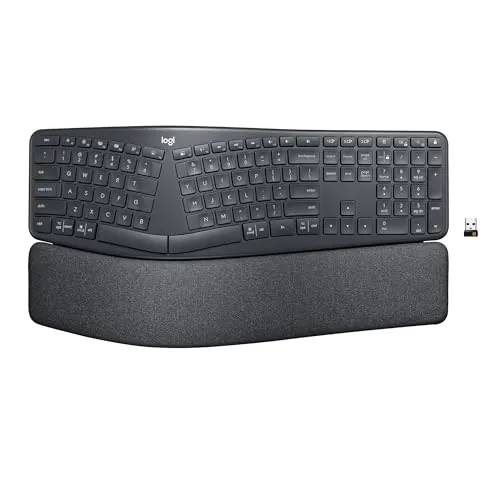
Logitech ERGO K860 Wireless Split Keyboard, Graphite (consumer model)
Consumer Graphite keyboard with a curved split keyframe, integrated pillowed palm rest, and adjustable palm-lift legs. It uses Bluetooth or a Unifying USB receiver and two AAA batteries; it does not have backlighting.
Model 920-009166
Amazon ASIN B07ZWK2TQT
Differences that matter
What matters most to you?
Choose a priority to see what it changes.
Sources for Desk or keyboard-tray space
Sources for Backlighting and daily controls
Sources for Wireless receiver, Bluetooth and OS setup
Sources for Power and maintenance
Start with the physical layout
MX Keys S is Logitech’s low-profile illuminated keyboard; its support specification lists the keyboard body separately from a palm-rest accessory and says some configurations include that rest. ERGO K860 uses a curved split keyframe with a palm rest attached to the keyboard and adjustable palm-lift feet. If you want the K860’s integrated support arrangement, measure for its full footprint; if you choose MX Keys S, confirm whether the exact box includes a separate rest. These features describe the hardware and do not promise an individual comfort or health result.
Check desk space and lighting
The manufacturer lists the MX Keys S keyboard body at 430.2 × 131.63 mm and its separate palm rest at 430 × 67 mm for package versions that include it. K860 is listed at 456 × 233 mm, with the built-in palm-rest arrangement. MX Keys S also has proximity/ambient smart backlighting; K860 has no backlighting. Measure the keyboard tray and decide whether illuminated keys are useful in your room before choosing.
Match the receiver and operating system
MX Keys S pairs through Logi Bolt or Bluetooth; consumer ERGO K860 pairs through Unifying or Bluetooth. Logitech explicitly says Bolt and Unifying are incompatible. Both have Easy-Switch for up to three computers, so Bluetooth can sidestep a receiver mismatch if supported on the host. Check current OS requirements before depending on software customization, because K860 support specifications date to an earlier OS matrix than MX Keys S.
Choose the power routine
MX Keys S charges through USB-C and can be used while charging. Logitech’s battery figures change with backlight conditions, and the backlight turns off at low charge. K860 uses two AAA cells and has a maker estimate of up to 24 months under stated use conditions; its technical specifications list no backlighting. These are different maintenance routines, not a controlled comparison of battery life.
Product details
Logitech MX Keys S Wireless Illuminated Keyboard, Graphite
- Exact model and finish
- 920-011558 / Graphite; MX Keys S product selection Source
- Connection and device switching
- Included Logi Bolt USB receiver or Bluetooth Low Energy; pair with up to three computers Source
- Dimensions and package note
- Keyboard 430.2 × 131.63 mm (20.5 mm high); specification lists separate 430 × 67 mm palm rest for some package versions Source
- Power and lighting
- Rechargeable 1500 mAh battery, USB-C charging; estimated life varies with backlight (manufacturer specification lists 6–10 days under specified lighting examples and five months with backlight off) Source
Logitech ERGO K860 Wireless Split Keyboard, Graphite (consumer model)
- Exact model and design
- Consumer ERGO K860; Graphite 920-009166; curved split keyframe and integrated palm rest Source
- Dimensions
- 456 mm wide × 233 mm deep × 48 mm high (manufacturer technical specification) Source
- Connection and switching
- Bluetooth Low Energy or Logitech Unifying USB receiver; pair with up to three computers Source
- Power and illumination
- Two AAA batteries; Logitech rates up to 24 months depending on use; no backlighting Source
Before you buy
Community discussions
Activating the backlight while charging
Logitech MX Keys S Wireless Illuminated Keyboard, Graphite
An MX Keys S owner said they could trigger the backlight by moving a hand near the keyboard on battery, but needed a keypress when they kept the cable connected.
What to check
If lighting matters at your desk, test the MX Keys S both on battery and while charging. Also check the visibility of the other keyboard’s legends in the same room.
Common questions
Can I use one keyboard’s USB receiver with the other?
No. MX Keys S uses Logi Bolt; consumer ERGO K860 uses Logitech Unifying. Logitech states that Bolt and Unifying devices are not compatible with the other receiver family. Both keyboards also support Bluetooth Low Energy.Getting Started - MX Keys SGetting Started - ERGO K860Are Logi Bolt devices compatible with Unifying USB receivers?
Does every MX Keys S package include a palm rest?
Do not assume so. Logitech’s MX Keys S technical specification says the box includes an “IID” and notes that some versions have a palm rest. Check the exact offer contents for SKU 920-011558 before counting on one.Specification - MX Keys S
Which keyboard has backlit keys?
MX Keys S has smart backlighting that responds to hand proximity and ambient light; Logitech says it disables the backlight when battery is low. ERGO K860 technical specifications list no backlighting.MX Keys S Keyboard, Graphite (920-011558)Getting Started - MX Keys SERGO K860 Technical Specifications
Can both switch between computers?
Yes. Logitech documents Easy-Switch pairing for up to three computers on both models. That shared multi-device function does not make their USB receivers interchangeable.Getting Started - MX Keys SGetting Started - ERGO K860
Does the K860 prove it will be more comfortable or healthier for me?
No. The manufacturer documents a curved split keyframe and integrated palm rest as design features, but that does not establish your personal comfort, posture or medical outcome. If your decision depends on a specific outcome, try the layout in person or seek independent guidance.ERGO K860 Wireless Split Keyboard, Graphite (consumer 920-009166)Getting Started - ERGO K860
Sources and scope
This is a documentation-based comparison, not a typing, comfort or medical test. Logitech describes design goals and palm-support features, but those do not establish an individual health, posture or comfort outcome. MX Keys S documentation says some configurations include a palm rest; the exact selected offer should be checked before treating it as included. K860 dimensions include its integrated palm-rest format. Software support can change, so verify current OS requirements for the precise functions you intend to use.
Related comparisons

Logitech MX Keys S vs Wave Keys: Choose by Lighting, Layout and Power
These two Logitech keyboards share Bluetooth, an included Logi Bolt receiver and Easy-Switch workflows, so connection alone does not settle the choice. MX Keys S (920-011558) has a low-profile layout, adaptive backlighting and a USB-C charging port you can use while typing. Wave Keys (920-011898) has a wave-shaped layout with an attached cushioned palm rest, uses two included AAA batteries, and its Logitech consumer FAQ says its keys are not backlit. Check your lighting, desk layout, host operating systems and power preference before choosing; neither model is a universal comfort winner.
Read comparison
Logitech MX Keys S vs MX Mechanical: Scissor or Tactile Quiet?
The Graphite MX Keys S uses scissor keys; the assigned full-size MX Mechanical is the Tactile Quiet low-profile mechanical version. Logitech lists 1.8 mm total travel for MX Keys S and 3.2 mm for MX Mechanical. Both support lighting, Bluetooth LE or a Logi Bolt receiver, and switching among up to three devices. Choose by a typing style you already know you want; these specifications do not establish typing speed, comfort or sound superiority.
Read comparison