
Products compared
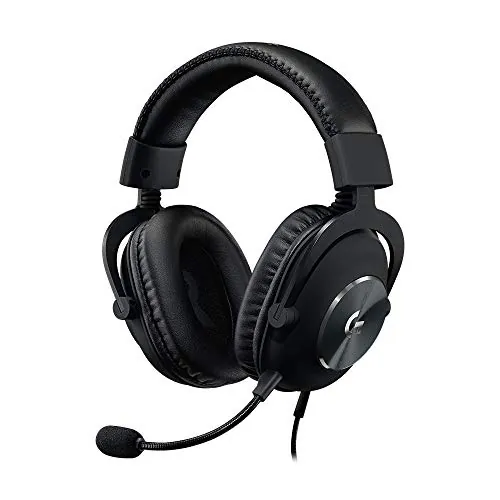
Logitech G
Logitech G PRO X Wired Gaming Headset — Black
Wired Black single headset with detachable microphone and included USB DAC; this comparison does not cover PRO X Wireless, PRO X 2 or PRO X SE.
Model 981-000817
Amazon ASIN B07PDFBJZD

HyperX
HyperX Cloud III Wired Gaming Headset — Black
Wired Black single headset; the exact official U.S. page lists SKU 727A8AA. This is not Cloud III Wireless or Cloud III S Wireless.
Model 727A8AA
Amazon ASIN B0C3BSZ56D
Differences that matter
Sources for Configured EQ between PCs
Sources for Where volume and mute are reached
Sources for Connection and software path
Sources for Windows app support
Start with the ports on your desk
The Logitech G PRO X Wired setup guide separates the PC USB-DAC path from its analog path. Logitech's guide documents a USB DAC for its software features and shows the PC cable/splitter arrangement; its page also ties the assigned model to part 981-000817. Check whether your computer has USB or separate headphone and microphone jacks before choosing the route.
HyperX lists USB-C, an included USB-C-to-USB-A adapter and a 3.5 mm headset-jack connection for Cloud III Wired. Its support page says software and spatial features vary by platform and connection. If using a controller or a device with one combined headset jack, confirm that the exact port and app route you intend to use are supported.
Decide whether settings need to move with you
For the PRO X, Logitech documents saving an EQ to the supplied USB DAC so that it can be used on another PC without G HUB. That portability applies to EQ only: Blue VO!CE microphone processing and DTS Headphone:X 2.0 still require G HUB and the DAC on a PC, and are not saved to the DAC.
For Cloud III Wired, HyperX says NGENUITY settings are not stored on the headset USB and do not persist when used with another system. A multi-PC owner should plan to configure the second PC again. This is a documented settings-transfer difference, not a comparison of audio quality or microphone results.
Pick the control position you will reach
The PRO X technical specifications place microphone mute and rotary volume on its PC cable. HyperX places Cloud III Wired volume and mic mute on the earcup and documents an LED indicator for mic mute. If you frequently adjust volume or mute during a call, consider whether your hand naturally reaches the cable or the headset itself.
The sources describe where each control is, but do not establish which layout is faster, more comfortable or less likely to be bumped for every user. Try the position in person if that interaction is decisive.
Check the app version before relying on custom features
Logitech's PRO X documentation requires G HUB and the USB DAC on a PC for Blue VO!CE and DTS. HyperX currently identifies NGENUITY and NGENUITY Legacy as Windows-only; its support list names Cloud III in the current list and Cloud III Wired in the Legacy list. HyperX's wired product page also notes that software and spatial features vary by platform and connection.
Because the lists distinguish app versions and can change, confirm the current supported app/model combination for your computer before buying for one specific custom setting.
Product details
Logitech G PRO X Wired Gaming Headset — Black
- PC sound controls
- Included USB DAC supports G HUB EQ setup; Logitech says a saved EQ can be used on another PC without G HUB. Source
- Processing requirements
- Blue VO!CE and DTS Headphone:X 2.0 require the USB DAC and Logitech G HUB on PC; these processing settings are not saved to the DAC. Source
- PC cable controls
- The included PC cable has microphone mute and rotary volume controls. Source
HyperX Cloud III Wired Gaming Headset — Black
- Included connections
- The wired kit lists 3.5 mm, USB-C and a USB-C-to-USB-A adapter; choose a connector supported by the host or controller. Source
- Physical controls
- Volume and microphone mute are on the earcup; the product page describes an LED mute indicator. Source
- Settings transfer
- HyperX says Cloud III Wired NGENUITY settings are not saved to the headset USB and will not persist when moved to another system. Source
Before you buy
Community discussions
Deciding whether to configure EQ on each PC
HyperX Cloud III Wired Gaming Headset — Black
A Cloud III Wired owner using USB reported leaving NGENUITY unused and being satisfied with their default sound. They also preferred the controls on the headset to their old cable controls.
What to check
If you move between PCs, listen to the Cloud III at default settings before deciding how much a saved EQ on the PRO X USB DAC matters to you.
A PRO X Wired owner reports a microphone issue after replacing its cable
Logitech G PRO X Wired Gaming Headset — Black
One owner of the wired G PRO X says its cable broke, then a basic replacement 3.5 mm cable did not carry microphone audio through the owner's USB sound card setup. They also mention trying a splitter. The post does not establish whether the replacement cable, connection chain, or another factor caused the issue, nor confirm a working substitute.
What to check
If you expect to replace or swap the PRO X cable, verify the replacement is specified for this exact headset and that its mic connection works with your intended USB-DAC or analog route. Check the exact package listing for included cables and adapters.
Common questions
Does the Logitech G PRO X USB DAC save every G HUB setting?
No. Logitech documents saved EQ as usable on another PC without G HUB, but Blue VO!CE and DTS processing still require G HUB and the USB DAC on PC and are not saved to the DAC.PRO X setup guide
Will HyperX Cloud III Wired keep NGENUITY settings when I move it to another PC?
HyperX says wired Cloud III settings configured in NGENUITY are not saved onto the headset USB and will not persist on another system. Plan to configure the second system separately.Cloud III Usage
Where are the mute and volume controls?
Logitech lists mic mute and rotary volume on the PRO X PC cable. HyperX places Cloud III Wired's volume and mic mute controls on the earcup and documents an LED mic-mute indicator.PRO X Gaming Headset — Technical SpecificationsCloud III Wired Gaming Headset — Black, SKU 727A8AA
Does the HyperX app work on macOS?
HyperX currently says NGENUITY and NGENUITY Legacy are available only on Windows. Confirm the current app and exact-model compatibility list before depending on customization; the wired headset itself also supports documented analog and USB connection options, with software features varying by platform and connection.NGENUITY software and supported productsCloud III Wired Gaming Headset — Black, SKU 727A8AA
Sources and scope
This guide compares documented connection paths, software requirements, settings persistence and control placement for the wired Black models only. It does not rank sound, microphone quality, comfort, fit, latency or durability. The Logitech saved-EQ behavior is documented for use through its included USB DAC on PCs; do not assume the benefit on an analog or arbitrary console/mobile path. HyperX documents Cloud III Wired NGENUITY settings as not stored on the headset USB and not carried to another system. App compatibility can change; check the current app list for the exact wired model and host before relying on software features.
Related comparisons

HyperX Cloud III Wired vs Cloud Alpha Wired: Ports, Adapters and Controls
The black HyperX Cloud III Wired (727A8AA) has documented USB-C, USB-A via its included adapter, and 3.5mm connection options, with USB NGENUITY features on supported Windows PCs. The Black-Red Cloud Alpha Wired (4P5L1AA#ABL) is documented around a 3.5mm connection and includes a detachable headset cable, inline controls, and a PC extension cable. Check the port and cable you will actually use before choosing; this guide compares setup features, not sound or comfort results.
Read comparison
Corsair HS65 Surround vs HyperX Cloud III: Ports, PC Features and Mic Controls
Both wired headsets can connect over 3.5 mm, but their USB paths differ: the exact Corsair HS65 adds an included adapter for iCUE SoundID/Dolby features, while the exact black Cloud III includes a USB dongle and USB-A adapter and lists NGENUITY access on supported Windows PCs. The HS65 boom stays attached and flips to mute; Cloud III's mic detaches and its mute LED shows state.
Read comparison