
Products compared
Logitech G
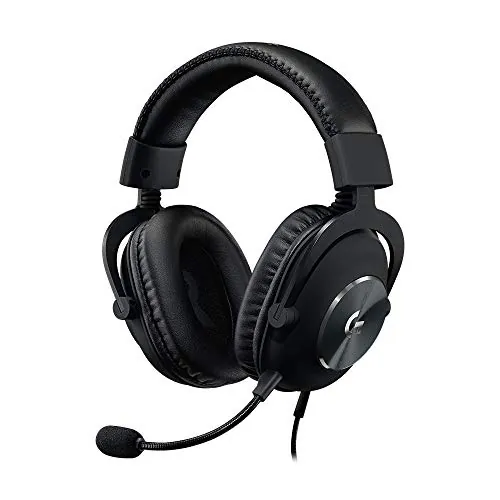
Logitech G PRO X Wired Gaming Headset
Black wired edition; detachable boom microphone; includes a USB external sound card and PC cable controls. Product ID 13826.
Model 981-000817
Amazon ASIN B07PDFBJZD
Logitech G
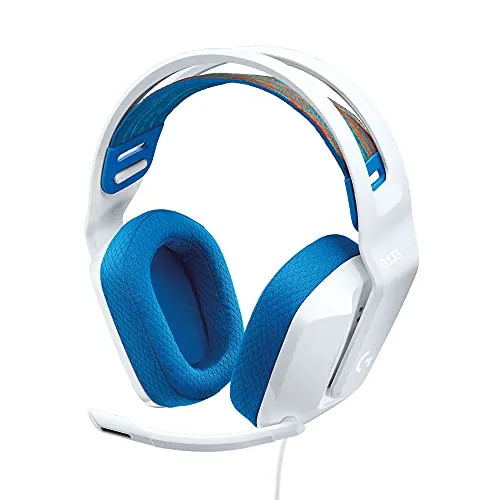
Logitech G335 Wired Gaming Headset
White wired edition; 3.5 mm headset connection, flip-up-to-mute boom and earcup volume roller. Product ID 13851.
Model 981-001017
Amazon ASIN B08KKZ8S36
Differences that matter
Sources for USB processing versus analog route
Sources for Mute and volume reach
Sources for Desktop jack and included pieces
Sources for Supported software conditions
Start with your host and its port
The G PRO X Wired can take two routes. Its supplied USB sound card is the route for the documented G HUB features on a supported PC. The setup guide also shows analog connections; on that path, the USB processing features are not active. The G335 uses a 3.5 mm headset connection. Check whether your PC has one combined headset jack or separate headphone and microphone sockets, and check what the console/controller exposes.
If you plan to use two separate PC sockets, check the exact package for the appropriate Y-splitter. Do not treat an adapter as universal: confirm your device's port arrangement and microphone support before buying.
Choose the mute and volume routine you will use
PRO X places mute and rotary volume on the PC cable and has a detachable boom mic. G335 uses a boom-up-to-mute gesture and an earcup volume roller. Consider where your hand will be while playing and whether you sometimes want to remove the microphone; the manufacturer sources document these layouts, but do not prove which is quicker or more comfortable.
The G335 setup guide depicts the 3.5 mm connection, boom-up mute and on-ear volume. Logitech's PRO X specifications identify the cable mute/volume controls, while the assigned exact-part product page lists its detachable mic.
A short pre-buy check for a desktop or console
1. Identify the exact model and color: Black PRO X 981-000817 or White G335 981-001017. 2. Trace the intended connection from the headset to your actual PC, controller or mobile device. 3. If you want G HUB processing, confirm a supported PC setup and use the PRO X USB sound card. 4. If the desktop has separate headphone and microphone jacks, confirm the selected seller's bundle includes the needed splitter. 5. Pick the mute control you prefer: cable mute or raise-the-boom mute.
Neither listing should be treated as a controlled sound or microphone comparison. The practical choice is the connection and control setup that works with your host and routine.
Product details
Logitech G PRO X Wired Gaming Headset
- Connection paths
- USB external sound card for supported PC software features; separate analog use is also documented, but bypasses those USB software features. Source
- Cable controls
- The PC cable has microphone mute and rotary volume controls. Source
- Boom and accessories
- The exact U.S. model page identifies 981-000817 and lists a detachable microphone and external USB sound card in package contents. Source
Logitech G335 Wired Gaming Headset
- Connection
- 3.5 mm audio connection to a platform, PC or console controller; verify that the device's jack carries the headset microphone as needed. Source
- Mute and volume
- Raise the boom to mute; volume is controlled on the earcup. Source
- Color and exact variant
- The manufacturer U.S. page path identifies part 981-001017 and the selected color is White. Source
Before you buy
Community discussions
A wired PRO X owner reports a pop in voice chat when using the inline mute switch
Logitech G PRO X Wired Gaming Headset
One new wired G PRO X owner says using the mute switch on the cable produced a pop that was also heard by people in voice chat. The post asks whether this is normal; it does not establish the cause or how common the behavior is.
What to check
If you use mute frequently, try the cable switch with your intended computer and voice-chat setup, or check the seller and manufacturer's support terms before purchase. This report is one person's experience and does not show how the control performs across units.
Testing analog playback and mic with a splitter
Logitech G PRO X Wired Gaming Headset
A wired G PRO X owner reported that the headset worked with the USB adapter. Over their PC’s analog splitter, they could hear playback but could not use the mic.
What to check
Check whether your computer has a combined jack or separate ports. Test both audio directions through the splitter or USB adapter you plan to use.
Common questions
Does PRO X's Blue VO!CE or DTS processing work when I plug it into a controller?
The setup guide separates its analog console/controller connection from the PC USB sound-card path. Logitech documents Blue VO!CE and DTS as G HUB PC features via the USB sound card, so do not count them when you plan to use analog controller audio.PRO X Setup GuidePRO X Wired Gaming Headset, Black, U.S. part 981-000817
How do I mute each headset?
On PRO X, use microphone mute on the PC cable. On G335, raise the boom to mute; its volume roller is on the earcup.PRO X Gaming Headset Technical SpecificationsG335 Setup Guide
Which one should I check for separate headphone and microphone ports on a desktop?
Check the exact offer's box contents for the correct PC splitter. The model-specific U.S. product sources used here list a splitter for each assigned package, but sellers can bundle or describe variants differently; match the part number before ordering.PRO X Wired Gaming Headset, Black, U.S. part 981-000817G335 Wired Gaming Headset, White, U.S. part 981-001017
Sources and scope
This is a documentation-based comparison of the assigned Black G PRO X Wired (981-000817) and White G335 (981-001017). It does not claim a listening, microphone, comfort, fit, isolation, latency or durability winner. PRO X software processing requires its USB sound card and supported PC software; it does not follow the analog connection. Confirm the exact model, included adapters and connector needs on the offer you select.
Related comparisons
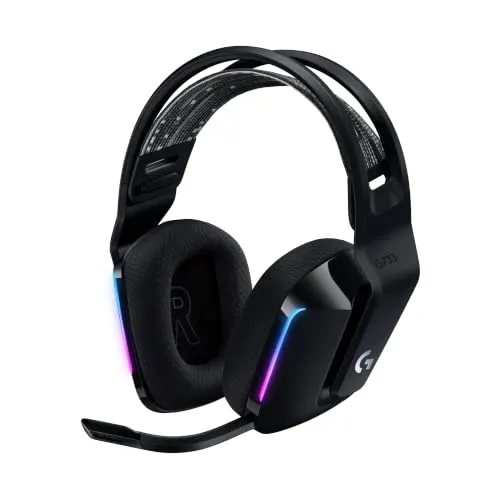
Logitech PRO X Wired vs G733: Connection, PC Features, and Fit Adjustments
The black Logitech PRO X (981-000817) connects by cable and can use its USB DAC for PC features; the black G733 (981-000863) uses a LIGHTSPEED USB receiver and has a rechargeable, non-user-replaceable battery. Compare the connection your device can use, the features that require G HUB, and the fit adjustments you prefer.
Read comparison
Logitech G PRO X vs HyperX Cloud Alpha: USB DAC or 3.5 mm Setup?
The black Logitech G PRO X wired headset (981-000817) and black-red HyperX Cloud Alpha (4P5L1AA#ABL) are both wired, detachable-mic headsets, but their setup paths differ. Logitech documents a USB DAC that enables Blue VO!CE, five-band EQ, and DTS Headphone:X 2.0 on a PC using G HUB; using the PC's analog sound-card splitter does not enable those features. HyperX documents a 3.5 mm connection, inline volume and mic-mute controls, and a detachable headset cable, mic, and PC extension cable in the box. Logitech also specifies included leatherette and velour ear-pad sets. These are setup and package choices, not sound or comfort results.
Read comparison