
Products compared
Logitech G
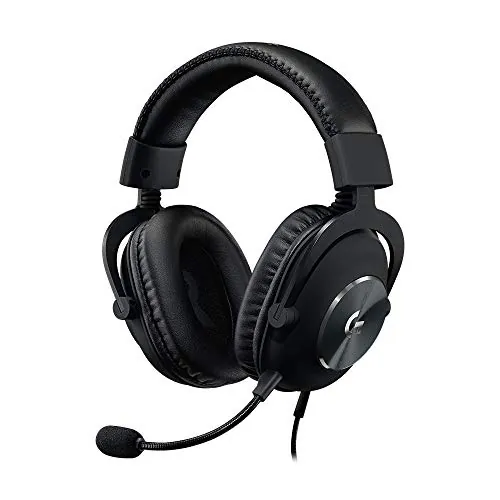
Logitech G PRO X Wired Gaming Headset
Black U.S. listing; confirm model 981-000817 and whether the exact offer includes the accessories you need.
Model 981-000817
Amazon ASIN B07PDFBJZD
Logitech G
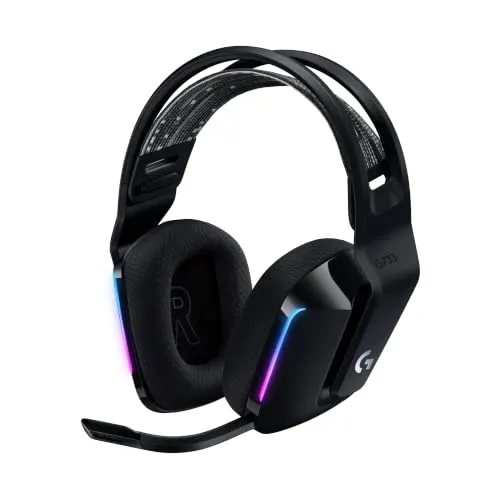
Logitech G733 LIGHTSPEED Wireless Gaming Headset
Black U.S. listing; model 981-000863. Uses a USB receiver and USB-C charging.
Model 981-000863
Amazon ASIN B081415GCS
Differences that matter
What matters most to you?
Choose a priority to see what it changes.
Sources for Headset connection and power
Sources for PC audio and microphone software path
Sources for Documented fit customization
Sources for Host and port check
Match the connection to the seat and device
The PRO X is the cable-connected option. Logitech's setup guide shows the console/PC cable connected to the headset, then routed through a USB DAC to a PC, a PC splitter to separate headphone and microphone ports, or an analog controller connection. Its current US product page lists Xbox, PS5, PC, Nintendo Switch and Switch 2; the exact connection and features still depend on the host path.
The G733 uses LIGHTSPEED wireless via USB. Its setup guide illustrates inserting the receiver into a PC USB port, while Logitech's support page identifies USB-C as the charging port. Before selecting it for a console or another host, check current official instructions for that exact host; the PC receiver setup shown in this guide is not proof of universal device compatibility.
Separate connection from PC software features
If you want the PRO X's listed PC controls, its route is specific: Logitech says the included USB DAC enables 5-band EQ tuning, DTS Headphone:X 2.0 and Blue VO!CE on PC, and requires G HUB. The guide says those functions are not available when using the PC splitter or a console controller. That makes the DAC path a real pre-buy check, not a general guarantee about every device.
For G733, the setup guide says G HUB is optional for advanced features and lists DTS Headset:X 2.0, Blue VO!CE, EQ, sidetone, lighting and mute-button assignment as customization options. These are G733's wireless-plus-software workflow, not the PRO X's USB-DAC workflow. Confirm your computer and software needs before choosing on a feature name alone.
Compare the adjustment options without assuming comfort
Logitech describes the PRO X's memory-foam pads in leatherette or breathable velour, but the exact listing should determine which pad set is included. If material is a deciding factor, confirm the box contents before buying rather than assuming both options are in every package.
The G733 setup guide shows earcups that adjust up and down, an adjustable headband length, and a reversible, replaceable strap; it also identifies removable, replaceable earpads. Those are documented adjustment and replacement options, not a measurement of who will find the headset more comfortable. If fit is uncertain, rely on your own try-on or return terms.
Product details
Logitech G PRO X Wired Gaming Headset
The PRO X is the wired choice. Logitech's guide separates its cable, USB DAC, PC splitter, and analog controller paths, and limits the listed PC audio/mic features to the USB DAC plus G HUB on PC. Logitech describes alternate earpad materials, but check the exact offer for the included set.
- Connection routes
- Wired headset cable; official guide shows PC USB DAC, PC splitter, and analog controller routes Source
- PC audio and microphone tools
- 5-band EQ, DTS Headphone:X 2.0, and Blue VO!CE require the USB DAC, a PC, and Logitech G HUB Source
- Earpad materials described by Logitech
- Memory foam wrapped in leatherette or breathable velour; verify the pads included with the exact offer Source
Logitech G733 LIGHTSPEED Wireless Gaming Headset
The G733 is the wireless option when the host can use its USB receiver and you are comfortable charging the built-in battery. Logitech's setup guide documents adjustable earcups and headband length plus a reversible, replaceable strap; those options do not establish personal comfort.
- Wireless connection
- LIGHTSPEED wireless via USB receiver; Logitech's setup guide illustrates inserting the receiver into a PC USB port Source
- Power
- USB-C charging; lithium-ion battery is not user-replaceable Source
- Documented fit adjustments
- Adjustable earcups and headband length; reversible, replaceable strap and removable, replaceable earpads Source
Before you buy
Community discussions
G733 owner asks whether sidetone settings carry to a work computer
Logitech G733 LIGHTSPEED Wireless Gaming Headset
An owner replacing a G933 says they use sidetone on a work computer, could not open G HUB there, and was unsure whether the G733 would retain the setting on the headset. The post does not establish why G HUB failed or whether the setting is stored on the headset.
What to check
If you need sidetone on a work computer, confirm that G HUB is available on that computer and test the setting on the host you will use. This report does not confirm on-headset setting storage.
Common questions
Does the PRO X need its USB DAC for every connection?
No. Logitech's guide also shows a PC splitter connection and an analog cable to a controller. The USB DAC is the route for the listed 5-band EQ, DTS Headphone:X 2.0 and Blue VO!CE features on PC with G HUB.PRO X Setup Guide
Does the G733 connect by Bluetooth?
The Logitech specification and setup guide reviewed here describe LIGHTSPEED wireless via a USB receiver. If you need Bluetooth or another mode, check current official specifications for the exact headset before ordering.Specification - G733 | Logitech SupportG733 Wireless RGB Headset Setup Guide
Can I replace the G733 battery myself?
Logitech lists a lithium-ion battery and says it is not user-replaceable. The headset charges through USB-C.Specification - G733 | Logitech Support
Which headset sounds or feels better?
This guide does not include a matched listening, microphone, or wear test, so it does not rank sound or comfort. Choose using the documented cable/receiver and adjustment options, and verify host support and exact offer contents.PRO X Setup GuideG733 Wireless RGB Headset Setup Guide
Sources and scope
Feature-fit guidance based on Logitech pages and setup materials, not a hands-on test. No sound, microphone, comfort, isolation, durability, or performance winner is claimed. PRO X advanced features are scoped to the documented USB DAC + PC + G HUB route. Confirm the exact PRO X offer's earpad contents and confirm G733 receiver support for your specific host. The sources reviewed do not establish universal G733 compatibility across every console or device.
Related comparisons

Logitech G733 vs G522: Wireless Modes, USB Setup and Mic Controls
For the exact US black G733 (981-000863) versus G522 (981-001491), the practical difference is how you connect and manage the headset. Logitech lists the G733 with LIGHTSPEED wireless through its USB receiver; the G522 adds LIGHTSPEED, Bluetooth and USB wired audio. G522 switches between Bluetooth and LIGHTSPEED rather than mixing their audio, and USB wired mode disables LIGHTSPEED. Its headset mic EQ and signal-cleanup options work across its listed modes, while voice modulation still depends on G HUB. Pick G733 if your setup is a receiver-based PC/console workflow and you do not need Bluetooth; choose G522 if you want to switch among receiver, phone Bluetooth and USB audio. Check your platform, available USB port and the exact listing's box contents before ordering.
Read comparison
Logitech G PRO X vs HyperX Cloud Alpha: USB DAC or 3.5 mm Setup?
The black Logitech G PRO X wired headset (981-000817) and black-red HyperX Cloud Alpha (4P5L1AA#ABL) are both wired, detachable-mic headsets, but their setup paths differ. Logitech documents a USB DAC that enables Blue VO!CE, five-band EQ, and DTS Headphone:X 2.0 on a PC using G HUB; using the PC's analog sound-card splitter does not enable those features. HyperX documents a 3.5 mm connection, inline volume and mic-mute controls, and a detachable headset cable, mic, and PC extension cable in the box. Logitech also specifies included leatherette and velour ear-pad sets. These are setup and package choices, not sound or comfort results.
Read comparison