
Products compared
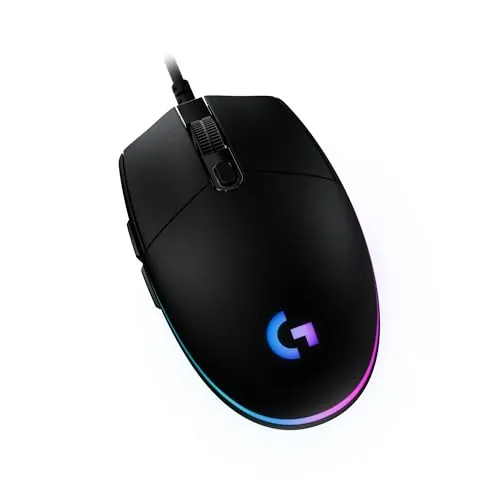
Logitech G
Logitech G203 LIGHTSYNC Wired Gaming Mouse
Black US model; wired USB connection
Model 910-005790
Amazon ASIN B07YN82X3B
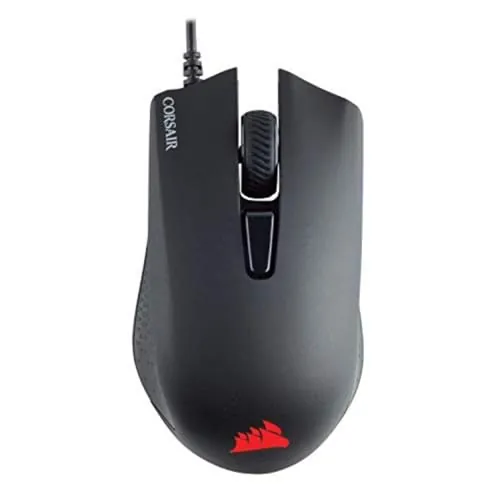
CORSAIR
CORSAIR HARPOON RGB PRO FPS/MOBA Gaming Mouse
Black North American SKU; wired USB-A connection
Model CH-9301111-NA
Amazon ASIN B07QVB51L9
Differences that matter
What matters most to you?
Choose a priority to see what it changes.
Sources for Published body envelope (L × W × H)
Sources for Wired host and cable planning
Sources for Button count and labeled controls
Sources for Manufacturer listed package contents
Use body dimensions as a shortlist, not a hand-fit promise
The exact black G203 910-005790 body is listed at 116.6 × 62.1 × 38.2 mm. The HARPOON RGB PRO CH-9301111-NA sheet lists 115.5 × 68.3 × 40.4 mm and describes rubber side grips. So the G203 is listed narrower and lower, while the CORSAIR shell is listed wider and taller. Check the dimensions of a mouse you already use, then compare how each shape supports your preferred grip; the numbers alone cannot predict comfort.
The Logitech page's current text view does not expose its dimensional accordion. These G203 body measurements are retained from the upstream exact-model Logitech page data and reviewed source review, while the Logitech product sheet's own dimensions are package measurements and are not used as mouse dimensions.
Check the cable path before choosing either wired mouse
Both need a USB connection rather than a wireless receiver. CORSAIR specifies a fixed USB 2.0 Type-A cable measuring 1.8 m, and its quick-start instructions name an available USB 2.0 or USB 3.0 port. Logitech's exact G203 sheet lists a USB port requirement but no cable length in the cited section. If the computer sits far from the mouse area, measure that route and confirm the G203 cable from the exact listing before ordering.
The port-generation label does not establish a gaming-performance difference here; it is a host and cable-planning check.
Six buttons are common; choose the configuration app you want
Both maker sources list six buttons. CORSAIR's quick-start diagram identifies left, right, middle, DPI-cycle, forward and backward controls. Logitech's product sheet says the G203's six buttons can take commands and macros, and its advanced customization requires G HUB. CORSAIR documents iCUE for macro programming and lighting synchronization with compatible CORSAIR equipment.
If you already use one ecosystem's app with compatible devices, that is a practical setup reason to pick the matching mouse. If you do not use either app, button count is a tie; consult current software requirements before relying on advanced settings.
Verify the exact package if you expect extras
The Logitech-authored G203 sheet lists the mouse and user documentation. CORSAIR's exact SKU sheet lists the HARPOON RGB PRO mouse, Quick Start Guide and warranty card. These maker lists describe the basic packages; a retailer may add a bundle, so confirm the selected ASIN and seller page if an extra cable, receiver or accessory is part of your decision.
The CORSAIR product page currently presents two conflicting weight figures—0.117 kg in the technical table and 85 g in marketing copy. This guide leaves weight out rather than trying to reconcile those claims or infer which one applies to a particular unit.
Product details
Logitech G203 LIGHTSYNC Wired Gaming Mouse
- Published body dimensions
- 116.6 L × 62.1 W × 38.2 H mm; overall body size, not a grip or comfort measurement Source
- Connection
- Wired; USB port required Source
- Controls and software
- Six programmable buttons; advanced customization requires Logitech G HUB Source
- Manufacturer listed box contents
- Gaming mouse and user documentation Source
CORSAIR HARPOON RGB PRO FPS/MOBA Gaming Mouse
- Published body dimensions
- 115.5 L × 68.3 W × 40.4 H mm; contoured body with rubber side grips Source
- Connection and fixed cable
- USB 2.0 Type-A wired; fixed 1.8 m cable Source
- Controls and software
- Six buttons; iCUE is supported for lighting and macro configuration Source
- Manufacturer listed package contents
- HARPOON RGB PRO mouse, Quick Start Guide and warranty card Source
Before you buy
Community discussions
Checking where your fingers rest on a smaller mouse
Logitech G203 LIGHTSYNC Wired Gaming Mouse
A user comparing their G203 LIGHTSYNC with a larger mouse described where their fingertips and palm rested on each one.
What to check
Measure the mouse you use now and look at where its buttons sit under your hand. Try the G203 and Harpoon with your usual grip if possible.
Looking for a similar shape when replacing a mouse
CORSAIR HARPOON RGB PRO FPS/MOBA Gaming Mouse
A Harpoon RGB Pro owner shopping for a replacement wanted the same shape and room for the side buttons they used with their thumb.
What to check
Compare the length and profile as well as the side-button position. Decide which controls you need to reach without changing your grip.
Checking whether a setting is easy to find again
CORSAIR HARPOON RGB PRO FPS/MOBA Gaming Mouse
A Harpoon RGB Pro owner reinstalling the control software asked how to make the lighting follow the active sensitivity setting.
What to check
If you use lighting as an indicator, check the controls in the current software. Try restoring the settings you would want after changing computers.
Common questions
Which mouse has more buttons?
Neither: both are listed with six buttons. CORSAIR's quick-start guide labels forward/back and DPI-cycle controls; Logitech's exact-model sheet identifies six programmable buttons and a DPI-cycle control.Logitech-authored G203 LIGHTSYNC product sheetCORSAIR HARPOON RGB PRO Quick Start Guide
Will the HARPOON fit my hand better because it has rubber side grips?
That cannot be determined from a specification sheet. CORSAIR documents rubber side grips and a wider, taller body; those facts describe construction, not measured comfort for your hand. Try the shape if possible.CORSAIR HARPOON RGB PRO product SKU sheet
Do I need G HUB or iCUE just to connect the mouse?
Both are wired USB models. Logitech says advanced G203 features require G HUB; the HARPOON guide directs users to connect to a USB 2.0 or 3.0 port and install iCUE for configuration. Check current software support if customization is important.Logitech-authored G203 LIGHTSYNC product sheetCORSAIR HARPOON RGB PRO Quick Start Guide
Are these wireless mice?
No. Logitech identifies G203 as wired, and the HARPOON exact SKU sheet specifies wired USB connectivity. Keep comparing if a wireless connection is required.Logitech G203 LIGHTSYNC product page (black 910-005790)CORSAIR HARPOON RGB PRO product SKU sheet
Sources and scope
This is a specification-based feature-fit guide, not a hands-on test. Published outside dimensions do not establish comfort for your hand or grip. The G203 measurements come from the specification fields on the exact Logitech product page. CORSAIR's official product page currently shows a conflicting weight (0.117 kg in its technical table versus 85 g in its marketing copy); weight is excluded. Button behavior, settings persistence across computers and current operating-system compatibility should be checked in the relevant software documentation for your setup.
Related comparisons
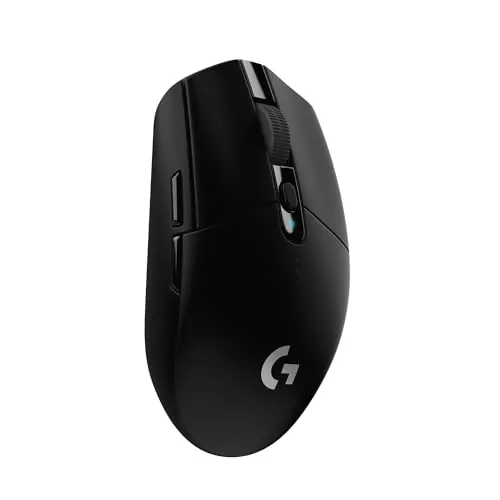
Logitech G203 LIGHTSYNC vs G305 LIGHTSPEED: Wired Desk or Wireless Setup?
The assigned black G203 is the LIGHTSYNC model 910-005790, not a G203 Prodigy; it connects by cable and offers configurable LIGHTSYNC RGB. The black G305 910-005280 uses a LIGHTSPEED USB receiver and a replaceable AA battery, and Logitech lists its RGB lighting as none. Both have six buttons, so decide by connection, lighting and the setup changes you are willing to make rather than button count or untested gaming performance.
Read comparison
Logitech G203 LIGHTSYNC vs G502 HERO: Six Buttons or More Controls?
Both are wired Logitech gaming mice. The G203 LIGHTSYNC has a six-button layout and a lower published weight; the G502 HERO adds wheel tilt, more programmable positions, a separate scroll-mode switch, and optional weights. Map your intended actions before choosing.
Read comparison