
Products compared
Logitech G
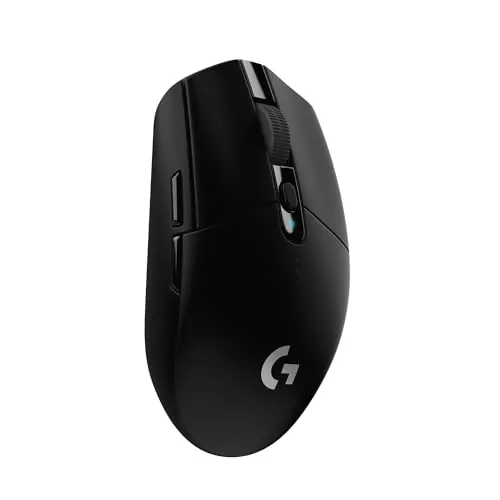
Logitech G305 LIGHTSPEED Wireless Gaming Mouse (Black)
Black US variant; connects through the included LIGHTSPEED USB receiver.
Model 910-005280
Amazon ASIN B07CMS5Q6P
Razer
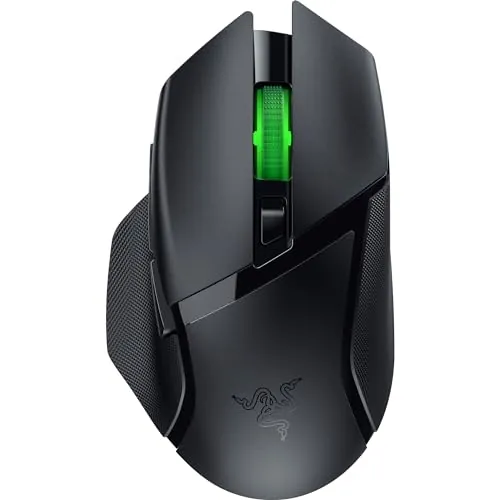
Razer Basilisk V3 X HyperSpeed (Classic Black)
Classic Black US variant; offers HyperSpeed 2.4 GHz receiver and Bluetooth modes, plus a separate multi-function trigger.
Model RZ01-04870100-R3U1
Amazon ASIN B0BXBC26X8
Differences that matter
What matters most to you?
Choose a priority to see what it changes.
Sources for Wireless connection to the host
Sources for Physical button and control layout
Sources for Secondary command customization
Quick answer: check the host, then choose the controls
The Logitech G305 LIGHTSPEED Black (910-005280) uses a USB receiver and Logitech lists a USB 2.0+ port as a system requirement. The Razer Basilisk V3 X HyperSpeed Classic Black (RZ01-04870100-R3U1) offers its 2.4 GHz receiver or Bluetooth. If your computer requires Bluetooth, the documented connection options point to the Basilisk. If a receiver works for your setup, choose by the commands and positions you actually want.
The G305 technical table lists six programmable buttons and identifies a DPI button separately. Razer lists seven buttons and nine controls, including scroll directions, plus a distinct multi-function trigger. Treat that as a layout choice, not a performance or comfort ranking.
Make the connection decision on your actual computer
The G305's manufacturer documentation specifies a USB receiver, 2.4 GHz wireless, and a USB 2.0+ port requirement. It does not document Bluetooth for this model. Razer documents receiver and Bluetooth modes for the Basilisk V3 X HyperSpeed. Before buying, check whether the computer you plan to use has an available, supported receiver port or whether you need the Bluetooth route.
If both connection choices work, this difference stops deciding the purchase. Continue to the physical-control question instead of assuming a wireless mode makes a mouse faster or more reliable in your environment.
Compare the commands and where your thumb will reach
On the G305, Logitech lists six programmable buttons: left and right click, wheel click, Forward and Back; its specification table separately names a DPI button. The Basilisk has a left-side thumb rest and a separate multi-function trigger beside the side buttons. Razer says the trigger is the default Hypershift control: hold it while pressing another control to activate a secondary command through Synapse.
Use a small command map before deciding: write down the actions you need, mark which mouse places them where you expect, and check whether you would use the trigger. Try that reach if possible. A listed thumb rest or trigger does not establish that a shape is comfortable for your hand.
Battery type is shared, not the tie-breaker
The G305 technical specifications say one replaceable AA and list an alkaline AA in the box. Razer's product FAQ says the Basilisk V3 X HyperSpeed requires one AA, and the model guide identifies the AA setup. That makes ordinary AA replacement a shared routine for these exact models.
Manufacturer endurance figures use different conditions and should not be read as a head-to-head battery-life test. If rechargeability or a measured endurance result is essential, this comparison does not answer that question.
Before you buy: a four-step setup check
1. Identify your intended computer and confirm whether a USB receiver port is available or Bluetooth is required. 2. Write down the mouse commands you need and compare them with each model's documented controls; remember that Razer's nine-control count includes scroll directions. 3. If choosing the Basilisk for its trigger, check its reach and whether you will use Hypershift; verify current Synapse support on your host. 4. Treat one-AA power as common ground, then confirm the listing's exact model and color: G305 Black 910-005280 or Basilisk Classic Black RZ01-04870100-R3U1.
The comparison does not report a current price or establish which mouse tracks better, lasts longer, or feels more comfortable.
Product details
Logitech G305 LIGHTSPEED Wireless Gaming Mouse (Black)
Razer Basilisk V3 X HyperSpeed (Classic Black)
Before you buy
Community discussions
Choosing by familiar shape
Razer Basilisk V3 X HyperSpeed (Classic Black)
A buyer comparing the G305 with the Basilisk V3 X says their current mouse shape is closer to the Basilisk and asks whether the G305 would be a reasonable alternative.
What to check
If your current mouse shape is closer to the Basilisk, compare both shapes in hand before choosing the G305 as a compromise.
Comparing two shapes for a smaller-hand setup
Logitech G305 LIGHTSPEED Wireless Gaming Mouse (Black)
A buyer with 16 × 10 cm hands says an MX Master 3 can feel too large and is considering both the G305 and Basilisk V3 X for home and gaming.
What to check
If your current mouse feels too large, compare the two shapes directly; this buyer wanted a smaller, lighter option but thought the Basilisk might feel similar to the MX Master.
Common questions
Does the Razer's nine-control count mean it has nine separate buttons?
No. Razer lists seven programmable buttons and nine controls; its diagram counts scroll directions among the controls. For your decision, map the commands you need to the actual button positions rather than comparing headline counts alone.Razer Basilisk V3 X HyperSpeed features and FAQ
Can I connect the Logitech G305 without its USB receiver?
The G305 technical specifications document its LIGHTSPEED USB receiver and a USB 2.0+ host-port requirement. They do not list a Bluetooth mode. The Basilisk V3 X HyperSpeed documents both a receiver and Bluetooth mode.G305 LIGHTSPEED Wireless Gaming Mouse Technical SpecificationsRazer Basilisk V3 X HyperSpeed, exact US model RZ01-04870100-R3U1
What does Hypershift do on the Basilisk?
Razer says Hypershift, enabled through Synapse, lets you hold the default multi-function trigger while pressing another control to call a secondary command. Check current Synapse and host requirements if that workflow is essential.Razer Basilisk V3 X HyperSpeed features and FAQ
Do these mice use different battery types?
Both exact-model documentation describes one AA battery. Logitech specifies a replaceable AA and lists one alkaline AA in the G305 box. Razer's product FAQ says the Basilisk needs a single AA; its master guide also identifies the AA battery setup.G305 LIGHTSPEED Wireless Gaming Mouse Technical SpecificationsRazer Basilisk V3 X HyperSpeed features and FAQRazer Basilisk V3 X HyperSpeed Master Guide
Sources and scope
This is a feature-fit guide based on current manufacturer documentation, not a hands-on or measured comparison. It does not rank tracking, latency, comfort, battery endurance, durability, or reliability. Software customization depends on the current Razer Synapse or Logitech G HUB requirements for your host; verify compatibility before buying. The exact variants here are G305 Black 910-005280 and Basilisk Classic Black RZ01-04870100-R3U1.
Related comparisons
Logitech G502 LIGHTSPEED vs Razer Basilisk V3 X HyperSpeed: Controls, Receiver and Battery
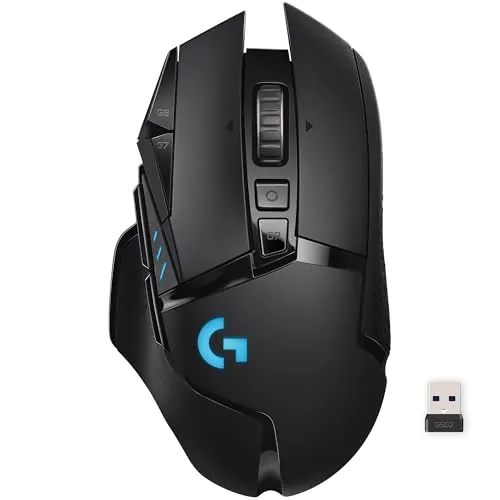
The Logitech G502 LIGHTSPEED (910-005565) and Razer Basilisk V3 X HyperSpeed (RZ01-04870100-R3U1) are wireless gaming mice with different command layouts and power routines. Choose the G502 for its 11 programmable buttons, included receiver extension and rechargeable battery; choose the Basilisk if you prefer one AA cell, Bluetooth as an alternative to its HyperSpeed receiver, and Razer Hypershift secondary commands. Their control counts use different definitions, so this is a feature-fit guide, not a button-count ranking or performance test.
Read comparison
Razer Basilisk V3 vs Basilisk V3 X HyperSpeed
The black Basilisk V3 (RZ01-04000100-R3U1) is a wired, battery-free mouse with an officially specified four-way HyperScroll tilt wheel and notched/free-spin modes. The black Basilisk V3 X HyperSpeed (RZ01-04870100-R3U1) connects by 2.4 GHz or Bluetooth, takes one AA cell, and its exact-model guide says it has no tilt scroll wheel. Decide by cable, battery and wheel workflow; these specs do not establish a gaming-performance winner.
Read comparison