
Products compared
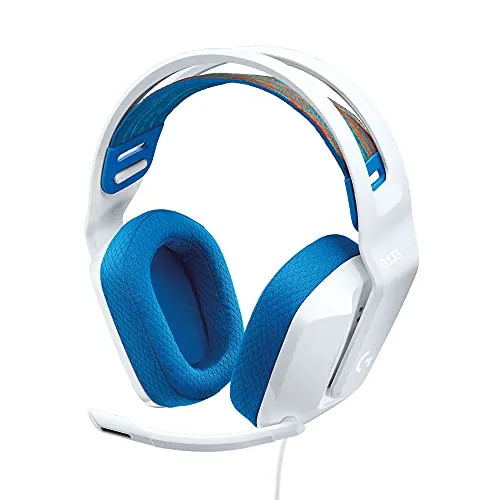
Logitech G
Logitech G335 Wired Gaming Headset — White
White U.S. variant; wired 3.5 mm headset, with PC Y-splitter listed in the package data
Model 981-001017
Amazon ASIN B08KKZ8S36

HyperX
HyperX Cloud III Wired Gaming Headset — Black
Black U.S. wired variant; 3.5 mm and USB audio options, detachable microphone
Model 727A8AA
Amazon ASIN B0C3BSZ56D
Differences that matter
Sources for What you plug into your computer or console
Sources for How you mute and handle the microphone
Sources for Where software features apply
Start with the ports on your actual setup
The G335 is an analog-first choice: Logitech describes a 3.5 mm jack, and the guide shows it plugged into a PC or an Xbox/PlayStation controller. Logitech's exact white product data lists a PC Y-splitter, which matters when a desktop has separate headphone and microphone jacks rather than one combo headset port.
Cloud III Wired gives you 3.5 mm plus a USB audio option and includes a USB dongle with a USB-C-to-USB-A adapter. HyperX documents USB on supported computers, including access to NGENUITY on a supported Windows PC. Treat the host and connector as a checklist: confirm the port, then confirm that the feature you want supports that connection mode.
Treat Xbox as a 3.5 mm decision
Both makers describe the wired headset as usable with Xbox, but the connection detail changes what that means. Logitech's G335 guide shows the 3.5 mm plug connected to a controller. HyperX says the Cloud III USB adapter does not function on Xbox, and its included DTS license is PC-only; HyperX directs Xbox users to the controller's compatible 3.5 mm headset jack.
If Xbox is your only host, compare the mute action and the exact controller jack rather than counting Cloud III's USB adapter as an advantage. For a compatible PC, that USB path may be useful. This is a port and feature boundary, not a measured sound or microphone result.
Choose the mute motion you will actually use
G335 mutes when you flip the boom upward; Logitech describes that motion as moving it out of the way, and the headset has an earcup volume roller. Cloud III instead has a button on the earcup to toggle mic mute, with an LED indicating the mute state. Its microphone is detachable if you want to remove it when not in voice chat, and it also has an earcup volume wheel.
These are two different routines: move the G335 boom to mute, or leave the Cloud III boom in place and press its button. Decide based on how you tend to pause voice chat. The sources do not compare microphone pickup, and they do not establish whether the G335 microphone detaches.
Product details
Logitech G335 Wired Gaming Headset — White
- Headset connection
- 3.5 mm audio jack; the setup guide shows a PC or Xbox/PlayStation controller connection. Source
- PC jack accessory
- The exact white product package data lists a PC Y-splitter for separate headphone and microphone jacks. Source
- On-headset controls
- Earcup volume roller; raise the boom to mute and move it out of the way. Source
HyperX Cloud III Wired Gaming Headset — Black
- Headset connections
- 3.5 mm and USB audio; the box lists a USB dongle and USB-C-to-USB-A adapter. Source
- Microphone
- Detachable microphone; earcup mute button with an LED mute indicator. Source
- Xbox connection boundary
- HyperX says the included USB adapter does not function on Xbox; its support page directs Xbox use to the controller's 3.5 mm headset jack. Source
Before you buy
Community discussions
Reaching the earcup controls
HyperX Cloud III Wired Gaming Headset — Black
After a week using the Cloud III Wired over USB, an owner preferred its earcup volume wheel and mute button. They had accidentally changed settings on the inline controls of their previous headset.
What to check
Compare what feels easier while playing: pressing the Cloud III’s earcup button or flipping the G335 boom up.
What Discord hears when you press mute
HyperX Cloud III Wired Gaming Headset — Black
A Cloud III Wired user on USB reported that friends in Discord could hear computer playback even after the user pressed the headset’s mic mute. The post does not establish the cause.
What to check
If using Cloud III via USB on a PC, make a test call and verify what your friend hears when you press mute while playback continues.
Common questions
Does the HyperX Cloud III USB adapter work on Xbox?
No. HyperX says its included USB adapter does not function on Xbox and the bundled DTS license is PC-only. HyperX directs Xbox users to connect through a compatible controller's 3.5 mm headset jack. The Logitech G335 setup guide also shows a 3.5 mm controller connection.Cloud III DTS Not Available on Xbox — HyperX SupportLogitech G335 Wired Gaming Headset Setup Guide
Which headset is simpler for a PC with separate headphone and microphone sockets?
The G335's exact white product package data lists a PC Y-splitter for those separate jacks. Cloud III can instead use its supplied USB audio dongle on a supported PC, or its 3.5 mm connection with a compatible headset input. Check the ports on your specific PC before choosing.Logitech G335 Wired Gaming Headset — White U.S. product pageHyperX Cloud III Wired Gaming Headset — Black U.S. variant
Can I mute the Cloud III without moving its microphone boom?
Yes. HyperX documents a button that toggles mic mute and an LED that indicates mute state. G335 uses a different action: raise the mic boom to mute it and move it out of the way.Cloud III Mic Mute Button and Volume Wheel — HyperX SupportLogitech G335 Wired Gaming Headset Setup Guide
Is this comparison about Cloud III Wireless?
No. It covers the wired black Cloud III, model 727A8AA (ASIN B0C3BSZ56D). Cloud III Wireless and Cloud III S Wireless have different connections and instructions.HyperX Cloud III Wired Gaming Headset — Black U.S. variant
Sources and scope
This is a manufacturer-documentation comparison of the exact white G335 and black wired Cloud III. It does not include the product listing listening, microphone, comfort, isolation, durability or latency tests, and it does not identify a sound or fit winner. Host support depends on the exact device, port and connection mode. HyperX's USB adapter is not supported on Xbox; use a compatible controller headset jack with 3.5 mm instead. Cloud III Wireless and Cloud III S Wireless are different products and are not covered.
Related comparisons

HyperX Cloud III Wired vs Cloud Alpha Wired: Ports, Adapters and Controls
The black HyperX Cloud III Wired (727A8AA) has documented USB-C, USB-A via its included adapter, and 3.5mm connection options, with USB NGENUITY features on supported Windows PCs. The Black-Red Cloud Alpha Wired (4P5L1AA#ABL) is documented around a 3.5mm connection and includes a detachable headset cable, inline controls, and a PC extension cable. Check the port and cable you will actually use before choosing; this guide compares setup features, not sound or comfort results.
Read comparison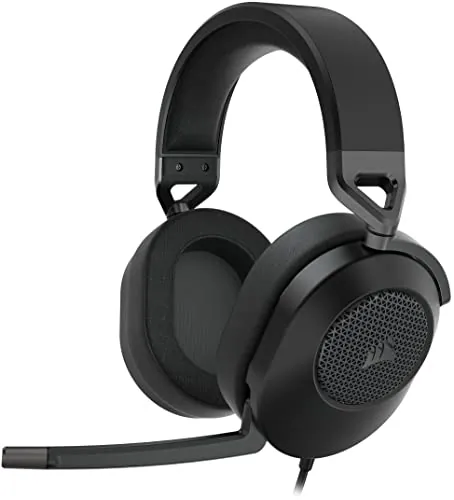
Corsair HS65 Surround vs HyperX Cloud III: Ports, PC Features and Mic Controls
Both wired headsets can connect over 3.5 mm, but their USB paths differ: the exact Corsair HS65 adds an included adapter for iCUE SoundID/Dolby features, while the exact black Cloud III includes a USB dongle and USB-A adapter and lists NGENUITY access on supported Windows PCs. The HS65 boom stays attached and flips to mute; Cloud III's mic detaches and its mute LED shows state.
Read comparison